
CaDA C51072W
CaDA RC Racing Building Toy Instruction Manual
Modello: C51072W
1. Introduzione
This instruction manual provides comprehensive guidance for the assembly, operation, and maintenance of your CaDA RC Racing Building Toy, Model C51072W. This STEM building block set allows you to construct a detailed sports car that can be controlled via both a dedicated 2.4GHz remote control and a smartphone application, offering multiple interactive play modes.

Image: The CaDA RC Racing Building Toy, showcasing the assembled red sports car, its remote control, and the smartphone application interface.
2. Informazioni sulla sicurezza
- This product is not suitable for children under 3 years old due to small parts which may present a choking hazard.
- Si raccomanda la supervisione di un adulto durante il montaggio e l'uso.
- Non mischiare batterie vecchie e nuove. Non mischiare batterie alcaline, standard (zinco-carbone) o ricaricabili (nichel-cadmio).
- Prima dell'uso, assicurarsi che tutti i vani batteria siano ben chiusi.
- Avoid operating the vehicle near water or in wet conditions to prevent damage to electronic components.
3. Cosa c'è nella scatola
Your CaDA RC Racing Building Toy package includes the following components:
- Building Blocks (approximately 306 pieces)
- RC Chassis / Motor Unit (pre-assembled)
- Telecomando 2.4GHz
- Manuale di istruzioni (questo documento)

Image: Various building blocks and components of the CaDA RC Racing Building Toy, ready for assembly.
4. Impostazione
4.1 Montaggio
Follow the detailed step-by-step instructions provided in the included physical instruction manual to assemble the sports car using the building blocks. The RC chassis and motor unit come pre-assembled, simplifying the construction process.
4.2 Installazione della batteria
Ensure batteries are inserted with correct polarity (+/-) as indicated in the compartments.
- Per l'auto: Insert 3 x AA 1.5V batteries (not included) into the battery compartment of the RC chassis.
- Per il telecomando: Insert 2 x AAA 1.5V batteries (not included) into the battery compartment of the remote control.
4.3 Download e connessione dell'app
To utilize the advanced app control features, download the CaDA Smart APP:
- Scan the QR code found on the product packaging or in the video cover image to directly download the APP.
- Alternatively, visit the official CaDA website to find the download link.
- Ensure your smartphone meets the minimum requirements: iOS 12.0 or Android 8.0 and above.
- Once installed, open the app and follow the on-screen instructions to connect to your RC car via Bluetooth.

Image: The CaDA Smart app interface displaying various control modes for the RC car.
5. Istruzioni per l'uso
5.1 Funzionamento del telecomando
The included 2.4GHz remote control provides intuitive command over your RC car. Ensure both the car and remote have fresh batteries and are powered on.
- Interruttore di alimentazione: Located on the remote, turn it on to activate. An indicator light will illuminate.
- Controllo di guida: Use the left joystick to control forward and reverse movement.
- Controllo dello sterzo: Use the right joystick to control left and right steering.
- The remote offers an interference-free system with a range of approximately 25 meters.
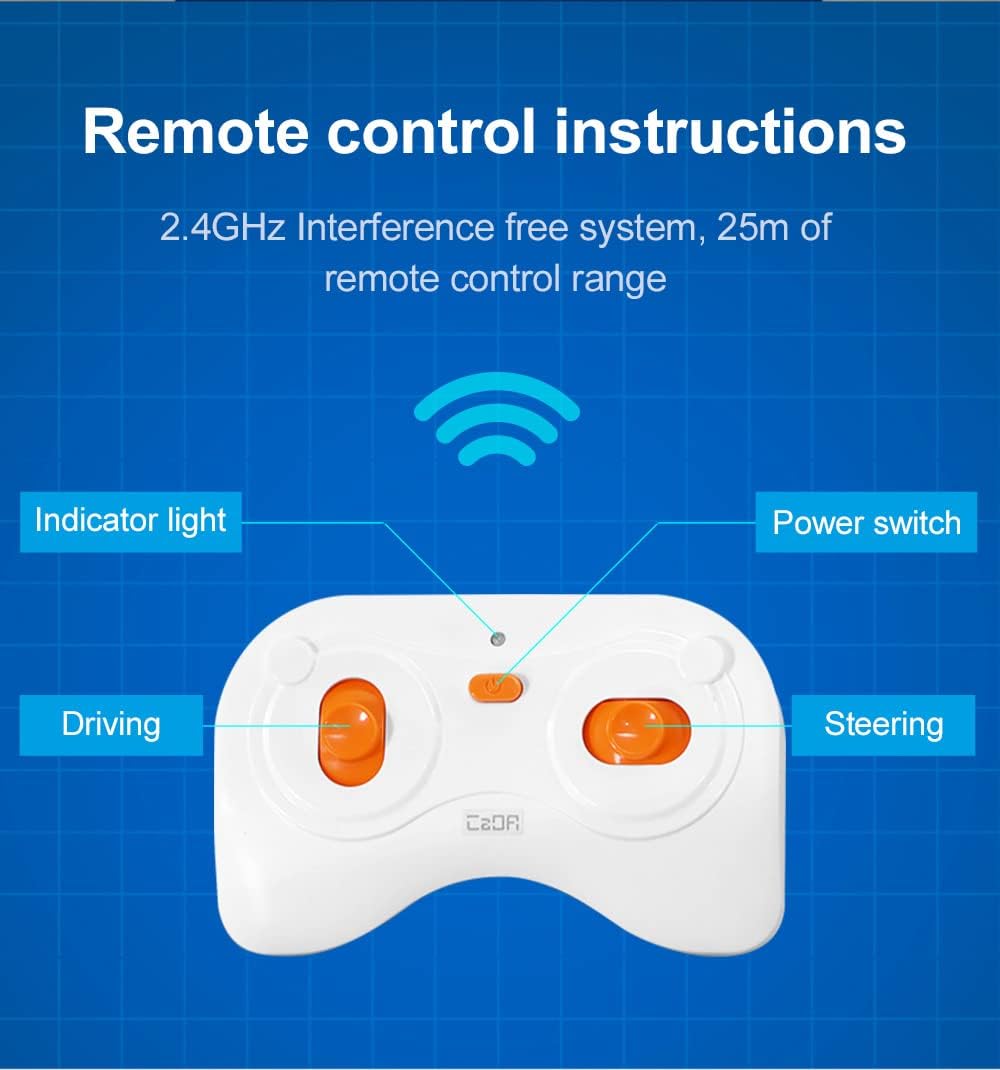
Immagine: dettagliata view of the 2.4GHz remote control, highlighting its indicator light, power switch, driving, and steering controls.
5.2 Funzionamento del controllo dell'app
The CaDA Smart APP unlocks advanced control modes for enhanced playability:
- Modalità di controllo remoto: Mimics the physical remote, allowing direct control of movement and steering via your smartphone screen.
- Modalità di programmazione Scratch: Drag and drop coding blocks to create custom movement sequences for the car. This mode supports various commands like forward, reverse, turns, and pauses, allowing for creative programming.
- Controllo del giroscopio: Control the car's steering by tilting your smartphone, providing an immersive driving experience.
- Modalità percorso: Draw a path on your smartphone screen, and the car will automatically follow the drawn route.
Video: An official demonstration of the CaDA RC Race Car Building Toy, showcasing its various control modes including remote, app programming, gyroscope, and path control.
6. Manutenzione
- Keep the building blocks and RC unit clean and free from dust. Wipe with a dry cloth.
- Evitare di esporre il prodotto a temperature estreme o alla luce solare diretta per periodi prolungati.
- If the toy will not be used for an extended period, remove all batteries from both the car and the remote control to prevent leakage and corrosion.
- Store the assembled car and loose blocks in a dry, safe place.
7. Risoluzione Dei Problemi
| Problema | Possibile causa | Soluzione |
|---|---|---|
| L'auto non si muove e non risponde. | Low or dead batteries in car or remote; incorrect battery installation; car/remote not powered on; out of range. | Replace batteries; ensure correct polarity; turn on both devices; move closer to the car. |
| Problemi di connessione all'app. | Bluetooth not enabled; app not updated; car not powered on; interference. | Enable Bluetooth on your device; update the app to the latest version; ensure car is on; try connecting in a different location. |
| L'auto si muove in modo irregolare o non è dritta. | Steering trim needs adjustment; loose connections in assembly. | Adjust the steering trim on the remote or within the app; check the assembly of the car, especially the steering components. |
8. Specifiche
- Nome del prodotto: RC Racing Building Toy
- Numero modello: C51072W
- Marca: CaDA
- Pezzi: Circa 306 pezzi
- Dimensioni del prodotto: 7.9 x 3.7 x 2.1 pollici (20.07 x 9.4 x 5.33 cm)
- Peso dell'articolo: 1.41 libbre (0.64 kg)
- Età consigliata dal produttore: 6 - 12 anni
- Batteria dell'auto: 3 x AA 1.5 V (non incluse)
- Radio Control Battery: 2 x AAA 1.5V (non incluse)
- Radio Control Range: Fino a 25 metri
- Velocità del veicolo: ≥3.8 km / h

Immagine: dettagliata views of the CaDA C51072W Race Car, highlighting its wheel design and front aesthetics.
9. Garanzia e supporto
CaDA is committed to customer satisfaction. Our building brick kits are carefully packaged and inspected to ensure quality upon arrival.
- If you encounter any issues with your product, CaDA offers a 100% satisfaction guarantee.
- For after-sales service, questions, or concerns, please contact CaDA customer support. A dedicated representative will aim to answer your questions within 24 hours.
- Conservare la ricevuta d'acquisto come prova d'acquisto per eventuali reclami in garanzia.
Ask a question about this manual
Ask about setup, troubleshooting, compatibility, parts, safety, or missing instructions. Manuals+ will review the question and use this page’s manual context to help answer it.