
1. Introduzione
Grazie per l'acquistoasing the Lenco SCD-341 Portable CD-Radio. This device combines a CD player, DAB+ and FM radio, and Bluetooth connectivity in a compact design. This manual provides essential information for safe and efficient use of your new audio system. Please read it thoroughly before operation and retain it for future reference.
2. Informazioni sulla sicurezza
- Non esporre l'unità alla pioggia o all'umidità per evitare incendi o scosse elettriche.
- Assicurare una ventilazione adeguata. Non ostruire le aperture di ventilazione.
- Utilizzare solo l'alimentatore fornito con l'unità.
- Non aprire il casing. Affidare tutti gli interventi di manutenzione a personale qualificato.
- Evitare di posizionare l'unità vicino a fonti di calore o alla luce diretta del sole.
- Tenere l'unità lontana da forti campi magnetici.
3. Contenuto della confezione
Si prega di verificare che tutti gli articoli siano presenti e in buone condizioni:
- Lenco SCD-341 Portable CD-Radio Unit
- Adattatore di alimentazione
- Manuale dell'utente (questo documento)
- Guida rapida
4. Prodotto finitoview
The Lenco SCD-341 features a user-friendly interface with clearly labeled buttons and an LCD display.

Figura 1: Fronte view of the Lenco SCD-341, showing the main controls, LCD display, and stereo speakers.

Figure 2: Lenco SCD-341 with its integrated handle and telescopic antenna extended for radio reception.
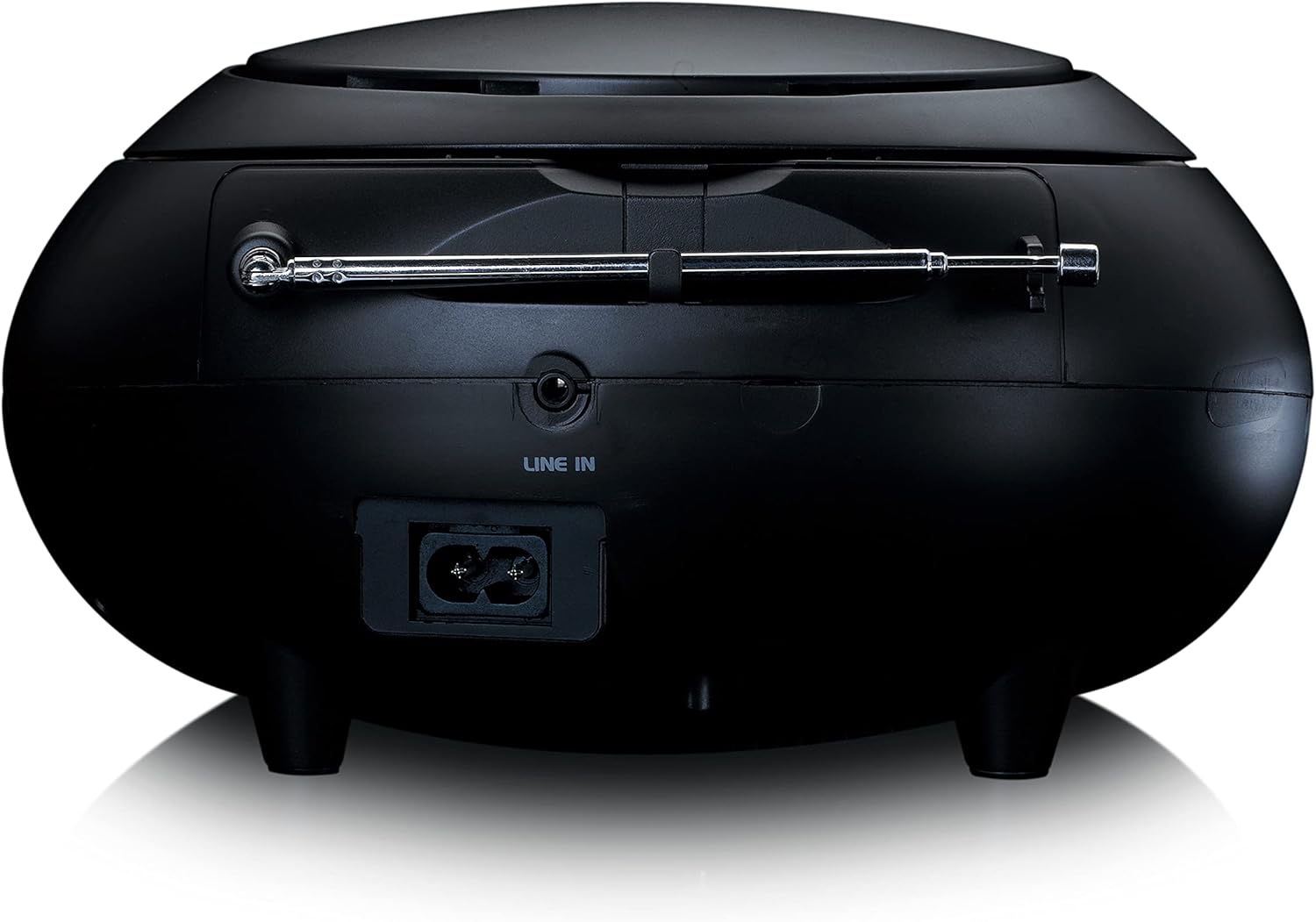
Figura 3: Posteriore view of the Lenco SCD-341, highlighting the power input and LINE IN audio port.
5. Impostazione
5.1 Collegamento di alimentazione
The Lenco SCD-341 can be powered by the included AC adapter or by batteries.
- Alimentazione CA: Connect the supplied power adapter to the AC IN socket on the rear of the unit (refer to Figure 3) and plug the other end into a standard wall outlet.
- Potenza della batteria: Open the battery compartment on the bottom of the unit. Insert the required number of C-type batteries (not included), ensuring correct polarity. Close the compartment securely.
5.2 Configurazione dell'antenna
For optimal DAB+ and FM radio reception, fully extend the telescopic antenna located on the rear of the unit. Adjust its position for the best signal.
6. Istruzioni per l'uso
6.1 Accensione/spegnimento
Premere il tasto ENERGIA pulsante per accendere o spegnere l'unità.
6.2 Riproduzione CD
- Premere il tasto FONTE button repeatedly until "CD" is displayed on the LCD screen.
- Aprire il coperchio del vano CD sollevandolo delicatamente.
- Posizionare un CD sul perno con l'etichetta rivolta verso l'alto.
- Close the CD compartment lid. The unit will begin reading the CD.
- Utilizzare il RIPRODUCI/PAUSA, FERMARE, SALTA AVANTI, E SALTA INDIETRO pulsanti per controllare la riproduzione.

Figura 4: in alto view of the Lenco SCD-341 with the CD compartment open, showing a CD being inserted.
6.3 Funzionamento della radio DAB+
- Premere il tasto FONTE ripetutamente il pulsante finché non viene visualizzato "DAB".
- The unit will automatically scan for available DAB+ stations. This may take a few moments.
- Una volta completata la scansione, utilizzare il file SINTONIA +/- pulsanti per navigare tra le stazioni disponibili.
- Per salvare una stazione come preimpostata, tenere premuto il tasto PRESET pulsante, quindi utilizzare SINTONIA +/- to select a preset number and press PRESET di nuovo per confermare.
6.4 Funzionamento della radio FM
- Premere il tasto FONTE ripetutamente il pulsante finché non viene visualizzato "FM".
- Premere e tenere premuto il tasto SINTONIA +/- pulsanti per la scansione automatica della successiva stazione disponibile. Premere brevemente per la sintonizzazione manuale.
- Per salvare una stazione come preimpostata, tenere premuto il tasto PRESET pulsante, quindi utilizzare SINTONIA +/- to select a preset number and press PRESET di nuovo per confermare.
6.5 Associazione Bluetooth
- Premere il tasto FONTE button repeatedly until "Bluetooth" is displayed. The unit will enter pairing mode, indicated by a flashing Bluetooth icon on the display.
- On your external device (smartphone, tablet), enable Bluetooth and search for available devices.
- Select "Lenco SCD-341" from the list of found devices.
- Once paired, the Bluetooth icon on the unit's display will stop flashing and remain solid. You can now play audio from your device through the Lenco SCD-341.
6.6 Controllo del volume
Utilizzare il VOLUME +/- pulsanti per regolare il livello di uscita audio.
7. Manutenzione
- Pulizia: Utilizzare un panno morbido e asciutto per pulire l'esterno dell'unità. Non utilizzare detergenti abrasivi o solventi.
- Cura delle lenti CD: Se si verificano problemi di riproduzione del CD, utilizzare un disco per la pulizia delle lenti dei CD disponibile in commercio.
- Magazzinaggio: When not in use for extended periods, disconnect the power adapter and remove batteries. Store the unit in a cool, dry place.
8. Risoluzione Dei Problemi
| Problema | Possibile causa | Soluzione |
|---|---|---|
| Nessun potere | Adattatore di alimentazione non collegato; batterie scariche o inserite in modo errato. | Check power adapter connection; replace batteries or ensure correct polarity. |
| Nessun suono | Volume troppo basso; sorgente selezionata non corretta; cuffie collegate. | Increase volume; select correct source (CD, DAB, FM, Bluetooth); disconnect headphones. |
| Il CD non viene riprodotto | CD inserted incorrectly; CD dirty or scratched; CD format not supported. | Reinsert CD correctly; clean or replace CD; ensure CD is a standard audio CD. |
| Scarsa ricezione radio | Antenna not extended or positioned poorly; strong interference. | Fully extend and adjust antenna; move unit away from other electronic devices. |
| Associazione Bluetooth non riuscita | Bluetooth not enabled on external device; device too far; unit not in pairing mode. | Ensure Bluetooth is on and discoverable; move device closer; select Bluetooth source on unit. |
9. Specifiche
| Numero di modello | SCD-341 |
| Marca | Lenco |
| Dimensioni (L x P x A) | Dimensioni: 21.5 x 21 x 11.5 cm |
| Peso | 1.09 kg |
| Fonte di alimentazione | AC (adapter included) / Battery-Powered |
| Tecnologia sintonizzatore | DAB+, FM |
| Connettività | Bluetooth |
| Modalità di uscita audio | Stereo |
| Tipo di visualizzazione | LCD |
| Potenza di uscita | 3 W RMS |

Figure 5: Dimensions of the Lenco SCD-341 unit.
10. Garanzia e supporto
For warranty information and technical support, please refer to the warranty card included in your package or visit the official Lenco websito.
Produttore: Lenco GmbH
Paese di origine: Hong Kong
11. Video ufficiali dei prodotti
Watch this official video for a visual guide to the Lenco SCD-341.
Video 1: A 360-degree product view of the Lenco SCD-341, showcasinil suo design e le sue caratteristiche da tutte le angolazioni.