
Introduzione
Thank you for choosing the Varmilo MA Series V2 Summit R2 Mechanical Keyboard. This manual provides essential information for setting up, operating, maintaining, and troubleshooting your new keyboard. Please read this manual thoroughly to ensure optimal performance and longevity of your device.
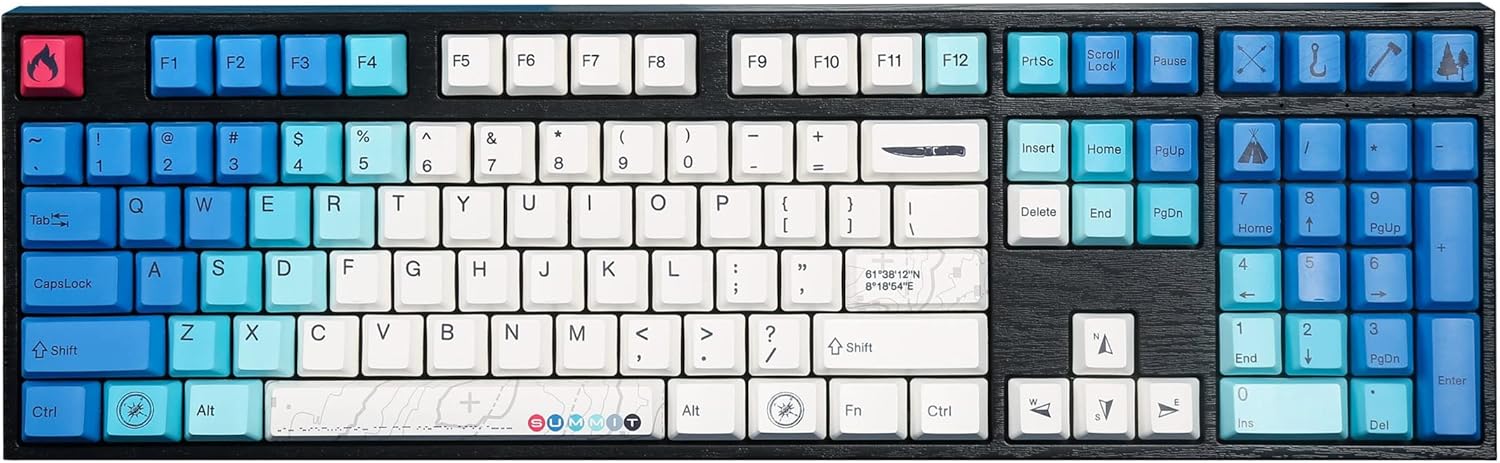
Image: The Varmilo MA Series V2 Summit R2 Mechanical Keyboard, showcasing its full layout and unique keycap design.
Impostare
1. Disimballaggio
Estrarre con cautela la tastiera e tutti gli accessori dalla confezione. Assicurarsi che siano presenti i seguenti elementi:
- Varmilo MA Series V2 Summit R2 Mechanical Keyboard
- Cavo USB-C
- Estrattore per tasti (se incluso)
- Manuale dell'utente (questo documento)
2. Collegamento della tastiera
- Individuare la porta USB-C sul retro della tastiera.
- Collegare un'estremità del cavo USB-C in dotazione alla tastiera.
- Collegare l'altra estremità del cavo USB-C a una porta USB disponibile sul computer.
- La tastiera è plug-and-play e dovrebbe essere riconosciuta automaticamente dal sistema operativo.
3. Adjusting Keyboard Angle
The Varmilo MA Series V2 features a double-section kickstand, allowing for two different typing angles. Gently flip out the desired sections of the kickstand located on the underside of the keyboard to adjust its height and angle for ergonomic comfort.

Immagine: Pro lateralefile of the Varmilo keyboard, illustrating the adjustable kickstand in an extended position.
Istruzioni per l'uso
1. Funzioni base dei tasti
The keyboard features a standard full-size (104-key) layout. All alphanumeric and standard function keys operate as expected. The Varmilo EC Ivy V2 switches provide a smooth and responsive typing experience.
2. Function (Fn) Key Combinations
The Fn key (typically located near the right Alt key) allows access to secondary functions printed on certain keycaps. Hold down the Fn key and press the desired function key simultaneously.
- Fn + F1-F12: Multimedia controls (e.g., volume, play/pause, stop).
- Fn + tasti freccia: LED brightness or effect control (refer to specific keycap legends).
- Fn + Win: Tasto Blocca/Sblocca Windows.

Immagine: un primo piano view of the right side of the Varmilo keyboard, highlighting the special function keys and their legends.
3. Controllo della retroilluminazione a LED
The keyboard features White LED backlighting. Use the Fn key combinations to adjust the brightness and switch between various lighting effects. Specific key legends will indicate the corresponding functions for LED control.
Manutenzione
1. Pulizia della tastiera
Per mantenere l'aspetto e la funzionalità della tastiera:
- Scollegare la tastiera dal computer prima di pulirla.
- Utilizzare un panno morbido e privo di lanugine leggermente dampcon acqua o una soluzione detergente delicata per pulire i tasti e casing.
- Per rimuovere polvere e detriti tra i tasti, utilizzare aria compressa.
- Avoid using harsh chemicals, abrasives, or solvents, as these can damage the PBT keycaps and finish.
2. Rimozione e sostituzione dei tasti
The keyboard features durable Dye Sub PBT keycaps. If you need to remove keycaps for deep cleaning or customization:
- Use the provided keycap puller (if applicable) or a similar tool.
- Gently attach the keycap puller to the keycap and pull straight up to remove it. Avoid twisting or excessive force.
- Per riposizionarlo, allineare il tasto con lo stelo dell'interruttore e premere con decisione finché non scatta in posizione.

Image: A collection of individual Varmilo keycaps, including special design keycaps, demonstrating their PBT material and dye-sublimated legends.
Risoluzione dei problemi
If you encounter issues with your Varmilo keyboard, please refer to the following common solutions:
- La tastiera non risponde:
- Assicurarsi che il cavo USB-C sia collegato saldamente sia alla tastiera che al computer.
- Prova a collegare la tastiera a una porta USB diversa del computer.
- Prova la tastiera su un altro computer per escludere problemi specifici del sistema.
- Riavvia il computer.
- LEDs Not Working or Incorrect:
- Ensure the LED brightness is not set to the lowest level using Fn key combinations.
- Check if any specific lighting modes are active that might turn off certain LEDs.
- Chiavi non registrate:
- Rimuovere il tasto e ispezionare l'interruttore per verificare che non vi siano ostruzioni.
- Clean around the switch stem with compressed air.
Ripristino delle impostazioni di fabbrica
If issues persist, a factory reset may resolve them. Consult the Varmilo official website or support for specific reset procedures for your model, as these can vary.
Specifiche
The following are the technical specifications for the Varmilo MA Series V2 Summit R2 Mechanical Keyboard:
| Caratteristica | Dettaglio |
|---|---|
| Marca | Varmilo |
| Modello | MA Series V2 Summit R2 |
| Disposizione | Full-size (104 + 4 keys) |
| Tipo di interruttore | Varmilo EC Ivy V2 Mechanical Switches |
| Materiale del copritastiera | Dye Sub PBT |
| Connettività | USB-C |
| Retroilluminazione | LED bianco |
| Materiale | Polybutylene Terephthalate, Silicone |
| Fonte di alimentazione | USB alimentato |
| Dispositivi compatibili | Computer (tramite USB-C) |
Garanzia e supporto
Varmilo products are manufactured to high-quality standards. For information regarding warranty coverage, technical support, or service inquiries, please visit the official Varmilo webo contattare direttamente l'assistenza clienti. Conservare la ricevuta d'acquisto come prova d'acquisto per eventuali reclami in garanzia.
Official Varmilo Store: Varmilo Store on Amazon