
VTECH
CS5209 DECT 6.0 Cordless Phone Expansion Handset User Manual
Modello: CS5209
Introduzione
Welcome to the user manual for your new vtech CS5209 DECT 6.0 Cordless Phone Expansion Handset. This manual provides detailed instructions for setting up, operating, and maintaining your new handset. For optimal performance, please read these instructions carefully before use.
Cosa c'è nella scatola
- CS5209 Cordless Handset
- Handset Battery Pack
- Handset Battery Cover
- Charger Cradle for Handset
- Power Adapter for Charger Cradle
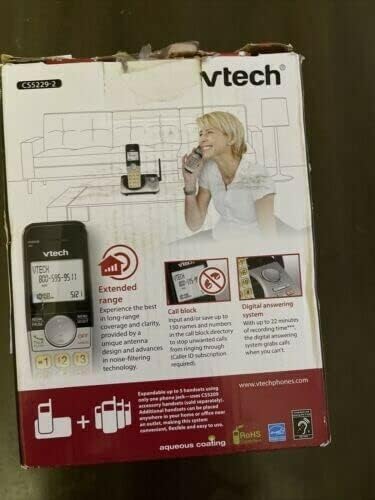
This image displays the product packaging for the vtech CS5209 DECT 6.0 Cordless Phone Expansion Handset. The box highlights key features including extended range for better coverage and clarity, a call block function capable of storing up to 150 numbers to prevent unwanted calls (requires Caller ID subscription), and a digital answering system with up to 17 minutes of recording time to capture messages when you are unavailable. The packaging also indicates that the system is expandable up to 5 handsets using only one phone jack.
Impostare
1. Installazione della batteria
- Individuare il vano batteria sul retro del ricevitore.
- Insert the battery pack into the compartment, ensuring the connector is properly aligned with the socket.
- Close the battery compartment with the battery cover until it clicks into place.
2. Caricare il portatile
- Connect the small end of the power adapter to the charger cradle.
- Collegare l'estremità grande dell'adattatore di alimentazione a una presa elettrica standard.
- Place the handset face forward into the charger cradle. The charge indicator light on the handset should illuminate, indicating it is charging.
- Lasciare caricare il telefono per almeno 16 ore prima del primo utilizzo per garantire la piena capacità della batteria.
3. Registrazione del portatile
The CS5209 is an expansion handset and must be registered to a compatible vtech DECT 6.0 base unit (e.g., CS5229, CS5249) before use. Refer to your base unit's manual for specific registration instructions. Generally, the process involves:
- Place the CS5209 handset in its charger cradle.
- On your base unit, press and hold the PAGINA or LOCALIZZATORE DEL RICEVITORE button for approximately 4 seconds until the registration light on the base unit begins to flash.
- Entro 10 secondi, premere il tasto # key on the CS5209 handset.
- The handset will display "Registering..." and then "Handset Registered" if successful. If registration fails, try again or consult the base unit's manual for troubleshooting.
Istruzioni per l'uso
Effettuare e ricevere chiamate
- Per effettuare una chiamata: Premere PARLA/FLASH or any dial pad key, then dial the phone number.
- Per rispondere a una chiamata: Quando il telefono squilla, premere PARLA/FLASH or any dial pad key.
- Per terminare una chiamata: Premere SPENTO/CANCELLA or place the handset back in the charger cradle.
- Regolazione del volume: Durante una chiamata, premere Volume+ or vol- on the side of the handset to adjust the earpiece volume.
Funzione di blocco delle chiamate
The call block feature allows you to stop unwanted calls from ringing through. You can input and save up to 150 names and numbers in the call block directory. This feature requires a Caller ID subscription from your telephone service provider.
- Per bloccare un numero dalla cronologia dell'ID chiamante: Mentre riviewing Caller ID history, press BLOCCARE to add the number to the block list.
- To Manually Add a Number to Block List: Access the Call Block menu through the handset's menu options and follow the prompts to add a number.
Sistema di risposta digitale
The digital answering system, integrated with your base unit, automatically answers calls and records messages when you are unavailable. It offers up to 17 minutes of recording time.
- Riproduzione dei messaggi: Access the answering system menu on your handset or base unit to play new or old messages.
- Registrazione di un annuncio: You can record a personalized outgoing announcement through the answering system menu.
- Eliminazione dei messaggi: Messages can be deleted individually or all at once through the answering system menu.
Citofono
If you have multiple registered handsets, you can use the intercom feature to communicate between them.
- Per avviare l'interfono: Premere INTERNO on the handset, then dial the number of the desired handset (e.g., 2 for Handset 2).
- To Answer Intercom: Premere PARLA/FLASH when an intercom call comes in.
Manutenzione
Pulizia del telefono
To keep your phone clean, wipe it with a soft, slightly damp panno. Non utilizzare spray detergenti o prodotti chimici aggressivi, poiché potrebbero danneggiare la finitura o i componenti elettrici.
Cura della batteria
- Always charge the handset for at least 16 hours before initial use.
- Se il telefono non verrà utilizzato per un periodo prolungato, rimuovere la batteria per evitare perdite.
- Replace the battery when the handset consistently shows a low battery warning or has significantly reduced talk/standby time. Use only the specified replacement battery pack.
Risoluzione dei problemi
| Problema | Soluzione |
|---|---|
| Il portatile non si registra sull'unità base. | Ensure the handset battery is charged. Follow the registration steps carefully. If issues persist, try resetting the base unit by unplugging its power for a few minutes, then plugging it back in and attempting registration again. |
| Nessun segnale di linea. | Check that the base unit is properly connected to the telephone line and power outlet. Ensure the handset is registered to the base unit. |
| Poor call quality (static, interference). | Move the handset closer to the base unit. Avoid placing the base unit near other electronic devices (Wi-Fi routers, microwaves, computers) that may cause interference. |
| La segreteria telefonica non registra i messaggi. | Check if the answering system is turned ON. Ensure there is sufficient recording time available (up to 17 minutes). Delete old messages to free up space if necessary. |
| Handset battery does not hold a charge. | Ensure the handset is properly seated in the charger cradle. Clean the charging contacts on both the handset and cradle. If the battery is old, it may need to be replaced. |
Specifiche
- Modello: CS5209
- Tipo di telefono: Cordless DECT 6.0 Expansion Handset
- Colore: Nero
- Fonte di energia: Corded Electric (for charger cradle)
- Tipo di combinatore: Tastiera singola
- Tipo di sistema di risposta: Digital (integrated with compatible base unit)
- Capacità di registrazione: Up to 17 minutes (on compatible base unit)
- Dispositivi compatibili: PSTN, ISDN (via compatible base unit)
- Operazione multilinea: Multi-Line Operation (via compatible base unit)
- Identificazione del chiamante: Yes (requires subscription from service provider)
- Produttore: VTECH
Garanzia e supporto
For warranty information, technical support, or to purchase replacement parts, please visit the official vtech webo contattare il servizio clienti. Conservare la ricevuta d'acquisto come prova d'acquisto per eventuali reclami in garanzia.
Official vtech websito: www.vtechphones.com
Ask a question about this manual
Ask about setup, troubleshooting, compatibility, parts, safety, or missing instructions. Manuals+ will review the question and use this page’s manual context to help answer it.