
1. Introduzione
The OC Acoustic Newport Plug-in Bluetooth Speakers offer a convenient and clutter-free audio solution. Designed to plug directly into any standard electrical outlet, these speakers eliminate the need for charging cables and free up counter space. Enjoy crisp, loud sound without the hassle of batteries or wires.

Immagine: Frontale view of the OC Acoustic Newport Plug-in Bluetooth Speaker.
2. Cosa c'è nella scatola
Verificare che tutti gli articoli siano presenti nel pacco:
- OC Acoustic Newport Plug-in Bluetooth Speakers (Pair)
- USB charging cable (for device charging via speaker's USB port)
3. Impostazione
Follow these steps to set up your Newport Plug-in Bluetooth Speakers:
- Collegare: Insert the speaker directly into any standard electrical outlet. The speaker is designed to not block the second plug.
- Accensione: Once plugged in, the speaker will automatically power on. A light indicator will confirm it is ready for pairing.

Image: The Newport speaker plugged into a wall outlet.
4. Istruzioni per l'uso
4.1 Associazione Bluetooth
To connect your device to the Newport speaker via Bluetooth:
- Ensure the Newport speaker is plugged into an outlet and powered on.
- Sul tuo smartphone o tablet, vai alle impostazioni Bluetooth.
- Attiva il Bluetooth.
- Scan for available devices. The Newport speaker will appear as "Newport_XXXX" (where XXXX is a unique identifier).
- Select "Newport_XXXX" from the list to pair. A confirmation sound will indicate successful pairing.
4.2 Party Mode (Multiroom Audio)
To create a multiroom audio system with multiple Newport speakers:
- Ensure all Newport speakers are plugged in and powered on.
- Pair your primary device to one Newport speaker following the Bluetooth Pairing instructions above.
- Refer to the OC Acoustic app or additional documentation for specific instructions on linking multiple Newport speakers for Party Mode, as this feature typically requires app control.
4.3 Built-in USB Type-A Charging Port
The Newport speaker includes a USB Type-A port for convenient charging of your mobile devices.
- Individuare la porta USB sul lato dell'altoparlante.
- Collega il cavo di ricarica USB del tuo dispositivo a questa porta.
- Il tuo dispositivo inizierà a caricarsi.
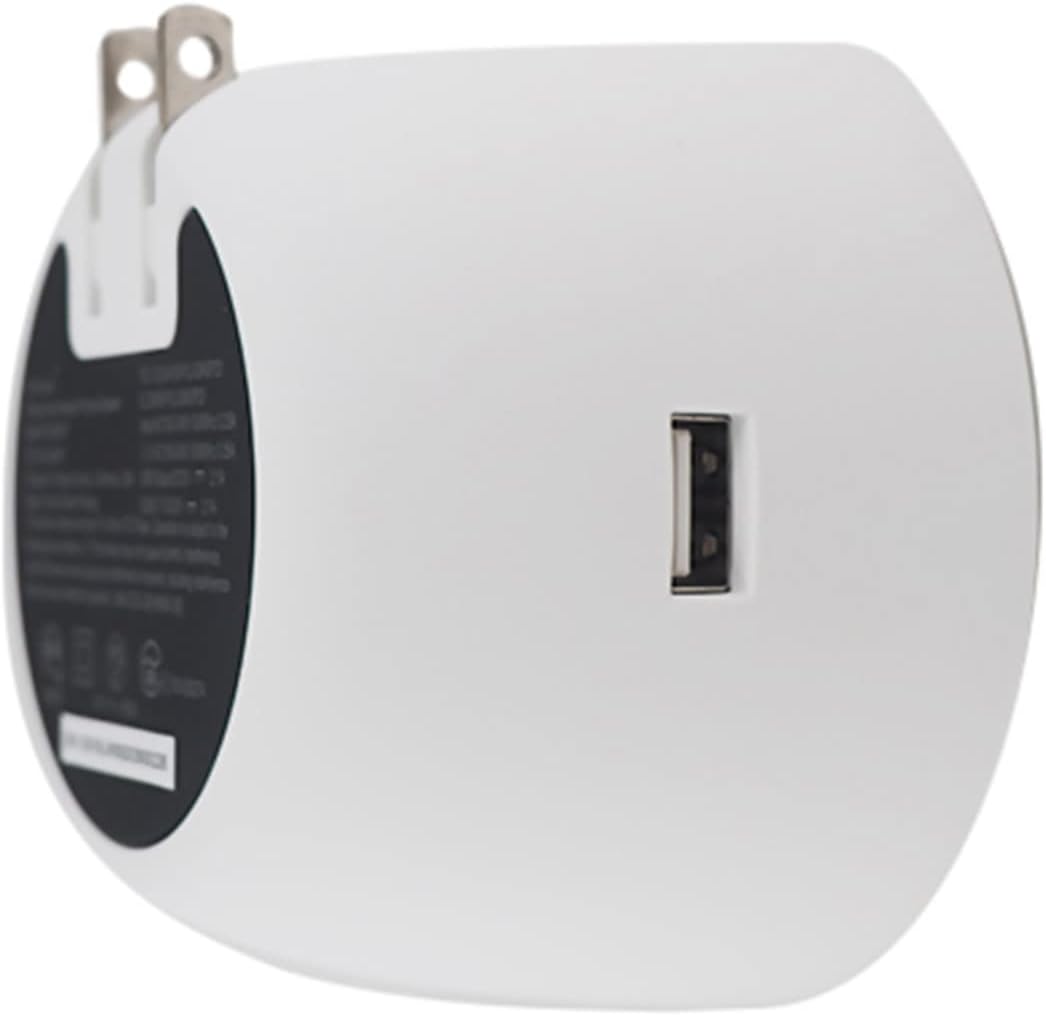
Immagine: Indietro view of the Newport speaker, highlighting the USB charging port.
5. Risoluzione Dei Problemi
5.1 Unit Pairing but No Sound
If your device shows as paired but you hear no sound:
- Sul tuo dispositivo, vai alle impostazioni Bluetooth.
- Locate the paired Newport speaker (e.g., "Newport_5da9").
- Select the information icon (usually an 'i' in a circle) next to the speaker name.
- Choose the option to "Forget This Device" or "Unpair".
- Riavviare il processo di associazione dalla Sezione 4.1.
5.2 Reconnecting After Unplugging
If you unplug your Newport speaker and then plug it back in, it may not automatically reconnect to your device.

Image: Close-up of the Newport speaker, indicating the power button location.
Soluzione: After plugging the speaker back into the outlet, press the power button on the speaker to re-establish the connection with your previously paired device.
6. Specifiche
| Caratteristica | Dettaglio |
|---|---|
| Marca | OC Acustica |
| Nome del modello | Newport Plug-in Bluetooth Speakers - Pair |
| Numero di modello | JBLSENSELITEBLKAM |
| Tecnologia di connettività | Bluetooth, USB |
| Tipo di montaggio | Collegare |
| Tipo di altoparlante | Altoparlante Bluetooth |
| Caratteristiche aggiuntive | Porta USB |
| Diametro subwoofer | 2 pollici |
| Colore | Grigio chiaro/Bianco |
| È impermeabile | FALSO |
| Tipo di garanzia | Limitato |
| Metodo di controllo | Tocco |
| Dimensioni dell'altoparlante | 2 pollici |
| Diametro del woofer | 2 pollici |
| Portata Bluetooth | 20.12 metri |
| Tipo di controllore | Battery powered (refers to connected device) |
| Dimensioni dell'articolo P x L x A | 2.48"P x 3.64"L x 3.35"A |
| Peso dell'articolo | 2 libbre |
| Dispositivi compatibili | Smartphone, Tablet |
| Fonte di alimentazione | Elettrico con cavo |
| Media integrati | Cavo di ricarica USB |
| Numero di articoli | 2 |
| Codice UPC | 683950295810 |
| Produttore | OC Acustica |
| Numero di canali audio | 2.0 |
| Tecnologia senza fili | Bluetooth |
| Tecnologia di connettività del subwoofer | Senza fili |
| Protocollo di connettività | Bluetooth |
| Codice GTIN | 683950295810 |

Image: Dimensions of the Newport Plug-in Bluetooth Speaker.
7. Video del prodotto
Guarda il video ufficiale del prodotto per un'analisi più approfonditaview of the OC Acoustic Newport Plug-in Bluetooth Speakers:
Video: Un video ufficiale del prodotto mostraasing the features and use of the OC Acoustic Newport speakers.
8. Garanzia e supporto
8.1 Informazioni sulla garanzia
The OC Acoustic Newport Plug-in Bluetooth Speakers come with a Garanzia limitata del produttore di 1 anniLa presente garanzia copre i difetti di materiali e fabbricazione in condizioni di normale utilizzo. Si prega di conservare la prova d'acquisto per eventuali reclami in garanzia.
8.2 Assistenza clienti
For technical assistance, warranty claims, or general inquiries, please visit the official OC Acoustic website or contact their customer support. Refer to the product packaging or the brand's online resources for the most current contact information.