
1. Modelli e anni applicabili
This XTRONS Car Stereo is designed for the following Porsche Cayenne models and years:
- Porsche Cayenne (2003-2010)
- Porsche Cayenne S (2003-2010)
- Porsche Cayenne GTS (2003-2010)
- Porsche Cayenne Turbo (2003-2010)
- Porsche Cayenne Turbo S (2003-2010)
- Porsche Cayenne Diesel (2003-2010)

Image: Comparison of the Porsche Cayenne dashboard before and after installing the XTRONS car stereo, showing seamless integration.
Nota importante sulla compatibilità:
If your car comes with the original reversing camera, you may need to purchase an adapter cable (e.g., ICE/ACS/FZM RM01) to ensure it functions correctly after upgrading to this stereo unit.
2. Caratteristiche principali
- Android 12 Qualcomm Snapdragon 665: Octa-core processor with 8GB LPDDR4 RAM and 256GB Solid State ROM for responsive performance and amplo stoccaggio.
- Schermo touch IPS da 9 pollici: High-definition 1280x720 resolution with a 178° viewangolo di ripresa per immagini nitide e vivide.
- DSP AKM integrato: Migliora l'esperienza audio con un'elaborazione audio avanzata.
- Automotive Grade Hardware: Features 100% aluminum heat dissipation and a built-in cooling fan for high performance and durability.
- Wireless Car Play e Android Auto: Compatible with iPhone (iOS 8+) and Android phones (Android 4.3+) for seamless smartphone integration, including navigation, calls, and music.
- Decodifica CANbus ottimizzata: Ensures perfect fitting for Porsche, displaying car information like AUX status, GPS status, and door status.
- Wi-Fi a doppia banda: Supporta le bande da 2.4 GHz e 5 GHz per una connettività Internet più veloce e stabile.
- Navigazione GPS: Supports popular Android navigation software such as Google Maps, Sygic, and Waze.
- Interfaccia utente esclusiva XTRONS: Optimized user interface with intuitive icons for safe driving.
- Porta HDMI integrata: Allows transmission of high-fidelity content to external monitors for passenger entertainment.
- Soluzione 4G LTE integrata: (Note: 4G function DOES NOT work in the Americas area - US, Canada, etc.) Supports Asia and Europe for internet access via SIM card.

Immagine: Oltreview of the XTRONS Car Stereo's core specifications and features.
3. Contenuto della confezione
The following items are included in your XTRONS Car Stereo package:
- 2 × cablaggio ISO
- 1 × cavo RCA
- 2 × Cavo USB
- 1 × Antenna GPS
- 1 × Cavo della fotocamera
- 1 × Adattatore per antenna radio
- 1 antenna 4G+
- 1 × Antenna 4G
- 1 × scatola CANbus
- 1 × Cavo antenna radio
- 1 × Decodificatore in fibra ottica
- 2 × Manuale utente (inglese/tedesco)

Image: All included accessories for the XTRONS Car Stereo.
4. Configurazione e installazione
4.1 Schema elettrico
Refer to the detailed wiring diagram below for proper connection of the car stereo to your vehicle's electrical system. Ensure all connections are secure before powering on the unit.
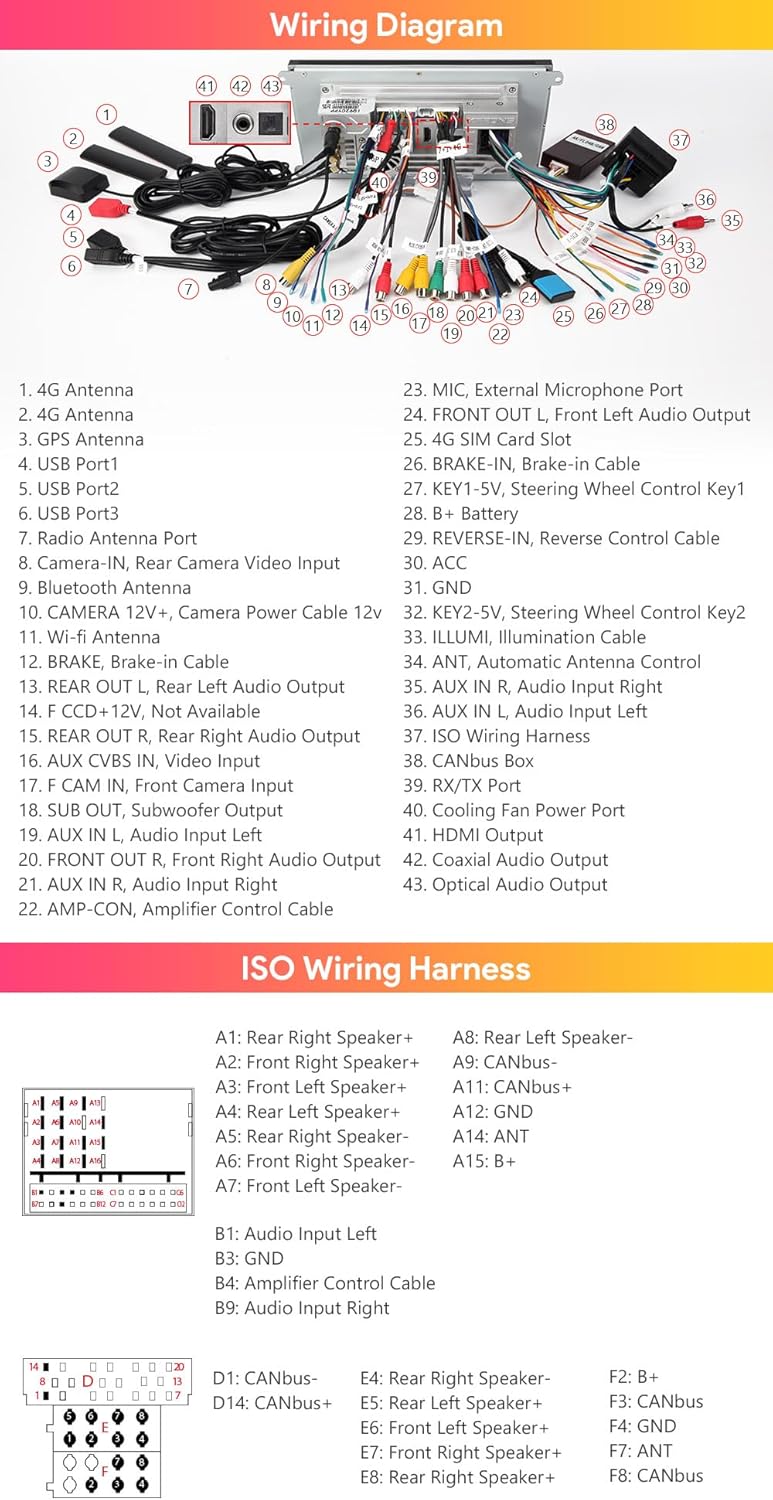
Image: Comprehensive wiring diagram for the XTRONS Car Stereo.
4.2 Optical Fiber Decoder
The included Optical Fiber Decoder is essential for integrating the stereo with your Porsche Cayenne's existing fiber optic audio system. Connect it according to the wiring diagram to ensure proper audio output.
4.3 CANbus Box
The CANbus Box facilitates communication between the car stereo and your vehicle's CANbus system. This enables features such as displaying car information (AUX status, GPS status, door status) and maintaining steering wheel control functionality.
5. Istruzioni per l'uso
5.1 Display e interfaccia
The 9-inch IPS touch screen provides a clear and responsive interface. Navigate through menus and applications with ease. The XTRONS Exclusive UI is designed for intuitive operation, minimizing distractions while driving.

Image: Main display interface of the XTRONS Car Stereo.
5.2 Connettività
- Wireless Car Play e Android Auto: Connect your iPhone (iOS 8 and above) or Android phone (Android 4.3 and above) wirelessly or via USB for access to navigation, calls, music, and voice assistants (Siri, Google Assistant).
- Bluetooth 5.0: Pair your Bluetooth devices for hands-free calling and audio streaming.
- Wi-Fi a doppia banda: Connect to 2.4GHz or 5GHz Wi-Fi networks for faster internet speeds and improved stability.
- Soluzione 4G LTE integrata: For regions outside the Americas (US, Canada, etc.), insert a SIM card to access the internet directly from the unit.

Image: CarAutoPlay and Android Auto functionality.
5.3 Navigazione
The unit supports various Android navigation software, including Google Maps, Sygic, and Waze. Download your preferred navigation app from the Google Play Store.
5.4 Caratteristiche audio
- DSP AKM integrato: Utilize the Digital Sound Processor to fine-tune your audio settings for an enhanced listening experience.
- Uscita coassiale/ottica/HDMI: Connect external audio playback devices or monitors to enjoy high-fidelity sound and video.

Image: HD Output for external displays.
5.5 Mirroring dello schermo
Screen mirroring allows you to display content from your smartphone directly onto the car stereo screen. This feature is useful for viewing videos, photos, or using apps that are not natively supported by the head unit.
5.6 Video ufficiale del prodotto
Video: XTRONS 9'' Octa Core 8+256GB Car Stereo for Porsche Cayenne. This video provides an overview delle caratteristiche e delle funzionalità del prodotto.
6. Manutenzione
6.1 Sistema di raffreddamento
The XTRONS Car Stereo features a 100% aluminum heat sink and a built-in cooling fan to ensure optimal performance and prevent overheating. The cooling fan automatically activates when the unit's temperature exceeds 80°C and deactivates when it drops below 80°C, contributing to power saving and durability. Ensure the cooling fan's power cable is connected for proper operation.

Image: Internal cooling system of the XTRONS Car Stereo.
7. Risoluzione Dei Problemi
If you encounter any issues with your XTRONS Car Stereo, please refer to the following general troubleshooting steps:
- Nessun potere: Controllare tutti i collegamenti elettrici e assicurarsi che l'accensione del veicolo sia inserita. Verificare che il fusibile sia intatto.
- Nessun suono: Check speaker connections, audio output settings, and ensure the volume is not muted or too low. Verify the optical fiber decoder is correctly installed if applicable.
- Touchscreen che non risponde: Prova a riavviare l'unità. Se il problema persiste, potrebbe essere necessario un ripristino delle impostazioni di fabbrica (per questa opzione, consulta le impostazioni sullo schermo).
- Perdita del segnale GPS: Assicurarsi che l'antenna GPS sia collegata correttamente e abbia una visuale libera view del cielo.
- Problemi di connessione Bluetooth: Assicurati che il Bluetooth sia abilitato sia sullo stereo che sul dispositivo. Prova a disaccoppiare e riassociare il dispositivo.
- Problemi di connettività Wi-Fi: Verify Wi-Fi is enabled and you are connecting to the correct network with the correct password. Check signal strength.
For more specific issues or persistent problems, please contact XTRONS customer support.
8. Specifiche
| Caratteristica | Dettaglio |
|---|---|
| Sistema operativo | Androide 12 |
| Processore | Qualcomm Snapdragon 665 Octa-core |
| Memoria RAM | 8 GB LPDDR4 |
| ROM | 256GB Solid State ROM |
| Scheda grafica | Adreno 610 |
| Dimensioni dello schermo | 9 pollici |
| Risoluzione | 1280x720 (pannello IPS) |
| Connettività | Bluetooth 5.0, Dual Band Wi-Fi (2.4GHz/5GHz), 4G LTE (region dependent) |
| Uscita audio | Built-in AKM DSP, Coaxial/Optical/HDMI Output |
| Dimensioni (confezione) | 14 x 8.6 x 4.92 pollici |
| Peso dell'articolo | 4.91 libbre |
9. Garanzia e supporto
XTRONS fornisce un Garanzia di 1 anno for this unit. For any technical support or warranty claims, please do not hesitate to contact XTRONS via Amazon email. They aim to reply as soon as possible to ensure your rights and interests are protected at all times.
You can also visit the official XTRONS store for more information and additional products: Negozio Amazon XTRONS