
1. Introduzione
Thank you for choosing the cimetech K268 Wireless Numeric Keypad. This manual provides detailed instructions for setting up, operating, and maintaining your device. Please read this manual carefully before use to ensure optimal performance and longevity of your keypad.
The cimetech K268 is an 18-key wireless numeric keypad designed to enhance data entry efficiency for laptops and PCs. It features a 2.4G USB receiver for stable wireless connectivity and an ergonomic design for comfortable use.
2. Contenuto della confezione
- 1 x cimetech K268 Wireless Numeric Keypad (Black)
- 1 x 2.4G USB Receiver (stored in the battery compartment)
- 1 x Manuale utente

Image: The cimetech K268 Wireless Numeric Keypad shown with its accompanying 2.4G USB receiver.
3. Prodotto finitoview
The cimetech K268 numeric keypad is designed for comfort and efficiency. Key features include:
- Disposizione dei 18 tasti: Standard numeric keypad layout for efficient data entry.
- Ergonomic 15° Tilt: Provides a comfortable typing angle to reduce wrist strain.
- Base antiscivolo: Quattro piedini antiscivolo sulla base garantiscono stabilità durante l'uso.
- Ultra-thin and Portable: Compact dimensions make it easy to carry.
- Quiet Click Keys: Designed for a silent typing experience.

Immagine: Pro lateralefile of the keypad illustrating its 15-degree ergonomic tilt for comfortable typing.
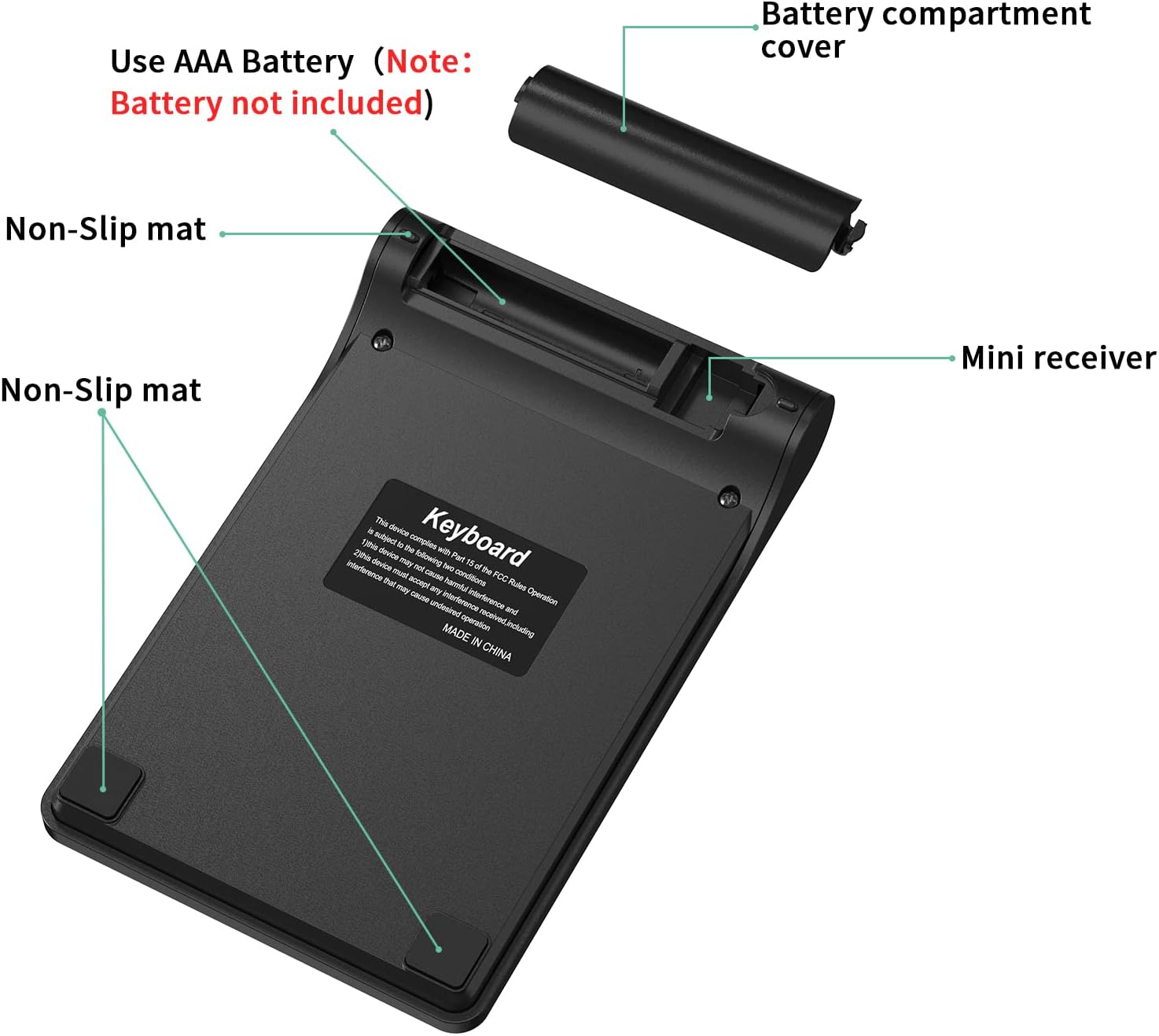
Image: The underside of the keypad, highlighting the battery compartment, the storage slot for the mini USB receiver, and the non-slip rubber feet.

Image: Diagram showing the dimensions of the cimetech K268 Wireless Numeric Keypad: 133mm (5.24in) length, 86mm (3.39in) width, and varying thickness from 9mm (0.39in) to 20mm (0.79in).
4. Istruzioni per l'installazione
Follow these steps to set up your cimetech K268 Wireless Numeric Keypad:
- Installa la batteria: Open the battery compartment cover on the back of the keypad. Insert one AAA battery (not included), ensuring correct polarity. Close the battery cover.
- Recupera ricevitore USB: The 2.4G USB receiver is stored inside the battery compartment for convenience. Carefully remove it.
- Collegare il ricevitore: Plug the 2.4G USB receiver into an available USB port on your computer (laptop or PC).
- Accensione: The keypad does not have a separate power switch. Once the battery is installed and the receiver is plugged in, the keypad is ready for use. A green indicator light may flash briefly.
- Collega e usa: No drivers are required. Your computer should automatically detect and install the necessary software.

Image: Visual guide for setting up the keypad, showing battery installation, USB receiver connection, indicator light, and immediate use.
5. Istruzioni per l'uso
Once set up, the cimetech K268 functions as a standard 18-key numeric keypad. It is ideal for:
- Data entry in spreadsheets (e.g., Microsoft Excel, Google Sheets).
- Financial calculations.
- Accounting tasks.
- Any application requiring frequent numerical input.
Funzioni chiave:
- Blocco numerico: Toggles the numeric keypad function. When Num Lock is active, the keys function as numbers. When inactive, some keys may perform navigation functions (Home, End, PgUp, PgDn).
- / , * , - , + : Standard arithmetic operators.
- Inserisci: Confirms input.
- Indietro: Deletes the previous character.
- Del (Elimina): Deletes the character at the cursor position.
- Ins (Insert): Toggles insert mode.

Image: The numeric keypad being used in different professional environments, demonstrating its versatility for tasks in banking, accounting, and general business operations.
6. Compatibilità
The cimetech K268 Wireless Numeric Keypad offers wide compatibility with various operating systems:
- Finestre: Fully compatible with Windows 7, 8, 10, 11, Vista, and XP.
- Linux: Compatible with most Linux distributions.
- Mac OS: Partially compatible. Some specific key functions may not operate identically to a native macOS keypad.
- Androide: Compatible with devices supporting USB input.

Image: The keypad displayed alongside icons representing Windows, Linux, and macOS, indicating its broad operating system compatibility.
7. Manutenzione
Per garantire la longevità e le prestazioni ottimali della tastiera, seguire queste linee guida per la manutenzione:
- Pulizia: Utilizzare un panno morbido e asciutto per pulire la tastiera. Per lo sporco ostinato, un panno leggermenteamp È possibile utilizzare un panno, ma assicurarsi che non penetri liquido nel dispositivo. Evitare prodotti chimici aggressivi o detergenti abrasivi.
- Sostituzione della batteria: Replace the AAA battery when the keypad's performance degrades or it stops responding. Always use a fresh, high-quality battery.
- Magazzinaggio: When not in use for extended periods, remove the battery to prevent leakage. Store the keypad in a cool, dry place.
- Design resistente agli schizzi: While the keypad features a spill-resistant design, it is not waterproof. Avoid exposing it to excessive liquids. If spills occur, immediately disconnect the device, remove the battery, and allow it to dry completely before reuse.
8. Risoluzione Dei Problemi
If you encounter issues with your cimetech K268 Wireless Numeric Keypad, refer to the following common solutions:
- La tastiera non risponde:
- Ensure the AAA battery is correctly installed and not depleted. Replace if necessary.
- Verify the 2.4G USB receiver is securely plugged into a working USB port on your computer. Try a different USB port.
- Move the keypad closer to the USB receiver to rule out interference or range issues.
- Riavvia il computer.
- Keys typing incorrect characters or not working:
- Check if the "Num Lock" key is activated. Press it to toggle its state.
- Ensure there are no physical obstructions under the keys.
- Connessione intermittente:
- Reduce the distance between the keypad and the USB receiver.
- Evitare di posizionare il ricevitore vicino ad altri dispositivi wireless (ad esempio router Wi-Fi, dispositivi Bluetooth) che potrebbero causare interferenze.
- Assicurarsi che la batteria abbia energia sufficiente.
Se il problema persiste dopo aver provato questi passaggi, contattare l'assistenza clienti.
9. Specifiche
| Caratteristica | Dettaglio |
|---|---|
| Marca | cimetech |
| Modello | K268 |
| Colore | Nero |
| Tecnologia di connettività | Wireless 2.4G (ricevitore USB) |
| Numero di chiavi | 18 |
| Dispositivi compatibili | Computer portatile, PC |
| Compatibilità del sistema operativo | Windows 7/8/10/11/Vista/XP, Linux, macOS (partial), Android |
| Caratteristiche speciali | Ergonomic 15° tilt, Spill-resistant design, Quiet click, Portable |
| Fonte di alimentazione | 1 batteria AAA (non inclusa) |
| Dimensioni del prodotto (L x P x A) | 13.3 cm x 8.6 cm x 1 cm (circa 5.24 x 3.39 x 0.39 pollici) |
10. Garanzia e supporto
cimetech products are designed for reliability and performance. For warranty information and customer support, please refer to the documentation included with your purchase or visit the official cimetech websito.
If you have any questions or require assistance, please contact our customer support team. Details can typically be found on the product packaging or the manufacturer's websito.