
1. Introduzione
The Datel Go-Tcha Ranger is an advanced accessory designed for Pokémon GO players. It provides on-screen animated alerts and vibration feedback for nearby Pokémon and PokéStops. With its auto-catch mode, the device can automatically catch Pokémon and collect items from PokéStops, allowing players to continue their game without constant smartphone interaction. The Go-Tcha Ranger features a 1200mAh built-in battery that can also charge your smartphone, extending gaming sessions. Its compact design includes an LED torch and an integral compass, making it a versatile tool for outdoor use.

Figure 1: Datel Go-Tcha Ranger in its retail packaging.
2. Requisiti di sistema
To use the Go-Tcha Ranger, ensure your device meets the following requirements:
- Pokémon GO Mobile Game App installed.
- Device requires Bluetooth low-energy compatible smartphone.
- Compatible with iPhone® 5 / 5c / 5s / SE / 6 / 6s / 6 Plus / 7 / 7 Plus devices with iOS Ver. 8–10 installed.
- Compatible with Android devices with 2 GB RAM or more, Bluetooth Smart (Bluetooth Ver. 4.0 or higher) capability, and Android Ver. 4.4–7.0 installed.

Figure 2: Detailed system requirements for the Go-Tcha Ranger.
3. Cosa c'è nella scatola
Your Go-Tcha Ranger box will include:
- 1x Go-Tcha Ranger OLED Display Unit
- USB Re-charge Connection Cable
- Smartphone Charge Cable with iPhone Adaptor

Figure 3: The back of the Go-Tcha Ranger packaging highlighting its features and components.
4. Impostazione
4.1 Charging the Go-Tcha Ranger
Before first use, fully charge your Go-Tcha Ranger. Connect the provided USB re-charge cable to the Go-Tcha Ranger and a USB power source. The OLED display will show a charging icon. A full charge typically takes 1-2 hours.
The Go-Tcha Ranger also features a built-in 1200mAh power bank. Use the included smartphone charge cable with the iPhone adaptor to charge your smartphone on the go.
4.2 Accensione/Spegnimento
To power on the Go-Tcha Ranger, press and hold the main button until the screen illuminates. To power off, navigate through the menu options on the OLED screen until you find the power off option, then confirm.
4.3 Pairing with Pokémon GO
Follow these steps to pair your Go-Tcha Ranger with the Pokémon GO app:
- Ensure your Go-Tcha Ranger is charged and powered on.
- Open the Pokémon GO app on your smartphone.
- Tap the Main Menu button (Poké Ball icon) at the bottom of the map screen.
- Tap the "Settings" icon in the top right corner.
- Scroll down and select "Pokémon GO Plus."
- Press the button on your Go-Tcha Ranger to make it discoverable. It should appear under "Available Devices" in the app.
- Tap on "Pokémon GO Plus" (or the Go-Tcha Ranger device name) in the app to initiate pairing.
- Once successfully paired, the icon in the Pokémon GO app will change, and the Go-Tcha Ranger will vibrate.
Nota: If you experience issues, ensure Bluetooth is enabled on your phone and no other Bluetooth devices are interfering. You may need to "forget" previous Pokémon GO Plus devices in your phone's Bluetooth settings.
5. Istruzioni per l'uso
The Go-Tcha Ranger enhances your Pokémon GO experience with several automated and interactive features.
5.1 Auto-Catch and Auto-Collect
The Go-Tcha Ranger can be set to automatically catch Pokémon and collect items from PokéStops. This feature allows you to play Pokémon GO without constantly checking your phone.
- Auto-Catch: When enabled, the device will automatically attempt to catch any Pokémon it encounters.
- Auto-Collect: When enabled, the device will automatically spin PokéStops and collect items.
You can toggle these settings on or off via the Go-Tcha Ranger's OLED touch screen menu. Refer to the on-screen prompts for navigation.
5.2 OLED Touch Screen Display
The Go-Tcha Ranger features an OLED touch screen for easy navigation and information display. Tap the screen to cycle through different information screens and menu options. The screen displays alerts for nearby Pokémon, PokéStops, battery status, and more.
5.3 Feedback di vibrazione
The device provides vibration feedback for various events, including:
- New Pokémon detected.
- PokéStop detected.
- Pokémon caught or escaped.
- Items collected from PokéStop.
- Avviso di batteria scarica.
- Disconnection from the app.
5.4 LED Torch and Compass
The Go-Tcha Ranger includes a built-in LED torch and an integral compass for convenience during outdoor activities. These features can be activated through the device's menu.
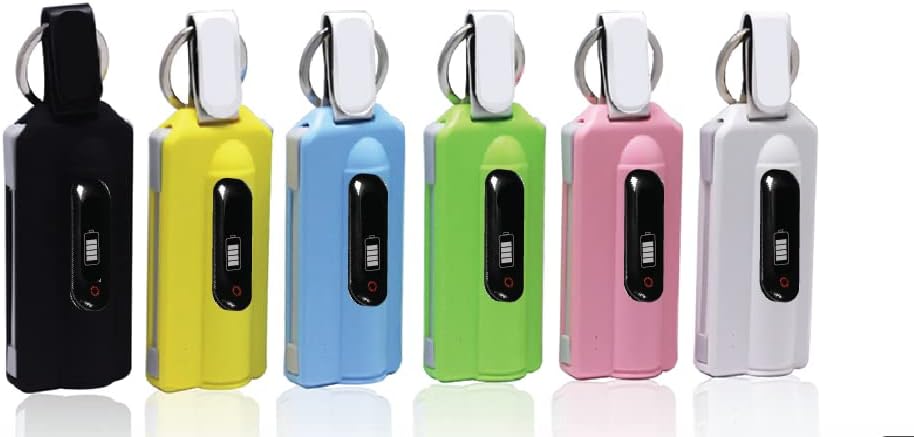
Figure 4: Go-Tcha Ranger devices in various colors, showcasingrazie al loro design compatto.
6. Manutenzione
Proper care will ensure the longevity of your Go-Tcha Ranger.
- Pulizia: Pulisci il dispositivo con un panno morbido e asciutto. Evita di utilizzare prodotti chimici aggressivi o materiali abrasivi.
- Magazzinaggio: Conservare il dispositivo in un luogo fresco e asciutto quando non in uso. Evitare temperature estreme.
- Cura della batteria: Per una durata ottimale della batteria, evitare di scaricare completamente il dispositivo frequentemente. Caricarlo regolarmente, anche se non lo si utilizza costantemente.
7. Risoluzione Dei Problemi
7.1 Dispositivo non in carica
- Ensure the USB cable is securely connected to both the Go-Tcha Ranger and the power source.
- Prova una porta USB o un alimentatore diverso.
- Controllare il cavo di ricarica per eventuali danni.
- If the battery is completely depleted, it may take a few minutes for the charging icon to appear. Leave it connected for at least 15 minutes.
7.2 Cannot Connect/Pair with Pokémon GO
- Assicurati che il Bluetooth sia abilitato sul tuo smartphone.
- Make sure the Go-Tcha Ranger is powered on and within range of your phone.
- In your phone's Bluetooth settings, "forget" or "unpair" any previously connected Pokémon GO Plus or Go-Tcha devices.
- Restart both your smartphone and the Go-Tcha Ranger.
- Close and reopen the Pokémon GO app.
- Ensure your Pokémon GO app is updated to the latest version.
7.3 Auto-Catch/Collect Not Working
- Check the settings on your Go-Tcha Ranger's OLED screen to ensure auto-catch and auto-collect are enabled.
- Verify that the Go-Tcha Ranger is successfully connected to the Pokémon GO app.
- Ensure you have enough Poké Balls in your inventory for catching.
- Make sure your item bag is not full, which would prevent collecting from PokéStops.
8. Specifiche
| Caratteristica | Dettaglio |
|---|---|
| Marca | Datel |
| Nome del modello | Go-Tcha Ranger |
| Dispositivi compatibili | Android, iPhone (iOS 8-10, Android 4.4-7.0) |
| Tipo di controllore | Tastiera touch |
| Tecnologia di connettività | USB, Bluetooth Low Energy |
| Caratteristiche aggiuntive | Touchpad, Auto-catch, Auto-collect, Animated graphics, Vibration feedback, Compass, LED Torch, Smartphone charging (1200mAh power bank) |
| Fonte di alimentazione | Alimentato a batteria (1200 mAh) |
| Dimensioni dell'articolo | 3.94 x 1.97 x 0.5 pollici |
| Colore | Bianco |
9. Garanzia e supporto
For warranty information and technical support, please refer to the documentation included with your product or visit the official Datel websito. Conservare la prova d'acquisto per eventuali reclami in garanzia.
For app-related support or updates, please check the respective app stores (Apple App Store or Google Play Store) for the latest version of the Pokémon GO app.