
OREiN OL36002
Manuale utente della luce di sicurezza intelligente OREiN
Modello: OL36002
Marca: OREiN
1. Introduzione
Thank you for choosing the OREiN Smart Security Light. This manual provides detailed instructions for the installation, setup, operation, and maintenance of your new smart floodlight. Designed for outdoor use, this light offers advanced features such as motion detection, app control, voice control, and customizable security modes to enhance your home's safety and convenience.
2. Caratteristiche del prodotto
- Customizable Security Modes: Choose from Motion Mode, Light Mode, and Security Mode to suit your specific needs.
- Controllo vocale e tramite app: Control your light locally and remotely using the Aidot app, or via voice commands with Alexa and Google Assistant.
- 450° Widely Adjustable Lighting: Patented design with 3 active joints allows for flexible 450° adjustment, ensuring wide and precise illumination.
- Controllo di gruppo: Connect multiple OREiN smart floodlights to a single group for synchronized control via Wi-Fi and BLE Mesh technology.
- Modalità di sicurezza in viaggio: Deter intruders with intimidating flashing lights and receive push notifications on your phone when motion is detected while you're away.
- IP65 impermeabile: Designed to withstand various weather conditions, ensuring reliable performance outdoors.
- Luminosità dimmerabile: Adjust brightness from 1% to 100% to create the perfect ambiance or save energy.
- LED super luminoso: Provides 1600 lumens of 5000K daylight white light with only 12W power consumption.
3. Contenuto della confezione
Prima dell'installazione, assicurarsi che tutti i componenti siano presenti:
- OREiN Smart Security Light Unit
- Staffa di fissaggio
- Viti di montaggio e tasselli a parete
- Terminale di collegamento
- Sealing Cushion
- Manuale dell'utente (questo documento)
4. Guida all'installazione
Follow these steps for proper installation. It is recommended to consult a qualified electrician if you are unsure about any electrical connections.
Step 1: Fix the Mounting Bracket

Securely attach the mounting bracket to your desired outdoor wall location using the provided screws and wall anchors. Ensure the bracket is level and firmly fixed.
Step 2: Thread the Wires

Carefully thread the electrical wires from your power source through the designated opening in the light's base. Ensure sufficient wire length for connection.
Passaggio 3: collegare i fili

Using the provided connection terminal, securely connect the live, neutral, and ground wires according to local electrical codes. Ensure all connections are tight and insulated.
Step 4: Screw the Connection Terminal

Once wires are connected, carefully position the connection terminal inside the light's housing and secure it with screws if applicable, ensuring no wires are pinched.
Step 5: Cover the Sealing Cushion
Place the sealing cushion over the wiring compartment to ensure IP65 waterproof protection. This step is crucial for outdoor durability.
Step 6: Secure the Light

Attach the main light unit to the mounting bracket and secure it firmly. Ensure all parts are properly aligned and tightened.
5. Smart Setup and App Control
The OREiN Smart Security Light is controlled via the Aidot app, offering advanced customization and remote access.
5.1 Download and Register Aidot App
Download the "Aidot" app from your device's App Store (iOS) or Google Play Store (Android).

After downloading, create an account and log in. Note: Your Wi-Fi network must be 2.4GHz for proper connection.
5.2 Power On and Connect
Once installed, power on the security light. The lights will flash, indicating they are ready for pairing.
Open your home Wi-Fi settings and ensure you are connected to a 2.4GHz network.
In the Aidot app, press the "+" button to add a new device. The app will search for nearby devices. Select your OREiN Smart Security Light from the list.
If the device is not found, press and hold the reset button on the light for 10 seconds to reset it, then turn it on again to reconnect.
Enter your Wi-Fi password when prompted to connect the light to your network. Once connected, you can assign the light to a specific room within the app for easier management.
Video: Detailed guide on how to use the Aidot App to control your OREiN Smart Security Light, including setup and connection steps.
5.3 Integrazione del controllo vocale
The OREiN Smart Security Light is compatible with Alexa and Google Assistant. Once connected to the Aidot app, you can link your Aidot account to your voice assistant for convenient voice control.
Example Command: "Alexa, turn on the security light."
Video: Demonstrates voice control features and integration with smart home assistants.
6. Modalità operative e impostazioni
The Aidot app allows you to customize various settings and choose from three preset operating modes:
6.1 Modalità movimento
In Motion Mode, the light activates when motion is detected and automatically turns off after a set delay. You can adjust the brightness when motion is detected and set a 'Dim Light Mode' for low brightness when no person is detected, saving energy.

You can also enable 'Night Economy' for dimmable light after midnight to save energy and avoid harmful light effects on wildlife.
6.2 Modalità luce
Light Mode allows the floodlight to function as a normal light, automatically turning on during a specified effective time. This is ideal for general illumination during evening hours.

6.3 Security Mode (Travel Period)
This mode is designed to deter intruders when you are away. When motion is detected, the light will flash intimidatingly, and you will receive a push notification on your phone. You can manually disarm the alarming light from the app.

Note: The light alarm function uses red and white light flashes as a deterrent and does not include an audible alarm.
6.4 Controllo della luminosità
The light offers 1%-100% dimmable brightness, allowing you to adjust the intensity to your preference via the Aidot app.

6.5 Controllo di gruppo
As a gateway, this smart security light can connect all OREiN smart floodlights into a single control group using Wi-Fi and BLE Mesh technology. This allows you to control multiple lights simultaneously from the Aidot app.

To add a light control group, navigate to the "My Home" section in the Aidot app, tap the "+" icon, and select "Add Outdoor Group". Choose the lights you wish to include in the group.
Video: Oltreview of OREiN Smart Security Light features, including group control and app functionalities.
7. Manutenzione
The OREiN Smart Security Light is designed for durability with an IP65 waterproof rating, making it resistant to rain, snow, and heat. Regular maintenance will ensure optimal performance and longevity.
- Pulizia: Pulire periodicamente l'apparecchio di illuminazione con un panno morbido eamp panno per rimuovere sporco e detriti. Evitare l'uso di prodotti chimici aggressivi o detergenti abrasivi.
- Ispezione: Regularly check the mounting and wiring for any signs of wear, damage, or loose connections. Ensure the sealing cushion remains intact for waterproofing.
- Area del sensore: Mantenere la lente del sensore di movimento pulita e libera da ostruzioni (ad esempio, ragniwebs, foglie) per garantire un rilevamento accurato.

For information on recycling and cleaning light bulbs, please refer to general guidelines on bulb maintenance.
8. Risoluzione Dei Problemi
If you encounter issues with your OREiN Smart Security Light, please refer to the following common solutions:
| Problema | Possibile causa | Soluzione |
|---|---|---|
| Light not turning on/off or unresponsive to app. | No power, Wi-Fi disconnected, app glitch. | Check power supply. Ensure Wi-Fi is 2.4GHz and stable. Restart the light by pressing the reset button for 10 seconds. Reconnect via Aidot app. |
| Difficulty connecting to Wi-Fi. | Banda Wi-Fi errata, segnale debole, password errata. | Confirm your Wi-Fi is 2.4GHz. Move the light closer to the router. Double-check Wi-Fi password. Reset the light and try pairing again. |
| Il sensore di movimento non rileva. | Sensor obstructed, incorrect sensitivity settings. | Clear any obstructions from the sensor lens. Adjust motion sensitivity settings in the Aidot app. Ensure the sensor is oriented correctly. |
| Wiring connection is difficult. | Limited space in connection compartment. | Ensure you have sufficient wire length. Use rigid wires if possible. Take care when connecting in tight spaces. Consider professional installation if uncomfortable. |
9. Specifiche
| Attributo | Valore |
|---|---|
| Marca | OREiN |
| Numero di modello | OL36002 |
| Dimensioni (L x P x A) | Dimensioni: 18 x 15 x 10 cm |
| Peso | 662.24 grammi (1.46 libbre) |
| Colore | Nero |
| Materiale | Policarbonato |
| Tipo di finitura | Dipinto |
| Numero di lampadine | 1 (LED integrato) |
| Voltage | 220 Volt |
| Caratteristiche speciali | 3 Work Modes, IP65 Waterproof, 450° Adjustment, App Control, Dual Arms |
| Tipo di installazione | Montaggio a parete |
| Tipo di lampadina | GUIDATO |
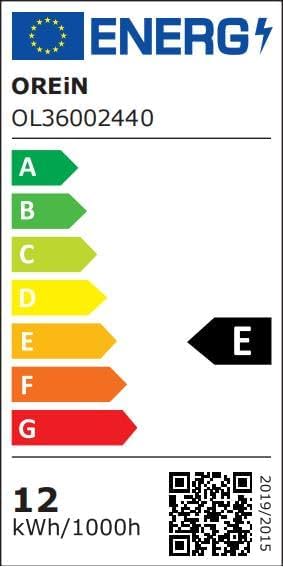
| Etichetta energetica | E (Link to EPREL database) |
| Flusso luminoso | 1600 lumen |
| Energia | 12 Watt |
| Temperatura del colore | 5000 gradi Celsius |
| Livello di resistenza all'acqua | Impermeabile (IP65) |
10. Garanzia e supporto
OREiN provides a Garanzia di 24 mesi for this product. Our customer support team is available 7 giorni su 24, XNUMX ore su XNUMX to assist you with any questions or issues.
For technical support, troubleshooting, or warranty claims, please contact us through the Aidot app or visit the OREiN official websito per le informazioni di contatto.
We regularly update the app version to improve functionality. Please ensure your app is up-to-date for the best experience.
Ask a question about this manual
Ask about setup, troubleshooting, compatibility, parts, safety, or missing instructions. Manuals+ will review the question and use this page’s manual context to help answer it.