
1. Prodotto finitoview
The JJA Uniwa V1000 is a mobile phone specifically designed for senior citizens, featuring a large display screen, big buttons, and a loud ringtone for ease of use. It includes essential functions such as calling, messaging, an SOS button for emergencies, FM radio, and Bluetooth connectivity. Its robust design and long-lasting battery ensure reliable communication.
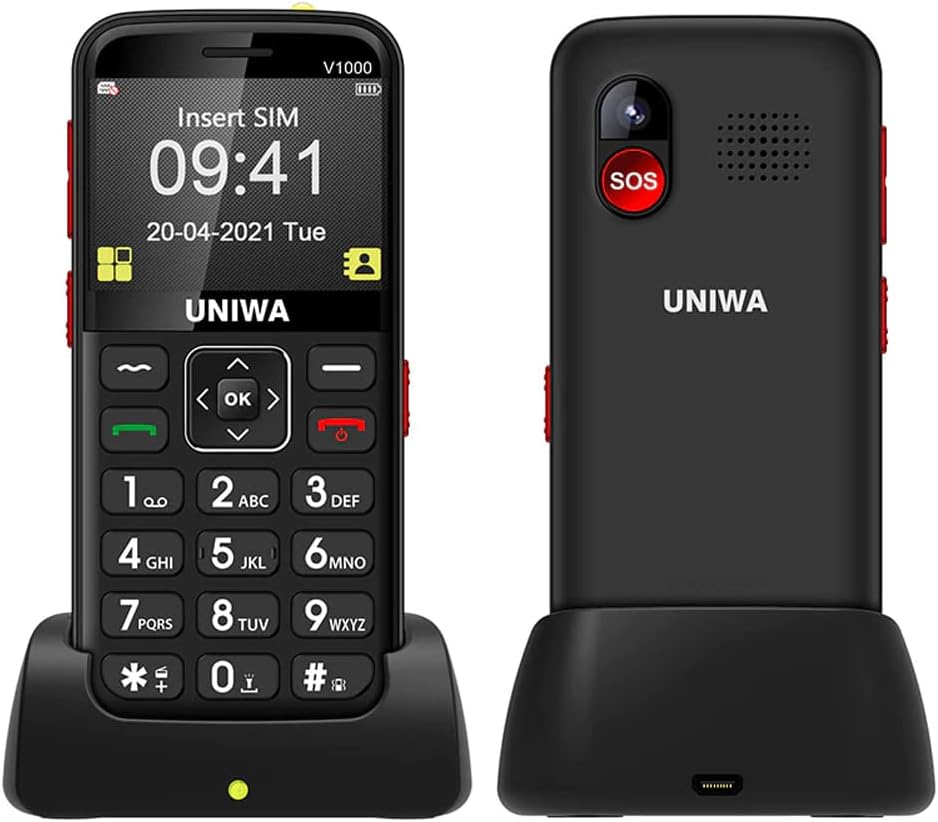
Immagine: Fronte e retro view of the Uniwa V1000 phone, showcasing its large keypad, display, and the included charging dock.
2. Contenuto della confezione
Si prega di controllare il contenuto della confezione una volta disimballata per assicurarsi che siano presenti tutti gli articoli:
- 1 x JJA Uniwa V1000 Mobile Phone
- Caricatore da parete 1 x
- 1 x Manuale utente (questo documento)
- 1 x 1700mAh Battery (pre-installed inside the phone)
- 1 x Stazione di ricarica
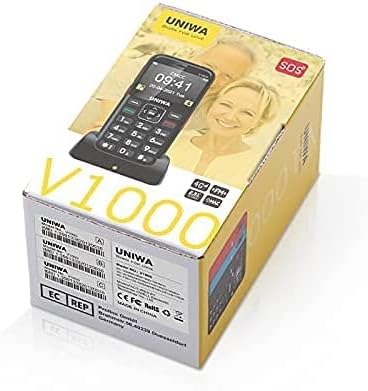
Image: The retail packaging box for the JJA Uniwa V1000, indicating the product model and brand.
3. Informazioni sulla sicurezza
Read all safety information before using the device to ensure safe and proper operation and to prevent damage to the device or injury to yourself and others.
- Sicurezza della batteria: Use only JJA approved batteries, chargers, and accessories. Improper use may lead to fire, explosion, or other hazards.
- Ricarica: Do not charge the device in wet conditions. Ensure the charger is securely connected.
- Protezione dell'udito: Avoid prolonged exposure to loud sounds when using headphones or the loudspeaker.
- Sicurezza di guida: Always prioritize driving safety. Do not use the phone while driving if it distracts you.
- Dispositivi Medici: Maintain a safe distance between the phone and medical devices like pacemakers. Consult your physician and the medical device manufacturer for specific guidelines.
- Disposizione: Dispose of the phone and battery properly according to local regulations. Do not dispose of them in household waste.
4. Impostazione
4.1 Inserimento della scheda SIM e della batteria
The Uniwa V1000 uses a single SIM card. The 1700mAh battery is typically pre-installed.
- Turn off the phone and disconnect any chargers.
- Rimuovere con cautela la cover posteriore del telefono.
- If the battery is not already installed, insert the 1700mAh Lithium Ion battery into its compartment, ensuring the gold contacts align.
- Locate the SIM card slot. Gently slide your 4G SIM card into the slot with the gold contacts facing down and the cut corner oriented correctly.
- Riposizionare il coperchio posteriore finché non scatta saldamente in posizione.
4.2 Ricarica del telefono
Prima del primo utilizzo, caricare completamente la batteria del telefono.
- Utilizzo della base di ricarica: Place the phone into the charging dock, ensuring it sits firmly. Connect the wall charger to the charging dock, then plug the charger into a power outlet. The phone will begin charging.
- Ricarica diretta: Alternatively, connect the wall charger directly to the phone's charging port, then plug it into a power outlet.
A charging indicator will appear on the screen. The phone is fully charged when the indicator shows a full battery icon.

Image: The Uniwa V1000 phone securely placed in its charging dock, illustrating the stability during charging and highlighting key features like battery capacity and USB connectivity.
5. Istruzioni per l'uso
5.1 Accensione/spegnimento
- Per accendere: Premere e tenere premuto il tasto Pulsante di chiamata verde finché lo schermo non si accende.
- Per spegnere: Premere e tenere premuto il tasto Pulsante rosso di fine chiamata until the power off options appear, then select "Power off" using the navigation keys and confirm.
5.2 Effettuare e ricevere chiamate
- Effettuare una chiamata:
- Inserire il numero di telefono utilizzando la tastiera grande.
- Premere il tasto Pulsante di chiamata verde comporre il numero.
- Per terminare la chiamata, premere il tasto Pulsante rosso di fine chiamata.
- Ricevere una chiamata:
- Quando squilla il telefono, premere il tasto Pulsante di chiamata verde per rispondere.
- Per terminare la chiamata, premere il tasto Pulsante rosso di fine chiamata.
5.3 Invio e ricezione di messaggi
- Navigate to the "Messages" menu using the navigation keys.
- Seleziona "Scrivi messaggio" per comporre un nuovo SMS.
- Inserisci il numero del destinatario e il tuo messaggio.
- Select "Send" to transmit the message.
- I messaggi ricevuti appariranno nella "Posta in arrivo".
5.4 Funzione SOS
Il pulsante SOS è una funzione di sicurezza fondamentale in caso di emergenza.
- Impostazione dei contatti SOS:
- Vai su "Impostazioni" > "Impostazioni SOS".
- Add up to 5 emergency contact numbers. These numbers will be called sequentially when the SOS button is pressed.
- You can also enable an SOS message to be sent to these contacts.
- Utilizzo del pulsante SOS: In caso di emergenza, tenere premuto il tasto Pulsante SOS on the back of the phone for a few seconds. The phone will automatically dial the pre-set emergency contacts one by one until an answer is received, and send the SOS message if enabled.
5.5 Radio FM
- Dal menu principale, accedere all'applicazione "Radio FM".
- Utilizzare i tasti di navigazione per cercare le stazioni o sintonizzarsi manualmente su una frequenza.
- Per una ricezione ottimale potrebbe essere necessario utilizzare delle cuffie che fungano da antenna.
5.6 Connettività Bluetooth
- Vai su "Impostazioni" > "Bluetooth".
- Attiva il Bluetooth.
- Seleziona "Cercare devices" to find nearby Bluetooth devices (e.g., headsets).
- Selezionare il dispositivo desiderato dall'elenco e seguire le istruzioni visualizzate sullo schermo per associarlo.
Fotocamera a 5.7°
The Uniwa V1000 features a 0.3 Megapixel rear camera.
- Dal menu principale, accedere all'applicazione "Fotocamera".
- Punta la fotocamera sul soggetto.
- Press the "OK" button (center navigation button) to capture a photo.
- Photos are saved to the phone's internal memory.
6. Manutenzione
- Pulizia: Utilizzare un panno morbido e asciutto per pulire la superficie del telefono. Evitare l'uso di detergenti liquidi o spray.
- Cura della batteria:
- Non esporre la batteria a temperature estreme.
- Evitare di scaricare completamente la batteria frequentemente.
- Se il telefono non verrà utilizzato per un periodo prolungato, caricarlo fino a circa il 50% prima di riporlo.
- Magazzinaggio: Conservare il telefono in un luogo fresco e asciutto, lontano dalla luce solare diretta e da temperature estreme.
7. Risoluzione Dei Problemi
| Problema | Possibile causa/soluzione |
|---|---|
| Il telefono non si accende. | Battery is low or depleted. Charge the phone for at least 30 minutes. Ensure battery is correctly inserted. |
| Nessun segnale di rete. | SIM card not inserted correctly or damaged. Reinsert SIM card. You may be in an area with no network coverage. Move to a different location. |
| Batteria non in carica. | Charger or charging dock may be faulty. Check connections. Ensure power outlet is working. |
| Non riesco a sentire il chiamante / Il chiamante non riesce a sentirmi. | Volume too low. Adjust volume during a call. Microphone or speaker may be blocked. Ensure no obstructions. |
| Il pulsante SOS non funziona. | SOS contacts not set up. Ensure emergency numbers are configured in SOS settings. |
8. Specifiche
| Caratteristica | Dettaglio |
|---|---|
| Marca | JJA |
| Modello | Uniwa V1000 |
| Dimensioni RAM | 64 MB |
| Capacità di archiviazione digitale | 128 MB |
| Sistema operativo | Mobile |
| Tipo di processore | Vincitore completo A20 |
| Dimensioni di visualizzazione dello schermo in piedi | 2.3 pollici |
| Risoluzione | 320 x 240 pixel |
| Capacità della batteria | 1700 mAh agli ioni di litio |
| Durata media della batteria (standby) | 180 ore |
| Tecnologia cellulare | 4G (Note: Check regional band compatibility) |
| Input dell'interfaccia umana | Tastiera |
| Risoluzione della telecamera posteriore | 0.3 Megapixel |
| Peso dell'articolo | 400 grammi |
9. Garanzia e supporto
JJA is committed to customer satisfaction. If you encounter any issues or have questions regarding your Uniwa V1000 phone, please do not hesitate to contact our customer support. While specific warranty details are not provided in this manual, we strive to provide the best product and service to ensure a worry-free experience.
Per assistenza, fare riferimento alle informazioni di contatto fornite sulla confezione del prodotto o sul sito del rivenditore website where you purchased the device.