
FIFINE H6 Gaming Headset User Manual
Modello: H6
1. Introduzione
Thank you for choosing the FIFINE H6 Gaming Headset. This headset is designed to provide an immersive audio experience for gaming on PC, PS4, and PS5. It features virtual 7.1 surround sound, a detachable microphone for clear communication, three EQ modes, and comfortable ear cushions for extended use.
Please read this manual carefully before using the product to ensure proper operation and to maximize your gaming experience.
2. Contenuto della confezione
- FIFINE H6 Gaming Headset
- Microfono staccabile
- Manuale d'uso
3. Prodotto finitoview
3.1 Componenti delle cuffie
The FIFINE H6 headset is designed for comfort and durability, featuring soft ear cushions and an adjustable headband.

Immagine 3.1: The headset features breathable ear cushions, a soft headband, and an adjustable metal frame for a comfortable fit. It weighs approximately 330g.
3.2 Controlli in linea
The headset includes an inline control unit for easy access to audio settings.
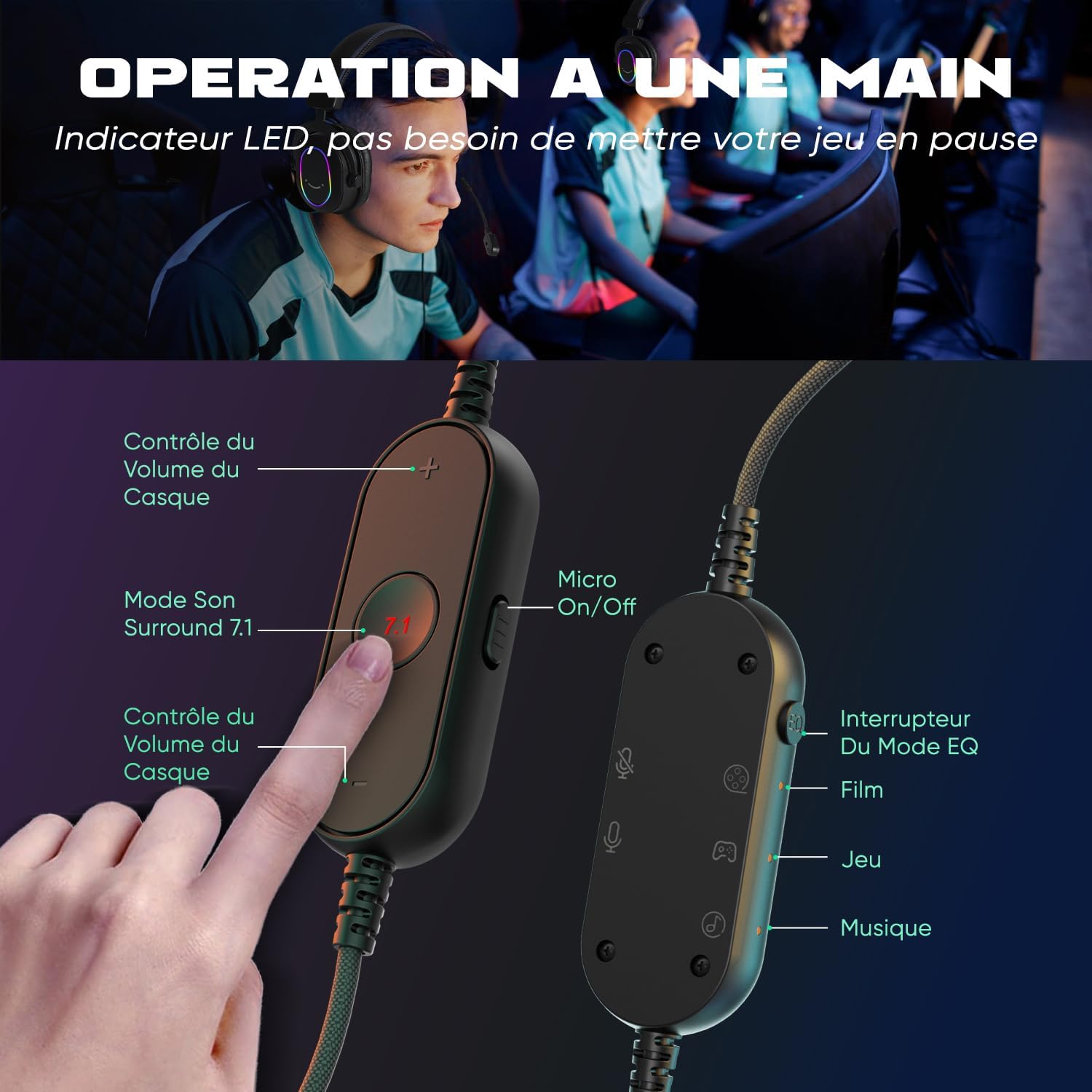
Immagine 3.2: The inline controller allows for quick adjustments. It includes headset volume control, a 7.1 surround sound activation button, a microphone on/off switch, and an EQ mode selector for Film, Game, and Music modes.
3.3 Tecnologia audio
Equipped with 50mm drivers, the H6 headset delivers enhanced sound quality for an immersive experience.

Immagine 3.3: The headset features 50mm drivers designed to improve overall sound quality and enhance your audio experience.
4. Impostazione
The FIFINE H6 headset offers plug-and-play functionality, making setup quick and easy.
4.1 Collegamento dell'auricolare
- Connect the USB-A cable of the headset to an available USB port on your PC, PS4, or PS5.
- The headset is automatically recognized by your device. No additional drivers are typically required.
- Ensure the headset is selected as the default audio input and output device in your system's sound settings.

Immagine 4.1: The headset connects via USB and is compatible with Windows, PS4/PS5, and Mac OS devices, offering simple plug-and-play installation.
4.2 Collegamento del microfono
- Insert the detachable microphone into the designated port on the left earcup until it clicks into place.
- Adjust the flexible microphone boom to position it optimally for your voice.
- To remove, gently pull the microphone out of its port.

Immagine 4.2: The headset features a detachable and 360-degree flexible microphone. A red light on the inline control indicates when the microphone is muted.
5. Istruzioni per l'uso
5.1 Suono surround virtuale 7.1
Activate the virtual 7.1 surround sound for an immersive gaming experience, allowing you to pinpoint audio cues like footsteps and gunfire.
- Premere il tasto 7.1 button on the inline control unit to toggle virtual 7.1 surround sound on or off.
- An LED indicator on the control unit will confirm the status.

Immagine 5.1: Virtual 7.1 surround sound provides an immersive gaming experience, allowing precise localization of in-game sounds such as explosions, gunshots, footsteps, aircraft, and vehicles.
5.2 modalità EQ
The headset offers three equalization (EQ) modes optimized for different audio scenarios.
- Premere il tasto Interruttore modalità EQ button on the inline control unit to cycle through the modes:
- Modalità film: Optimized for movie watching.
- Modalità di gioco: Enhanced audio for gaming, highlighting in-game sounds.
- Modalità Musica: Balanced audio for listening to music.
- An LED indicator will show the currently active EQ mode.
5.3 Controllo del volume
- Utilizzare il Volume su (+) E Volume basso (-) buttons on the inline control unit to adjust the headset's audio output level.
5.4 Disattivazione del microfono
- Fai scorrere il Micro On/Off switch on the inline control unit to mute or unmute the microphone.
- A red LED light on the control unit indicates when the microphone is muted.
6. Manutenzione
- Pulizia: Per pulire le cuffie, utilizzare un panno morbido e asciutto. Non utilizzare prodotti chimici aggressivi o materiali abrasivi.
- Magazzinaggio: Conservare le cuffie in un luogo fresco e asciutto, lontano dalla luce solare diretta e da temperature estreme.
- Cura del cavo: Avoid bending or twisting the cable excessively to prevent damage. The braided cable material is designed for durability.
- Microfono: When not in use, you can detach the microphone to prevent accidental damage.
7. Risoluzione Dei Problemi
| Problema | Soluzione |
|---|---|
| Nessun suono dalle cuffie |
|
| Il microfono non funziona |
|
| Problemi di qualità del suono (ad esempio, statico, distorsione) |
|
8. Specifiche
| Caratteristica | Dettaglio |
|---|---|
| Marca | FIFINE |
| Nome del modello | H6 (also referred to as MI4 in some documentation) |
| Colore | Nero |
| Tecnologia di connettività | Cablato (USB-A) |
| Posizionamento dell'orecchio | Over-Ear (Circum-Aurale) |
| Tipo di conducente | Dinamico |
| Dimensioni del conducente | 50 millimetri |
| Gamma di frequenza | 20 Hz - 20,000 Hz |
| Caratteristiche speciali | Virtual 7.1 Surround Sound, Detachable Microphone, 3 EQ Modes (Film, Game, Music), RGB Lighting, Inline Controls |
| Dispositivi compatibili | Desktop Computers, Gaming Consoles (PS4, PS5) |
| Caratteristiche del cavo | Braided, Durable, Sufficient Length |
| Materiale | Metallo, Plastica |
| Livello di resistenza all'acqua | Non impermeabile |
9. Garanzia e supporto
9.1 Informazioni sulla garanzia
FIFINE products typically come with a standard manufacturer's warranty. Please refer to your purchase documentation or the official FIFINE websito per i termini e le condizioni di garanzia specifici applicabili alla tua regione.
9.2 Assistenza clienti
For technical assistance, troubleshooting, or any questions regarding your FIFINE H6 Gaming Headset, please contact FIFINE customer support through their official websito o il rivenditore presso cui hai acquistato il prodotto.
You can often find support contact information on the FIFINE brand store page or by visiting www.fifinemic.com.