
1. Introduzione e oltreview
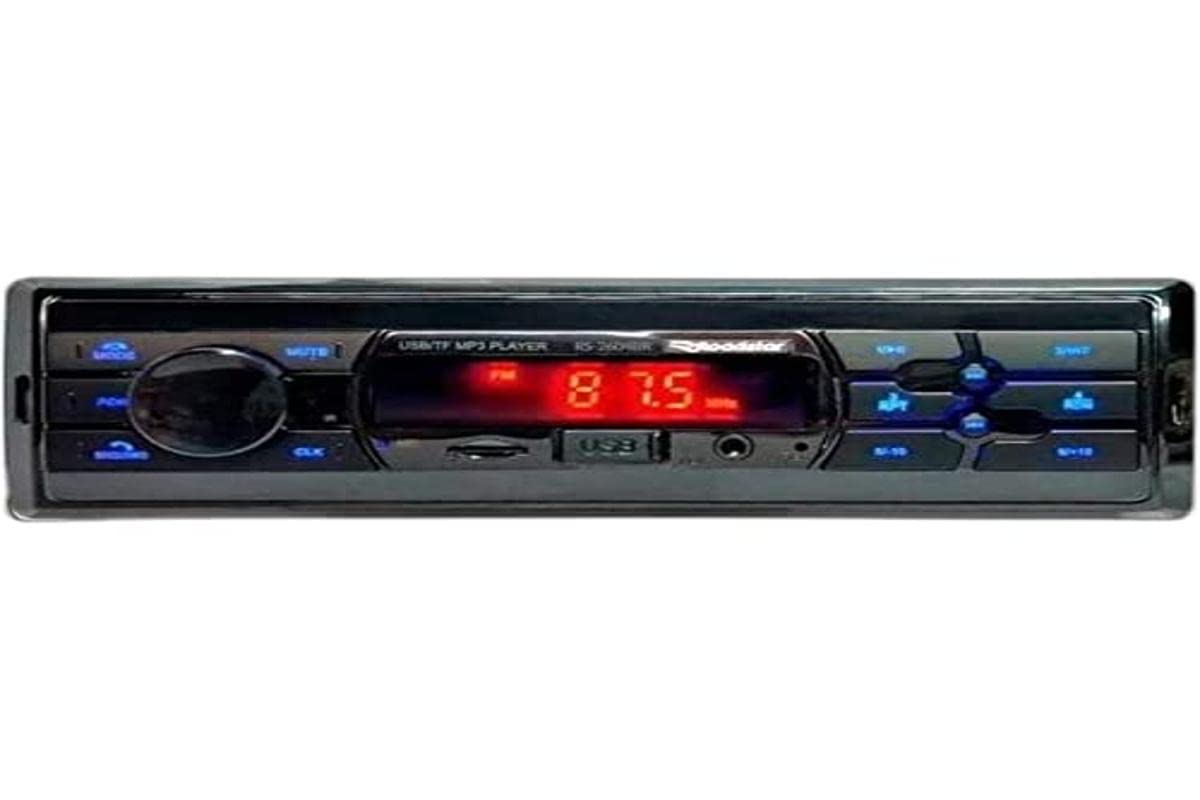
The Roadstar RS-2604BR USB/Bluetooth Car Radio is a versatile audio device designed to enhance your in-vehicle entertainment and communication. This unit features Bluetooth connectivity for wireless audio streaming and hands-free calling, a USB port for media playback, and an SD card slot. It also includes an auxiliary input for connecting other audio sources and an FM radio tuner. This manual provides essential information for the safe installation, operation, and maintenance of your new car radio.
2. Informazioni sulla sicurezza
- Installazione professionale consigliata: For optimal performance and safety, it is highly recommended that this product be installed by a qualified professional.
- Fonte di energia: Collegare l'unità solo a un alimentatore da 12 V CC con messa a terra negativa.
- Evita le distrazioni: Non utilizzare l'unità o view video mentre si è alla guida, poiché ciò potrebbe causare incidenti.
- Cablaggio: Ensure all wiring is correctly connected according to the wiring diagram to prevent damage to the unit or vehicle. Incorrect wiring can cause fire or electric shock.
- Controllo del volume: Mantieni il volume a un livello tale da riuscire comunque a sentire i rumori del traffico esterno.
- Umidità: Do not expose the unit to moisture or water to prevent electric shock.
3. Contenuto della confezione
Si prega di controllare la confezione per verificare la presenza dei seguenti elementi:
- Roadstar RS-2604BR Car Radio Unit
- Telecomando
- Cablaggio elettrico
- Mounting Hardware (Screws, Brackets)
- Manuale dell'utente (questo documento)
4. Caratteristiche del prodotto
The Roadstar RS-2604BR offers a range of features for a comprehensive audio experience:
- Potenza di uscita: 4 channels of 30 Watts RMS (Total 120W RMS).
- Display: Clear Red LED display.
- Connettività Bluetooth: Per lo streaming audio wireless e le chiamate in vivavoce.
- Ingressi multipli: Micro SD card slot, Auxiliary input, and 1 USB port.
- Uscite audio: 4 RCA outputs for external amplificatori.
- Connettore ISO: Yes, for easy installation.
- Telecomando: Physical remote control included, with potential for app control.
- Controlli audio: Adjustable Bass, Treble, and Channel Balance.
- Preimpostazioni dell'equalizzatore: Predefined equalization settings for various music genres.
- Illuminazione personalizzabile: 7-color illumination options to match your vehicle's interior.
Immagine del prodotto
5. Guida all'installazione
Un'installazione corretta è fondamentale per le prestazioni e la longevità della tua autoradio. In caso di dubbi su alcuni passaggi, consulta un installatore professionista.
Passaggi di installazione di base:
- Scollegare la batteria: Prima di iniziare, scollegare il terminale negativo della batteria del veicolo per evitare cortocircuiti.
- Rimuovere la vecchia unità: Rimuovere con cautela l'autoradio dal cruscotto.
- Collegare il cablaggio: Connect the wiring harness of the RS-2604BR to your vehicle's wiring. Ensure all connections (power, ground, speaker, antenna, accessory) are secure and correctly matched. The ISO connector simplifies this process.
- Unità di montaggio: Slide the RS-2604BR into the dashboard opening and secure it using the provided mounting hardware.
- Collegare l'antenna: Plug in your vehicle's radio antenna cable.
- Ricollegare la batteria: Ricollegare il terminale negativo della batteria del veicolo.
- Funzionalità di prova: Turn on the unit and test all functions (radio, USB, Bluetooth, sound controls) to ensure proper operation.
6. Istruzioni per l'uso
6.1 Controlli di base
- Accensione/spegnimento: Premere il pulsante di accensione (solitamente la manopola del volume) per accendere o spegnere l'unità.
- Controllo del volume: Ruotare la manopola del volume per regolare il livello audio.
- Selezione della modalità: Press the MODE button to cycle through available sources (FM, Bluetooth, USB, SD, AUX).
- Cerca/Sintonizza: Use the seek buttons (◀◀ / ▶▶) to change radio stations or skip tracks.
6.2 Funzionamento radio (FM)
- Select FM mode using the MODE button.
- Press and hold the seek buttons (◀◀ / ▶▶) for automatic station scanning.
- Briefly press the seek buttons to manually tune to the next available station.
- Per salvare una stazione, sintonizzarsi sulla frequenza desiderata, quindi tenere premuto uno dei pulsanti numerici preimpostati (1-6) finché non si sente un segnale acustico.
6.3 Associazione Bluetooth
- Ensure the car radio is in Bluetooth mode. The display will show "BT" or a Bluetooth icon.
- Sul tuo cellulare, attiva il Bluetooth e cerca i dispositivi disponibili.
- Select "ROADSTAR" or a similar name from the list of devices.
- Se richiesto, immettere il codice di associazione (solitamente "0000").
- Once paired, the unit will confirm the connection, and you can stream audio or make calls.
6.4 Riproduzione USB/SD
- Inserire un'unità USB nella porta USB o una scheda SD nello slot per schede SD.
- L'unità passerà automaticamente alla modalità USB/SD e inizierà a riprodurre audio compatibile files.
- Use the seek buttons (◀◀ / ▶▶) to skip tracks.
- Utilizzare il pulsante Riproduci/Pausa per mettere in pausa o riprendere la riproduzione.
6.5 Ingresso ausiliario
Connect an external audio device (e.g., MP3 player, smartphone) to the AUX input jack using a 3.5mm audio cable. Select AUX mode using the MODE button to play audio from the connected device.
6.6 Sound Settings and Illumination
- Equalizzatore: Press the EQ button (or similar) to cycle through predefined equalizer settings (e.g., POP, ROCK, JAZZ, CLASSIC, USER).
- Bassi/Acuti/Bilanciamento: Press the AUDIO button repeatedly to access settings like BASS, TREBLE, FADER (front/rear balance), and BALANCE (left/right balance). Use the volume knob to adjust these values.
- Illuminazione: The unit features 7-color illumination. Refer to the specific button on your unit (often labeled 'CLR' or similar) or the remote control to cycle through the available colors and select your preferred display color.
Dimostrazione video del prodotto
7. Risoluzione Dei Problemi
If you encounter issues with your Roadstar RS-2604BR, refer to the following common problems and solutions:
| Problema | Possibile causa | Soluzione |
|---|---|---|
| Nessun potere | Fusibile bruciato, cablaggio errato, collegamento elettrico allentato. | Check vehicle's fuse box and the unit's fuse. Verify all power and ground wires are securely connected. |
| Nessun suono | Muted, incorrect source selected, loose speaker wires, damaged speakers. | Check if the unit is muted. Ensure the correct audio source is selected. Verify speaker wire connections. Test with different speakers if possible. |
| Il Bluetooth non si connette | Unit not in pairing mode, phone's Bluetooth off, interference. | Ensure the unit is in Bluetooth mode. Turn your phone's Bluetooth off and on again. Delete previous pairings and try re-pairing. |
| USB/SD not reading | Incompatibile file format, corrupted media, incorrect insertion. | Garantire files are in a compatible format (e.g., MP3, WMA). Try a different USB drive or SD card. Ensure media is inserted correctly. |
| Il telecomando non funziona | Batteria scarica, ostruzione, fuori portata. | Replace the remote control battery. Ensure no obstructions between the remote and the unit's IR sensor. |
8. Specifiche
| Caratteristica | Specificazione |
|---|---|
| Marca | Stella della strada |
| Numero di modello | RS-2604BR (78650) |
| Tecnologia di connettività | USB, Bluetooth |
| Dispositivi compatibili | Smartphone, Altoparlanti |
| Tipo di connettore | USB, Auxiliary, RCA |
| Modalità di uscita audio | Stereo |
| Potenza di uscita | 30 Watts per channel (RMS) |
| Numero di canali | 4 |
| Metodo di controllo | Remoto |
| Tecnologia di comunicazione wireless | Bluetooth |
| Peso dell'articolo | 300 grammi |
| Componenti inclusi | Radio, telecomando |
| Colore | White (Note: Product image shows black/blue unit, color may vary by specific variant) |
9. Manutenzione
To ensure the longevity and optimal performance of your Roadstar RS-2604BR car radio, follow these maintenance guidelines:
- Pulizia: Use a soft, dry cloth to clean the unit's exterior. Do not use abrasive cleaners, solvents, or chemical sprays, as they can damage the finish or internal components.
- Evitare i liquidi: Keep the unit away from water and other liquids. If liquid enters the unit, immediately disconnect power and have it inspected by a qualified technician.
- Temperatura: Evitare di esporre l'unità a temperature estreme, alla luce solare diretta per periodi prolungati o a elevata umidità.
- USB/SD Port Care: When inserting or removing USB drives or SD cards, do so gently to avoid damaging the ports.
10. Garanzia e supporto
Informazioni sulla garanzia
This Roadstar RS-2604BR car radio comes with a Garanzia di 12 mesi from the date of purchase. This warranty covers manufacturing defects under normal use. It does not cover damage caused by improper installation, misuse, accidents, unauthorized repairs, or normal wear and tear.
Assistenza clienti
For technical assistance, warranty claims, or further inquiries, please contact Roadstar customer support through their official webo il rivenditore presso cui è stato acquistato il prodotto. Si prega di tenere a portata di mano la prova d'acquisto e il numero di modello del prodotto quando si contatta l'assistenza.