
Introduzione
This manual provides comprehensive instructions for the setup, operation, and maintenance of your Yealink W78P DECT IP Phone System. Please read this manual thoroughly before using the device to ensure proper functionality and to prevent damage. Keep this manual for future reference.
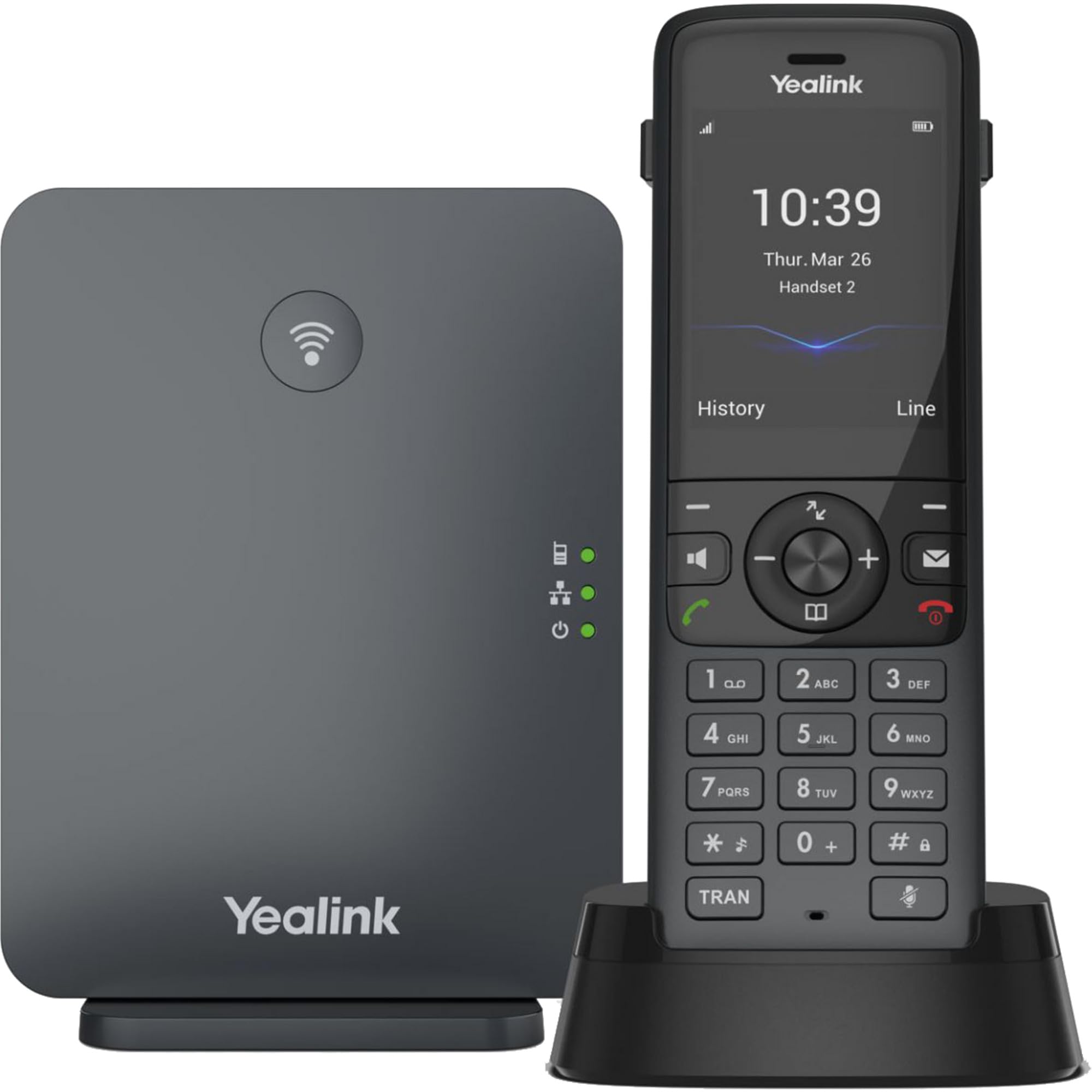
Image: The Yealink W78P system, featuring the W70B base station and the W78H cordless handset in its charging cradle.
Cosa c'è nella scatola
Verifica che tutti gli articoli siano presenti nel tuo pacco:
- Ricevitore W78H
- Stazione base W70B
- Base di ricarica per cellulare
- Power Adapter for Handset Charging Cradle and Base Station
- Cavo di rete
Guida all'installazione
1. Connecting the Base Station (W70B)
- Collegamento elettrico: Connect the power adapter to the W70B base station and plug it into a power outlet. Alternatively, if your network supports Power over Ethernet (PoE), connect the base station to a PoE-enabled network switch using the provided network cable.
- Connessione di rete: Connect one end of the network cable to the LAN port on the W70B base station and the other end to your router or network switch.
- Wait for the base station to power on and obtain an IP address. The network indicator LED on the base station will illuminate steadily when connected.
2. Charging the Handset (W78H)
- Connect the power adapter to the handset charging cradle and plug it into a power outlet.
- Place the W78H handset into the charging cradle. The battery icon on the handset display will indicate charging status. Allow the handset to charge fully before initial use.
3. Registrazione iniziale del telefono
The W78H handset typically comes pre-registered to the W70B base station in a W78P package. If registration is required or if you are adding a new handset:
- On the W70B base station, press and hold the registration button until the registration LED flashes.
- Sul telefono W78H, vai a Menu > Impostazioni > Registrazione > Registra telefono.
- Select the desired base station (if multiple are detected) and enter the base station PIN (default is 0000).
- The handset will display "Handset Subscribed" upon successful registration.
Istruzioni per l'uso
Effettuare e ricevere chiamate
- Per effettuare una chiamata: Comporre il numero e premere il Chiamata key (green phone icon).
- Per rispondere a una chiamata: Premere il tasto Chiamata chiave o la Vivavoce chiave.
- Per terminare una chiamata: Premere il tasto Termina chiamata key (red phone icon).
- Ricomposizione: Premere il tasto Chiamata key to access the call history and select a number to redial.
Funzioni di chiamata avanzate
- Presa: Durante una chiamata, premere il tasto Presa tasto funzione. Premerlo nuovamente per riprendere la chiamata.
- Trasferimento: Durante una chiamata, premere il tasto Trasferire tasto funzione, comporre il nuovo numero e premere Trasferire Ancora.
- Conferenza: Durante una chiamata, premere il tasto Conf soft key, dial the second party's number, and once connected, press Conf di nuovo per unirsi a tutte le parti.
Collegamento dell'auricolare
- Cuffia Bluetooth: The W78H handset supports Bluetooth connectivity. Navigate to Menu > Impostazioni > Bluetooth to enable Bluetooth and pair with your headset.
- 3.5mm Jack Headset: Connect a compatible 3.5mm headset to the headset jack on the side of the W78H handset.
DECT Radio Coverage
The W78P system offers a radio coverage of up to 50 meters indoors and up to 300 meters outdoors, under ideal conditions. Environmental factors may affect actual range.
Manutenzione
Pulizia
- Pulire il ricevitore e la stazione base con un panno morbido e asciutto.amp stoffa.
- Non utilizzare detergenti abrasivi o solventi.
- Assicurarsi che il dispositivo sia spento e scollegato prima della pulizia.
Cura della batteria
- The W78H handset provides up to 21 hours of talk time and 166 hours of standby time under ideal conditions.
- Per una durata ottimale della batteria, evitare temperature estreme.
- Charge the handset regularly. A 10-minute charge provides approximately 2 hours of talk time.
Risoluzione dei problemi
If you encounter issues with your Yealink W78P system, refer to the table below for common problems and solutions.
| Problema | Possibile causa | Soluzione |
|---|---|---|
| Nessun tono di linea | Base station not powered or not connected to network. | Check power and network cable connections to the W70B base station. Ensure network indicator LED is steady. |
| Il portatile visualizza "Non registrato" | Handset lost registration with base station. | Re-register the handset to the base station following the steps in the "Initial Handset Registration" section. |
| Scarsa qualità audio | Out of DECT range, interference, or network issues. | Move closer to the base station. Check for sources of interference (e.g., Wi-Fi routers, microwaves). Verify network stability. |
| Il portatile non si carica | Charging cradle not powered or handset not seated correctly. | Ensure the charging cradle's power adapter is connected. Re-seat the handset firmly in the cradle. |
Specifiche tecniche
| Caratteristica | Dettaglio |
|---|---|
| Marca | Yealink |
| Numero di modello | W78P |
| Colore | Nero |
| Materiale | Acrilonitrile Butadiene Stirene (ABS) |
| Dimensioni articolo (L x P x A) | 24 x 51 x 157 millimetri |
| Peso dell'articolo | 500 grammi |
| Fonte di alimentazione | Alimentato a batteria |
| Numero di batterie | 1 agli ioni di litio |
| Tempo di conversazione telefonica | 21 ore |
| Tempo di standby del telefono | 166 ore |
| Dispositivi compatibili | Yealink W56H, Yealink W57R, Yealink W59R, Yealink W73H, Yealink W78H |
| ID chiamante | SÌ |
| Funzionamento multilinea | SÌ |
| Paese di origine | U.S.A. |
| Codice UPC | 841885125675, 841885109125 |
Informazioni sulla garanzia
The Yealink W78P DECT IP Phone System comes with a Garanzia del produttore di 2 anni. Please retain your proof of purchase for warranty claims. For detailed terms and conditions, refer to the warranty documentation included with your product or visit the official Yealink websito.
Assistenza clienti
Per assistenza tecnica, risoluzione di problemi non descritti in questo manuale o richieste di assistenza, contattare l'assistenza clienti Yealink. Le informazioni di contatto sono disponibili sul sito ufficiale Yealink. websito o tramite il fornitore del prodotto.