
1. Introduzione
Thank you for choosing the YENKEE YMS 3030BK RGB Gaming Mouse Ultra Light Shotgun. This manual provides detailed instructions for setting up, operating, and maintaining your new gaming mouse. Please read this manual carefully before use to ensure optimal performance and longevity of your device.
The YENKEE YMS 3030BK RGB Gaming Mouse features an ergonomic design for comfortable use. Its unique ultra-light perforated construction promotes airflow, helping to keep your palm cool during extended use. Equipped with an accurate IC 6651 sensor, it offers precise tracking with a resolution of up to 6400 DPI, and includes customizable RGB backlighting.
2. Contenuto della confezione
Si prega di controllare la confezione per verificare la presenza dei seguenti elementi:
- 1 x YENKEE YMS 3030BK RGB Gaming Mouse Ultra Light Shotgun
- Manuale dell'utente (questo documento)
3. Prodotto finitoview
3.1 Caratteristiche principali
- Unique ultra-light perforated construction for improved airflow
- Ergonomic design for comfortable grip and to prevent palm sweat
- Customizable RGB backlight
- Accurate IC 6651 sensor with up to 6400 DPI resolution
- Wired USB connectivity
3.2 Componenti del mouse
The YMS 3030BK mouse typically includes the following components:
- Pulsante clic sinistro
- Pulsante clic destro
- Rotellina di scorrimento / Pulsante centrale
- Pulsante di regolazione DPI (solitamente situato dietro la rotellina di scorrimento)
- Forward/Backward Side Buttons (typically on the left side)
- Optical Sensor (on the underside)
- Cavo USB
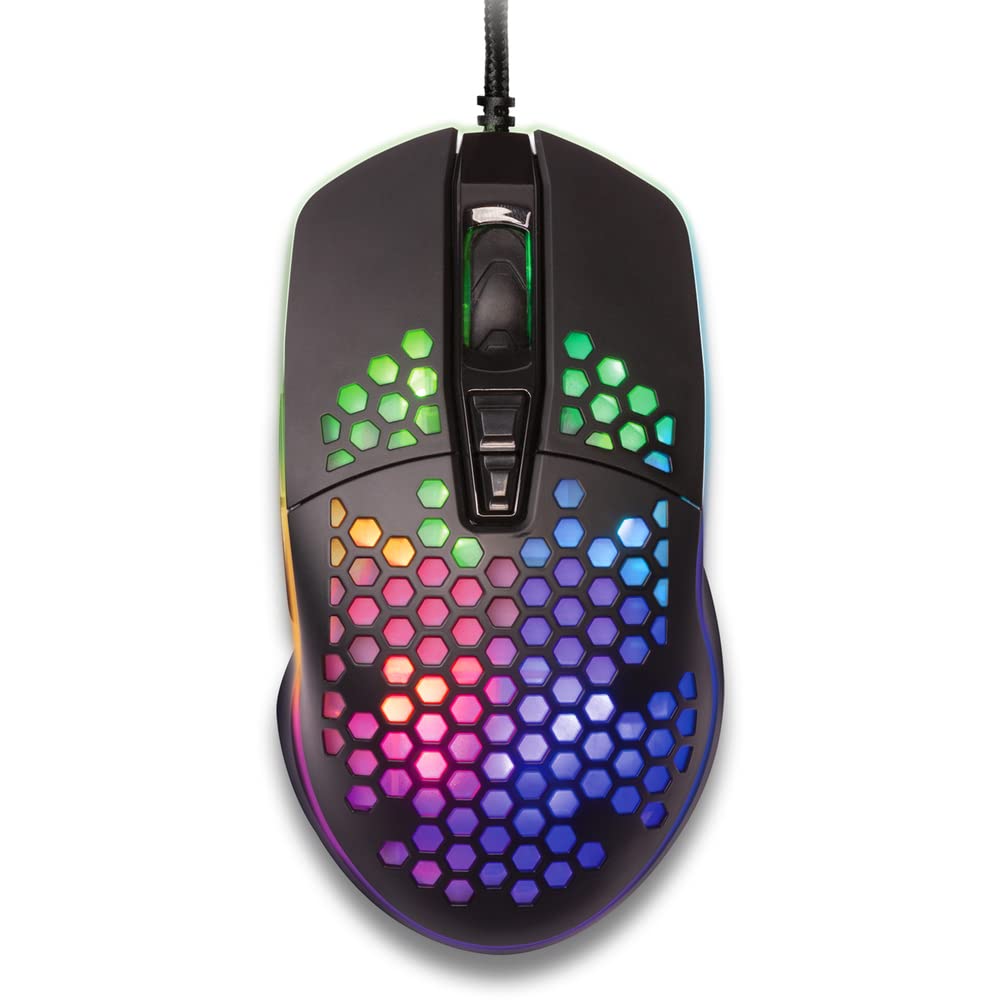
Figura 1: Dall'alto verso il basso view of the YENKEE YMS 3030BK RGB Gaming Mouse, highlighting its ultra-light perforated design and ergonomic contours.
4. Impostazione
Follow these steps to set up your YENKEE YMS 3030BK gaming mouse:
- Collega il mouse: Collega il connettore USB del mouse a una porta USB disponibile sul tuo computer.
- Installazione del driver: Your operating system (Windows 7, 8, Vista, XP) should automatically detect and install the necessary drivers. No additional software installation is typically required for basic functionality.
- Software opzionale: For advanced customization of RGB lighting and button assignments, please visit the official YENKEE website to check for any dedicated software for the YMS 3030BK model.
5. Istruzioni per l'uso
5.1 Funzionamento di base
- Clic sinistro: Azione primaria, selezione.
- Clic destro: Menu contestuale, azione secondaria.
- Rotella di scorrimento: Scroll up/down, middle click for specific functions (e.g., opening links in new tabs).
- Pulsanti laterali: Default functions are typically 'Forward' and 'Backward' in web browser o file esploratori. Spesso possono essere personalizzati tramite software.
5.2 Regolazione DPI
The YMS 3030BK mouse features an IC 6651 sensor with a maximum resolution of 6400 DPI. You can adjust the DPI (Dots Per Inch) sensitivity on-the-fly using the dedicated DPI button, usually located behind the scroll wheel. Pressing this button will cycle through preset DPI levels, indicated by changes in the mouse's RGB lighting color or pattern. Refer to the optional software for precise DPI level configuration and customization.
5.3 Personalizzazione dell'illuminazione RGB
The RGB backlight of your mouse can be customized to match your preferences. While some mice offer onboard controls for basic lighting effects, full customization of colors, patterns, and brightness is typically achieved through the dedicated YENKEE software (if available). Please download and install the software from the official YENKEE website for advanced lighting options.
6. Manutenzione
To ensure the longevity and optimal performance of your gaming mouse, follow these maintenance guidelines:
- Pulizia: Use a soft, dry cloth to wipe the surface of the mouse. For perforated areas, a soft brush or compressed air can help remove dust. Avoid using harsh chemicals or abrasive materials.
- Pulizia del sensore: Occasionally clean the optical sensor on the underside of the mouse with a cotton swab lightly dampcon alcol isopropilico. Assicurarsi che sia completamente asciutto prima dell'uso.
- Cura del cavo: Per evitare danni, evitare di piegare bruscamente o tirare eccessivamente il cavo USB.
- Magazzinaggio: Quando non lo si utilizza, conservare il mouse in un ambiente pulito e asciutto.
7. Risoluzione Dei Problemi
If you encounter issues with your YENKEE YMS 3030BK mouse, refer to the table below for common problems and solutions:
| Problema | Possibile causa | Soluzione |
|---|---|---|
| Il mouse non risponde | Connessione USB allentata, porta USB difettosa, problema con il driver. | Assicurati che il cavo USB sia collegato correttamente. Prova una porta USB diversa. Riavvia il computer. Controlla lo stato del driver in Gestione dispositivi. |
| Il movimento del cursore è irregolare o saltellante | Sensore ottico sporco, superficie del tappetino per mouse non adatta. | Clean the optical sensor. Use a clean, uniform mouse pad. |
| Regolazione DPI non funzionante | Conflitto software, malfunzionamento dei pulsanti. | Ensure no conflicting software is running. If using custom software, check its settings. |
| L'illuminazione RGB non funziona o è bloccata | Problema software, problema di alimentazione. | Check the YENKEE software settings. Unplug and replug the mouse. Restart your computer. |
8. Specifiche
| Caratteristica | Dettaglio |
|---|---|
| Marca | YENKE |
| Numero di modello | YMS 3030BK |
| Tecnologia di connettività | USB (elettrico con cavo) |
| Tecnologia di rilevamento del movimento | Optical (IC 6651 Sensor) |
| DPI massimo | 6400 DPI |
| Caratteristiche speciali | Ergonomic Design, Lightweight, Perforated Construction, RGB Backlight |
| Colore | Nero |
| Peso dell'articolo | 4.2 once (circa 119 grammi) |
| Dimensioni del prodotto (LxWxH) | 5.43 x 2.44 x 9.06 pollici (circa 13.8 x 6.2 x 23 cm) |
| Piattaforma hardware | Gioco d'azzardo |
| Compatibilità del sistema operativo | Windows 7, Windows 8, Windows Vista, Windows XP |
9. Garanzia e supporto
Informazioni sulla garanzia: For detailed warranty terms and conditions, please refer to the warranty card included with your product or visit the official YENKEE website. Warranty periods may vary by region and retailer.
Assistenza clienti: If you require technical assistance or have questions regarding your YENKEE YMS 3030BK gaming mouse, please contact your retailer or visit the support section of the official YENKEE websito per informazioni di contatto e FAQ.