
GOOLOO GTX300
GOOLOO Portable Power Station GTX300 User Manual
Model: Discovery 300 / GTX300
Marca: GOOLOO
1. Introduzione
The GOOLOO Portable Power Station GTX300 is a versatile and reliable power solution designed for various applications, from outdoor adventures to emergency home backup. This manual provides essential information for safe and efficient operation, maintenance, and troubleshooting of your device.
Caratteristiche principali:
- Design portatile: Lightweight and compact, weighing approximately 8.8 pounds, with an integrated handle for easy transport.
- Alta capacità: 300Wh (25.6Ah/11.7V) battery capacity provides ample power for multiple devices.
- Uscita CA a onda sinusoidale pura: Delivers clean and stable 110V/300W AC power (600W surge) suitable for sensitive electronics.
- Uscite CC multiple: Includes 12V/10A car port and two 12V/5A DC 5521 ports.
- Versatile USB Charging: Features two USB-A ports (one standard 5V/2.4A, one Quick Charge 3.0) and two USB-C ports (one 5V/3A, one Power Delivery 60W bi-directional).
- Multi-Method Charging: Can be recharged via wall outlet, car charger, or solar panel.
- Display digitale intelligente: Provides real-time information on battery level, input/output wattage, and remaining usage/charging time.
- Luce LED di emergenza: Integrated rear light with Low, High, and SOS modes for various situations.
- Funzionalità di sicurezza avanzate: Built-in Battery Management System (BMS) with multiple protections including over-charge, over-discharge, over-current, over-voltagee protezione da cortocircuito.

Figure 1: The GOOLOO Portable Power Station GTX300 demonstrating its high capacity by powering a router (10W for 20 hours), mini-fridge (60W for 4 hours), drones (40Wh for 6 times), and cameras (16Wh for 14 times).
2. Cosa c'è nella scatola
Upon unboxing your GOOLOO Portable Power Station GTX300, please ensure all the following components are present:
- GOOLOO Portable Power Station GTX300 Unit
- Cavo di ricarica CA.
- Cavo di ricarica per auto
- Manuale d'uso
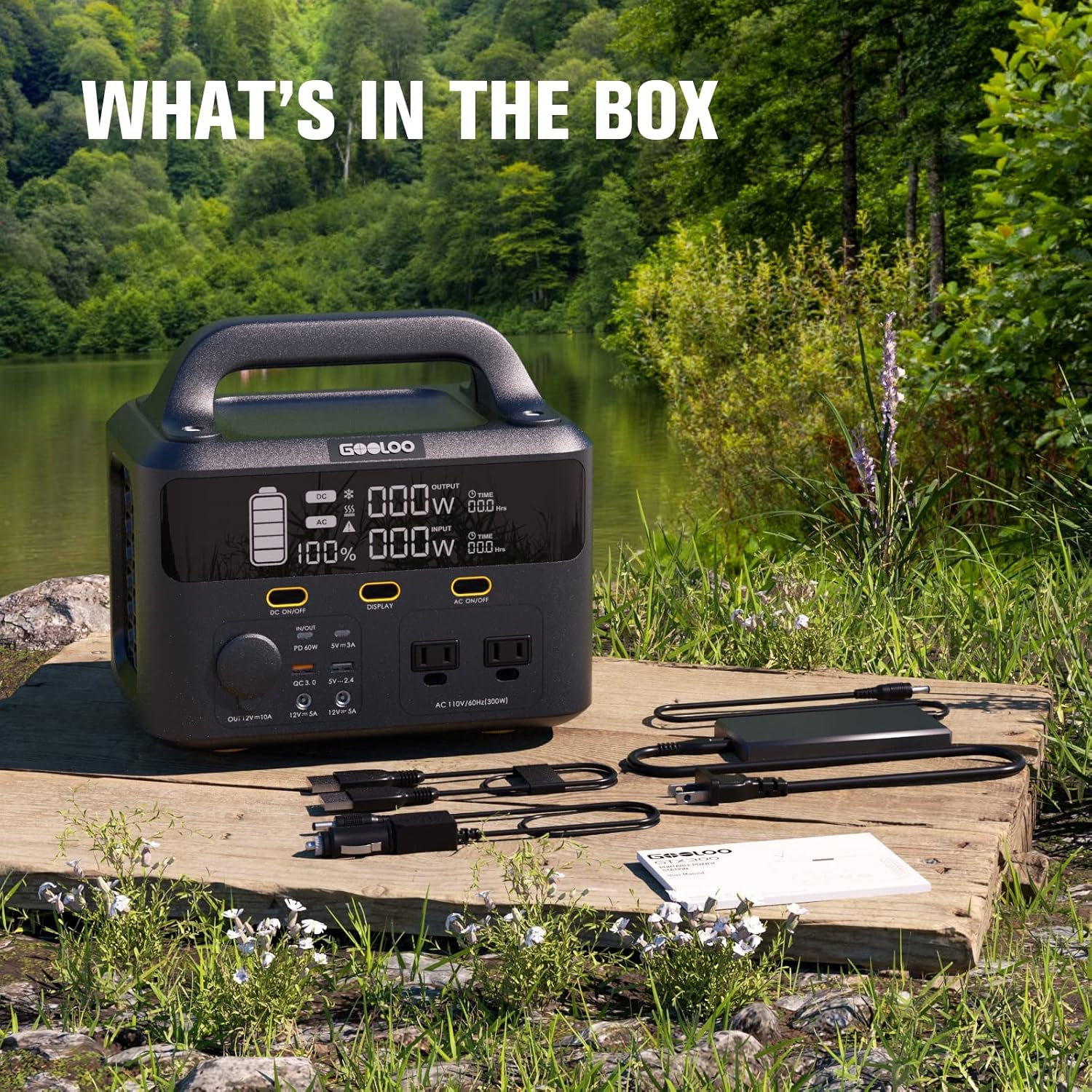
Figure 2: All included accessories with the GOOLOO Portable Power Station GTX300, laid out on a wooden surface in an outdoor setting.
3. Prodotto finitoview
Familiarize yourself with the various ports, controls, and indicators on your power station.
Pannello frontale:
- Prese CA (x2): Standard 110V AC outlets, providing 300W continuous power with a 600W surge capability. These are pure sine wave outputs, safe for sensitive electronics.
- DC Car Port (x1): 12V/10A output, compatible with car appliances.
- Porte DC 5521 (x2): 12V/5A outputs, suitable for various DC-powered devices.
- Porte USB-A (x2): One standard 5V/2.4A port and one Quick Charge 3.0 port for rapid charging of compatible devices.
- Porte USB-C (x2): One 5V/3A port and one Power Delivery (PD) 60W bi-directional port. The PD port can both charge devices and be used to recharge the power station itself.
- Display digitale: Mostra la percentuale di carica della batteriatage, ingresso wattage, uscita wattage, and estimated time remaining for charge/discharge.
- Pulsanti di controllo: Separate buttons to activate DC outputs, AC outputs, and the display.
Pannello posteriore:
- Luce LED di emergenza: A large panel light with three modes: Low brightness, High brightness, and SOS flashing for emergencies.
- Porta di ingresso CA: For charging the power station using the included AC charging cable.
- DC/Solar Input Port: For charging the power station using the included car charging cable or a compatible solar panel (up to 120W).
Pannelli laterali:
- Ventilation Grids: Designed to allow internal fans to pull air through the unit, keeping the electronics cool during operation and charging.
Video 1: An official product video from GOOLOO showcasing the GTX300 Portable Power Station, highlighting its features, ports, and various use cases in different environments.
4. Impostazione
Carica iniziale:
Before first use, it is recommended to fully charge the GOOLOO Portable Power Station. This ensures optimal battery performance and longevity.
- Connect the included AC charging cable to the AC Input Port on the rear of the power station.
- Collegare l'altra estremità del cavo di ricarica CA a una presa a muro standard.
- The digital display will illuminate, showing the charging status and estimated time to full charge.
- Una volta completata la carica, il display indicherà il 100%. Scollegare il cavo di ricarica.
5. Istruzioni per l'uso
Turning On/Off Outputs:
- Uscita CC: Press the "DC ON/OFF" button on the front panel to activate or deactivate the DC car port and DC 5521 ports. The DC indicator on the display will light up when active.
- Uscita CA: Press the "AC ON/OFF" button on the front panel to activate or deactivate the AC outlets. The AC indicator on the display will light up when active.
- Display: Press the "DISPLAY" button to turn the digital screen on or off.
Utilizzo della luce LED di emergenza:
The rear LED light can be used for illumination in various situations.
- Press the light button on the rear panel once for Low brightness mode.
- Press again for High brightness mode.
- Press a third time for SOS flashing mode.
- Premere una quarta volta per spegnere la luce.

Figure 3: The GOOLOO Portable Power Station GTX300 features a powerful emergency LED light with three distinct modes for various needs.
Carica e scarica simultanea:
The GOOLOO Portable Power Station GTX300 supports simultaneous charging and discharging, allowing you to power your devices while the unit itself is being recharged.

Figure 4: The power station can charge and discharge simultaneously, making it highly efficient for continuous power supply.
6. Ricarica della stazione di alimentazione
Your GOOLOO Portable Power Station GTX300 can be recharged using three primary methods:
Ricarica a parete:
Use the included AC charging cable to recharge the power station from a standard wall outlet. A full charge typically takes approximately 4 hours.

Figure 5: Wall charging the power station from 0% to 100% in approximately 4 hours.
Ricarica auto:
Recharge your power station on the go using your vehicle's 12V car outlet.
- Connect the included car charging cable to the DC/Solar Input Port on the rear of the power station.
- Collega l'altra estremità alla presa accendisigari da 12 V dell'auto.
- Una carica completa richiede in genere circa 3 ore.

Figure 6: Car charging the power station from 0% to 100% in approximately 3 hours.
Ricarica solare:
Harness solar energy to recharge your power station, ideal for off-grid use. The unit features a built-in MPPT controller for efficient solar charging.
- Connect a compatible solar panel (not included, max 120W) to the DC/Solar Input Port on the rear of the power station.
- Posizionare il pannello solare alla luce diretta del sole per una ricarica ottimale.
- A full charge using a 120W solar panel typically takes approximately 3.5-6 hours, depending on sunlight conditions.

Figure 7: Solar charging the power station from 0% to 100% in approximately 3.5-6 hours, depending on sunlight intensity.

Figura 8: Oltreview of recharge times for the GOOLOO Portable Power Station using different methods.
7. Manutenzione
- Magazzinaggio: Conservare la centrale elettrica in un luogo fresco e asciutto, lontano dalla luce solare diretta e da temperature estreme.
- Frequenza di ricarica: Per una salute ottimale della batteria, ricaricare l'unità almeno una volta ogni 3-6 mesi, anche se non viene utilizzata.
- Pulizia: Utilizzare un panno asciutto e morbido per pulire l'esterno dell'unità. Non utilizzare detergenti abrasivi né immergere l'unità in acqua.
- Evitare il sovraccarico: Do not exceed the rated output power of 300W (or 600W surge) to prevent damage to the unit and connected devices.
8. Risoluzione Dei Problemi
L'unità non si accende:
- Ensure the battery is charged. Connect to a power source and check the display.
- Press and hold the main power button for a few seconds to ensure it's fully engaged.
Outputs Not Working:
- Ensure the specific output (DC or AC) is activated by pressing its respective ON/OFF button.
- Check if the device being powered exceeds the power station's output limits (300W continuous, 600W surge for AC).
- Verify that the cables are securely connected to both the power station and the device.
Ricarica lenta:
- For solar charging, ensure the solar panel is in direct sunlight and free from obstructions.
- Verify the solar panel's wattage is sufficient (up to 120W recommended).
- Assicurarsi che il cavo di ricarica non sia danneggiato e che sia collegato correttamente.
9. Specifiche
| Caratteristica | Specificazione |
|---|---|
| Nome del modello | Discovery 300 / GTX300 |
| Capacità della batteria | 300 Wh (25.6 Ah/11.7 V) |
| Uscita CA | 110V/300W (Pure Sine Wave, 600W Surge) |
| DC Output (Car Port) | 12V/10A |
| Uscita CC (5521 porte) | 12 V/5 A (x2) |
| Uscita USB-A | 5V/2.4A (x1), QC 3.0 (x1) |
| Uscita USB-C | 5V/3A (x1), PD 60W (bi-directional) (x1) |
| Ingresso CA | 120W max |
| Ingresso CC/solare | 120W massimo (MPPT) |
| Dimensioni | 9.8 x 6.9 x 9 pollici |
| Peso dell'articolo | 8.8 libbre |
| Temperatura di esercizio | da -10°C a 40°C (da 14°F a 104°F) |
| Tipo di cella della batteria | Ioni di litio |
10. Garanzia e supporto
GOOLOO products are designed and manufactured to the highest quality standards. For information regarding warranty coverage, technical support, or customer service, please refer to the contact information provided on the product packaging or visit the official GOOLOO websito.
Ask a question about this manual
Ask about setup, troubleshooting, compatibility, parts, safety, or missing instructions. Manuals+ will review the question and use this page’s manual context to help answer it.