
1. Introduzione
Grazie per l'acquistoasing the iDance GO PARTY 4 Portable Bluetooth Speaker. This device is designed to provide high-quality audio streaming via Bluetooth, USB MP3 playback, and includes a wired microphone with voice changer effects and integrated disco LED lights. This manual provides essential information for safe and effective use of your speaker.
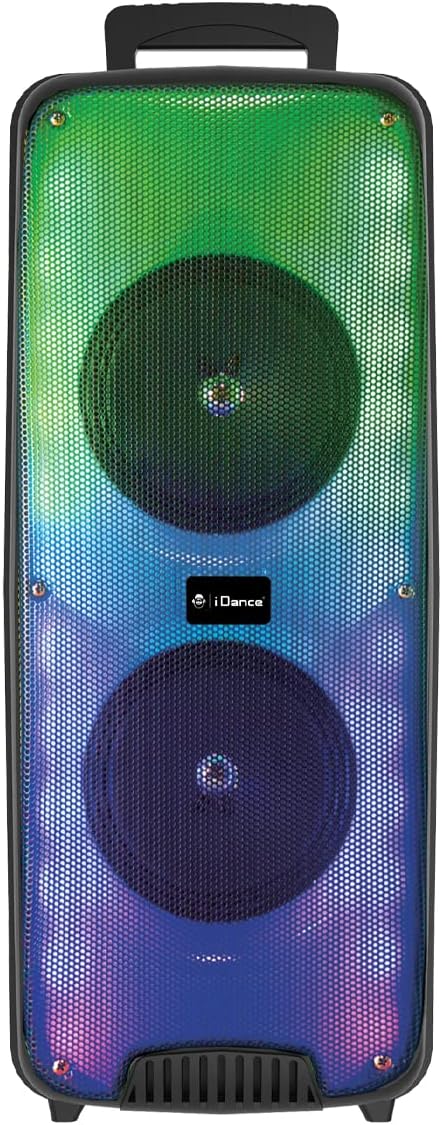
Immagine 1.1: anteriore view of the iDance GO PARTY 4 Portable Bluetooth Speaker, showcasing its dual speakers and vibrant LED lighting.
2. Informazioni sulla sicurezza
- Leggere tutte le istruzioni prima di utilizzare il dispositivo.
- Keep the speaker away from water, moisture, and extreme temperatures. This product is non impermeabile.
- Non ostruire le aperture di ventilazione.
- Utilizzare solo gli accessori specificati dal produttore.
- Scollegare il dispositivo durante i temporali o quando non viene utilizzato per lunghi periodi.
- Non tentare di riparare l'unità da soli. Per qualsiasi intervento di assistenza, rivolgersi a personale qualificato.
- Smaltire le batterie e i componenti elettronici in modo responsabile, nel rispetto delle normative locali.
3. Contenuto della confezione
Assicurarsi che tutti gli articoli siano presenti nel pacco:
- iDance GO PARTY 4 Portable Bluetooth Speaker
- Microfono cablato
- Telecomando
- Cavo di ricarica (micro USB)

Image 3.1: Included wired microphone and remote control.
4. Prodotto finitoview
Familiarize yourself with the control panel and ports of your iDance GO PARTY 4 speaker.

Image 4.1: Rear control panel of the iDance GO PARTY 4 speaker.
Caratteristiche del pannello di controllo:
- Interruttore ON/OFF: Accende o spegne l'altoparlante.
- Manopola VOLUME: Regola il volume dell'altoparlante principale.
- INGRESSO AUDIO: Ingresso ausiliario da 3.5 mm per dispositivi audio esterni.
- CHARGING DC 5V Port: Porta micro USB per caricare l'altoparlante.
- Porta USB: For USB MP3 playback.
- Slot per schede TF: For TF (MicroSD) card MP3 playback.
- Pulsanti PRECEDENTE / SUCCESSIVO: Navigate tracks during MP3 playback.
- SOUND EFFECT Button: Attiva vari effetti sonori.
- VOICE CHANGER Button: Cycles through voice changer modes.
- MODE / LED ON/OFF Button: Switches between input modes (Bluetooth, USB, AUX) and controls LED lights.
- Manopola ECO: Regola l'effetto eco del microfono.
- Manopola MIC VOL: Regola il volume del microfono.
- INPUT (MIC) Port: Jack da 6.35 mm per il collegamento del microfono cablato.
- Indicatore di carica: Luce LED che indica lo stato di carica.
5. Impostazione
5.1. Ricarica dell'altoparlante
- Connect the provided Micro USB charging cable to the CHARGING DC 5V Port sull'altoparlante.
- Collegare l'altra estremità del cavo a un adattatore di alimentazione USB standard (non incluso) o alla porta USB di un computer.
- La spia di carica si illuminerà. Una volta completata la carica, la spia potrebbe cambiare colore o spegnersi, a seconda del modello.
- A full charge provides approximately 4 to 8 hours of playback time.
5.2. Accensione/spegnimento
- To turn on the speaker, slide the Interruttore ON/OFF to the 'ON' position.
- To turn off the speaker, slide the Interruttore ON/OFF nella posizione 'OFF'.
6. Istruzioni per l'uso
6.1. Accoppiamento Bluetooth
- Assicurarsi che l'altoparlante sia acceso.
- Premere il tasto MODALITÀ button on the control panel or remote control until the speaker is in Bluetooth mode. A voice prompt or indicator light will confirm.
- Sul tuo dispositivo mobile (smartphone, tablet, ecc.), attiva il Bluetooth e cerca i dispositivi disponibili.
- Select "iDance GO PARTY 4" or a similar name from the list of devices.
- Una volta effettuato l'abbinamento, l'altoparlante indicherà una connessione riuscita e sarà possibile iniziare lo streaming audio.
6.2. Riproduzione MP3 tramite USB
- Inserire una chiavetta USB contenente audio MP3 files nel Porta USB.
- The speaker should automatically switch to USB mode and begin playing the MP3 files. In caso contrario, premere il tasto MODALITÀ per selezionare la modalità USB.
- Utilizzare il PRECEDENTE / SUCCESSIVO pulsanti per saltare le tracce.
6.3. Microphone Usage and Voice Changer
- Collegare il microfono cablato al INPUT (MIC) Port.
- Regola il volume del microfono usando il Manopola MIC VOL.
- Ruotare il Manopola ECHO to add or reduce the echo effect to your voice.
- Premere il tasto VOICE CHANGER Button to cycle through the four available voice effects: Child, Woman, Man, and Robot.
6.4. Luci LED
The iDance GO PARTY 4 features integrated disco LED lights. Press the MODE / LED ON/OFF Button (or the dedicated LED button on the remote) to turn the lights on or off.
6.5. Funzioni di controllo remoto
The included remote control allows for convenient operation of the speaker from a distance. Functions include:
- Accensione/spegnimento
- Mode Selection (Bluetooth, USB, AUX)
- Volume su/giù
- Track Skip (Previous/Next)
- Riproduci/Pausa
- Controllo della luce a LED
- Voice Changer Activation
- Sound Effects (EFX1-EFX8)
7. Manutenzione
- Pulizia: Utilizzare un panno morbido e asciutto per pulire l'esterno dell'altoparlante. Non utilizzare detergenti liquidi o materiali abrasivi.
- Magazzinaggio: Conservare l'altoparlante in un luogo fresco e asciutto, lontano dalla luce solare diretta e da temperature estreme.
- Cura della batteria: Per prolungare la durata della batteria, evitare di scaricarla completamente frequentemente. Caricare regolarmente l'altoparlante, anche se non in uso, per preservare la salute della batteria.
8. Risoluzione Dei Problemi
| Problema | Possibile causa | Soluzione |
|---|---|---|
| L'altoparlante non si accende. | La batteria è scarica. | Caricare l'altoparlante utilizzando il cavo Micro USB in dotazione. |
| Nessun suono dall'altoparlante. | Volume is too low; incorrect input mode; device not paired (Bluetooth). | Increase volume; press MODE button to select correct input; re-pair Bluetooth device. |
| Il dispositivo Bluetooth non riesce a connettersi. | Altoparlante non in modalità di associazione; dispositivo troppo lontano; interferenza. | Ensure speaker is in Bluetooth mode; move device closer; turn off other Bluetooth devices. |
| Il microfono non funziona. | Microfono non collegato correttamente; MIC VOL troppo basso. | Ensure microphone is fully plugged into the INPUT port; increase MIC VOL. |
| Il telecomando non risponde. | Battery depleted; obstruction between remote and speaker. | Replace remote control battery; ensure clear line of sight to the speaker's IR receiver. |
9. Specifiche
| Numero di modello | GOPTY4 |
| Marca | iDance |
| Tecnologia di connettività | Bluetooth |
| Potenza in uscita | 200 Watt (picco) |
| Speaker Output (Max) | 10 Watt |
| Fonte di alimentazione | Alimentato a batteria (ioni di litio) |
| Durata della batteria | 4-8 ore (circa) |
| Dimensioni (L x P x A) | Dimensioni: 25.5 x 20 x 58 cm |
| Peso | 3.99 chilogrammi |
| Materiale | Plastica |
| Metodo di controllo | Telecomando, pulsanti sul dispositivo |
| Caratteristiche speciali | Portable, Disco LED Lights, USB MP3 Player, Wired Microphone, Voice Changer (Child, Woman, Man, Robot), Echo Effect |
| Dispositivi compatibili | Smartphones, Tablets, MP3 Players, Home Cinema Systems, Televisions |
| Impermeabile | NO |
10. Garanzia e supporto
The iDance GO PARTY 4 Portable Bluetooth Speaker comes with a limited warranty. Please refer to the warranty card included in your package for specific terms and conditions. For technical support, service inquiries, or further assistance, please contact your retailer or visit the official iDance websito.


