
Introduzione
Thank you for choosing the FULLJA 15-inch WiFi Smart Digital Photo Frame. This manual provides detailed instructions for setting up, operating, and maintaining your digital photo frame. Please read this manual thoroughly before use to ensure proper functionality and to maximize your experience.

Image: The FULLJA 15-inch WiFi Smart Digital Photo Frame showcasing a family photo, accompanied by a smartphone displaying the VPhoto application for remote photo sharing.
Contenuto della confezione
Si prega di verificare che tutti gli articoli siano presenti nel pacco:
- 1x FULLJA 15-inch WiFi Smart Digital Photo Frame
- 1x adattatore di alimentazione
- 1x telecomando
- 1x Manuale utente (questo documento)
- 1x Bracket (for stand or wall mounting)
- Cavo 1x Micro USB

Image: Contents of the FULLJA Digital Photo Frame package, including the frame, user manual, power adapter, and mounting bracket.
Prodotto finitoview
The FULLJA 15-inch WiFi Smart Digital Photo Frame features a 1024x768 HD display with a 4:3 aspect ratio, 32GB of internal storage, and supports various connectivity options for sharing photos and videos.
Caratteristiche principali:
- Schermo HD da 15 pollici: 1024x768 resolution with a 4:3 aspect ratio for clear image reproduction.
- Condivisione wireless: Share photos and videos via the VPhoto app or email.
- Memoria interna: 32GB built-in memory.
- Archiviazione esterna: Supports USB drives and TF cards (up to 32GB).
- Archiviazione cloud: Unlimited online cloud storage space.
- Funzioni intelligenti: Motion Sensor, Auto Rotate, Video Playback, Alarm, Clock, Auto Screen On/Off, Calendar, Split-Screen, Full Screen, Photo Folder, Music, Text Captions.
- Opzioni di montaggio: Can be placed on a desk using the bracket or wall-mounted.
Componenti e porte:
Familiarize yourself with the frame's components and connection ports.

Image: Detail of the frame's rear, highlighting the wall-mounted hole for installation.
- Schermo: 15-inch HD display.
- Porta di alimentazione: Si collega all'alimentatore.
- Porta USB: Per collegare unità USB.
- Slot per schede TF: For inserting TF (Micro SD) cards.
- Porta micro USB: For connecting to a computer (cable included).
- Foro per montaggio a parete: Located on the back for wall installation.
- Stand/Bracket Slot: Per fissare il supporto incluso.

Image: The digital photo frame displaying various feature icons, including WiFi, Photo, Video, Music, Weather Station, and Clock & Calendar.
Guida all'installazione
1. Accensione
- Connect the power adapter to the frame's power port and then to a wall outlet.
- La cornice si accenderà automaticamente. Seguire le istruzioni sullo schermo per la configurazione iniziale.
2. Connessione wifi
- On the frame's screen, navigate to the "Settings" menu.
- Select "Wi-Fi" and choose your desired network from the list.
- Enter the Wi-Fi password and confirm. The frame will connect to the internet.
3. VPhoto App Installation and Pairing
The VPhoto app allows for remote photo and video sharing.
- Download the "VPhoto" app from the App Store (for iOS) or Google Play Store (for Android) on your smartphone or tablet.
- Open the VPhoto app and create an account or log in.
- On your FULLJA frame, locate the unique connection code (usually found in the "Settings" or "Add Friends" section).
- In the VPhoto app, select "Add Device" and enter the connection code displayed on your frame.
- Once paired, you can invite family and friends to connect to your frame using the same connection code.

Image: Instructions for instantly sharing photos and videos via the VPhoto app, detailing the steps from app download to inviting others.
Istruzioni per l'uso
Condivisione di foto e video
- Via VPhoto App: Open the VPhoto app, select the photos or videos you wish to share, choose your connected frame, and send. The content will appear on your frame instantly.
- Via e-mail: The frame has a unique email address. Send photos or videos as attachments to this address. The frame will automatically receive and display them.
- Via USB Drive/TF Card: Insert a USB drive or TF card (up to 32GB) into the corresponding port. The frame will detect the storage and allow you to import media to its internal memory.

Image: The digital photo frame highlighting its wireless sharing capability, allowing users to share moments from any location.
Basic Settings and Features
- Impostazioni presentazione: Customize the display order, transition effects, and duration of photos in the slideshow via the "Settings" menu.
- Sensore di movimento: Enable or disable the motion sensor. When enabled, the frame will automatically turn on when motion is detected and turn off after a period of inactivity.
- Rotazione automatica: The frame supports automatic rotation, adjusting the display orientation (portrait or landscape) based on how it is positioned.
- Telecomando: Use the included remote control to navigate menus, adjust settings, and control media playback.
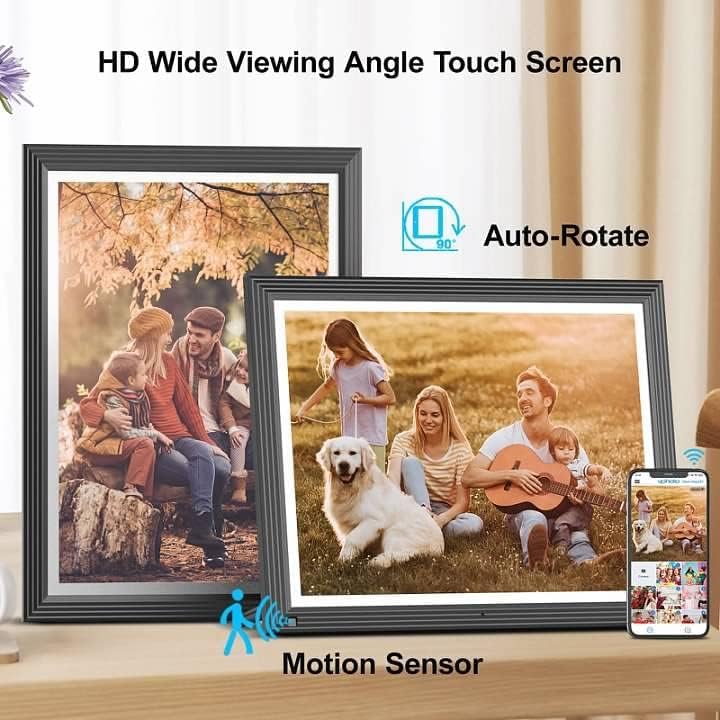
Image: Two digital photo frames demonstrating auto-rotate functionality and the presence of a motion sensor.

Image: The digital photo frame showcasing its HD wide viewing angle and flexibility for both portrait and landscape placement, including wall mounting.
Funzionalità avanzate
- Riproduzione video: The frame supports video playback. Videos shared to the frame will play automatically or can be selected from the media library.
- Riproduzione musicale: Play background music during slideshows or as a standalone feature.
- Alarm, Clock, Calendar: Utilize the frame's built-in alarm, clock, and calendar functions for added utility.
- Text Captions: Add custom text captions to your photos for personalized messages.
- Split-Screen/Full Screen: Choose between displaying multiple photos in a split-screen view or a single photo in full-screen mode.
Manutenzione
Pulizia:
- Turn off the frame and unplug it before cleaning.
- Utilizzare un panno morbido, asciutto e privo di lanugine per pulire delicatamente lo schermo e la cornice.
- Per macchie ostinate sullo schermo, applicare leggermenteampPulire il panno con acqua o con una soluzione detergente adatta allo schermo. Non spruzzare il liquido direttamente sullo schermo.
- Avoid using abrasive cleaners, solvents, or alcohol-based solutions, as these can damage the display or finish.
Magazzinaggio:
- If storing the frame for an extended period, ensure it is clean and dry.
- Conservare in un luogo fresco e asciutto, lontano dalla luce solare diretta e dalle temperature estreme.
- Conservare l'imballaggio originale per una conservazione e un trasporto sicuri.
Risoluzione dei problemi
| Problema | Possibile causa | Soluzione |
|---|---|---|
| Il telaio non si accende. | Adattatore di alimentazione non collegato o difettoso. | Assicurati che l'adattatore di alimentazione sia collegato saldamente al telaio e a una presa di corrente funzionante. Prova una presa diversa. |
| Impossibile connettersi al Wi-Fi. | Password errata, segnale debole o problema di rete. | Verify the Wi-Fi password. Move the frame closer to the router. Restart your router and the frame. Ensure your Wi-Fi network is 2.4GHz compatible. |
| Photos/Videos not appearing on the frame. | Frame not connected to Wi-Fi, incorrect sharing method, or file formato non supportato. | Check Wi-Fi connection. Ensure you are using the correct VPhoto app or email address. Verify that the file formats are compatible (e.g., JPEG for photos, MP4 for videos). |
| Telecomando non funzionante. | Batteria scarica o ostruzione. | Replace the remote control battery. Ensure there is no obstruction between the remote and the frame's IR receiver. |
| Lo schermo è vuoto o bloccato. | Problema software o errore temporaneo. | Scollegare l'adattatore di alimentazione, attendere 10 secondi, quindi ricollegarlo per riavviare il telaio. |
Specifiche
- Modello: 15E1
- Dimensioni dello schermo: 15 pollici
- Risoluzione: 1024x768 Alta Definizione
- Proporzioni: 4:3
- Memoria interna: 32 GB
- Archiviazione esterna: USB, TF Card (max 32GB)
- Connettività: Wi-Fi (2.4 GHz)
- Dispositivi compatibili: Androide, iPhone
- Dimensioni del prodotto: 13.98 x 11.3 x 0.99 pollici
- Peso dell'articolo: 4.4 libbre
- Colore: Nero
- Produttore: PIENOJA

Image: The FULLJA WiFi Digital Photo Frame, 15 inches with a 4:3 aspect ratio, displayed on a shelf.

Image: The digital photo frame highlighting its 32GB internal storage and unlimited online cloud storage capabilities.
Garanzia e supporto
FULLJA provides the following support for your digital photo frame:
- Garanzia limitata di un anno: Your product is covered by a one-year limited warranty from the date of purchase, covering manufacturing defects.
- Supporto a vita: Offriamo supporto tecnico a vita per il tuo prodotto.
- Risposta rapida: Riceverai una risposta alle tue richieste entro 24 ore.
For warranty claims, technical assistance, or any questions, please contact FULLJA customer support through the contact information provided with your purchase or on the official FULLJA websito.