
1. Introduzione
This manual provides essential instructions for the safe and effective operation of your Tenamic Deluxe Biometric Fingerprint Safe Box. Please read this manual thoroughly before installation and use, and retain it for future reference. This safe is designed to provide secure storage for your valuables using advanced biometric and electronic locking mechanisms.
2. Informazioni sulla sicurezza
- Always keep the emergency keys in a secure location away from the safe. Do not store them inside the safe.
- Ensure the safe is installed on a stable surface or securely mounted to a wall to prevent tipping.
- Non esporre la cassaforte a temperature o umidità estreme.
- Per garantire una funzionalità continua, sostituire tempestivamente le batterie quando compare l'indicatore di batteria scarica.
- Evitare di utilizzare detergenti abrasivi o solventi sulla superficie della cassaforte.
3. Contenuto della confezione
Dopo aver disimballato, verificare che siano presenti tutti i seguenti articoli:
- 1 x Tenamic Deluxe Biometric Fingerprint Safe Box (5.1 cuft)
- 4 chiavi di emergenza
- 2 viti di montaggio
- 1 x Manuale utente (questo documento)
- 1 x scomparto per batteria esterna
4. Prodotto finitoview
The Tenamic Deluxe Biometric Fingerprint Safe Box features a robust design with multiple security layers.

Figure 4.1: Tenamic Deluxe Biometric Fingerprint Safe Box with door open, revealing interior storage compartments.
Caratteristiche principali:
- Materiale più resistente: Constructed from solid steel with anti-corrosion and anti-wear powder coating. Features a pry-resistant steel door and concealed hinges.
- Reliable Fingerprint Locking System: Utilizes a semiconductor fingerprint reader for accurate and fast access.
- Doppia sicurezza: Includes a separate internal lock box and a hidden compartment for sensitive items.
- Configurazione avanzata: Automatic internal LED light (30-second duration) and a leather-lined interior to protect valuables.
- Potenza di emergenza: Equipped with an external battery pack for emergency power supply.
- Sistema di allarme: Activates after multiple incorrect fingerprint or password entries.
- Archiviazione flessibile: Features a removable shelf to customize interior space.
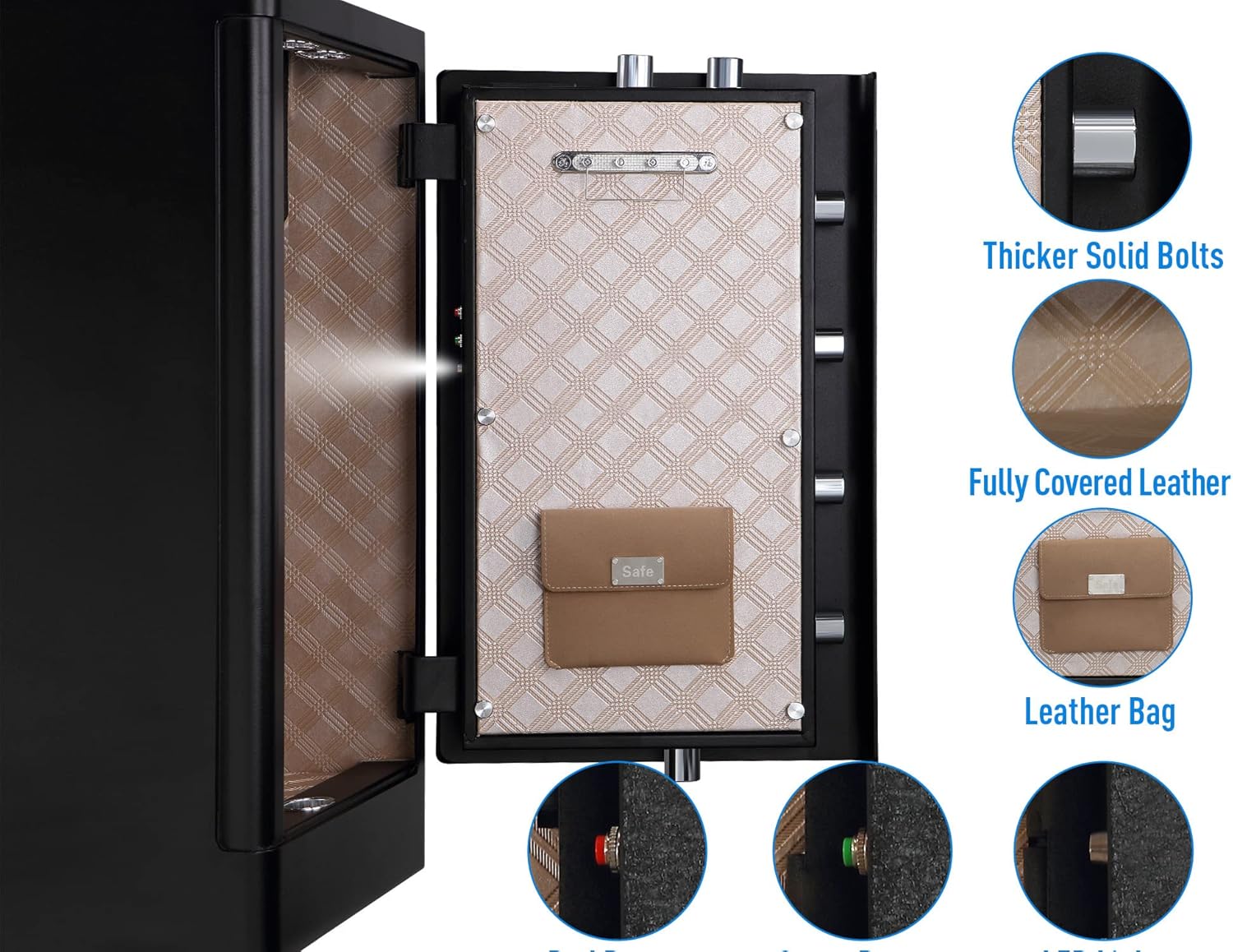
Figure 4.2: Interior details of the safe, showing locking bolts, leather lining, and internal features.

Figure 4.3: Illustration of the separate lock box and hidden compartment within the safe.
5. Impostazione
5.1 Initial Opening and Battery Installation
- Locate the emergency keyhole, usually concealed behind a cover on the front panel.
- Insert one of the emergency keys and turn it to unlock the safe.
- Apri la porta della cassaforte.
- Inside the door, locate the battery compartment. Install 4 AA batteries (not included) according to the polarity markings.
- Chiudere il vano batterie.
5.2 Montaggio della cassaforte
The safe can be freestanding or securely mounted to a wall or floor using the provided mounting screws.
- Scegliere un luogo adatto per la cassaforte.
- Mark the desired drilling points through the pre-drilled holes at the back or bottom of the safe.
- Drill pilot holes in the wall or floor using an appropriate drill bit.
- Align the safe with the drilled holes and secure it using the mounting screws. Ensure the safe is firmly attached.
6. Istruzioni per l'uso
6.1 Apertura della cassaforte
Your safe offers multiple access methods:

Figura 6.1: Quattro metodi per aprire la cassaforte.
A. Using Fingerprint:
- Posizionare il dito registrato sullo scanner per impronte digitali.
- If recognized, the indicator light will turn green.
- Turn the knob clockwise within 5 seconds to open the safe.
B. Using Passcode:
- Inserisci il tuo codice di accesso da 4 a 6 cifre sulla tastiera.
- Premere il tasto '#' per confermare.
- If correct, the indicator light will turn green.
- Turn the knob clockwise within 5 seconds to open the safe.
C. Using Emergency Key:
- Rimuovere il coperchio della serratura.
- Inserire la chiave di emergenza e girarla.
- Ruotare la manopola in senso orario per aprire la cassaforte.
6.2 Programming Fingerprints
- With the safe door open, press the internal reset button (usually a small red button on the inside of the door).
- The indicator light will flash, prompting for fingerprint registration.
- Place your finger on the scanner. Lift and repeat 4-5 times until the indicator light confirms successful registration (e.g., a long beep or solid green light).
- You can register multiple fingerprints. Repeat the process for each finger.
6.3 Programming Passcode
- Con lo sportello della cassaforte aperto, premere il pulsante di reset interno.
- Inserisci il codice di accesso desiderato, composto da 4-6 cifre, sulla tastiera.
- Premere il tasto '#' per confermare.
- Re-enter the same passcode and press '#' again to confirm.
- The indicator light will confirm successful registration.
Sistema di allarme 6.4
The safe is equipped with an alarm system to deter unauthorized access.
- If 5 continuous incorrect fingerprint attempts or 3 incorrect passcode entries occur, the alarm will activate for 20 seconds.
- To stop the alarm, enter the correct fingerprint or passcode.

Figure 6.2: Visual representation of the alarm system activation.
6.5 Luce interna
The safe features an internal LED light that illuminates automatically when the door is opened and turns off after approximately 30 seconds.
6.6 External Battery Pack Use
In case the internal batteries are depleted and you cannot open the safe, use the external battery pack:

Figure 6.3: Connecting the external battery pack for emergency power.
- Install 4 AA batteries into the external battery pack.
- Plug the external battery pack into the emergency power port on the safe's front panel (usually located near the keypad).
- You can now use your fingerprint or passcode to open the safe.
- Una volta aperta la cassaforte, sostituire immediatamente le batterie interne.
7. Manutenzione
7.1 Sostituzione della batteria
When the low battery indicator activates, replace all 4 AA batteries in the internal battery compartment. Use high-quality alkaline batteries for optimal performance.
7.2 Pulizia
Pulisci l'esterno della cassaforte con un panno morbido eamp cloth. Do not use harsh chemicals or abrasive materials, as they may damage the finish or electronic components.
8. Risoluzione Dei Problemi
- Safe does not open with fingerprint/passcode:
- Ensure batteries are not depleted. Use the external battery pack if necessary.
- Re-enter your passcode carefully.
- Ensure your finger is clean and properly placed on the scanner.
- Try using a different registered fingerprint.
- Use the emergency key to open the safe and re-program your fingerprint/passcode.
- L'allarme suona inaspettatamente:
- This indicates multiple incorrect entry attempts. Enter the correct fingerprint or passcode to disarm.
- Internal light not working:
- Controllare i livelli della batteria e sostituirla se necessario.
9. Specifiche

Figure 9.1: Dimensions and weight of the Tenamic safe.
| Caratteristica | Dettaglio |
|---|---|
| Marca | Tenamico |
| Numero di modello | TC80 |
| Dimensioni esterne (P x L x A) | 16.1" x 17.3" x 31.5" |
| Dimensioni interne (P x L x A) | 15.7" x 16.9" x 28.1" |
| Capacità | 5.1 piedi cubi |
| Peso dell'articolo | 110 libbre |
| Tipo di blocco | Biometrico, Serratura a combinazione elettronica, Chiave |
| Materiale | Acciaio legato |
| Tipo di montaggio | Indipendente, da tavolo |
| Fonte di alimentazione | Alimentato a batteria (4 batterie AA, non incluse) |
| Caratteristiche speciali | Alarm System, Internal LED Light, External Battery Pack |
| Livello di resistenza all'acqua | Non resistente all'acqua |
10. Assistenza clienti
For any questions, concerns, or assistance with your Tenamic Deluxe Biometric Fingerprint Safe Box, please contact our after-sales service. We are committed to providing support and resolving any issues you may encounter.
Please refer to the product packaging or the official Tenamic websito per le informazioni di contatto più aggiornate.