
1. Introduzione
Thank you for choosing the Cxy T18 Portable Car Jump Starter Power Bank. This device is designed to provide a reliable solution for starting 12V vehicles with up to 6L gas or 3L diesel engines, and also functions as a power bank for your electronic devices and an LED flashlight. Please read this manual thoroughly before use to ensure safe and optimal operation.
2. Istruzioni di sicurezza
Always observe the following safety precautions when using the Cxy T18 Jump Starter:
- Non fare riavviare una batteria congelata.
- Non fare use the jump starter if the battery clamps o i cavi sono danneggiati.
- Non fare collegare il polo positivo (+) e negativo (-) clampsono insieme.
- Non fare consentire ai bambini di utilizzare il dispositivo.
- Ensure the vehicle is in park (P) or neutral (N) and the parking brake is engaged before jump starting.
- Wear eye protection and gloves when working with vehicle batteries.
- Utilizzare il dispositivo in un'area ben ventilata.
- If the device shows "Clamps Reversely" on the display, immediately disconnect the clamps and re-attach them correctly.
- If the device shows "Over Heat", allow it to cool down before further use.
- Tenere il dispositivo lontano da acqua, umidità e temperature estreme.
- Conservare il dispositivo in un luogo fresco e asciutto quando non viene utilizzato.
3. Contenuto della confezione
Verifica che tutti gli articoli siano presenti nel tuo pacco:
- Cxy T18 Auto Start Aid Power Bank
- Batteria intelligente da 12 V Clamp (Heavy-duty jump leads)
- Cavo USB-C
- Manuale d'uso
4. Prodotto finitoview
Familiarize yourself with the components and display indicators of your Cxy T18 Jump Starter.
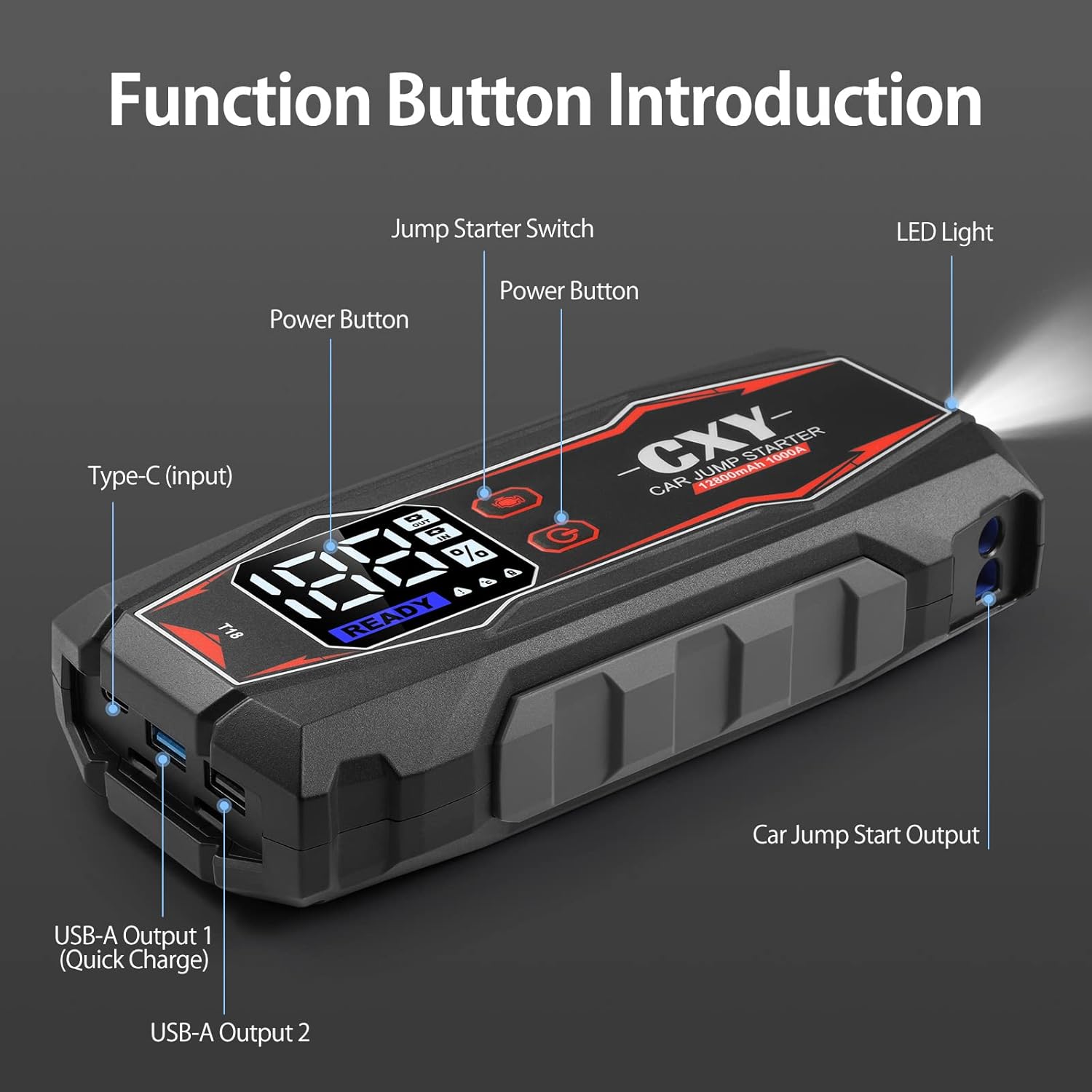
Figura 4.1: Cxy T18 Jump Starter with labeled function buttons and ports.
- 1. Jump Starter Switch: Activates the jump start function.
- 2. Pulsante di accensione: Turns the device on/off and cycles through display modes.
- 3. Type-C (Input): Utilizzato per caricare l'avviatore di emergenza.
- 4. USB-A Output 1 (Quick Charge): High-speed charging port for compatible devices.
- 5. USB-A Output 2: Standard charging port for electronic devices.
- 6. Car Jump Start Output: Port for connecting the smart battery clamps.
- 7. Luce LED: Built-in flashlight with multiple modes.
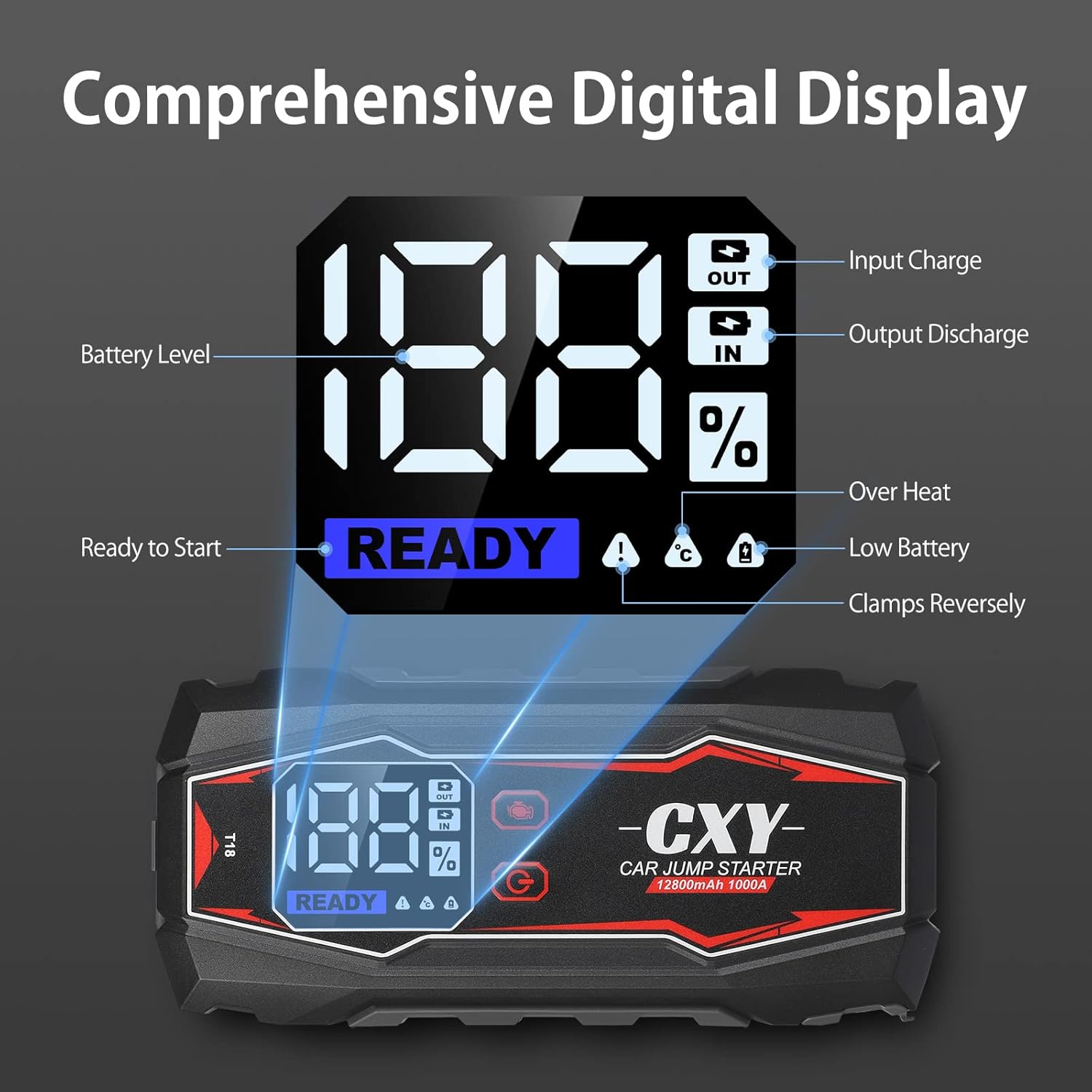
Figura 4.2: Digital LED display showing battery level, charging status, and error indicators.
- Livello batteria (%): Indicates the remaining charge of the jump starter.
- Input Charge (IN): Illuminates when the device is being charged.
- Output Discharge (OUT): Illuminates when the device is charging external devices.
- Pronto per iniziare: Indicates the device is ready for jump starting.
- Sopra il calore: Warning indicator for overheating.
- Batteria scarica: Warning indicator for low internal battery.
- Clamps Reversely: Warning indicator for incorrect clamp connessione.

Figura 4.3: The heavy-duty smart battery clamps feature double and long metal contacts for better conductivity and increased durability compared to standard clamps.
5. Installazione e addebito iniziale
Before first use, fully charge the Cxy T18 Jump Starter. Connect the USB-C cable to the Type-C input port on the device and plug the other end into a suitable USB wall adapter (not included). The digital display will show "IN" and the battery percentage increasing. A full charge is indicated when the display shows 100%.
It is recommended to recharge the device every 3-6 months to maintain battery health, even if not in use.
6. Istruzioni per l'uso: avviamento di emergenza di un veicolo
Per avviare il tuo veicolo in tutta sicurezza, segui attentamente questi passaggi:
- Preparare il veicolo: Ensure the vehicle's ignition is off, and the parking brake is engaged. Place the vehicle in park (P) or neutral (N).
- Connetti Clamps per Jump Starter: Inserire la spina blu della batteria intelligente clamps into the "Car Jump Start Output" port on the Cxy T18. Ensure a firm connection.
- Connetti Clamps alla batteria:
- Collegare il rosso positivo (+) clamp al terminale positivo (+) della batteria del veicolo.
- Collegare il nero negativo (-) clamp al terminale negativo (-) della batteria del veicolo.
Importante: If the display shows "Clamps Reversely", immediately disconnect and re-attach the clamps correttamente.
- Attiva Jump Start: Press the "Jump Starter Switch" button on the Cxy T18. The digital display should show "READY".
- Avviare il veicolo: Turn the vehicle's ignition key to start the engine.
- Disconnetti Clamps: Once the engine starts, immediately disconnect the black negative (-) clamp prima, poi il rosso positivo (+) clamp dalla batteria del veicolo. Infine, scollegare il cavo della batteria intelligenteamps from the Cxy T18.
- Store the Device: Store the Cxy T18 in its case in a cool, dry place.

Figura 6.1: Proper connection of the Cxy T18 Jump Starter to a vehicle battery for safe starting.
7. Charging the Cxy T18 Power Bank
To charge the Cxy T18, connect the provided USB-C cable to the Type-C input port on the device. Plug the other end into a USB wall adapter (5V/2A or higher recommended for faster charging). The digital display will show the "IN" indicator and the battery percentage. Il dispositivo è completamente carico quando il display mostra il 100%.
8. Multifunction Features
8.1. Funzione Power Bank
The Cxy T18 can charge various electronic devices such as smartphones, tablets, and other USB-powered gadgets. It features two USB-A output ports:
- USB-A Output 1 (Quick Charge): Provides faster charging for compatible devices.
- Uscita USB-A 2: Standard charging output.
To use, connect your device's USB charging cable to one of the USB-A output ports on the Cxy T18. The "OUT" indicator will illuminate on the digital display.

Figura 8.1: The Cxy T18 functioning as a power bank, charging a smartphone via its USB output ports.
8.2. Torcia a LED
La torcia LED integrata offre tre modalità per diverse situazioni:
- Normal Flashlight: Per l'illuminazione generale.
- Modalità SOS: Emette un segnale SOS in caso di emergenza.
- Modalità strobo: Luce lampeggiante per segnalare o attirare l'attenzione.
To activate the flashlight, press and hold the LED Light button. Press again to cycle through the modes. Press and hold again to turn off.

Figura 8.2: The Cxy T18's integrated LED flashlight providing illumination, useful for emergency lighting, night walking, and rescue situations.
9. Risoluzione Dei Problemi
If you encounter issues with your Cxy T18, refer to the following common problems and solutions:
| Problema | Possibile causa | Soluzione |
|---|---|---|
| Il dispositivo non si accende. | Batteria scarica o completamente scarica. | Caricare completamente il dispositivo utilizzando il cavo USB-C. |
| "Clamps Reversely" error on display. | Positive and negative clampi sono collegati in modo errato. | Scollegare immediatamente clamps and re-attach them to the correct battery terminals (red to +, black to -). |
| Il veicolo non si avvia dopo il tentativo di avviamento. |
|
|
| "Over Heat" error on display. | Device has been used excessively or in high temperatures. | Disconnect the device and allow it to cool down for at least 15-30 minutes before attempting further use. |
| La ricarica USB non funziona. |
|
|
10. Specifiche
| Caratteristica | Dettaglio |
|---|---|
| Marca | Cxy |
| Numero di modello | FR-CXY-T18V-TC-CXY |
| Corrente di picco | 1000 Amps |
| Capacità della batteria | Up to 12800mAh (as per product description) |
| Tipo di servizio del veicolo | Autovettura passeggeri |
| Compatible Engine Type | Up to 6L Gas or 3L Diesel Engines |
| Voltage | 12 Volt |
| Peso dell'articolo | 1.3 chilogrammi |
| Uscita USB 1 | Quick Charge (18W) |
| Uscita USB 2 | Uscita USB standard |
| Modalità di luce LED | SOS, Spotlight, Strobe |
| Codice UPC | 721295738293 |
11. Garanzia e supporto
The Cxy T18 Jump Starter Power Bank comes with a 30-day money-back guarantee. For any questions, technical assistance, or warranty claims, please contact our customer service. We offer 24/7 friendly customer service to assist you.
Please refer to your purchase documentation for specific contact details or visit the official Cxy websito.