
Introduzione
Grazie per l'acquistoasing the Thomson MIC401BT Stereo CD/Bluetooth Micro-Chain System. This manual provides essential information for the safe and efficient operation of your new audio system. Please read these instructions thoroughly before use and retain them for future reference.
Informazioni sulla sicurezza
- Fonte di energia: Garantire l'alimentazione voltage corrisponde all'etichetta di classificazione sull'unità.
- Ventilazione: Non ostruire le aperture di ventilazione. Lasciare spazio sufficiente attorno all'unità per un corretto flusso d'aria.
- Acqua e umidità: Non esporre l'unità a pioggia, umidità o liquidi che gocciolano/spruzzano. Tenere oggetti contenenti liquidi, come vasi, lontani dall'unità.
- Calore: Non posizionare l'unità vicino a fonti di calore quali radiatori, bocchette di riscaldamento, stufe o altri apparecchi (inclusi amplificatori) che producono calore.
- Pulizia: Scollegare l'unità dalla presa a muro prima di pulirla. Utilizzare solo un panno morbido e asciutto.
- Manutenzione: Non tentare di riparare questo prodotto da soli. Affidare tutte le operazioni di manutenzione a personale di assistenza qualificato.
Contenuto della confezione
Carefully unpack your micro-chain system and check that all items are present and in good condition. The package should contain:
- Thomson MIC401BT Stereo Micro-Chain System
- Telecomando
- Adattatore di alimentazione
- Manuale d'uso
Packaging box of the Thomson MIC401BT Stereo CD/Bluetooth Micro-Chain System, showing the product and its features.
Prodotto finitoview
Familiarize yourself with the main components and controls of your Thomson MIC401BT system.
Davanti View

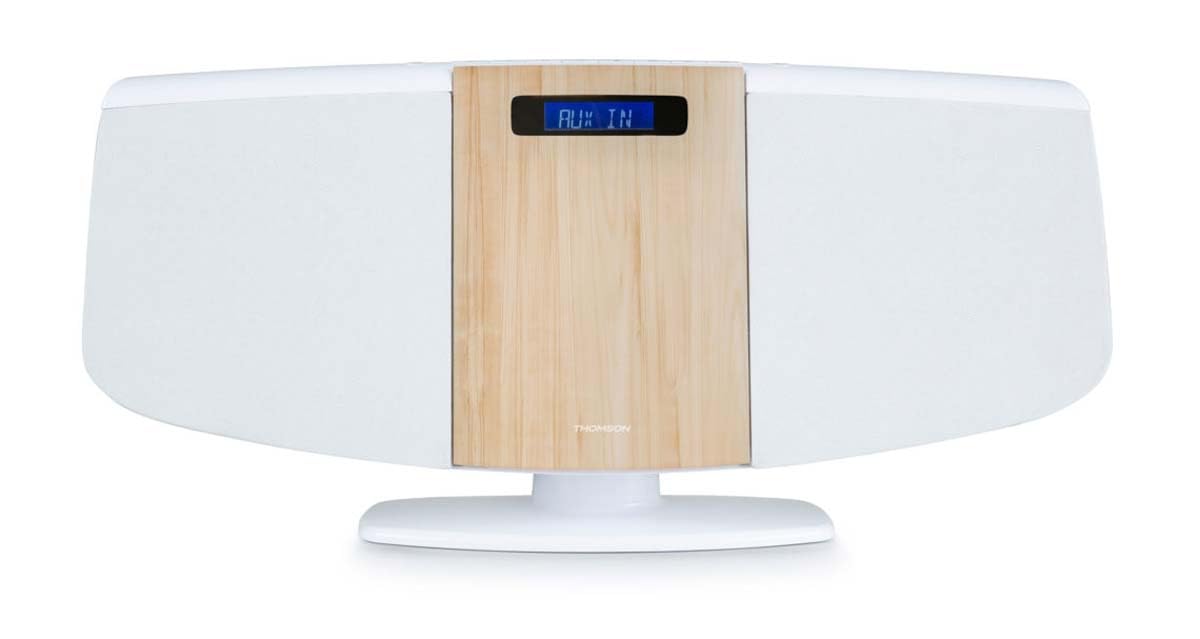
Davanti view of the Thomson MIC401BT micro-chain system, showcasing its white and wood-grain design with a digital display.
The front panel features the central digital display, the CD loading slot (behind the wood-grain panel), and integrated stereo speakers on either side.
Controlli e porte del pannello superiore

Close-up of the top panel controls of the Thomson MIC401BT, including the USB charge port, AUX-IN jack, and various function buttons for playback and settings.
Il pannello superiore comprende:
- Pulsante FONTE: To switch between input modes (CD, Bluetooth, FM, AUX).
- Tasto SONNO: To set the sleep timer.
- Pulsante ORA: Per impostare l'orologio.
- Pulsante ALLARME: To set the alarm function.
- Pulsante INVIO: Per confermare le selezioni.
- Pulsanti di controllo della riproduzione: Riproduci/Pausa, Interrompi, Salta avanti/indietro.
- USB CHARGE Port (5V === 1000mA): Per caricare dispositivi esterni.
- INGRESSO AUX (3.5 mm): Per collegare sorgenti audio esterne.
- Jack per cuffie: Per l'ascolto privato.
Impostare
1. Collegamento elettrico
- Collegare l'adattatore di alimentazione alla porta DC IN sul retro dell'unità.
- Collegare l'alimentatore a una presa a muro standard.
2. Antenna FM
Extend the FM wire antenna fully for optimal radio reception. Position it away from other electronic devices to minimize interference.
3. Opzioni di posizionamento
The MIC401BT can be placed on a flat surface using its integrated stand or mounted on a wall.
- Posizionamento sul desktop: Assicurarsi che l'unità sia posizionata su una superficie stabile e piana.
- Montaggio a parete: Use appropriate screws and wall plugs (not supplied) for your wall type. Consult a professional if unsure. Ensure the unit is securely fastened to prevent falling.

The Thomson MIC401BT micro-chain system mounted on a wall shelf, demonstrating its versatile placement options.
Istruzioni per l'uso
1. Accensione/spegnimento
Premere il tasto FONTE button once to turn the unit on. Press and hold the FONTE pulsante per spegnerlo.
2. Selezione della sorgente
Premere il tasto FONTE button repeatedly to cycle through available modes: CD, Bluetooth, FM Radio, AUX-IN.
3. Riproduzione CD
- Selezionare la modalità CD utilizzando il FONTE pulsante.
- Gently open the CD door (the wood-grain panel) and insert a CD with the label side facing forward.
- Close the CD door. The system will automatically begin playing the CD.
- Use the Play/Pause, Stop, and Skip buttons on the unit or remote control to manage playback.

Dettagliato view of the Thomson MIC401BT CD player mechanism with the disc tray open, ready for CD insertion.
4. Accoppiamento Bluetooth
- Selezionare la modalità Bluetooth utilizzando il FONTE button. The display will show "BLUETOOTH" and flash, indicating it's in pairing mode.
- Abilita il Bluetooth sul tuo dispositivo mobile (smartphone, tablet, ecc.).
- Cercare "MIC401BT" in your device's Bluetooth settings and select it to pair.
- Once paired, the display will stop flashing, and you can play audio from your device through the micro-chain system.
5. Radio FM
- Selezionare la modalità Radio FM utilizzando il FONTE pulsante.
- Use the Skip Forward/Backward buttons to manually tune to a station or press and hold them for automatic scanning.
- To save a station, refer to the detailed instructions in the full manual for memory presets.
6. Collegamento AUX-IN
- Collegare un dispositivo audio esterno (ad esempio, un lettore MP3) al AUX IN port using a 3.5mm audio cable (not supplied).
- Selezionare la modalità AUX-IN utilizzando il FONTE pulsante.
- Riproduci l'audio dal tuo dispositivo connesso.
7. Ricarica USB
Connect your USB-powered device to the RICARICA USB port (5V === 1000mA) on the top panel to charge it. This port is for charging only and does not support media playback.
8. Funzione di allarme
Premere il tasto ALLARME button to enter alarm setting mode. Use the navigation buttons to set the desired alarm time and source (e.g., FM radio, CD). Press ENTRARE to confirm each setting. Refer to the full manual for detailed alarm setup instructions.
Manutenzione
- Pulizia dell'unità: Utilizzare un panno morbido e asciutto per pulire l'esterno dell'unità. Non utilizzare detergenti abrasivi, cere o solventi.
- Cura del lettore CD: Keep the CD compartment clean. Avoid touching the lens. If a CD is dirty, wipe it with a soft, lint-free cloth from the center outwards.
- Magazzinaggio: Se l'unità non verrà utilizzata per un periodo prolungato, scollegarla dalla presa di corrente e conservarla in un luogo fresco e asciutto.
Risoluzione dei problemi
| Problema | Possibile causa | Soluzione |
|---|---|---|
| Nessun potere | Cavo di alimentazione non collegato; presa di corrente difettosa | Controllare il collegamento del cavo di alimentazione; provare una presa diversa |
| Nessun suono | Volume troppo basso; Sorgente selezionata non corretta; Cuffie collegate | Increase volume; Select correct source; Disconnect headphones |
| Il CD non viene riprodotto | CD inserted incorrectly; CD is dirty or scratched; Incorrect mode | Reinserire il CD correttamente; Pulire o sostituire il CD; Selezionare la modalità CD |
| Bluetooth non associato | Device too far; Bluetooth not enabled on device; Incorrect mode | Move device closer; Enable Bluetooth on device; Select Bluetooth mode |
| Scarsa ricezione FM | Antenna non estesa; Interferenza | Extend and adjust antenna; Move unit away from other electronics |
Specifiche
- Modello: Modello MIC401BT
- Marca: Thomson (Manufactured by Big Ben)
- Connettività: Ausiliario, Bluetooth, USB
- Colore: Bianco
- Tipo di altoparlante: Stereo
- Fonte di energia: Cavo elettrico
- Dispositivi compatibili: MP3 player, Personal computer, Tablet, Television, Smartphone
- Stile: CD boombox
- Uscita di potenza audio: 60 Watt
- Standard supportati: Bluetooth, FM
- Supporto per i formati audio: CD, MP3
- Numero di relatori: 2
- Uscita di carica USB: 5 V, 1000 mA
Garanzia e supporto
This Thomson MIC401BT Stereo CD/Bluetooth Micro-Chain System comes with a Garanzia di 2 anno dalla data di acquisto. Conservare la prova d'acquisto per eventuali reclami in garanzia.
For technical support, troubleshooting assistance beyond this manual, or warranty service, please contact your retailer or the official Thomson customer support channel. Contact information can typically be found on the product packaging or the manufacturer's websito.