
1. Prodotto finitoview
The havit GK59 Gaming Microphone is designed for clear audio capture during gaming, streaming, and voice communication. It features a condenser microphone for high-quality sound and a versatile design for ease of use.

Figura 1.1: Fronte view of the havit GK59 Gaming Microphone, showcasing its main body, stand, and control buttons.
Caratteristiche principali:
- Facile da usare: Simple plug-and-play functionality.
- Good Performance: Delivers clear and consistent audio.
- Good Quality: Costruzione durevole per un utilizzo affidabile.
- Design portatile: Compatto e facile da trasportare.
- Supporto regolabile: Consente un posizionamento flessibile.
2. Istruzioni per l'installazione
2.1 Contenuto della confezione
Si prega di controllare la confezione per verificare la presenza dei seguenti elementi:
- havit GK59 Gaming Microphone
- Cavo di collegamento USB
- Manuale dell'utente (questo documento)
2.2 Collegamento del microfono
The GK59 microphone offers versatile connectivity options for various devices.
- Connessione USB: Connect the provided USB cable to the USB-C port on the back of the microphone and the other end to an available USB port on your computer or gaming console. The microphone is plug-and-play and should be automatically recognized by most operating systems.
- Connessione jack da 3.5 mm: For devices supporting a 3.5mm auxiliary input, connect a 3.5mm audio cable (not included) to the 3.5mm jack on the back of the microphone and to your device's audio input.
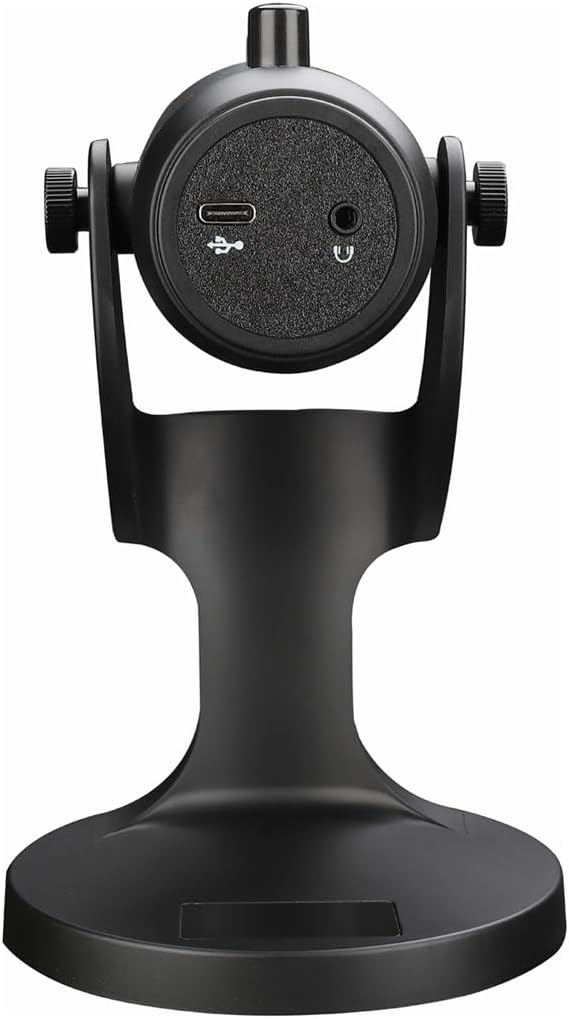
Figura 2.1: Posteriore view of the havit GK59 Gaming Microphone, highlighting the USB-C port for data and power, and the 3.5mm headphone jack for monitoring.
After connecting, ensure the microphone is selected as the default input device in your system's sound settings or your gaming/streaming software.
3. Istruzioni per l'uso
3.1 Controlli di base
The havit GK59 features intuitive controls located on the front of the microphone body:
- Tasto muto: Press to mute or unmute the microphone. An indicator light will typically show the mute status.
- MIC +/- Buttons: Adjust the microphone input sensitivity (gain). Press '+' to increase, '-' to decrease.
- Pulsanti VOL +/-: Adjust the headphone output volume for monitoring. Press '+' to increase, '-' to decrease.
- ECHO +/- Buttons: Adjust the echo effect level. Press '+' to increase, '-' to decrease.
Figura 3.1: dettagliata view of the microphone's control panel, including the mute button, microphone gain, volume, and echo adjustment buttons.
3.2 Adjusting Microphone Position
The microphone is equipped with an adjustable stand, allowing you to optimize its position for best sound capture and comfort.
- Gently hold the microphone body and the base of the stand.
- Tilt the microphone forward or backward to achieve the desired angle. The stand's design helps reduce vibration and abnormal sounds during use.
- Position the microphone approximately 6-12 inches (15-30 cm) from your mouth for optimal voice clarity.

Figure 3.2: The havit GK59 microphone demonstrating its adjustable tilt feature on the stand, designed for anti-vibration.
4. Manutenzione
4.1 Pulizia
To maintain the microphone's performance and appearance:
- Disconnect the microphone from its power source before cleaning.
- Utilizzare un panno morbido e asciutto per pulire le superfici esterne.
- Non utilizzare detergenti liquidi, spray o solventi, poiché potrebbero danneggiare la finitura o i componenti interni.
4.2 Conservazione
When not in use, store the microphone in a cool, dry place away from direct sunlight and extreme temperatures. Protect it from dust and moisture.
5. Risoluzione Dei Problemi
If you encounter issues with your havit GK59 Gaming Microphone, please refer to the following table for common problems and solutions:
| Problema | Possibile causa | Soluzione |
|---|---|---|
| No sound input from microphone | Microfono non collegato correttamente Dispositivo di input selezionato non corretto Microfono disattivato | Assicurarsi che il cavo USB sia collegato saldamente. Check system sound settings and select GK59 as input. Press the Mute button on the microphone to unmute. |
| Basso volume del microfono | Microphone gain too low System input volume too low | Press the 'MIC +' button on the microphone. Adjust input volume in your system's sound settings. |
| Audio distorto o poco chiaro | Microphone gain too high Microfono troppo vicino alla bocca Rumore ambientale | Press the 'MIC -' button on the microphone. Regolare la posizione del microfono (a 6-12 cm dalla bocca). Riduci il rumore di fondo nell'ambiente. |
| No headphone monitoring sound | Cuffie non collegate Headphone volume too low | Ensure headphones are plugged into the 3.5mm jack. Press the 'VOL +' button on the microphone. |
6. Specifiche tecniche
Below are the technical specifications for the havit GK59 Gaming Microphone:
| Caratteristica | Specificazione |
|---|---|
| Marca | Avere |
| Numero di modello | GK59 |
| Tecnologia di connettività | USB, 3.5 mm Jack (Auxiliary) |
| Usi consigliati | Gioco d'azzardo |
| Modello polare | Unidirezionale |
| Fattore di forma del microfono | Handheld (with desktop stand) |
| Peso dell'articolo | 429 grammi |
| Impedenza | 250 Ohm |
| Signal-to-Noise Ratio | 18 dB |
| Rumore udibile | 18 decibel |
| Fonte di alimentazione | Elettrico con cavo (tramite USB) |
| Dispositivi compatibili | Gaming Consoles, PCs |
| Dimensioni articolo (LxPxA) | 5.59 x 4.92 x 9.06 pollici |
| Colore | Nero |
7. Garanzia e supporto
7.1 Informazioni sulla garanzia
The havit GK59 Gaming Microphone comes with a standard manufacturer's warranty. Please refer to the warranty card included in your product packaging or visit the official havit websito per termini e condizioni di garanzia dettagliati.
7.2 Assistenza clienti
For technical assistance, troubleshooting not covered in this manual, or warranty claims, please contact havit customer support through their official channels. You can find more information and contact details on the havit Store on Amazon o il loro funzionario websito.