
SUPVANO E10
Manuale utente dell'etichettatrice SUPVAN E10
Modello: E10 | Marca: SUPVAN
1. Introduzione
The SUPVAN E10 Label Maker is a compact and portable thermal label printer designed for various labeling needs in homes, offices, schools, and businesses. It connects wirelessly via Bluetooth to your smartphone or tablet, allowing you to design and print custom labels using the intuitive Katasymbol application. This manual provides detailed instructions on setting up, operating, maintaining, and troubleshooting your E10 Label Maker.
Key features include inkless thermal printing, automatic label size recognition, an integrated cutter, and a long-lasting rechargeable battery. The Katasymbol app offers a wide range of fonts, borders, templates, and icons to personalize your labels.
2. Guida all'installazione
Follow these steps to set up your SUPVAN E10 Label Maker for first use.
2.1 Disimballaggio e ispezione iniziale
Rimuovere con cautela tutti i componenti dall'imballaggio. Assicurarsi che siano presenti i seguenti elementi:
- Etichettatrice SUPVAN E10
- One label roll (pre-installed or included separately)
- Cavo di ricarica USB
- Manuale dell'utente (questo documento)
Inspect the device for any visible damage. If any components are missing or damaged, please contact customer support.
2.2 Ricarica del dispositivo
Before first use, fully charge the label maker. Connect the provided USB cable to the charging port on the device and to a standard USB power adapter (not included) or a computer USB port. The charging indicator light will show the charging status.

Figure 2.1: The SUPVAN E10 Label Maker in use, demonstrating its compact size and the label printing process, alongside the companion mobile application.
The E10 features a built-in rechargeable lithium-ion battery, eliminating the need for disposable AA batteries found in older label makers.

Figure 2.2: Size and weight comparison of the SUPVAN E10 (left) against a traditional label maker (right), emphasizing its portability and the convenience of a rechargeable battery.
2.3 Installazione del rotolo di etichette
Open the label compartment cover. Insert the label roll with the adhesive side facing down and the leading edge of the label tape extending slightly out of the printer slot. Ensure the roll is seated correctly. Close the cover firmly.

Figura 2.3: Interno view of the label maker, illustrating the thermal printing technology, the precise integrated cutter, and the rechargeable battery, all contributing to its efficient operation.
2.4 Download e connessione all'app
The SUPVAN E10 operates via the Katasymbol app. Download it from your device's app store:
- For iOS devices, search "Katasymbol" on the Apple App Store.
- For Android devices, search "Katasymbol" on the Google Play Store.
Once installed, open the app and enable Bluetooth on your smartphone. The app will guide you through connecting to your E10 Label Maker. Select "E10" from the list of available devices to pair.

Figure 2.4: The Katasymbol app on a smartphone, demonstrating the seamless Bluetooth connectivity with the SUPVAN E10 Label Maker for quick and intuitive label creation.

Figure 2.5: Step-by-step guide for app usage: 1. Download Katasymbol app, 2. Connect via Bluetooth, 3. Utilize diverse editing features, 4. Print your label.
3. Istruzioni per l'uso
The Katasymbol app provides a comprehensive interface for designing and printing labels.
3.1 Designing Your Label
Within the Katasymbol app, you can:
- L'immissione di testo: Digita il testo desiderato.
- Caratteri: Choose from over 40 fonts to customize your text style.
- Bordi e cornici: Select from over 50 borders and frames to enhance your label's appearance.
- Icone e simboli: Access over 700 icons and symbols for visual representation.
- Modelli: Utilize over 150 pre-designed templates for quick label creation.
- QR & Barcodes: Generate QR codes and barcodes directly from the app.
- Continuous or Fixed Length: Define labels with continuous length or fixed sizes, depending on your needs.
- Stampa in batch: Stampa più etichette in modo efficiente.

Figure 3.1: The Katasymbol app's rich editing features, including a wide selection of fonts, QR code generation, numerous symbols, and customizable frames, enabling diverse label designs.
3.2 Printing Your Label
Once your design is complete, tap the print button in the app. The E10 Label Maker will automatically recognize the label size and print your design using thermal technology, which means no ink or toner is required.
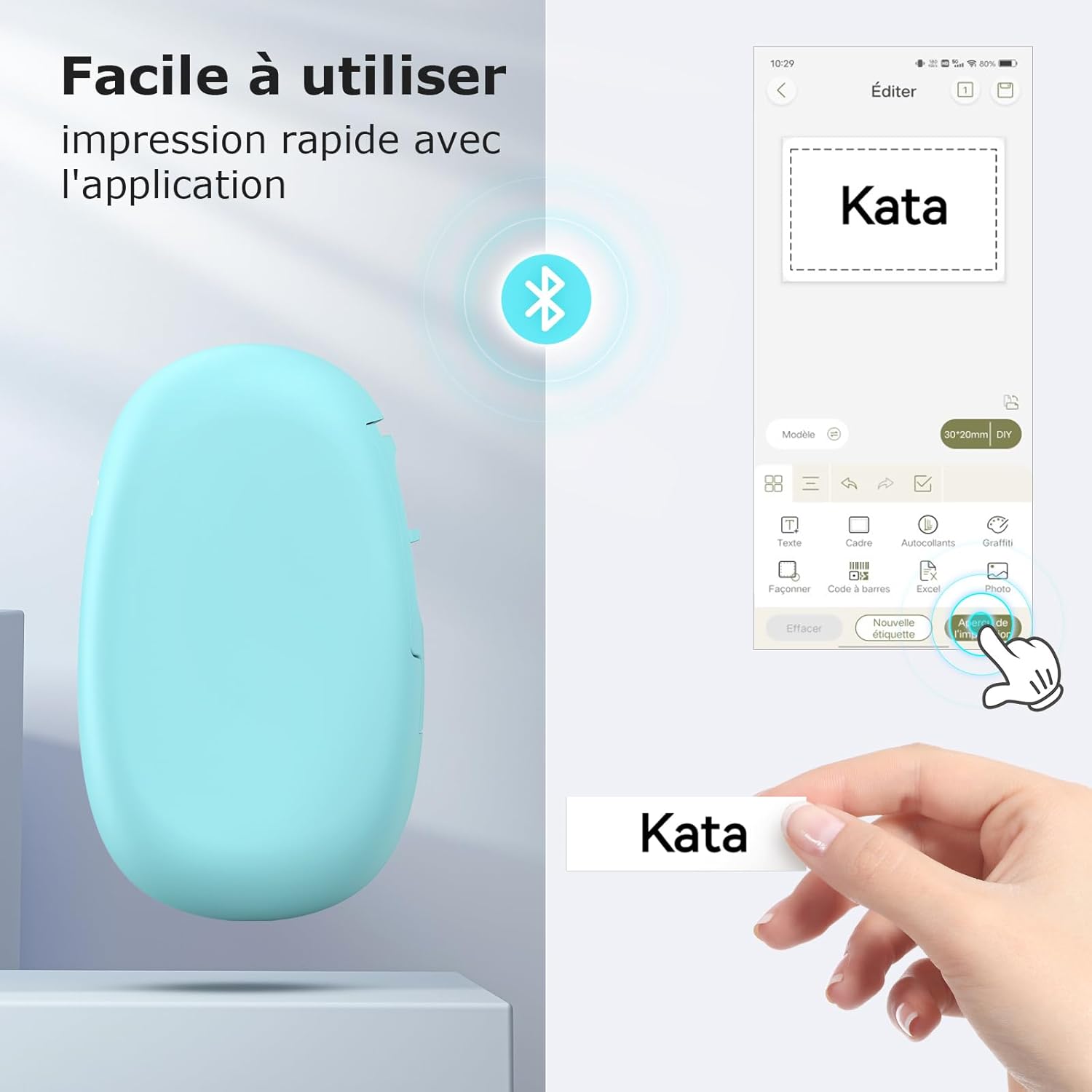
Figure 3.2: Comparison highlighting SUPVAN's continuous label roll (15mm x 6m) that allows for any length and cut, versus fixed-size labels offered by other brands.
3.3 Applicazioni delle etichette
The SUPVAN E10 is versatile and suitable for a wide range of applications:
- Organizzazione della casa: Label storage boxes, pantry items, spice jars, and personal belongings.
- Cucina: Organize food containers, ingredients, and meal prep items.
- School & Office: Etichetta files, folders, school supplies, and personal items.
- Fai da te e artigianato: Perfect for creative projects and organizing craft supplies.
- Gardening: Label plants and garden tools.
- Attività commerciale: Crea prezzo tags, address labels, product labels, and labels with company logos.
- Occasioni speciali: Design personalized labels for gifts and festive events.

Figura 3.3: Esamples of label usage in the kitchen and for home organization, including labeling bottles, storage boxes, food containers, and spice jars.

Figure 3.4: Diverse applications of the label maker, including organizing cables, personalizing school bags, labeling office files, and creating labels for envelopes and stationery.

Figure 3.5: Additional label applications for daily life, such as organizing medication, personalizing phone cases, labeling light switches, and tidying cosmetic products.

Figure 3.6: Specialized label uses, including school name tags, food expiration dates, supplement reminders, and custom designs for festive occasions.
4. Manutenzione
Proper maintenance ensures the longevity and optimal performance of your SUPVAN E10 Label Maker.
4.1 Pulizia della testina di stampa
The E10 uses thermal printing technology, which means no ink cartridges are needed. However, dust or adhesive residue can accumulate on the print head over time, affecting print quality. To clean the print head:
- Spegnere il dispositivo.
- Aprire il coperchio dello scomparto delle etichette.
- Pulire delicatamente la testina di stampa con un batuffolo di cotone leggermenteamparricchito con alcol isopropilico.
- Allow it to dry completely before closing the cover and turning on the device.
4.2 Cura della batteria
The built-in lithium-ion battery provides long-lasting power, with up to one month of standby time. To maximize battery life:
- Caricare regolarmente il dispositivo, soprattutto se verrà conservato per un periodo prolungato.
- Evitare di scaricare completamente la batteria frequentemente.
- Conservare il dispositivo in un luogo fresco e asciutto, lontano da temperature estreme.
4.3 Durata dell'etichetta
SUPVAN labels are designed for durability. They are:
- Waterproof and Oil-resistant: Suitable for use in kitchens and other environments where exposure to liquids is possible.
- Adesivo forte: Ensures labels stay in place.
- Nessun residuo: Le etichette possono essere rimosse senza lasciare residui appiccicosi.
- Fade-resistant: Designed to maintain legibility over time.

Figure 4.1: The SUPVAN E10 labels are waterproof, as demonstrated by a label remaining intact on a glass being washed.

Figure 4.2: Key durability features of SUPVAN labels: resistant to water and oil, easy to remove, leaves no sticky residue, and anti-scratch.

Figure 4.3: A comparison showing the clear, professional appearance of a printed label versus the potential smudging of a handwritten label.
5. Risoluzione Dei Problemi
If you encounter issues with your SUPVAN E10 Label Maker, refer to the following common problems and solutions.
5.1 Problemi di connettività
- Dispositivo non connesso tramite Bluetooth:
- Assicurati che il Bluetooth sia abilitato sul tuo smartphone/tablet.
- Make sure the label maker is turned on and within range (typically 10 meters).
- Restart both the label maker and your smartphone/tablet.
- Forget the device in your phone's Bluetooth settings and try pairing again through the Katasymbol app.
- Ensure the Katasymbol app has Bluetooth permissions enabled in your phone's settings.
5.2 Problemi di qualità di stampa
- Faint or incomplete printing:
- Check if the label roll is installed correctly and not running out.
- Clean the print head as described in the Maintenance section (4.1).
- Ensure the device battery is sufficiently charged. Low battery can affect print quality.
- Verify print density settings in the Katasymbol app, if available.
- Blank labels being printed:
- Ensure the label roll is inserted with the correct side facing the print head (thermal side up).
- Check if there is any text or design entered in the Katasymbol app before printing.
5.3 Label Feeding Issues
- Le etichette non vengono alimentate o si inceppano:
- Open the label compartment and ensure the label roll is properly seated and not tangled.
- Remove any loose label pieces or debris from the feeding path.
- Ensure you are using compatible SUPVAN label rolls (15mm width).
If the issue persists after trying these steps, please contact SUPVAN customer support.
6. Specifiche
| Caratteristica | Specificazione |
|---|---|
| Numero di modello | E10 |
| Dimensioni (L x P x A) | Dimensioni: 4 x 11 x 17 cm |
| Peso | 167 grammi |
| Tecnologia di connettività | Bluetooth, USB |
| Dispositivi compatibili | Smartphone Android e iOS |
| Tecnologia di stampa | Termico |
| Dimensione massima del supporto | 15 mm x 6 metri |
| Risoluzione di stampa massima (bianco e nero) | 203 dpi |
| Velocità di stampa massima (monocromatica) | 60 Pages per minute (equivalent) |
| Consumo energetico | 5 Watt |
| Tipo di batteria | Agli ioni di litio |
| Componenti inclusi | Etichette |
| Caratteristiche speciali | Portable, Inkless Printing, Integrated Cutter |
7. Garanzia e supporto
7.1 Garanzia del produttore
The SUPVAN E10 Label Maker comes with a Garanzia del produttore di 2 anniLa presente garanzia copre i difetti di materiali e fabbricazione in condizioni di normale utilizzo. Si prega di conservare la prova d'acquisto per eventuali reclami in garanzia.
For detailed warranty terms and conditions, please refer to the warranty card included with your product or visit the official SUPVAN websito.
7.2 Assistenza clienti
If you have any questions, require technical assistance, or need to report an issue, please contact SUPVAN customer support. Responsive customer service and video tutorials are available to assist you.
You can typically find contact information on the SUPVAN official website or through the Katasymbol app's help section.
For more information and to explore other SUPVAN products, visit the SUPVAN Brand Store.
Ask a question about this manual
Ask about setup, troubleshooting, compatibility, parts, safety, or missing instructions. Manuals+ will review the question and use this page’s manual context to help answer it.