
Logicool M550MGR
Manuale utente del mouse wireless silenzioso Logicool Signature M550MGR
Model: M550MGR
1. Introduzione
The Logicool Signature M550MGR is a silent wireless mouse designed for comfort and productivity. It features the unique SmartWheel for versatile scrolling and SilentTouch technology for reduced click noise. This mouse offers dual connectivity options: Bluetooth Low Energy and the Logi Bolt USB receiver, ensuring stable performance across various operating systems.

Image: The Logicool Signature M550MGR mouse, highlighting its ergonomic design and advanced scrolling capabilities.
2. Contenuto della confezione
- Logicool Signature M550MGR Wireless Mouse
- Ricevitore USB Logi Bolt
- 1 batteria AA (preinstallata)
- Documentazione utente (questo manuale)
3. Impostazione
3.1. Installazione della batteria
- Individuare il vano batteria sul lato inferiore del mouse.
- Aprire il coperchio del vano batterie.
- Ensure the AA battery is correctly oriented according to the polarity indicators (+/-).
- Chiudere il coperchio del vano batterie.
3.2. Collegamento del mouse
The M550MGR offers two connection methods: Logi Bolt USB receiver or Bluetooth Low Energy.
3.2.1. Logi Bolt USB Receiver Connection
- Remove the Logi Bolt USB receiver from the battery compartment or packaging.
- Collegare il ricevitore USB Logi Bolt a una porta USB disponibile sul computer.
- Il mouse dovrebbe connettersi automaticamente. In caso contrario, assicurarsi che il mouse sia acceso.
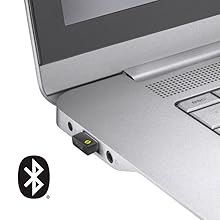
Image: The Logi Bolt USB receiver connected to a laptop, illustrating the wireless connection method.
3.2.2. Bluetooth Low Energy Connection
- Assicurati che il Bluetooth del tuo dispositivo sia abilitato.
- Accendi il mouse.
- Press and hold the connect button on the underside of the mouse for 3 seconds until the LED indicator starts blinking rapidly.
- On your device, go to Bluetooth settings and select "Logicool M550MGR" from the list of available devices to pair.
- The LED indicator will turn solid for a few seconds, then turn off, indicating a successful connection.

Image: Visual representation of the two connectivity options: Bluetooth and the Logi Bolt USB receiver.
4. Istruzioni per l'uso
4.1. Funzioni di base
- Clic sinistro: Azione primaria, selezione.
- Clic destro: Azione secondaria, menu contestuali.
- Rotella di scorrimento: Scorrere verso l'alto o verso il basso i documenti e web pagine.
4.2. SmartWheel Scrolling
The SmartWheel automatically switches between two scrolling modes:
- Line-by-line Scrolling: For precise navigation, ideal for detailed work.
- Hyper-fast Scrolling: Spin the wheel quickly to effortlessly glide through long documents and web pages. The wheel will automatically switch to this mode when spun with momentum.

Immagine: un primo piano view of the SmartWheel, demonstrating its design for efficient scrolling.
4.3. SilentTouch Technology
The M550MGR incorporates SilentTouch technology, which reduces click noise by 90% compared to traditional mice, while maintaining the familiar click feel. This creates a quieter work environment without compromising tactile feedback.

Image: A user operating the silent mouse in a calm environment, illustrating the benefit of SilentTouch technology.
5 Caratteristiche
- Ruota intelligente: Automatic switching between precise line-by-line and hyper-fast scrolling.
- Tecnologia SilentTouch: 90% reduced click noise with retained click feel.
- Doppia connettività: Connect via Logi Bolt USB receiver or Bluetooth Low Energy.
- Design ergonomico: Comfortable shape with rubber side grips for extended use.
- Batteria a lunga durata: Up to 24 months on a single AA battery.
- Compatibilità multi-sistema operativo: Supports Windows, macOS, Chrome OS, iPadOS, and Android.
6. Informazioni sulla batteria
- Tipo di batteria: 1 x AA alkaline battery.
- Durata della batteria: Up to 24 months, depending on usage.
- Sostituzione della batteria: Replace the AA battery when the LED indicator on the mouse turns red or when performance degrades. Follow the installation steps in Section 3.1.
7. Compatibilità
The Logicool Signature M550MGR mouse is compatible with the following operating systems:
- Logi Bolt Connection:
- Windows 10, 11 o successivo
- macOS 10.10 o successivo
- Sistema operativo Chrome
- Bluetooth Low Energy Connection:
- Windows 10, 11 o successivo
- macOS 10.15 o successivo
- Sistema operativo Chrome
- iPadOS 13.4 o successivo
- Android 5.0 o successivo
Note: This mouse is not compatible with Logitech Unifying receivers.
8. Manutenzione
- Pulizia: Use a soft, lint-free cloth to clean the mouse surface. For stubborn dirt, slightly dampLavare il panno con acqua. Evitare prodotti chimici aggressivi o materiali abrasivi.
- Sensore: Keep the optical sensor on the underside of the mouse clean and free from dust or debris for optimal tracking performance.
- Magazzinaggio: When not in use for extended periods, turn off the mouse to conserve battery life. Store in a dry, cool place.
9. Risoluzione Dei Problemi
9.1. Il mouse non risponde
- Assicurarsi che il mouse sia acceso.
- Controllare il livello della batteria e sostituirla se necessario.
- For Logi Bolt connection: Ensure the receiver is securely plugged into a working USB port. Try a different USB port.
- For Bluetooth connection: Ensure Bluetooth is enabled on your device and the mouse is paired. Try re-pairing the mouse (refer to Section 3.2.2).
- Riavvia il computer o il dispositivo.
9.2. Movimento irregolare del cursore
- Pulisci il sensore ottico sul lato inferiore del mouse.
- Assicurati di utilizzare il mouse su una superficie adatta. Evita superfici altamente riflettenti o trasparenti.
- Move the mouse closer to the Logi Bolt receiver or your Bluetooth-enabled device to reduce interference.
9.3. SmartWheel Not Switching Modes
- Ensure the wheel is spun with enough momentum to activate hyper-fast scrolling.
- Check for any debris around the scroll wheel that might impede its movement.
10. Specifiche
| Marca | Logicool |
| Numero di modello | M550MGR |
| Colore | Grafite |
| Tecnologia di connettività | Bluetooth, Logi Bolt (USB) |
| Tecnologia di rilevamento del movimento | Ottico |
| Caratteristiche speciali | SilentTouch, Wireless |
| Dimensioni del prodotto | Dimensioni: 6.1 x 10.82 x 3.88 cm |
| Peso dell'articolo | 97.4 grammi |
| Tipo di batteria | 1 batteria AA |
| Tempo di utilizzo continuo | Fino a 24 mesi |
11. Garanzia e supporto
The Logicool Signature M550MGR Wireless Mouse comes with a Garanzia del produttore di 2 anni dalla data di acquisto.
For technical support, warranty claims, or additional information, please visit the official Logicool support websito o contattare il servizio clienti. Conservare la prova d'acquisto per motivi di garanzia.
Official Logicool Support: www.logicool.co.jp
Ask a question about this manual
Ask about setup, troubleshooting, compatibility, parts, safety, or missing instructions. Manuals+ will review the question and use this page’s manual context to help answer it.