
Introduzione
This manual provides detailed instructions for the safe and effective use of your MiLESEEY D5 70M-BT Laser Distance Meter. This device is designed for precise distance measurements up to 70 meters, featuring an electronic angle sensor, various measurement modes, and smartphone application connectivity for enhanced functionality.
Informazioni sulla sicurezza
Si prega di leggere attentamente tutte le istruzioni di sicurezza prima di utilizzare il dispositivo. La mancata osservanza di queste istruzioni può causare esposizione a radiazioni laser, scosse elettriche, incendi o lesioni gravi.
- Laser Class II Product: This device emits Class II laser radiation. Do not stare into the laser beam. Avoid direct eye exposure.
- Tipo di laser: 635nm <1mW.
- Non tentare di modificare o smontare il dispositivo. Le riparazioni devono essere eseguite solo da personale di assistenza autorizzato.
- Tenere il dispositivo fuori dalla portata dei bambini.
- Non utilizzare il dispositivo in atmosfere esplosive o in prossimità di liquidi e gas infiammabili.
- Use only specified batteries (2 x 1.5V AAA alkaline batteries).
Contenuto della confezione
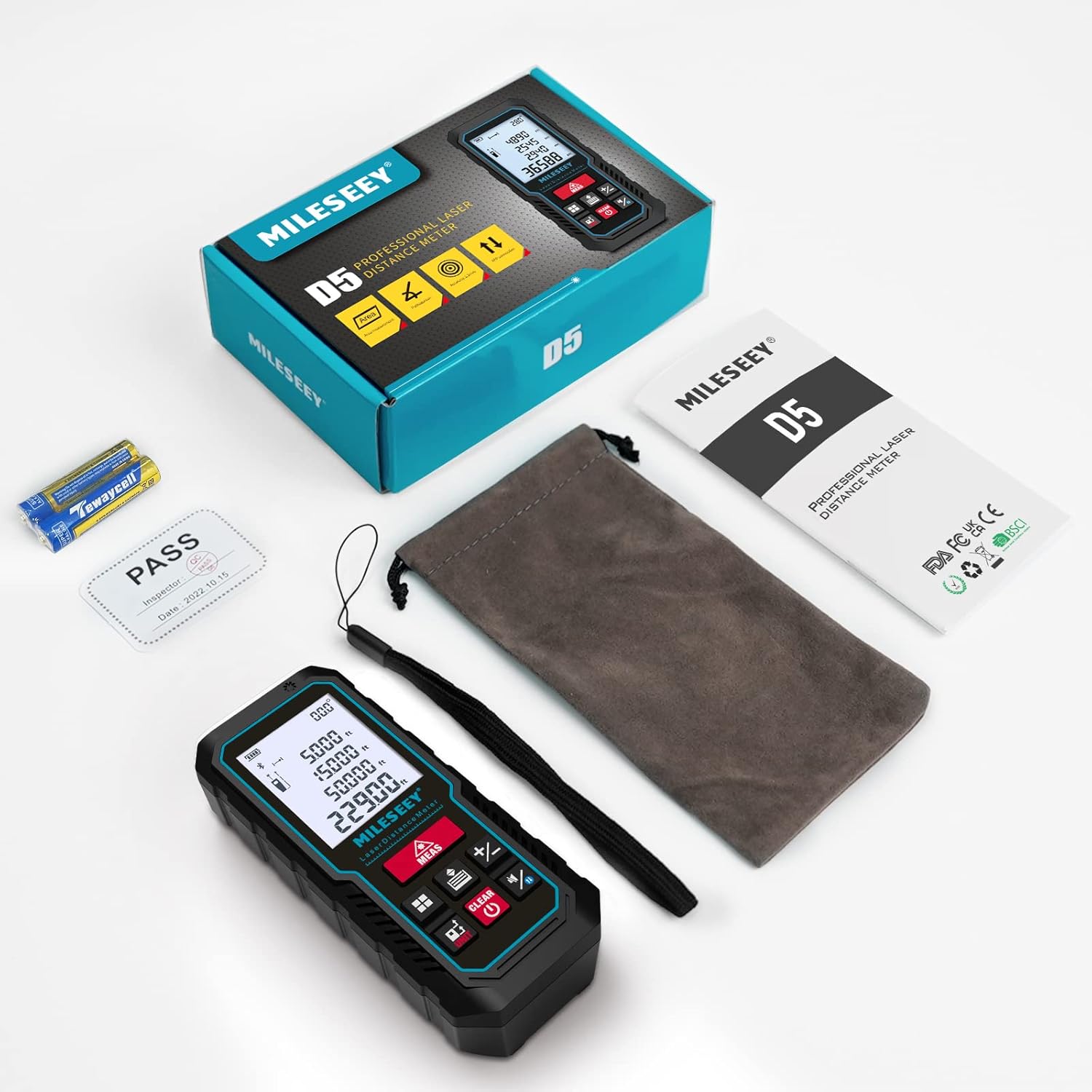
Verificare che tutti gli articoli siano presenti nel pacco:
- 1 x MiLESEEY D5 Laser Distance Meter
- 2 batterie AAA da 1.5 V
- 1 x Manuale utente
- 1 x Custodia portatile
- 1 x cinturino da polso

Prodotto finitoview
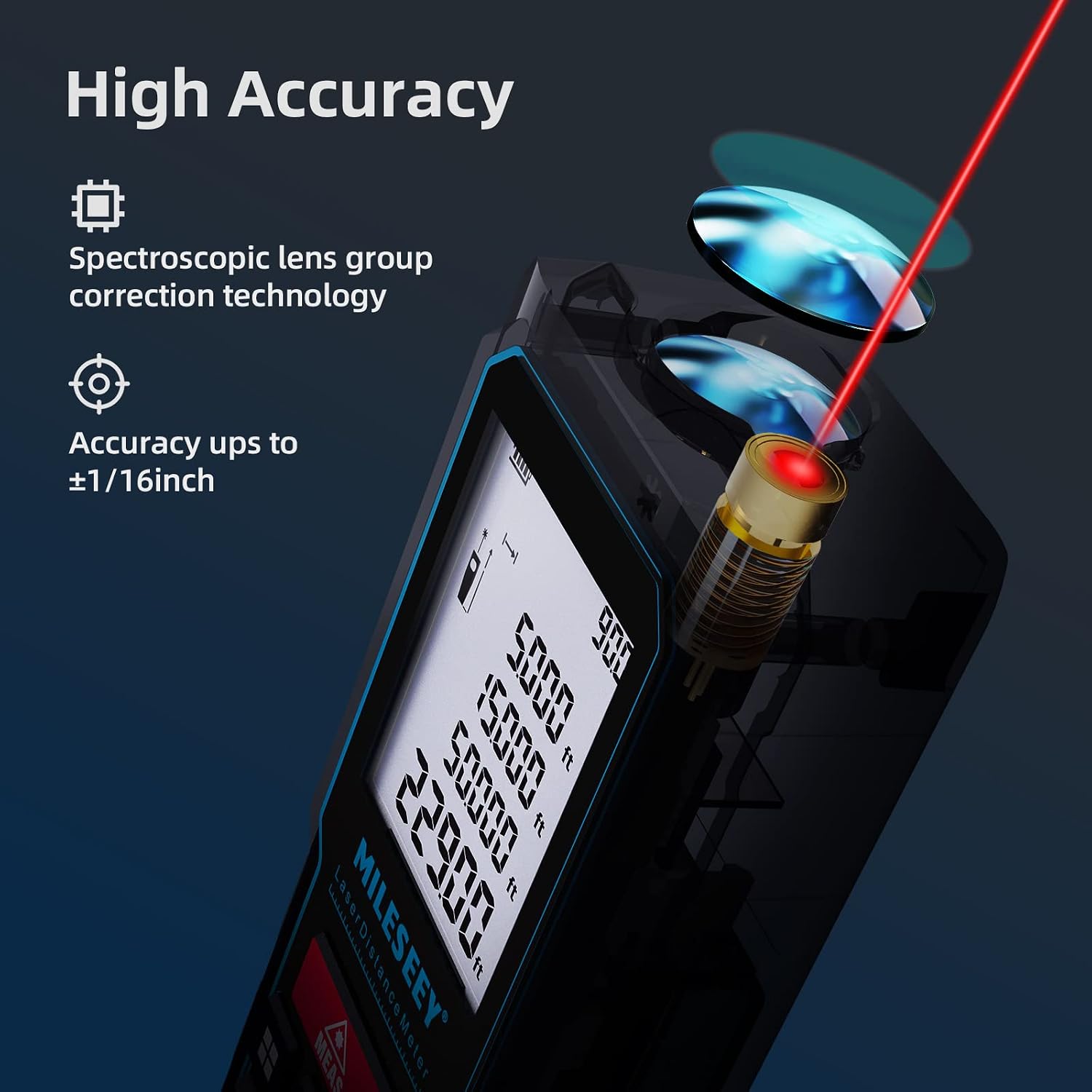
The MiLESEEY D5 70M-BT features a robust design with an easy-to-read LCD display and intuitive controls, offering high accuracy for various measurement tasks.
I componenti chiave includono:
- Emettitore/ricevitore laser: Located at the top for accurate measurements.
- Schermo LCD: 2-inch screen with backlight for clear visibility of measurements and settings.
- Measurement Button (MEAS): Avvia le misurazioni.
- Pulsanti funzione: For selecting measurement modes (distance, area, volume, Pythagorean, etc.).
- Pulsante Unità (UNITÀ): Changes measurement units (m/ft/in/ft+in).
- Pulsante Punto di Riferimento: Switches between front and rear reference points for measurement.
- Clear/Off Button (CLEAR/OFF): Cancella la misurazione corrente o spegne il dispositivo.
Impostare
Installazione della batteria
Il dispositivo richiede due batterie alcaline AAA da 1.5 V. Assicurarsi che la polarità sia corretta quando si inseriscono le batterie.
- Aprire il coperchio del vano batteria sul retro del dispositivo.
- Insert two AAA batteries, matching the positive (+) and negative (-) terminals as indicated.
- Chiudere saldamente il coperchio del vano batterie.
Accensione/spegnimento
- Per accendere, premere il MISURA pulsante.
- Per spegnere, tenere premuto il pulsante SMAMMARE button for a few seconds, or the device will automatically shut off after 180 seconds of inactivity to conserve energy.
Istruzioni per l'uso
Misurazione della distanza di base
Per una singola misurazione della distanza:
- Puntare il laser sul bersaglio.
- Premere il tasto MISURA button once. The measurement will be displayed on the screen within 0.5 seconds.

Modifica delle unità e del punto di riferimento
The device supports multiple units and reference points.
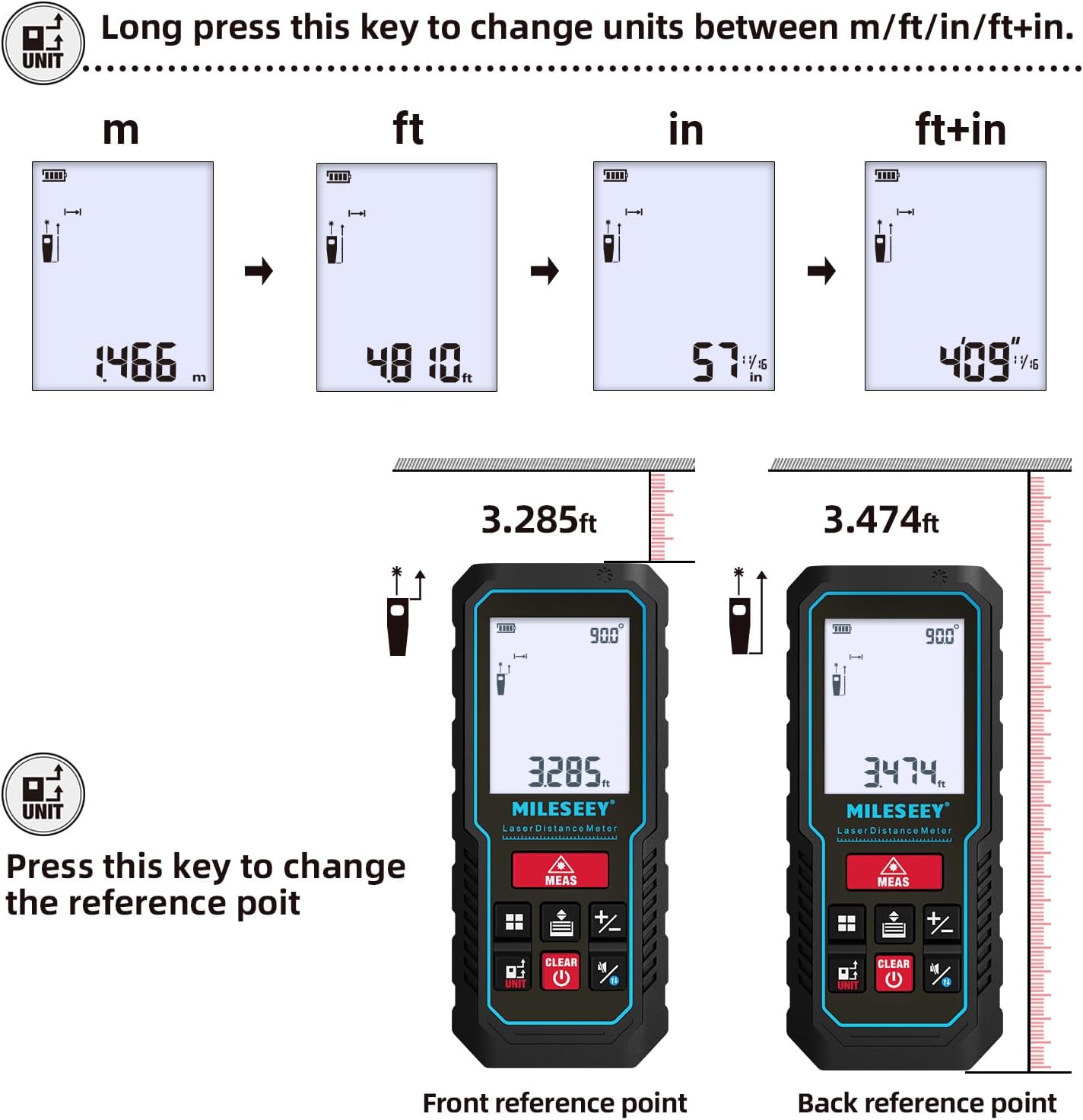
- Conversione dell'unità: Premere a lungo il tasto UNITÀ button to cycle through units: meters (m), feet (ft), inches (in), and feet + inches (ft+in).
- Punto di riferimento: Premere il tasto UNITÀ button briefly to switch the measurement reference point between the front edge and the rear edge of the device.
Modalità di misurazione
The MiLESEEY D5 offers various measurement functions:
- Misurazione continua: For tracking distances as you move the device.
- Misurazione dell'area: Calcola l'area di una superficie (lunghezza x larghezza).
- Misurazione del volume: Calcola il volume di uno spazio (lunghezza x larghezza x altezza).
- Pythagorean Method (2-point and 3-point): Indirect measurement for heights or distances where direct measurement is not possible.
- Addizione/Sottrazione: Add or subtract measurements.
- Auto Level: Automatically calculates horizontal distance.
- Auto Height: Automatically calculates vertical height.


Smartphone App Connectivity (Smart Life App)
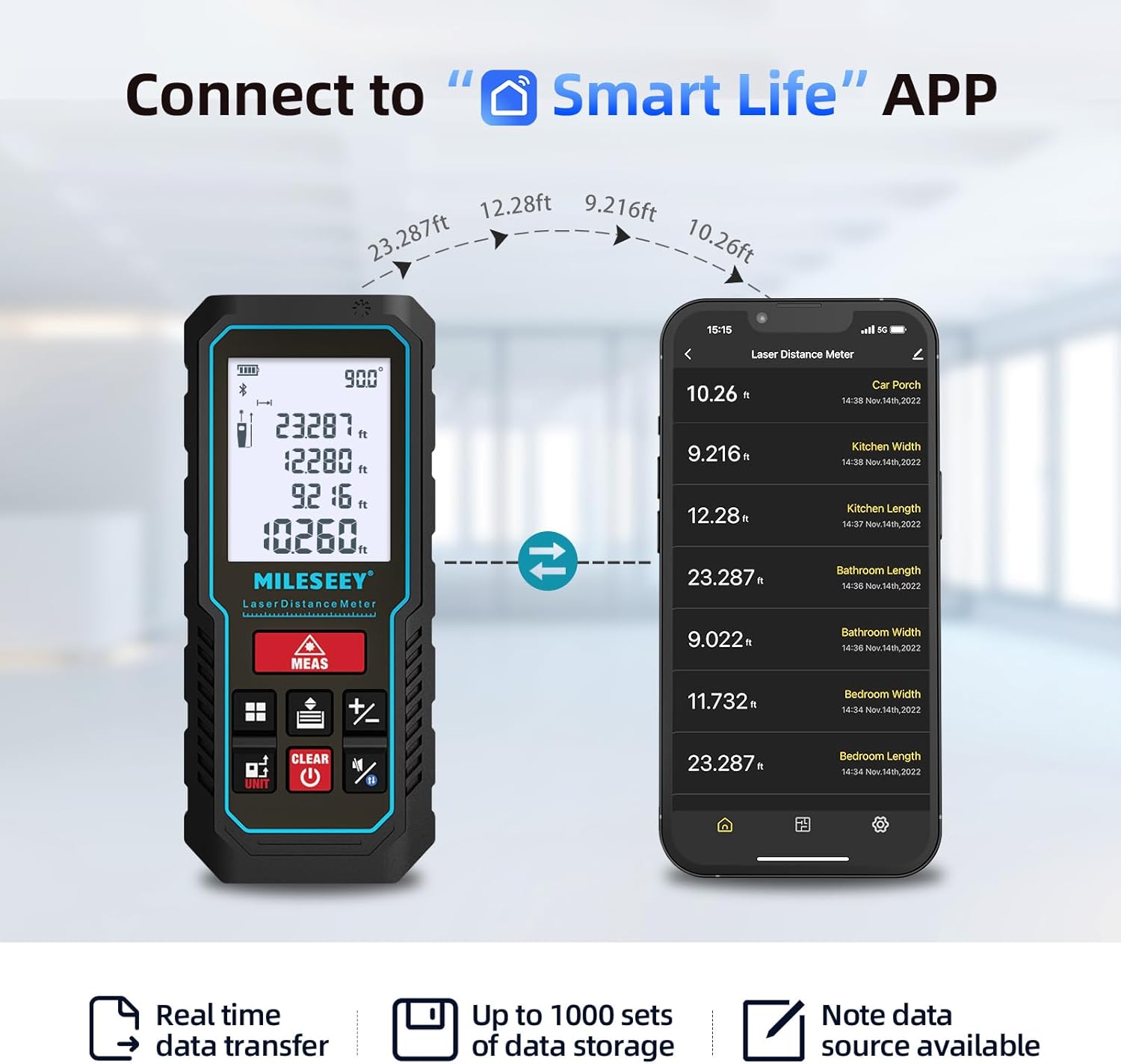
The MiLESEEY D5 70M-BT can connect wirelessly to your smartphone via the free "SMART LIFE" app, allowing for real-time data transfer, storage, and advanced functions.
- Download the "SMART LIFE" app from your device's app store (available on Google Play and Apple App Store).
- Enable Bluetooth on your smartphone and open the "SMART LIFE" app.
- Follow the in-app instructions to pair your MiLESEEY D5 device.
- Once connected, you can document measurements, create floor plans by drawing on photos or grids, and store up to 1000 sets of data.


Data Records and Mute Mode
- The device stores up to 30 data records, which can be recalled for review and calculation.
- A mute mode is available for quiet operation in sensitive environments.

Manutenzione
Una corretta manutenzione garantisce la longevità e la precisione del tuo dispositivo.
- Pulizia: Pulire il dispositivo con un panno morbido, damp panno. Non usare detergenti abrasivi o solventi.
- Magazzinaggio: Store the device in its portable pouch in a cool, dry place when not in use. Remove batteries if storing for extended periods.
- Protezione: The device has an IP54 rating, making it splash-resistant and dust-proof. Avoid submerging it in water. It also features 1-meter drop resistance.

Risoluzione dei problemi
If you encounter issues with your MiLESEEY D5, refer to the following common problems and solutions:
| Problema | Possibile causa | Soluzione |
|---|---|---|
| Il dispositivo non si accende | Batterie scariche o esaurite; installazione errata delle batterie. | Sostituire le batterie con nuove batterie alcaline AAA da 1.5 V. Assicurarsi che la polarità sia corretta. |
| Misurazioni imprecise | Obstruction in laser path; unstable measuring surface; extreme temperature changes; dirty lens. | Ensure a clear path for the laser. Measure on a stable surface. Allow device to acclimate to ambient temperature. Clean the lens with a soft cloth. |
| Cannot connect to Smart Life App | Bluetooth is off; app not installed; device not in pairing mode. | Ensure Bluetooth is enabled on your phone. Download and install the "SMART LIFE" app. Follow app instructions for pairing. |
| Messaggio di "Errore" sul display | Measurement out of range; strong light interference; target surface not reflective enough. | Ensure target is within 0.16m - 70m range. Avoid measuring in direct sunlight or strong light. Use a reflective target plate if necessary. |
Specifiche
| Caratteristica | Dettaglio |
|---|---|
| Marca | Mileseey |
| Numero di modello | D5 (70M-BT) |
| Campo di misura | 0.16 m - 70 m |
| Precisione | ±2 mm |
| Classe laser | Classe II |
| Tipo di laser | 635nm <1mW |
| Display | LCD da 2 pollici con retroilluminazione |
| Sensore angolare elettronico | Yes, ±0.3° accuracy |
| Funzioni di misurazione | Distance, Continuous, Area, Volume, Pythagorean (2/3-point), Addition/Subtraction, Auto Level, Auto Height |
| Unità | m / piedi / pollici / piedi + pollici |
| Record di dati | 30 (on device), up to 1000 (via app) |
| Connettività | Bluetooth (app Smart Life) |
| Alimentazione elettrica | 2 batterie alcaline AAA da 1.5 V |
| Spegnimento automatico | 180 secondi di inattività |
| Grado di protezione IP | IP54 (Splash-resistant, Dust-proof) |
| Resistenza alla caduta | 1 metro |
| Materiale | Acrilonitrile Butadiene Stirene (ABS) |
| Dimensioni (L x P x A) | 15.2 x 10.1 x 4.8 cm |
| Peso dell'articolo | 220 grammi |
Garanzia e supporto
MiLESEEY provides comprehensive support for its products.
- Garanzia: The device comes with a 12-month warranty.
- Garanzia soddisfatti o rimborsati: Viene offerta una garanzia di rimborso di 90 giorni.
- Supporto esteso: 2 years of assistance after registration and lifetime technical support from MILESEEY.
- For technical assistance or warranty claims, please contact MILESEEY customer service through their official channels or the retailer where the product was purchased.


