
1. Introduzione
The LiebeWH Wall Hanging Sound Level Meter is a versatile device designed for accurate measurement of sound levels, temperature, and humidity. Its large 11-inch LED display provides clear, real-time readings, making it suitable for various environments such as classrooms, offices, studios, and homes. This manual provides essential information for the proper setup, operation, and maintenance of your device.
2. Informazioni sulla sicurezza
- Non esporre il dispositivo a temperature estreme, alla luce solare diretta o a elevata umidità.
- Evitare di far cadere o sottoporre il dispositivo a forti impatti.
- Utilizzare solo il cavo USB in dotazione per la ricarica.
- Non tentare di aprire o riparare il dispositivo da soli. Per qualsiasi intervento di assistenza, rivolgersi a personale qualificato.
- Tenere fuori dalla portata dei bambini.
3. Contenuto della confezione
Si prega di controllare la confezione per verificare la presenza dei seguenti elementi:
- 1 x LiebeWH Wall Hanging Sound Level Meter
- 1 x USB Charging Cable (9.8 ft / 300 cm)
- Viti di montaggio e tasselli

Image: Contents of the product package, including the USB charging cable and mounting hardware.
4. Caratteristiche del prodotto
- Ampio display LED: An 11-inch bright LED screen clearly shows real-time decibel levels, temperature, and humidity.
- Automatic Noise Alarm: The display color changes automatically based on decibel levels for quick visual alerts:
- Green: Less than 60dB
- Yellow: 60 to 75dB
- Orange: 75 to 85dB
- Red: 85dB or more
- Misurazione multifunzionale: Measures sound levels from 30 to 130 decibels, as well as ambient humidity and temperature.
- Cavo USB lungo: Powered by a 2000mAh Li-ion battery and includes a 9.8 ft (300 cm) USB cable for convenient charging and continuous power.
- Posizionamento versatile: Can be easily hung on a wall or placed on a table, making it suitable for various indoor environments.
5. Impostazione
5.1 Ricarica del dispositivo
Before first use, fully charge the device. Connect the provided USB cable to the charging port on the side of the meter and plug the other end into a standard USB power adapter (not included) or a computer USB port. The battery indicator on the display will show charging status.
5.2 Opzioni di montaggio
The sound level meter offers two primary placement options:
- Posizionamento sul tavolo: Simply place the device on a flat, stable surface.
- Montaggio a parete:
- Choose a suitable location on a wall, away from direct heat sources or excessive vibrations.
- Use the included mounting screws and wall plugs to securely fasten the device to the wall. The back of the unit features keyhole slots for easy hanging.

Immagine: in alto view of the meter showing control buttons and a rear view illustrating the wall mounting points.
6. Istruzioni per l'uso
6.1 Accensione/spegnimento
Premere e tenere premuto il pulsante di accensione (U) located on the top of the device to turn it on or off.
6.2 Fine displayview
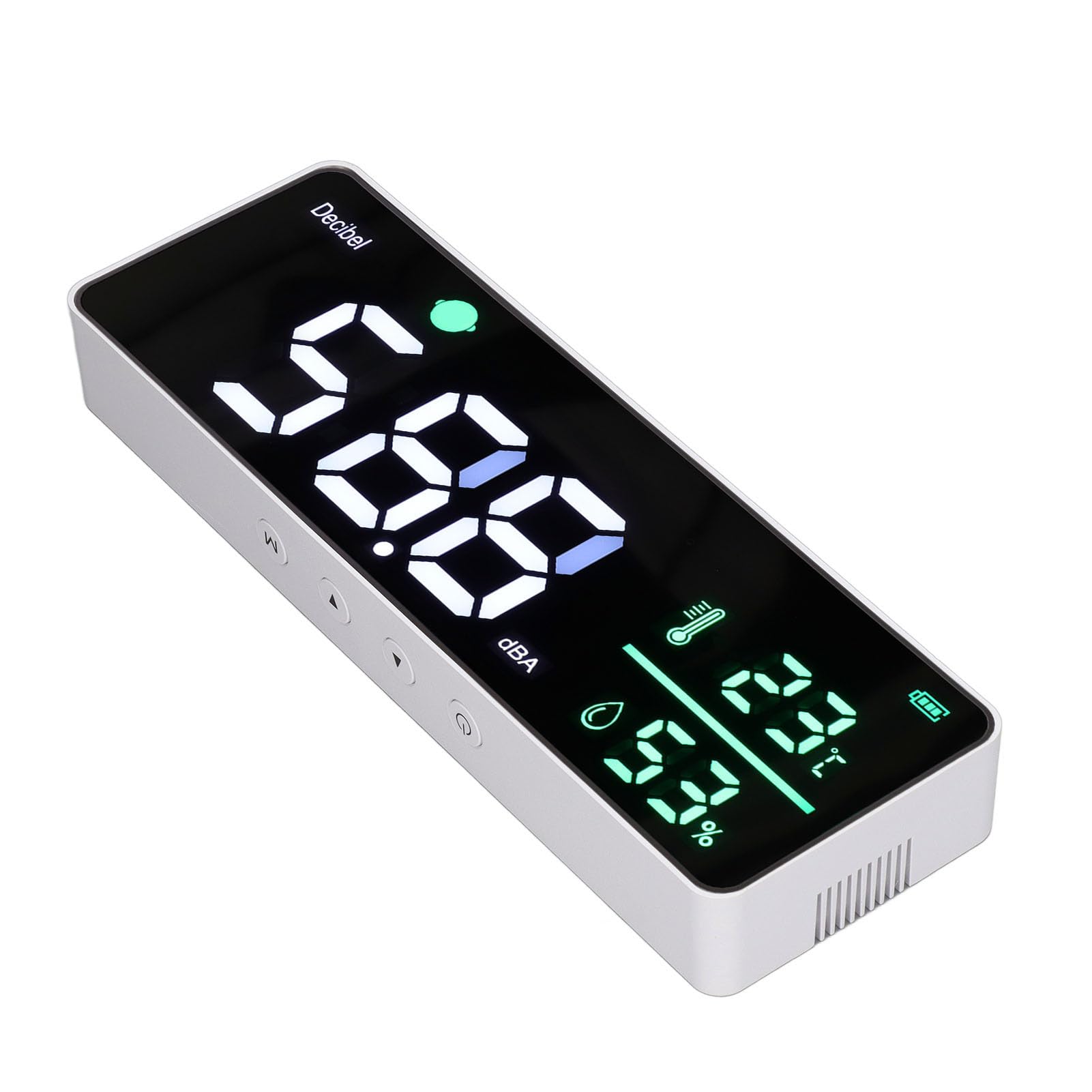
Immagine: Frontale view of the sound level meter display, showing current decibel reading, temperature, humidity, and battery status.
The large LED display shows the following information:
- Decibel Level (dB): The prominent large numbers indicate the current sound level.
- Temperatura (°C): Visualizza la temperatura ambiente.
- Umidità (%): Shows the relative humidity.
- Indicatore della batteria: Located in the top right corner, showing the current battery charge level.
- Color-Coded Alarm: The small circular indicator next to "Decibel" changes color based on the sound level, as described in Section 4.
6.3 Selezione della modalità
Press the 'M' button on the top of the device to cycle through different display modes or settings, if available. Consult the on-screen prompts for specific options.
6.4 Regolazione delle impostazioni
Use the '▲' (Up) and '▼' (Down) buttons to adjust settings when in a configuration mode. These buttons are located on the top panel of the device.

Immagine: Examples of the sound level meter being used in different settings, including a classroom, meditation room, studio, and study room.
7. Manutenzione
- Pulizia: Pulire il dispositivo con un panno morbido e asciutto. Non utilizzare detergenti abrasivi o solventi.
- Magazzinaggio: Quando non si utilizza il dispositivo per lunghi periodi, conservarlo in un luogo fresco e asciutto.
- Cura della batteria: To prolong battery life, avoid fully discharging the battery frequently. Recharge when the battery indicator is low.
8. Risoluzione Dei Problemi
| Problema | Possibile causa | Soluzione |
|---|---|---|
| Il dispositivo non si accende. | Batteria scarica o scarica. | Collegare il dispositivo a una fonte di alimentazione tramite il cavo USB e lasciarlo caricare. |
| Il display è scuro o illeggibile. | Insufficient power or display settings. | Ensure the device is charged or connected to power. Check if there are brightness settings (refer to operating instructions). |
| Letture imprecise. | Posizionamento del dispositivo o fattori ambientali. | Ensure the device is placed in an open area, away from direct airflow, heat sources, or obstructions. Avoid placing near loud machinery for accurate sound readings. |
| I pulsanti non rispondono. | Problema temporaneo del software. | Prova a riavviare il dispositivo tenendo premuto il pulsante di accensione. Se il problema persiste, contatta l'assistenza clienti. |
9. Specifiche
- Marca: LiebeWH
- Modello: LiebeWHun3h5zbxsg
- Sound Measurement Range: 30 - 130 dB
- Display: 11-inch Large LED
- Fonte di energia: 2000mAh Lithium Ion Battery, 5V USB
- Intervallo di temperatura: Fino a 50 °C
- Precisione della temperatura: 1 °C
- Tipo di montaggio: Montaggio a parete
10. Garanzia e supporto
For warranty information or technical support, please refer to the documentation included with your purchase or contact LiebeWH customer service directly. You can often find contact details on the manufacturer's official websito o tramite il rivenditore presso il quale è stato acquistato il prodotto.