
1. Introduzione
1.1 Prodotto finitoview
The ZKTeco MB2000 is an advanced access control and attendance recording device designed for efficient management of personnel entry and exit. It features fingerprint recognition technology for secure and reliable identification. This manual provides detailed instructions for the installation, operation, and maintenance of your MB2000 device.
1.2 Caratteristiche principali
- Riconoscimento delle impronte digitali: High-accuracy biometric identification for access and attendance.
- IPX7 International Protection Rating: Fornisce protezione contro l'immersione in acqua fino a 1 metro per 30 minuti.
- Design leggero: Facilitates easy installation and portability.
- Connettività wireless: Enables flexible data transfer and device management.
1.3 Contenuto della confezione
Verificare che tutti gli articoli siano presenti nel pacco:
- ZKTeco MB2000 Fingerprint Device
- Supporto di montaggio
- User Card (for initial setup or specific functions)
- Adattatore di alimentazione (non elencato esplicitamente ma implicito per il funzionamento)
- Manuale dell'utente (questo documento)
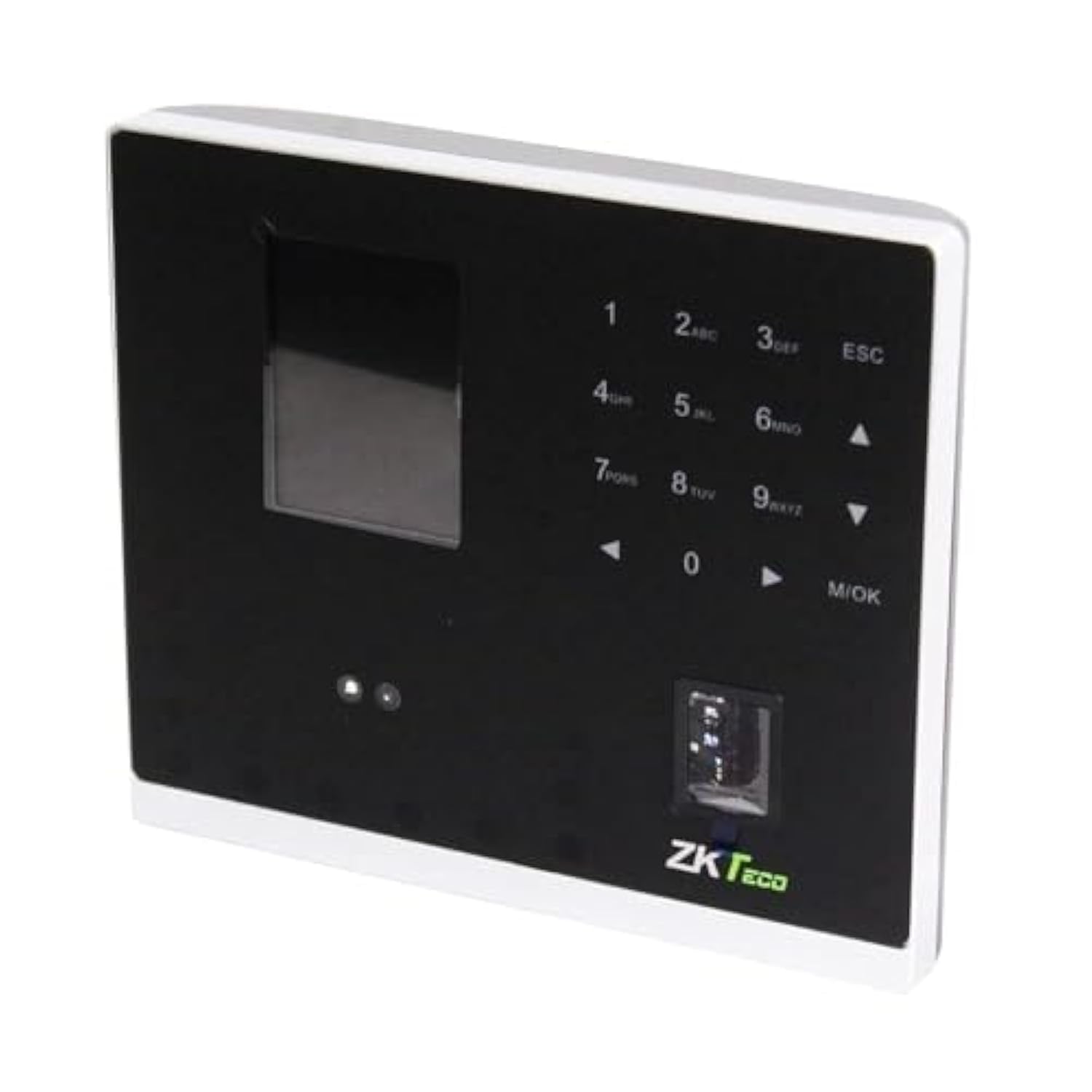
Figura 1.1: ZKTeco MB2000 Access Control and Attendance Recording Device. This image shows the front view of the compact device, highlighting its fingerprint sensor and display screen.
2. Informazioni sulla sicurezza
Si prega di leggere e comprendere tutte le istruzioni di sicurezza prima di utilizzare il dispositivo per evitare lesioni o danni.
- Alimentazione elettrica: Use only the specified power adapter provided with the device. Using an incorrect power supply may damage the device and void the warranty.
- Ambiente: Do not expose the device to extreme temperatures, direct sunlight, or corrosive substances. While rated IPX7, prolonged submersion or exposure to high-pressure water jets is not recommended.
- Gestione: Avoid dropping or subjecting the device to strong impacts. Do not attempt to disassemble or repair the device yourself. Contact qualified service personnel for assistance.
- Pulizia: Per la pulizia, utilizzare un panno morbido e asciutto. Non utilizzare detergenti liquidi o spray.
3. Guida all'installazione
3.1 Disimballaggio e ispezione
Carefully remove the device and all accessories from the packaging. Inspect for any signs of damage. If any components are missing or damaged, contact your supplier immediately.
3.2 Montaggio del dispositivo
The MB2000 can be mounted using the provided stand. Choose a stable, flat surface for placement. Ensure the device is positioned at a comfortable height for users to access the fingerprint sensor.
- Attach the stand securely to the back of the MB2000 device.
- Place the device with the stand on your desired surface.
- Ensure the device is stable and will not easily tip over.
3.3 Collegamento di alimentazione
Collega l'adattatore di alimentazione alla porta di ingresso dell'alimentazione del dispositivo e poi collegalo a una presa elettrica standard. Il dispositivo si accenderà automaticamente.
3.4 Configurazione iniziale
Upon first power-on, the device may prompt you to set up an administrator. Follow the on-screen instructions to register the first administrator fingerprint or card. This administrator will have privileges to manage users and device settings.
4. Istruzioni per l'uso
4.1 Registrazione dell'utente
Per registrare un nuovo utente:
- Access the device menu using the administrator's fingerprint or card.
- Navigate to the 'User Management' section.
- Selezionare "Aggiungi utente".
- Enter the user's ID and name (if applicable).
- Register the user's fingerprint by placing their finger on the sensor multiple times as prompted.
- Alternatively, register a user card by presenting it to the device's card reader.
- Salvare le informazioni dell'utente.
4.2 Controllo degli accessi
For access control, registered users can gain entry by:
- Verifica delle impronte digitali: Place a registered finger on the sensor. The device will verify the fingerprint and grant access if authorized.
- Presentazione della carta: Present a registered user card to the device's card reader. The device will verify the card and grant access if authorized.
4.3 Registrazione delle presenze
The device automatically records attendance when a user successfully verifies their identity for access. The timestamp of the verification is logged as an attendance record.
4.4 Gestione dei dati
Attendance logs and user data can be managed through the device's interface or by connecting to a compatible software (if available). Refer to the device's on-screen menu for options to download data via USB or network connection.
5. Manutenzione
5.1 Pulizia
Una pulizia regolare aiuta a mantenere prestazioni ottimali:
- Sensore di impronte digitali: Gently wipe the sensor surface with a soft, lint-free cloth. Do not use abrasive materials or harsh chemicals.
- Superficie del dispositivo: Clean the device's exterior with a slightly damp cloth, then dry immediately with a soft, dry cloth.
5.2 Aggiornamenti software
Controllare il produttore website periodically for software or firmware updates. Updates can improve performance, add features, or fix bugs. Follow the provided instructions carefully when performing updates.
5.3 Backup dei dati
Regularly back up attendance logs and user data to prevent loss. This can typically be done via USB export or through connected management software.
6. Risoluzione Dei Problemi
This section addresses common issues you might encounter with the MB2000 device.
| Problema | Possibile causa | Soluzione |
|---|---|---|
| Il dispositivo non si accende. | Nessuna alimentazione, adattatore difettoso o problema con la presa di corrente. | Check power connection. Ensure the adapter is correctly plugged in. Test the power outlet with another device. |
| Impronta digitale non riconosciuta. | Fingerprint not registered, dirty sensor, or incorrect placement. | Ensure the fingerprint is registered. Clean the sensor. Place the finger flat and centered on the sensor. Try re-registering the fingerprint. |
| Card not recognized. | Carta non registrata o tipo di carta errato. | Verify the card is registered. Ensure it is a compatible card type. |
| Problemi di trasferimento dati. | Incorrect settings, cable issues, or software incompatibility. | Check network settings or USB cable connection. Ensure the management software is compatible and correctly configured. |
7. Specifiche tecniche
| Specificazione | Dettaglio |
|---|---|
| Numero di modello | MB2000 |
| Marca | ZKTeco |
| Dimensioni di spedizione | Dimensioni: 31 x 25.5 x 12.5 cm |
| Peso dell'articolo | 1.5 kg |
| Caratteristiche speciali | Leggero |
| Connettività | Senza fili |
| Colore | Nero |
| Componenti inclusi | Fingerprint device, stand, card |
| Valutazione internazionale di protezione | IPX7 (impermeabile) |
| Numero di canali | 1 |
| Prima data disponibile | 6 novembre 2022 |
8. Garanzia e supporto
For warranty information, please refer to the warranty card included with your product or the purchase documentation. For technical support or service inquiries, please contact your local ZKTeco distributor or visit the official ZKTeco websito per i contatti.