
Introduzione
This manual provides detailed instructions for the safe and efficient operation of your LiTime 24V 20A LiFePO4 Battery Charger. Please read this manual thoroughly before using the product and retain it for future reference.
Informazioni importanti sulla sicurezza
- Compatibilità: This charger is designed exclusively for 24V (25.6V) LiFePO4 Lithium Batteries. Do not use with other battery types.
- Ambiente: This charger is not waterproof. Do not use in marine environments such as boats, ships, yachts, or with trolling motors. Avoid exposure to water or excessive moisture.
- Ventilazione: Ensure the charger is placed in a stable, well-ventilated area during use to prevent overheating. The built-in fan requires clear airflow.
- Connessioni: Always ensure battery terminals are tight to prevent overheating or melting. Connect the DC cable to the battery first, then the AC plug to grid power.
- Polarità: Observe correct polarity when connecting to the battery (Red = Positive, Black = Negative).
- Smontaggio: Do not disassemble the charger. Disassembly may cause malfunction and void the warranty.
- Voltage Corrispondenza: Il caricatore voltage must match the battery voltage. For adjustable voltage chargers, ensure settings match before connecting.
Caratteristiche del prodotto
- 29.2V Lithium Battery Charger: Specifically designed for charging 24V (25.6V) Lithium Batteries.
- Funzione di attivazione 0V: Can wake up deeply discharged batteries with triggered BMS cut-off protection.
- Tecnologia avanzata: Utilizes LLC half-bridge resonant soft-switching power supply control for compact, lightweight, and portable design.
- Sicurezza e affidabilità: CE & RoHS Certificated. Features fully automatic transition of CC, CV, and Float/Cut off.
- Protezioni integrate: Includes Over Temperature, Over Voltage, Short Circuit, and Reverse Polarity protection.
- Monitoraggio in tempo reale: LED indicators provide clear status of battery charging.
- Design durevole: High-grade aluminum alloy shell for good heat dissipation, with a built-in cooling fan.
- Connettore Anderson: Equipped with an Anderson connector for secure and easy connection.
Cosa c'è nella scatola

- LiTime 24V 20A LiFePO4 Battery Charger
- AC Cable (47.24 inches)
- DC Cable with Anderson Connection Wire (9.84 inches)
- Installation Screws (x4)
- Staffa di installazione (x1)
- Manuale dell'utente (questo documento)
Configurazione e installazione
Collegamento del caricatore
- Ensure the battery is compatible with the charger (24V LiFePO4).
- Connect the DC cable (with Anderson connector) to your LiFePO4 battery. Ensure a secure and tight connection to prevent arcing or overheating. Observe correct polarity: Red to Positive (+), Black to Negative (-).
- Plug the AC cable into the charger's AC port.
- Plug the AC power cord into a standard 100-240V, 50/60Hz wall outlet.

Montaggio del caricatore
The charger features mounting holes and an installation bracket for secure placement. Use the provided screws to mount the charger to a stable surface in a well-ventilated area. Ensure adequate space around the charger for airflow, especially around the cooling fan.

Istruzioni per l'uso
Charging Process (3 Stages with BMS Activation)
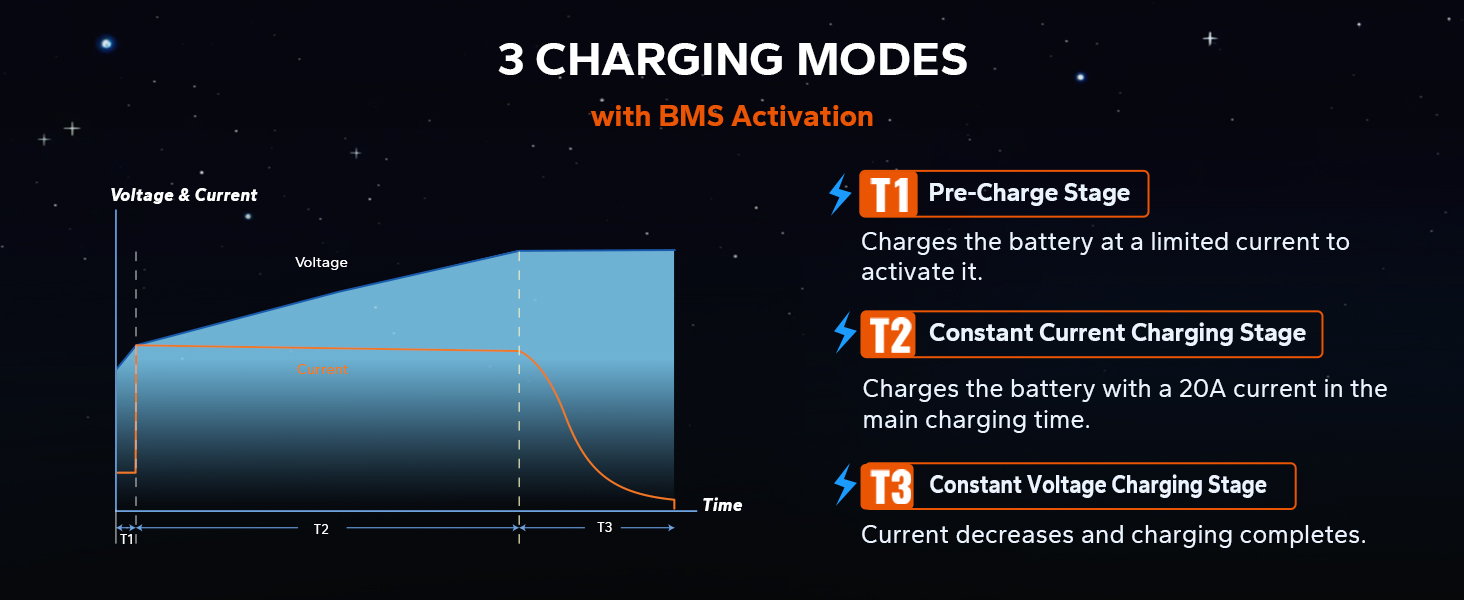
The LiTime charger employs a smart 3-stage charging process to optimize battery life and performance, including a 0V activation function for deeply discharged batteries.
- T1: Pre-Charge Stage: If the battery is deeply discharged (e.g., below 18V for a 24V battery), the charger will initiate a pre-charge stage. It charges the battery at a limited current to safely activate it and bring its voltage to a normal level. This stage is crucial for batteries that have entered BMS cut-off protection.
- T2: Constant Current Charging Stage: Una volta che la batteria voltage is within a safe range, the charger delivers a constant 20A current, rapidly charging the battery.
- T3: Constant Voltage Ricarica Stage: Quando la batteria si avvicina alla carica completa, il caricabatterie mantiene una tensione costantetage (29.2V) while gradually decreasing the current until the battery is fully charged.

Significati degli indicatori LED
The charger features LED indicators to provide real-time status updates:
- Rosso pieno: La batteria è in carica.
- Verde pieno: La batteria è completamente carica.
- Verde lampeggiante: Charger is on standby.
- Rosso lampeggiante: Charger fault or under protection.

Funzione di attivazione 0V
If your LiFePO4 battery's Battery Management System (BMS) has triggered its cut-off protection due to deep discharge, this charger can activate it. The charger will send a gentle current to safely raise the battery's voltage above the BMS cut-off threshold, allowing it to resume normal charging.

Video: This video demonstrates how to revive a LiFePO4 battery that has stopped working or won't charge, often due to BMS protection. It shows steps like disconnecting devices, letting the battery rest, and using a charger with an activation function. It also explains voltage thresholds for 12V and 24V batteries.
Video: This video explains the internal processes of a LiFePO4 charger during its 3-stage charging cycle: pre-charge, constant current, and constant voltage. It highlights how the charger safely raises voltage, delivers full power, and then steadily reduces current to protect battery cells and ensure full absorption of energy.
Manutenzione
- Pulizia: Keep the charger clean and free from dust and debris. Use a dry, soft cloth for cleaning. Do not use liquid cleaners.
- Magazzinaggio: Quando non lo si utilizza, conservare il caricabatterie in un luogo fresco, asciutto e ben ventilato.
- Ispezione dei cavi: Regularly inspect the AC and DC cables for any signs of damage, fraying, or loose connections. Replace damaged cables immediately.
- Ventilazione: Ensure the cooling fan is not obstructed during operation. Periodically check for dust buildup in the fan area.
Risoluzione dei problemi
Charger Won't Start or Battery Won't Charge
If your charger is not initiating a charge or your battery is not responding, consider the following:
- Controllare le connessioni: Ensure all connections (AC power, DC to battery) are secure and correctly polarized.
- Volume batteriatage: If your 24V battery's voltage is below 18V, its BMS might have activated protection. The LiTime charger has a 0V activation function to revive such batteries. Follow the steps in the "0V Activation Function" section.
- Dispositivi esterni: If an inverter or other device is plugged into the battery, it might block the charger's initial "wake-up" pulse.
- Unplug the inverter from the battery.
- Let the charger activate the battery.
- Reconnect the inverter after charging is complete.
- Guasto del caricabatterie: If the LED indicator is flashing red, there might be a charger fault or it's under protection (e.g., over-temperature, short circuit). Disconnect the charger, allow it to cool, and re-attempt connection. If the fault persists, contact customer service.
Specifiche
| Caratteristica | Dettaglio |
|---|---|
| Marca | LiTime |
| Modello | Caricabatterie LiFePO24 20 V 4 A |
| Dimensioni del prodotto | 10.87 x 4.75 x 3.52 pollici |
| Peso dell'articolo | 6.25 libbre |
| Volume di uscitatage | 29.2 Volt |
| Corrente di uscita | 20 Amps |
| Ingresso volumetage | 100-240 V CA, 50/60 Hz |
| Colore | Nero |
| Certificazioni | Certificazione CE, RoHS, FCC |
Garanzia e supporto
LiTime provides a Garanzia di qualità di 2 anni for this charger. For any technical support or customer service inquiries, please contact LiTime customer service. They offer professional technical support and online services with quick feedback within 24 hours.
You can find more information and contact details on the official LiTime websito: www.litime.com