
1. Introduzione
This multifunctional inverter/charger combines the functions of an inverter, solar charger, and battery charger, providing an uninterrupted power supply in a portable size. It is designed for various applications including home energy storage systems, RVs, and sheds. The integrated LCD display offers user-configurable button functions for easy access to settings such as battery charging current, AC/solar charger priority, and input voltage intervalli.
Key features include pure sine wave output, a 1.0 output power factor, and compatibility with WiFi & GPRS for iOS and Android systems. It boasts dual MPPT inputs and dual AC outputs, along with an integrated 160A MPPT solar charge controller. The inverter supports a high PV input voltage range (120 ~ 500 VDC) and includes built-in protection for harsh environments. A smart battery charger optimizes battery life, and RGB indicators automatically display the machine's operating mode. It supports both on-grid and off-grid operations via a touch screen interface and can function without batteries.
2. Informazioni sulla sicurezza
Leggere attentamente tutte le istruzioni e le avvertenze prima dell'installazione e dell'uso. Il mancato rispetto di queste istruzioni può causare scosse elettriche, incendi o lesioni gravi.
- L'installazione deve essere eseguita da personale qualificato.
- Prima di accendere il dispositivo, assicurarsi che tutti i collegamenti siano sicuri e corretti.
- Non esporre l'inverter a pioggia, neve, spruzzi o altri liquidi.
- Non smontare l'unità. All'interno non ci sono parti riparabili dall'utente.
- Garantire un'adeguata ventilazione intorno all'inverter per evitare il surriscaldamento.
- Tenere i bambini lontano dall'unità.
- Avoid installing the unit near bedrooms, as the cooling fan may generate noise during operation.
3. Prodotto finitoview e componenti
The PMSUN Hybrid Inverter is designed with user-friendly interfaces and robust construction.

Figura 3.1: Davanti view of the inverter, showing the main display and control buttons.

Figura 3.2: Posteriore view of the inverter, highlighting the connection ports.
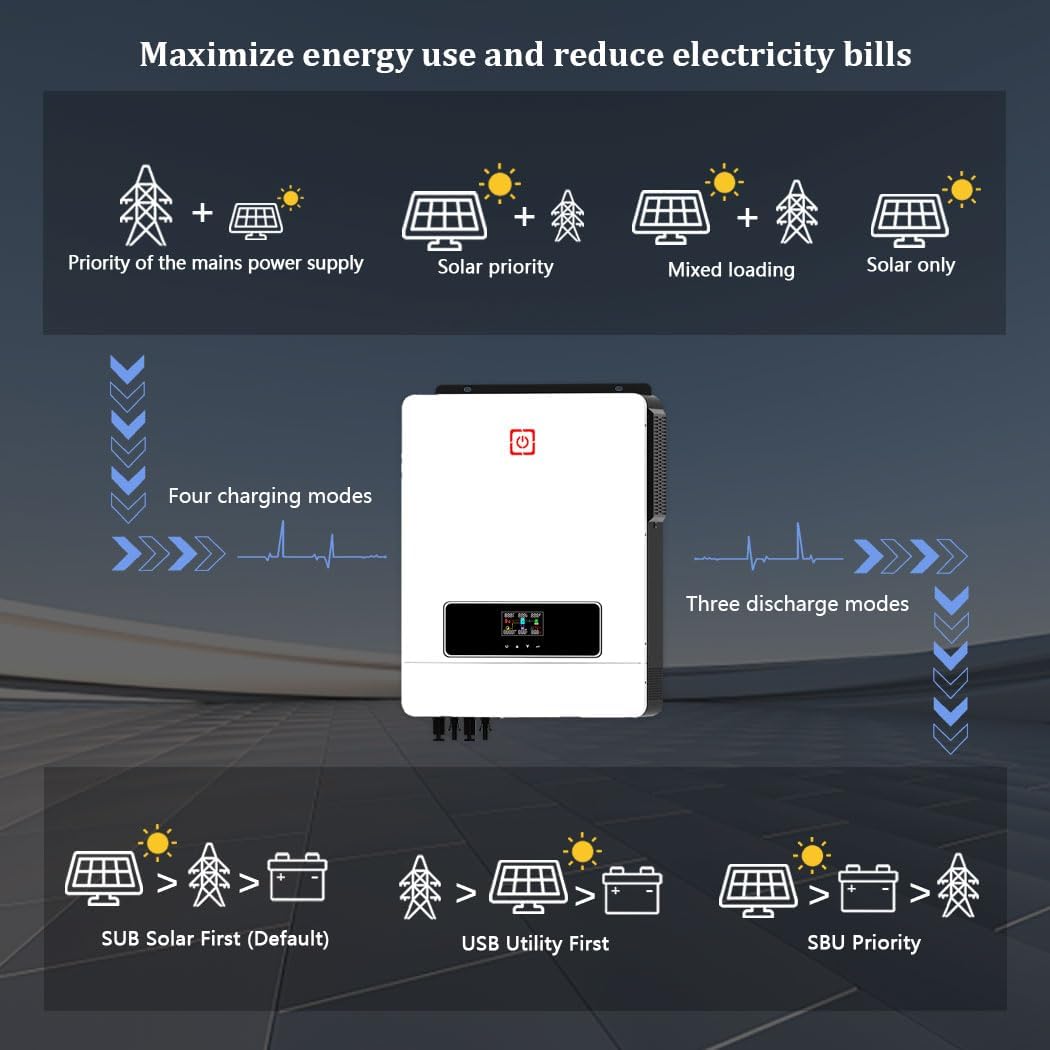
Figura 3.3: Port Introduction: (1) LCD display, (2) Status indicator, (3) Charging indicator, (4) Fault indicator, (5) Touch Function buttons, (6) AC input, (7) Main output, (8) Second output, (9) PV1 and PV2 input, (10) RS-232/WiFi/Remove LCD communication port, (11) Battery input.
4. Specifiche
| Caratteristica | Specificazione |
|---|---|
| Marca | PMSUN |
| Numero di modello | MPS-MAX 10.2KW-48V-M180A |
| Usi consigliati | Vehicle, Home, Office |
| Fonte di alimentazione | Batteria |
| Potenza nominale | 10200 Watt |
| Voltage | 48 Volt |
| Totale prese di corrente | 2 |
| Ingresso volumetage | 230 Volt CA |
| Potenza di uscita | 10200 Watt |
| Peso dell'articolo | 15.9 chilogrammi |
| Potenza massima in ingresso FV | 10200 L |
| PV voltage Gamma | 90-450 VCC |
| Massimo Circuito aperto fotovoltaico voltage (COV) | 500 V CC |
| Volume inizialetage | > 150 V |
| Vol. Operativo Ottimaletage | 300-360 V |
| Dimensioni consigliate del cavo fotovoltaico | Cavo AWG 10 |
| Corrente di carica massima | 160 A |
| Frequenza di uscita | Frequenza 60 Hz |
| Potenza di picco | 20400 L |
| Batterie compatibili | 48V Lead-acid (sealed, AGM, gel, submersible) and Lithium |
5. Configurazione e installazione
Proper installation is crucial for the safe and efficient operation of your PMSUN Hybrid Inverter. The battery capacity should be determined based on the specific load requirements and application scenario to avoid insufficient capacity or excessive power generation waste.
5.1 Schema elettrico
Refer to the following diagram for typical wiring connections. Ensure all cables are of appropriate gauge and connections are secure.
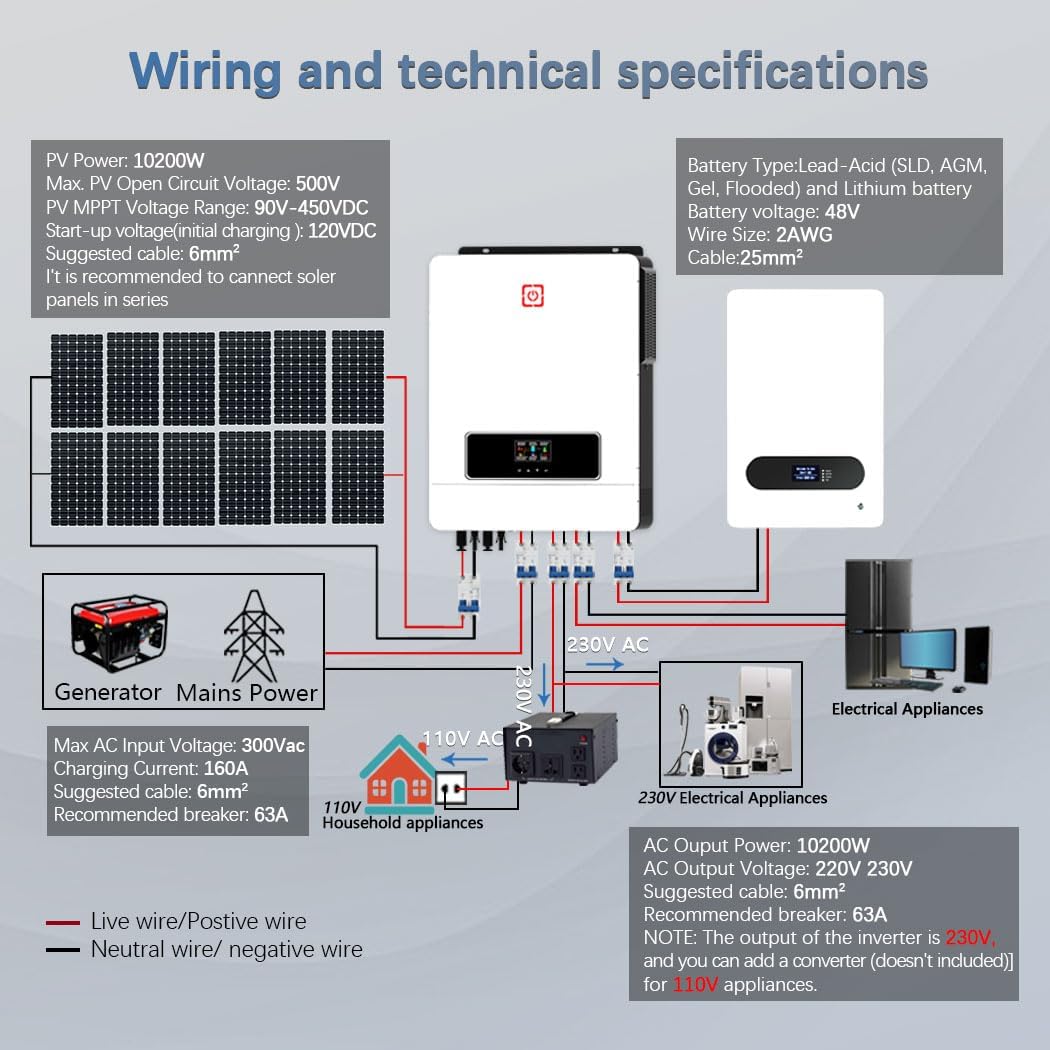
Figura 5.1: Wiring and Technical Specifications. This diagram illustrates the connections for PV panels, battery bank, generator/mains power, and both 230V AC and 110V AC household appliances (with an optional converter).
5.2 Compatibilità della batteria
The inverter is compatible with various 48V battery types, including Lead-Acid (sealed, AGM, gel, submersible) and Lithium batteries. It features an integrated BMS function and a lithium battery activation function to wake up dormant lithium batteries. For operation without batteries, the solar module voltage should exceed 200V DC.

Figura 5.2: Compatible Battery Types. The inverter supports AGM, GEL, FLD (Flooded), LI (Lithium), and SLD (Sealed Lead-Acid) battery chemistries.
6. Modalità operative e funzioni
The PMSUN Hybrid Inverter offers flexible operating modes to optimize energy usage and reduce electricity bills.
6.1 modalità di ricarica
L'inverter supporta quattro distinte modalità di ricarica:
- Solo solare: Carica le batterie esclusivamente tramite energia solare.
- Grid Period: Charges batteries from the utility grid.
- Hybrid Grid and Solar: Utilizes both grid and solar power for charging.
- Priorità solare: Prioritizes solar charging, using grid power only when solar is insufficient.
6.2 modalità di uscita
Three output modes are available to meet different application needs, ensuring uninterrupted power supply:
- Solar Priority (SUB Solar First - Default): Prioritizes solar power for loads, switching to battery or grid as needed.
- Utility Priority (USB Utility First): Prioritizes utility grid power for loads, using solar or battery as backup.
- Priorità SBU: Solar first, then Battery, then Utility.

Figura 6.1: Energy Flow and Priority Modes. This graphic shows how the inverter manages power from different sources to maximize energy use and reduce electricity bills.
6.3 Doppi ingressi MPPT
The inverter features dual MPPT inputs, allowing for two independent solar panel arrays. This optimizes power harvesting from solar panels, especially when panels are oriented differently or experience varying shading conditions throughout the day.

Figura 6.2: Dual MPPT Inputs. This setup allows for efficient power generation from solar panels even with varying sun exposure.
6.4 RGB Indicators
The inverter features RGB lighting that automatically changes color based on the operating mode:
- Viola: PV Mode (Solar power is active).
- Rosso: Battery Mode (Operating from battery power).
- Blu: Utility Mode (Operating from grid power).
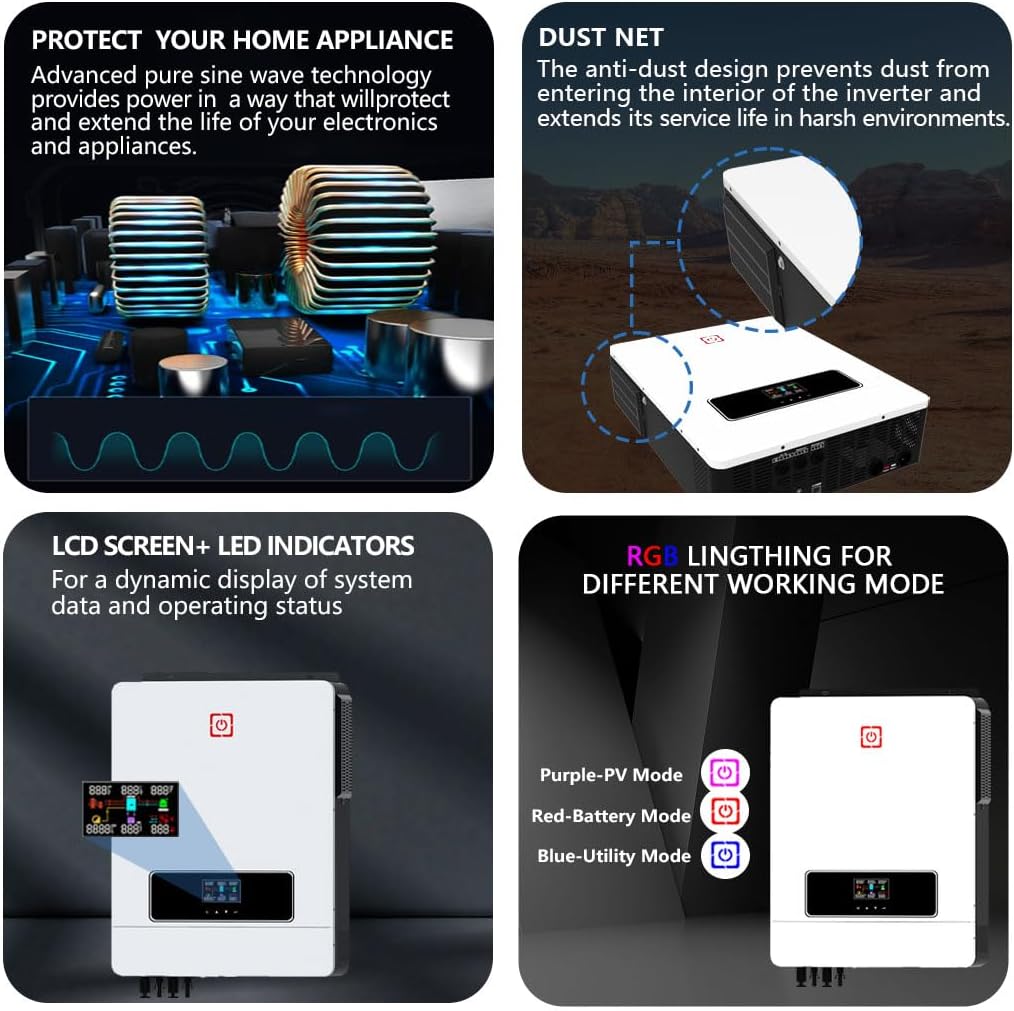
Figura 6.3: Additional Features: Pure sine wave output, dust net for protection, LCD screen with LED indicators, and RGB lighting for mode indication.
7. Manutenzione
Regular maintenance ensures the longevity and optimal performance of your PMSUN Hybrid Inverter.
- Pulizia: Periodically clean the exterior of the inverter with a dry cloth. Ensure the dust net is clear of debris to maintain proper airflow and prevent dust from entering the interior, which extends service life in harsh environments.
- Ventilazione: Ensure that the ventilation openings are not blocked. Adequate airflow is essential to prevent overheating.
- Connessioni: Regularly check all electrical connections for tightness and signs of corrosion. Loose connections can lead to poor performance or safety hazards.
- Stato della batteria: Monitor battery health and charge levels. Follow the battery manufacturer's guidelines for maintenance.
- Aggiornamenti del firmware: Controllare il produttore websito per eventuali aggiornamenti firmware disponibili per garantire che il tuo inverter funzioni con le funzionalità e i miglioramenti più recenti.
8. Risoluzione Dei Problemi
Questa sezione fornisce soluzioni ai problemi più comuni che potresti riscontrare con il tuo inverter.
8.1 Problemi comuni e soluzioni
- L'inverter non si accende:
- Check battery connections and ensure batteries are charged.
- Verify AC input connection if operating in grid mode.
- Assicurarsi che l'interruttore di alimentazione principale sia in posizione "ON".
- Nessuna potenza di uscita:
- Check for overload conditions. Reduce the connected load.
- Verify output circuit breaker status.
- Controllare il volume della batteriatage; if too low, the inverter may shut down.
- Batteria non in carica:
- Ensure PV panels are connected correctly and receiving sufficient sunlight.
- Controllare il volume di ingresso PVtage e corrente.
- Verify grid connection if charging from AC.
- Check battery type settings on the inverter's display.
- Rumore eccessivo della ventola:
- The fan operates to cool the inverter, especially under heavy load. This is normal.
- Garantire uno spazio di ventilazione adeguato attorno all'unità.
- If noise is unusually loud or persistent without load, contact support.
- Codici di errore sul display LCD:
- Refer to the specific error code displayed on the LCD screen. Consult the full manual (if available) or contact customer support with the error code for detailed guidance.
8.2 Protezione completa
L'inverter è dotato di funzioni di protezione complete a 360° per garantire un funzionamento sicuro e affidabile:
- Protezione da cortocircuito
- Protezione da sovraccarico
- Protezione da sovracorrente
- Protezione del riempimento
- Sotto il volumetage Protezione
- oltre il volumetage Protezione
- Protezione da sovraccarico
- Protezione da sovratemperatura

Figura 8.1: Comprehensive 360° Protection features of the inverter.
9. Supporto
For further assistance, technical support, or warranty claims, please contact PMSUN customer service through your point of purchase or the official PMSUN website. Please have your model number (MPS-MAX 10.2KW-48V-M180A) and purchase details ready when contacting support.