
Sharp RP-TT70
Sharp RP-TT70 Vinyl Record Player Turntable User Manual
Modello: RP-TT70
1. Prodotto finitoview
The Sharp RP-TT70 is a 12-inch vinyl record player turntable designed to deliver a rich audio experience with modern convenience. It features a classic wooden cabinet and comes with stereo bookshelf speakers. This belt-drive turntable supports multiple playback speeds and offers versatile connectivity options, including dual Bluetooth functionality.

Figure 1.1: Sharp RP-TT70 Turntable and Speakers. The turntable features a stylish wooden finish and a clear dust cover, flanked by two matching stereo bookshelf speakers.
2. Cosa è incluso
Si prega di controllare il contenuto della confezione per assicurarsi che siano presenti tutti gli articoli:
- Sharp RP-TT70 Turntable Unit
- Stereo Bookshelf Speakers (2 units)
- Copertura antipolvere
- Adattatore di alimentazione
- Manuale dell'utente (questo documento)
3. Istruzioni per l'installazione
Follow these steps to set up your Sharp RP-TT70 turntable:
- Posizionamento: Posizionare il giradischi su una superficie stabile e piana, lontano dalla luce solare diretta, da fonti di calore e da polvere eccessiva. Assicurarsi che vi sia un'adeguata ventilazione attorno all'unità.
- Collegamento dell'altoparlante: Connect the included stereo bookshelf speakers to the "SPEAKER OUT" terminals on the rear of the turntable. Ensure correct polarity (positive to positive, negative to negative).
- Collegamento elettrico: Connect the power adapter to the "POWER IN DC 12V" port on the rear of the turntable, then plug the adapter into a wall outlet.
- Copertura antipolvere: Carefully attach the dust cover to the hinges on the back of the turntable.

Figure 3.1: Rear Panel Connections. This image highlights the AUX-IN Jack, RCL (R&L) Speaker Out, Pitch (+)(-) Speed Calibration, and Power In DC 12V ports, crucial for proper setup.
4. Istruzioni per l'uso
4.1 Riproduzione di un disco in vinile
- Accensione: Turn the power knob to activate the turntable.
- Seleziona velocità: Adjust the speed selector to match the record's RPM (33 1/3, 45, or 78 RPM). For 45 RPM records, place the included 45 RPM adapter on the spindle.
- Registra il luogo: Posiziona con attenzione il disco in vinile sul piatto del giradischi.
- Sollevamento del braccio: Sollevare delicatamente il braccio utilizzando la leva di regolazione.
- Posizione Stilo: Spostare il braccio sul solco iniziale desiderato del disco.
- Braccio inferiore: Abbassare lentamente il braccio utilizzando la leva di avanzamento. La puntina entrerà in contatto con il disco e la riproduzione avrà inizio.
- Regolazione del volume: Regolare il volume utilizzando la manopola del volume sul giradischi.
- Funzione di arresto automatico: The turntable features an auto-stop function that will automatically stop the platter rotation when the record reaches its end.
4.2 Connettività Bluetooth
The Sharp RP-TT70 supports dual Bluetooth connectivity, allowing you to stream music in two ways:
- Streaming Vinyl to External Bluetooth Device:
- Assicurarsi che il giradischi sia acceso.
- Activate Bluetooth pairing mode on your external Bluetooth speaker or headphones.
- The turntable will automatically search for and connect to nearby Bluetooth devices. The Bluetooth indicator light will illuminate when connected.
- Once connected, audio from your vinyl record will play through the external Bluetooth device.
- Streaming Music from Your Phone to Turntable Speakers:
- Assicurarsi che il giradischi sia acceso.
- On your smartphone or other Bluetooth-enabled device, search for "Sharp RP-TT70" in the Bluetooth settings.
- Select the turntable to pair. The Bluetooth indicator light will illuminate when connected.
- Once connected, audio from your phone will play through the turntable's included stereo speakers.
4.3 Auxiliary Input (AUX-IN)
Connect external audio devices such as smartphones, tablets, or MP3 players using a 3.5mm audio cable (not included) to the AUX-IN jack on the rear of the turntable. Switch the input mode to AUX to play audio through the turntable's speakers.
4.4 Jack per cuffie
For private listening, connect headphones to the headphone jack located on the front panel of the turntable.
5. Manutenzione
Proper maintenance ensures the longevity and optimal performance of your turntable:
- Copertura antipolvere: Always keep the dust cover closed when the turntable is not in use to prevent dust accumulation on the platter and stylus.
- Pulizia dello stilo: Gently clean the stylus regularly using a soft brush designed for turntable styli. Brush from back to front.
- Pulizia del giradischi: Wipe the turntable and speakers with a soft, dry cloth. Do not use abrasive cleaners or solvents.
- Cartridge and Stylus Replacement: The RP-TT70 uses a changeable ceramic cartridge and stylus. If sound quality degrades or the stylus is damaged, replace it with a compatible Sharp replacement part.
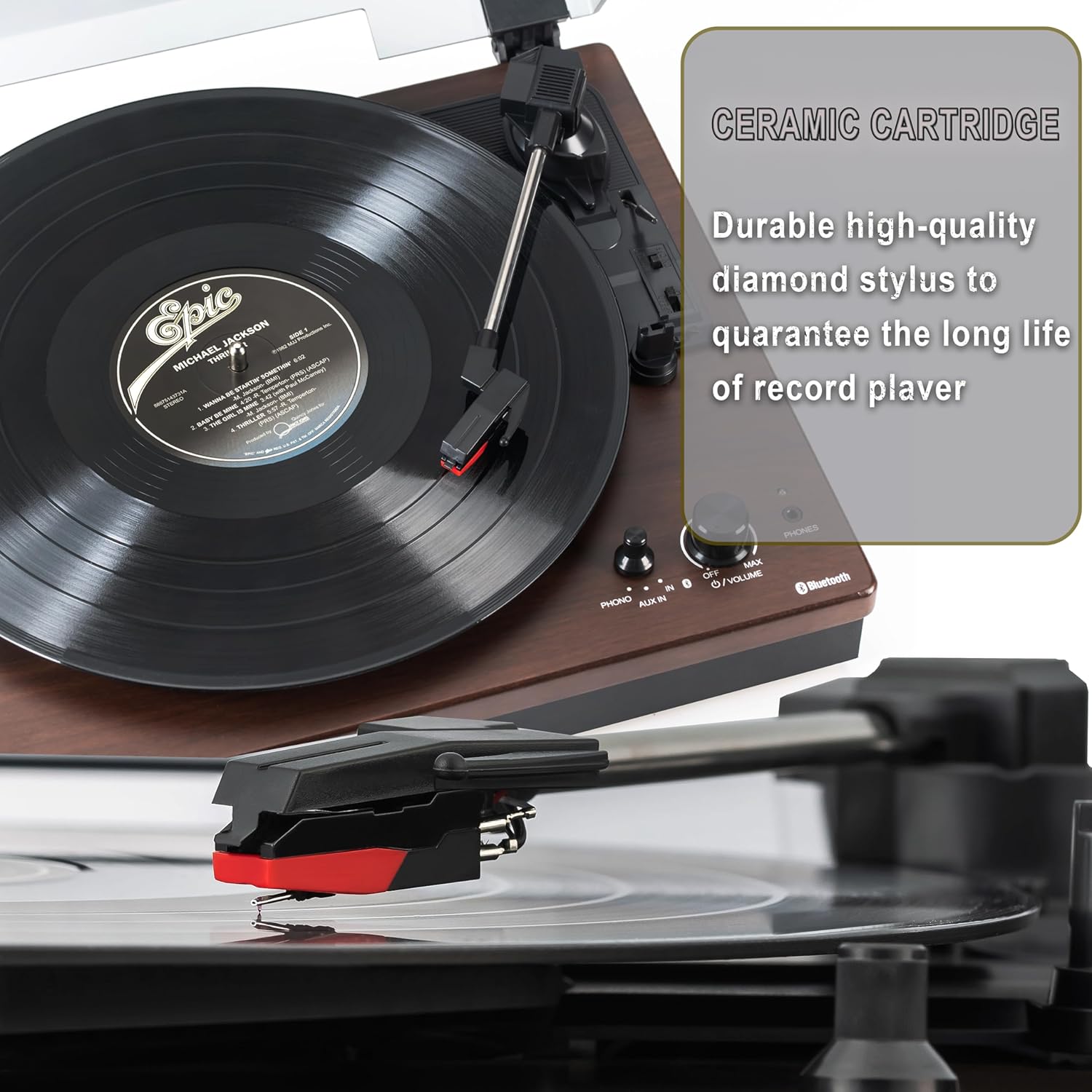
Figure 5.1: Ceramic Cartridge. The turntable is equipped with a durable high-quality diamond stylus designed for extended record playback life.
6. Risoluzione Dei Problemi
If you encounter issues with your Sharp RP-TT70, refer to the following common problems and solutions:
| Problema | Possibile causa | Soluzione |
|---|---|---|
| Nessun potere | Adattatore di alimentazione non collegato o presa non attiva. | Ensure power adapter is securely plugged into the turntable and a working wall outlet. |
| Nessun suono dagli altoparlanti | Speakers not connected correctly; Volume too low; Incorrect input mode. | Check speaker cable connections and polarity. Increase volume. Ensure turntable is in PHONO or AUX mode as appropriate. |
| Poor Sound Quality / Skipping | Puntina sporca o usurata; Disco sporco; Giradischi non in piano. | Clean the stylus and record. Ensure the turntable is on a stable, level surface. Consider replacing the stylus if worn. |
| Problemi di accoppiamento Bluetooth | Device too far; Bluetooth not enabled on external device; Interference. | Ensure devices are within range (approx. 30 ft). Confirm Bluetooth is enabled on the external device. Try restarting both devices. |
| Il piatto non gira | Belt dislodged; Auto-stop engaged prematurely. | Check if the drive belt is properly seated around the platter and motor pulley. If auto-stop is causing issues, ensure the record is placed correctly. |
7. Specifiche
| Caratteristica | Dettaglio |
|---|---|
| Numero di modello | RP-TT70 |
| Marca | Affilato |
| Dimensioni del prodotto | 16.8 x 13.5 x 2.8 pollici |
| Peso dell'articolo | 18.6 libbre |
| Tecnologia di connettività | Bluetooth (Bi-directional) |
| Velocità supportate | 33 1/3, 45, 78 giri al minuto |
| Componenti inclusi | Turntable, Stereo Bookshelf Speakers |
| Materiale | Plastica, legno |
| Colore | Black (with wooden finish) |
| Tipo di cartuccia | Changeable Ceramic Cartridge and Stylus |
| Caratteristiche | Belt-drive, Auto-return, Pitch control, Dust cover |
8. Garanzia e supporto
For warranty information and technical support, please refer to the official Sharp webo contattare direttamente il servizio clienti. Conservare la ricevuta d'acquisto come prova d'acquisto per eventuali reclami in garanzia.
Ask a question about this manual
Ask about setup, troubleshooting, compatibility, parts, safety, or missing instructions. Manuals+ will review the question and use this page’s manual context to help answer it.