
Wooask WOO09
Manuale utente del dispositivo traduttore di lingue Wooask W09
Model: WOO09
1. Introduzione
The Wooask W09 Language Translator Device is an advanced, portable tool designed for real-time two-way voice and photo translation across 144 languages and accents. Utilizing cutting-edge AI technology, it facilitates seamless communication for travel, business, and learning purposes. This manual provides detailed instructions for setting up, operating, and maintaining your device to ensure optimal performance.

Immagine: Fronte e retro view of the Wooask W09 Language Translator Device, showcasinil suo design elegante e il suo fattore di forma compatto.
2. Caratteristiche principali
- Two-way Voice Translation: Supports 144 languages and accents with up to 97% accuracy for real-time communication.
- Fast AI Translator: Powered by Google, Microsoft, and Nuance engines, offering response times under 0.5 seconds.
- HD Image Translation: Translates text from images in 42 languages, recognizing both print and handwritten fonts.
- Batteria a lunga durata: 1500mAh battery provides 8 hours of continuous work and a week of standby time.
- Schermo touch HD: 2.4-inch retina screen (240x230 resolution) for intuitive navigation and clear display.
- Connettività: Supports Wi-Fi and Hotspot connections for online translation.
3. Layout e controlli del dispositivo

Image: Diagram illustrating the physical layout of the Wooask W09, including the On/Off Button, Volume buttons, Touch Screen, Translation Keys (A and B), USB Charging Port, Microphone, Camera, and Speaker.
- Pulsante On/Off: Located on the side, used to power the device on or off.
- Pulsanti Vol+ / Vol-: Regola il volume dell'altoparlante.
- Schermo tattile: Interfaccia principale per la navigazione e l'interazione.
- Translation Key A: Press and hold to speak for translation.
- Translation Key B: Press and hold to speak for translation in the second language.
- Porta di ricarica USB: Per caricare il dispositivo.
- Microfono: Cattura l'input vocale per la traduzione.
- Telecamera: Utilizzato per la traduzione di foto.
- Oratore: Emette l'audio tradotto.
4. Guida all'installazione
4.1 Carica iniziale
Before first use, fully charge the Wooask W09 device. Connect the included USB cable to the device's charging port and plug the other end into a compatible USB power adapter (not included) or a computer's USB port. The charging indicator will show the charging status. A full charge typically takes 1-2 hours.
4.2 Accensione/Spegnimento
- Per accendere: Press and hold the On/Off button until the screen lights up.
- Per spegnere: Press and hold the On/Off button until a power-off prompt appears on the screen. Select "Power Off" to shut down the device.
4.3 Connessione di rete (Wi-Fi e hotspot)
The Wooask W09 requires an internet connection for real-time translation. You can connect via Wi-Fi or a mobile hotspot.
- Dalla schermata principale, tocca l'icona "Impostazioni".
- Select "WLAN" (Wi-Fi).
- Sposta l'interruttore Wi-Fi su "On".
- The device will scan for available networks. Select your desired Wi-Fi network from the list.
- Se richiesto, inserisci la password e tocca "Connetti".
- Una volta effettuata la connessione, l'icona Wi-Fi apparirà nella barra di stato.

Image: Screenshot of the Wooask W09 screen showing the Wi-Fi and Hotspot connection options, with a list of available Wi-Fi networks.
5. Istruzioni per l'uso
5.1 Voice Translation (Two-way)
The W09 supports real-time two-way voice translation. Ensure you are connected to the internet.
- Dalla schermata principale, tocca "Traduzione vocale".
- Select the two languages for translation (e.g., English to Spanish). The left side of the screen will display the first language, and the right side the second.
- Per parlare nella prima lingua, tieni premuto Translation Key A (usually the top button). Speak clearly into the microphone. Release the button when finished. The device will translate and speak the text in the second language.
- Per parlare nella seconda lingua, tieni premuto Translation Key B (usually the bottom button). Speak clearly into the microphone. Release the button when finished. The device will translate and speak the text in the first language.
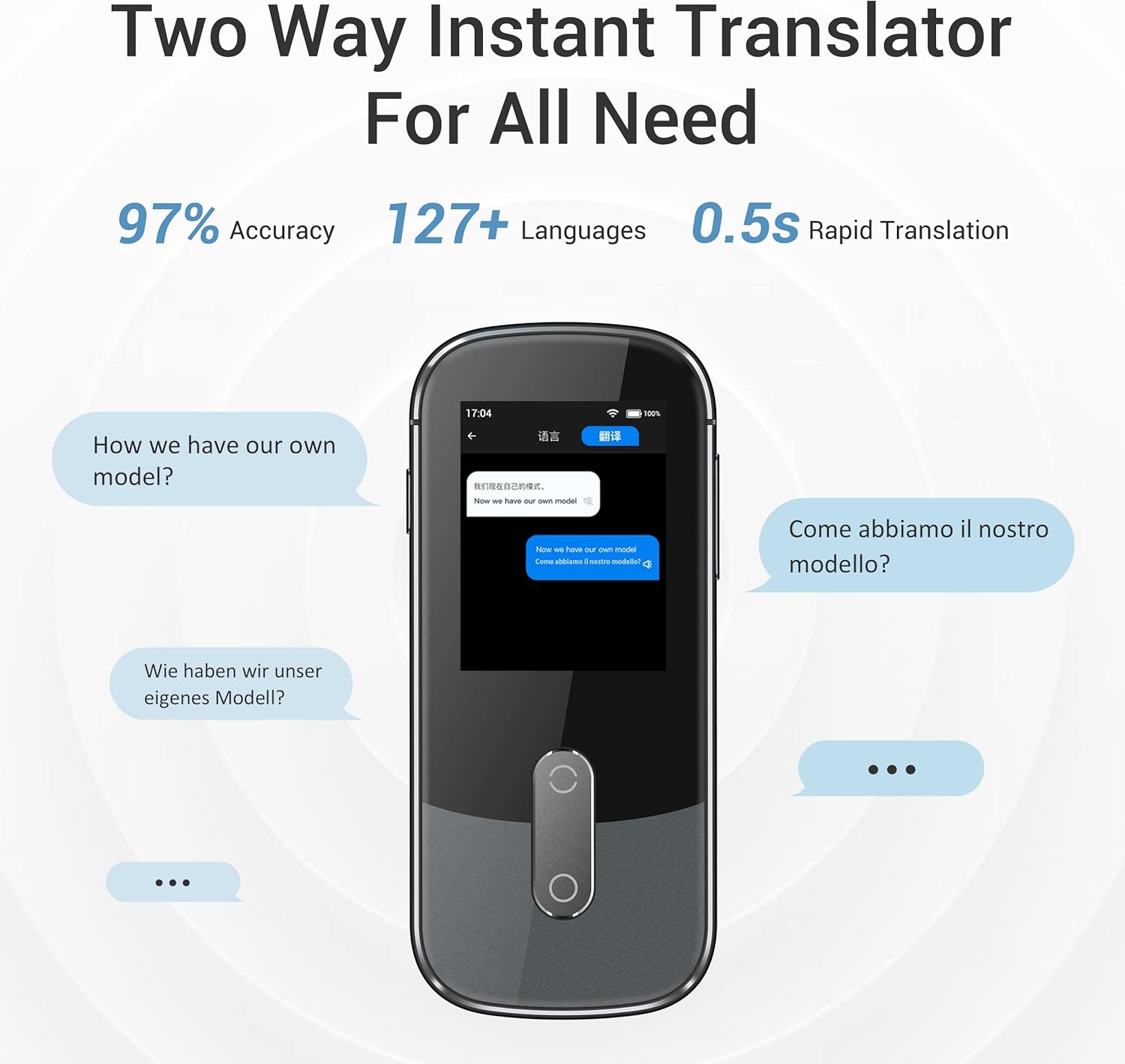
Image: Screenshot of the Wooask W09 screen demonstrating two-way instant translation, showing text bubbles in different languages.
5.2 Traduzione fotografica
The W09 can translate text from images, useful for signs, menus, or documents.
- Dalla schermata principale, tocca "Traduzione foto".
- Select the source language (language of the text in the image) and the target language (language you want to translate to).
- Point the device's camera at the text you wish to translate. Ensure the text is well-lit and clear within the camera frame.
- Tocca il pulsante di acquisizione sullo schermo. Il dispositivo elaborerà l'immagine e visualizzerà il testo tradotto.
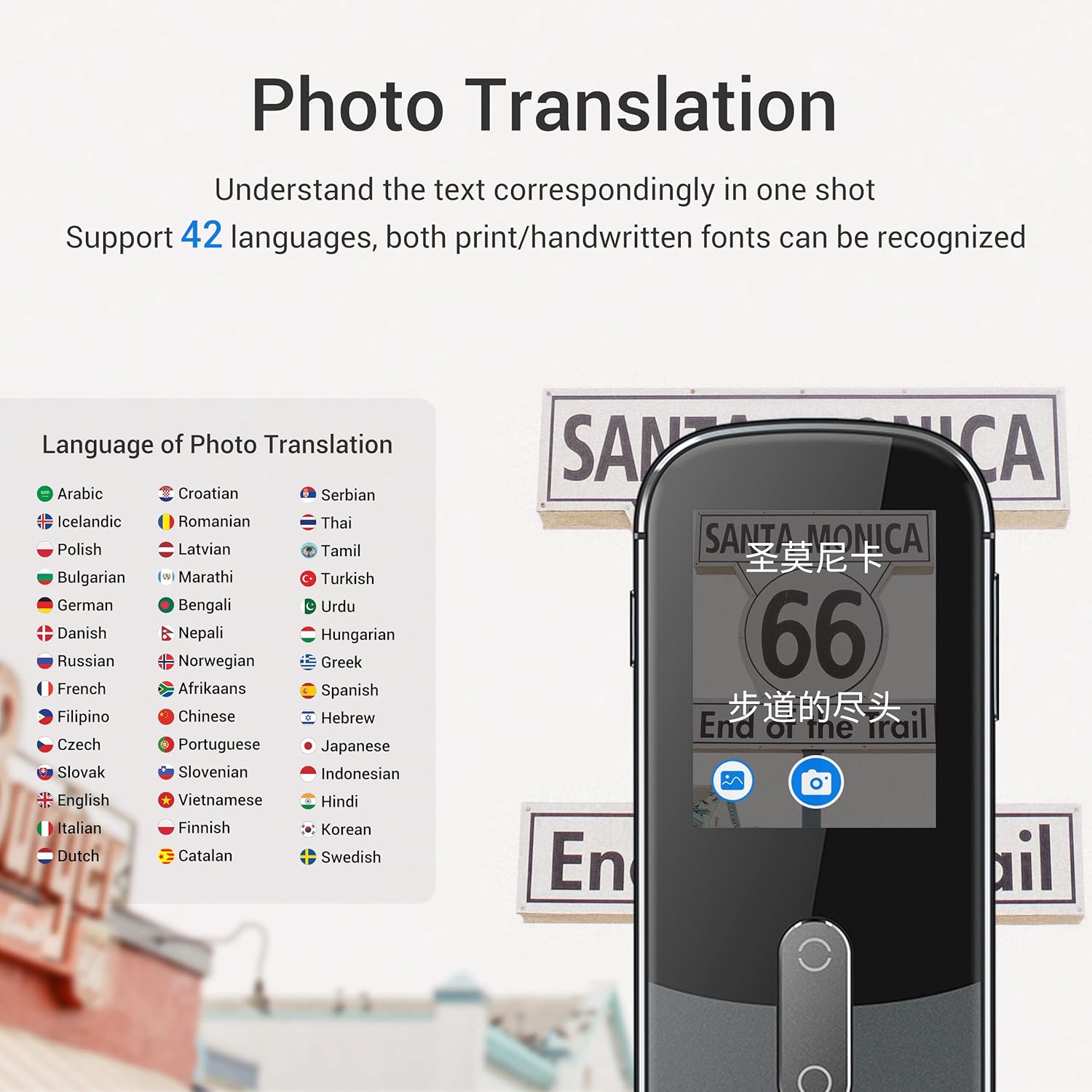
Image: Screenshot of the Wooask W09 screen showing the photo translation interface, with a list of supported languages and an example of text being translated from a sign.
5.3 Offline Translation (If Supported)
Some language pairs may support offline translation. To use this feature:
- Go to "Settings" and then "Offline Download".
- Download the desired language packs while connected to Wi-Fi.
- Once downloaded, you can perform basic voice translation for those language pairs without an internet connection.
6. Manutenzione
- Pulizia: Per pulire il dispositivo, utilizzare un panno morbido, asciutto e privo di lanugine. Non utilizzare detergenti liquidi o spray.
- Cura della batteria: Per prolungare la durata della batteria, evitare di scaricarla completamente frequentemente. Caricare il dispositivo regolarmente, anche se non viene utilizzato per periodi prolungati.
- Magazzinaggio: Conservare il dispositivo in un luogo fresco e asciutto, lontano dalla luce solare diretta e da temperature estreme.
- Aggiornamenti software: Periodically check for software updates via the "Settings" menu to ensure optimal performance and access to new features.
7. Risoluzione Dei Problemi
| Problema | Possibile causa/soluzione |
|---|---|
| Il dispositivo non si accende. | Battery might be depleted. Connect to charger and try again. If still unresponsive, perform a hard reset (refer to manufacturer's website for specific instructions if available). |
| La traduzione è imprecisa o lenta. |
|
| Impossibile connettersi al Wi-Fi. |
|
| La traduzione delle foto non funziona. |
|
8. Specifiche
| Caratteristica | Dettaglio |
|---|---|
| Numero di modello | WOO09 |
| Dimensioni del corpo | Dimensioni: 120 x 47 x 13 mm |
| Peso dell'articolo | 8.8 once (97 g) |
| Dimensioni dello schermo | 2.4" TFT (IPS) |
| Risoluzione dello schermo | 240x230 |
| Telecamera | 500M pixel |
| Capacità della batteria | 1500mAh agli ioni di litio |
| Microfono | 2 array di microfoni |
| Oratore | Altoparlante Hi-Fi |
| Porta di ricarica | Micro USB |
| Supporto di rete | Wi-Fi 2.4G |
9. Garanzia e supporto
For warranty information, technical support, or further inquiries, please refer to the official Wooask webo contattare direttamente il servizio clienti. Conservare la ricevuta d'acquisto come prova d'acquisto per eventuali reclami in garanzia.
Puoi visitare il Negozio Wooask su Amazon per maggiori informazioni sul prodotto e risorse di supporto.
Ask a question about this manual
Ask about setup, troubleshooting, compatibility, parts, safety, or missing instructions. Manuals+ will review the question and use this page’s manual context to help answer it.