
SONICAKE QAP-10
SONICAKE AmpCuffie per chitarra Honix AmpManuale utente lifier
Model: QAP-10 | Brand: SONICAKE
Introduzione
Il SONICAKE Amphonix QAP-10 is a portable, rechargeable plug-in headphone amplifier designed for electric guitars. It features multiple built-in effects, including clean, overdrive, distortion, modulation, delay, and reverb, allowing for versatile tone shaping. With Bluetooth audio and an auxiliary input, it provides a convenient solution for silent practice and jamming along with backing tracks.

Figura 1: SONICAKE AmpCuffie per chitarra Honix QAP-10 Amppiù vivace
This image displays the compact, black SONICAKE Amphonix QAP-10 headphone amplifier with its 1/4-inch jack plugged in, showing the illuminated effect indicators.
Impostare
Caricamento del dispositivo
IL Amphonix QAP-10 is USB-rechargeable and provides up to 5 hours of continuous operation on a full charge. Use the included USB charging cable to connect the device to a standard USB power source (e.g., computer USB port, USB wall adapter).
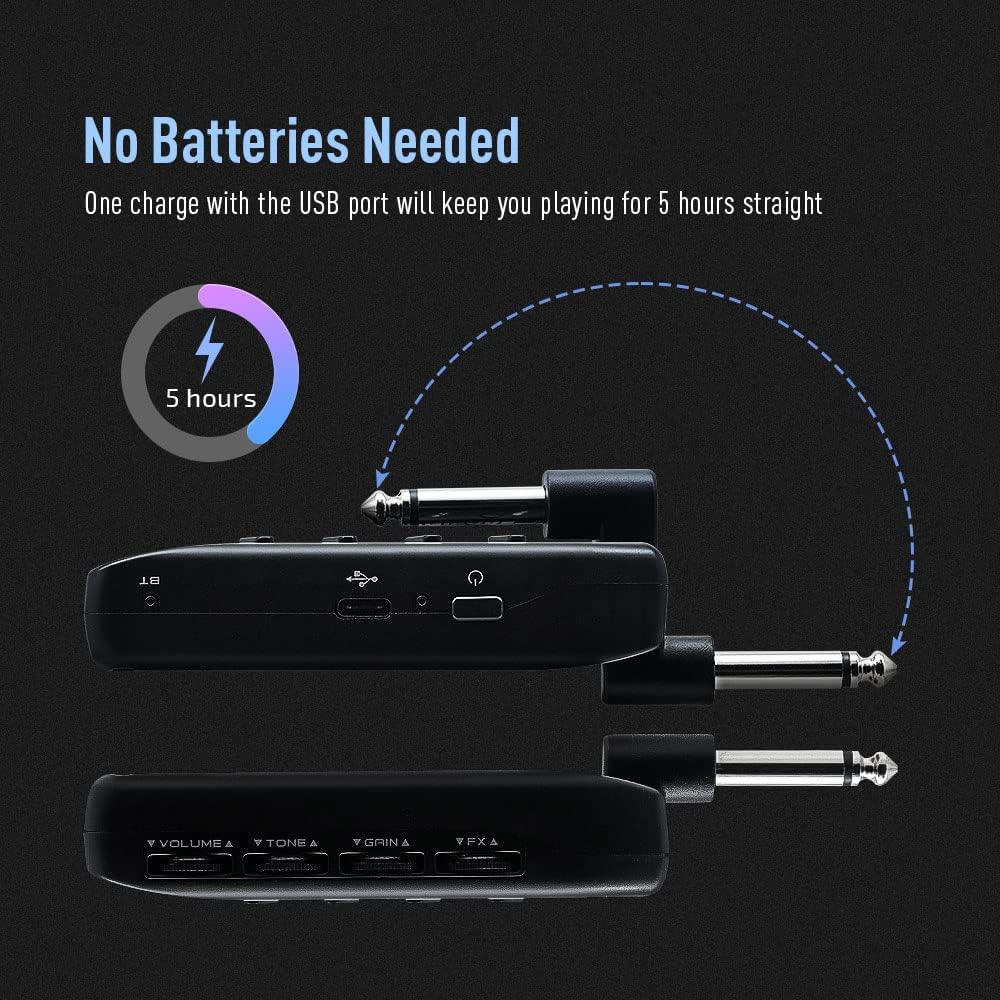
Figure 2: Charging the Amphonix QAP-10
This illustration shows the Amphonix QAP-10 being charged via a USB cable, highlighting its 5-hour battery life.
Connecting to Your Guitar and Headphones
- Collegare il jack da 1/4 di pollice del Amphonix QAP-10 directly into your electric guitar's output jack.
- Connect your wired headphones to the headphone output jack on the Amphonix QAP-10.
- To use an external audio source, connect it to the AUX input jack.

Figura 3: Collegamento del Amphonix QAP-10
Questa immagine mostra il Amphonix QAP-10 connected to a guitar and headphones, illustrating the various input and output ports.
Accoppiamento Bluetooth
IL Amphonix QAP-10 supports Bluetooth audio input for playing along with backing tracks. To pair:
- Accendi il Amphonix QAP-10. The Bluetooth indicator light will flash.
- On your smartphone or computer, enable Bluetooth and search for available devices.
- Seleziona "Amphonix" from the list to pair. Once paired, the Bluetooth indicator light will become solid.
- Audio from your paired device will now play through your headphones along with your guitar signal.
Video 1: Sonicake Amphonix Bluetooth headphone guitar amplificatore sopraview
This video demonstrates the features and connectivity of the Sonicake Amphonix, including its Bluetooth capabilities for playing along with music.
Operare il Amppiù vivace
IL Amphonix QAP-10 features intuitive controls for adjusting your tone and effects.
Controlli finitiview

Figura 4: Amphonix QAP-10 Controls
This image highlights the four control dials (Volume, Tone, Gain, FX) and the effect module buttons on the Amphonix QAP-10.
- Volume: Regola il volume di uscita complessivo delle cuffie.
- Tono: Modella le caratteristiche tonali, dai suoni più scuri a quelli più brillanti.
- Guadagno: Controls the amount of distortion or overdrive.
- Effetti: Adjusts the intensity or parameter of the selected effect.
- AMP/MOD/DLY/RVB Buttons: Press these buttons to cycle through the different amplifier models and effect types within each module. The illuminated LEDs indicate the currently selected setting.
Amplifier and Effect Modules
IL Amphonix QAP-10 features 6 AMP modules and 18 effects across Modulation (MOD), Delay (DLY), and Reverb (RVB) modules. These can be used simultaneously.
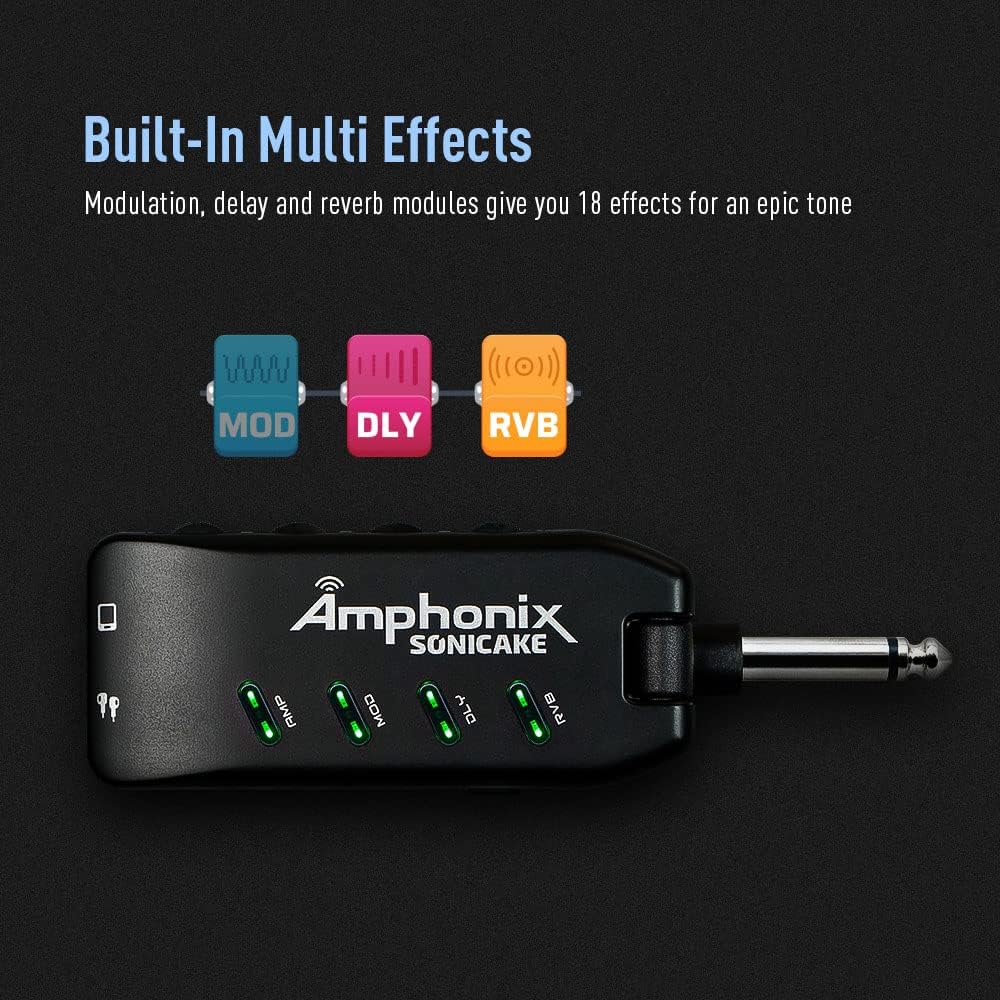
Figure 5: Effect Module Indicators
This image shows the illuminated AMP, MOD, DLY, and RVB indicators on the Amphonix QAP-10, signifying active effect modules.
| Modulo | Colore | Nome | Description / Based On |
|---|---|---|---|
| AMP | Verde | Pulisci 1 | Fender Bassman* |
| Blu | Pulisci 2 | Jazz leggendario Amp* | |
| Rosso | Sovraccarico 1 | Orange Rockerverb 50* | |
| Ciano | Sovraccarico 2 | Marshall JCM 800* | |
| Giallo | Distorsione 1 | Mesa/Boogie Dual Rectifier* | |
| Rosa | Distorsione 2 | ENGL Powerball II* | |
| MODIFICHE | Verde | Coro | Produces a vintage chorus sound |
| Blu | Rotante | Produces a rotary speaker sound | |
| Rosso | Tremolo | Produce un classico suono di tremolo ottico | |
| Ciano | Vibrato | Produces a natural vibrato sound | |
| Giallo | Flanger | Produce un tono flanger classico | |
| Rosa | Phaser | Produce un pH brillante e nitidoasintono g | |
| DLY | Verde | Eco caldo | Produce un caldo, vintage effetto di ritardo della voce analogica |
| Blu | Eco Puro | Produce un effetto delay puro e preciso | |
| Rosso | Eco del nastro | Simula il tono dell'eco da un registratore | |
| Ciano | Mod Eco | Produce un puro delay con un effetto chorus | |
| Giallo | Eco oscuro | Produce un effetto delay morbido e morbido | |
| Rosa | Schiaffo | Simula il classico tono di eco slapback | |
| RVB | Verde | Studio | Simula l'acustica di uno studio |
| Blu | Camera | Simula l'acustica di una stanza | |
| Rosso | Sala B | Simula l'acustica di una sala con un decadimento più luminoso | |
| Ciano | Hall D | Simula l'acustica di una sala con un decadimento più scuro | |
| Giallo | Chiesa | Simulates the acoustics of a church | |
| Rosa | Piatto | Simula un riverbero a piastre |
*I produttori e i nomi dei prodotti sopra menzionati sono marchi o marchi registrati dei rispettivi proprietari. I marchi sono stati utilizzati solo per identificare il carattere sano dei prodotti.
Video 2: Pocket Guitar Amplifier with Bluetooth Multi-Effects demonstration
This video showcases the various amplifier models and multi-effects available on the SONICAKE Amphonix, demonstrating their sonic capabilities.
Manutenzione
- Pulizia: Utilizzare un panno morbido e asciutto per pulire l'esterno del dispositivo. Evitare l'uso di detergenti abrasivi o solventi.
- Magazzinaggio: Conservare il Amphonix QAP-10 in a cool, dry place away from direct sunlight and extreme temperatures.
- Cura della batteria: Per prolungare la durata della batteria, evitare di scaricare completamente il dispositivo frequentemente. Ricaricarlo regolarmente, anche se non utilizzato per periodi prolungati.
Risoluzione dei problemi
| Problema | Possibile causa | Soluzione |
|---|---|---|
| Nessun suono dalle cuffie. | Headphones not fully plugged in; low battery; incorrect volume setting; device not powered on. | Ensure headphones are securely connected. Charge the device. Increase the Volume knob. Press the power button to turn on. |
| Il suono è distorto o poco chiaro. | Gain or Volume set too high; incorrect effect setting; low battery. | Reduce Gain or Volume. Adjust effect settings. Charge the device. |
| Problemi di associazione Bluetooth. | Device not in pairing mode; "Amphonix" not selected; interference. | Ensure the Bluetooth indicator is flashing. Re-scan for devices on your phone/computer. Move closer to the device. |
| No sound after turning on (requires gain adjustment). | Specific device behavior or setting. | As noted by some users, try slightly adjusting the Gain knob after powering on to activate the sound. |
| Constant buzzing/hissing sound. | Interference; high gain setting; faulty cable/headphones. | Try different headphones or cables. Reduce the Gain setting. Ensure no strong electromagnetic interference sources are nearby. |
Specifiche
| Caratteristica | Dettaglio |
|---|---|
| Marca | SONICAKE |
| Numero di modello | QAP-10 |
| Peso dell'articolo | 2.22 once |
| Dimensioni del prodotto | 1.61 x 5.16 x 4.65 pollici |
| Paese di origine | Cina |
| Batterie | 1 batteria ai polimeri di litio richiesta |
| Colore | Nero |
| Dispositivi compatibili | Chitarra |
| Tipo di connettore | Collegare |
| Tipo di materiale | Metallo |
| Uscita Wattage | 5 Watt |
| Fonte di alimentazione | Alimentato a batteria |
Garanzia e supporto
For detailed warranty information, please refer to the documentation included with your product or contact SONICAKE customer support directly. Protection plans may be available for purchase separately.
Risorse di supporto aggiuntive:
- Manuale utente ufficiale (PDF): Scarica PDF
- Visita il negozio SONICAKE: SONICAKE Negozio Amazon