
Genius SP-HF1800A V2
Manuale utente del sistema di altoparlanti Genius SP-HF 1800A V2
Model: SP-HF1800A V2 (31730031400)
Marca: Genius
1. Prodotto finitoview
The Genius SP-HF 1800A V2 is a high-fidelity 3-way wooden speaker system designed to deliver rich and balanced audio. With a total RMS output of 60 watts, these speakers utilize a sophisticated 3-way design, ensuring that each speaker unit precisely handles specific frequency ranges: high, mid, and low. The 4-inch closed-frame mid-range driver provides accurate vocal and instrument reproduction from 500Hz to 7000Hz, while the 4-inch lower woofer delivers deep, undistorted bass below 500Hz.
Key features include adjustable volume, bass, and treble controls, and easy connectivity to various devices such as PCs, televisions, and game consoles via two 3.5mm jack inputs.
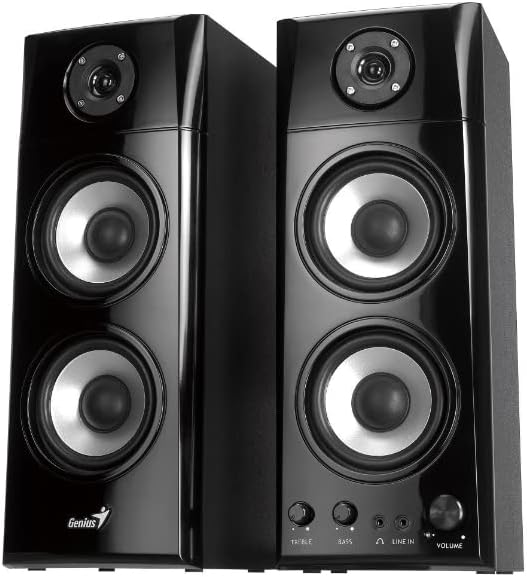
Figura 1.1: Fronte view of the Genius SP-HF 1800A V2 Speaker System, showcasing both speakers.
2. Contenuto della confezione
Si prega di controllare attentamente il pacco per assicurarsi che tutti gli articoli siano presenti e in buone condizioni:
- One pair of SP-HF 1800A V2 speakers
- RCA to 3.5mm stereo cable
- Manuale d'uso (questo documento)
3. Istruzioni per l'installazione
Follow these steps to set up your Genius SP-HF 1800A V2 speaker system:
- Posizionamento dei relatori: Place the speakers on a stable, flat surface. For optimal stereo imaging, position them equidistant from your listening position and spaced appropriately apart. Ensure adequate ventilation around the speakers.
- Collegare gli altoparlanti: Connect the passive speaker to the active (main) speaker using the integrated speaker cable. This cable typically connects the left speaker to the right speaker. Ensure the connection is secure.
- Connetti alla sorgente audio: Use the provided RCA to 3.5mm stereo cable. Connect the 3.5mm jack end to the audio output port of your PC, television, game console, or other audio device. Connect the RCA ends to the 'LINE IN' ports on the active speaker. The speakers feature two 3.5mm jack inputs for versatile connectivity.
- Collegamento elettrico: Plug the power cord of the active speaker into a standard electrical outlet.
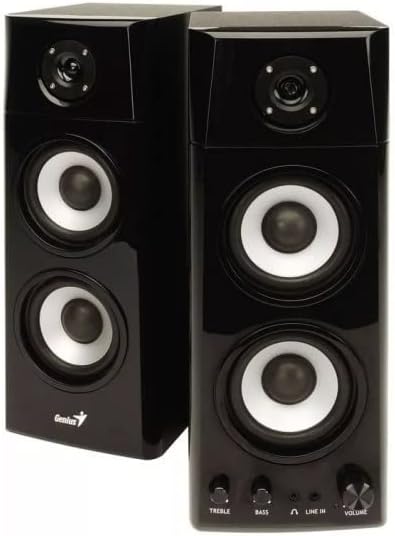
Figura 3.1: primo piano view of the active speaker's front panel, displaying the Treble, Bass, Headphone, Line In, and Volume controls.
4. Istruzioni per l'uso
Once set up, operate your speakers using the controls on the active speaker:
- Accensione/spegnimento: The main power switch is usually located on the back or side of the active speaker. Turn it on to power the system.
- Controllo del volume: Rotate the 'VOLUME' knob clockwise to increase the volume and counter-clockwise to decrease it.
- Controllo dei bassi: Use the 'BASS' knob to adjust the level of low-frequency sounds. Rotate clockwise for more bass, counter-clockwise for less.
- Controllo degli acuti: Use the 'TREBLE' knob to adjust the level of high-frequency sounds. Rotate clockwise for more treble, counter-clockwise for less.
- Uscita cuffie: A 3.5mm headphone jack is available on the front panel. Plug in your headphones for private listening. When headphones are connected, the speaker output will typically mute automatically.
- Ingresso linea: The 'LINE IN' ports allow connection to your audio source. Ensure your source device's volume is also adjusted appropriately.
5. Manutenzione
Una corretta manutenzione garantisce la longevità e le prestazioni dei vostri altoparlanti:
- Pulizia: Use a soft, dry cloth to clean the speaker cabinets. Do not use liquid cleaners or aerosol sprays, as they may damage the finish or internal components.
- Spolverare: Spolverare regolarmente le griglie e le superfici degli altoparlanti per evitare accumuli di polvere, che possono compromettere la qualità del suono e la durata dei componenti.
- Posizionamento: Avoid placing speakers in direct sunlight, near heat sources, or in areas with high humidity. Ensure they are on a stable surface to prevent accidental falls.
- Ventilazione: Do not block the ventilation openings on the speakers. Proper airflow is crucial to prevent overheating.
- Gestione dei cavi: Ensure all cables are neatly arranged and not tangled or pinched, which can lead to damage or signal loss.
6. Risoluzione Dei Problemi
Se riscontri problemi con gli altoparlanti, fai riferimento ai seguenti problemi comuni e alle relative soluzioni:
| Problema | Possibile causa | Soluzione |
|---|---|---|
| Nessun suono |
|
|
| Suono distorto |
|
|
| Un altoparlante non funziona |
|
|
7. Specifiche
Detailed technical specifications for the Genius SP-HF 1800A V2 Speaker System:
- Nome modello: SP-HF1800A V2
- Numero modello: 31730031400
- Modalità di uscita audio: Stereo
- Tipo di altoparlante: Coassiale
- Configurazione degli altoparlanti: 2.0 Channel System (3-way design)
- Potenza RMS totale: 60 Watt
- Woofer del conducente: 4 inches, 4Ω x 2
- tweeter: 1 inch, 4Ω
- Tecnologia di connettività: Ausiliario (jack da 3.5 mm)
- Connessioni: 2 x 3.5mm jack inputs
- Colore: Nero
- Dimensioni del prodotto (L x P x A): 14.5 x 16.74 x 38.4 cm (5.7 x 6.6 x 15.1 pollici)
- Peso del prodotto: 14.05 kg (30.97 libbre)
- Caratteristiche speciali: Portable (referring to ease of movement, not battery-powered)
- Utilizzi consigliati: For computer, gaming console, television
8. Informazioni sulla sicurezza
Si prega di leggere e seguire queste linee guida di sicurezza per evitare danni al prodotto o lesioni personali:
- Non esporre gli altoparlanti ad acqua, umidità o temperature estreme.
- Do not open the speaker cabinets. There are no user-serviceable parts inside. Refer all servicing to qualified personnel.
- Avoid placing heavy objects on the speakers.
- Unplug the power cord from the electrical outlet during lightning storms or when unused for long periods.
- Tenere fuori dalla portata dei bambini e degli animali domestici.
9. Garanzia e supporto
Warranty information for this product is not available in the provided data. For support, please contact your retailer or visit the official Genius website for the latest information and contact details.
Ask a question about this manual
Ask about setup, troubleshooting, compatibility, parts, safety, or missing instructions. Manuals+ will review the question and use this page’s manual context to help answer it.