
Introduzione
Thank you for choosing the Aubess 10A Mini WiFi Smart Plug with Energy Monitoring. This smart plug allows you to control your electronic devices remotely, monitor energy consumption, and automate your home using the VeSync app, Amazon Alexa, or Google Assistant. This manual provides essential information for safe operation, setup, and troubleshooting.

Image: The Aubess 10A Mini WiFi Smart Plug, a compact white device designed to fit into standard wall outlets.
Informazioni sulla sicurezza
- Non superare il carico massimo di 10 Ampso 1200 watt.
- Use only in dry indoor locations. Avoid damp ambienti.
- Ensure the smart plug is fully inserted into the wall outlet.
- Non smontare o modificare il dispositivo.
- Tenere fuori dalla portata dei bambini.
- If the plug feels excessively hot, discontinue use and contact support.
Contenuto della confezione
- Aubess 10A Mini WiFi Smart Plug
- Manuale d'uso
Prodotto finitoview
The Aubess Smart Plug is a compact device designed to make your home smarter. It features a power button/indicator light and a standard 3-prong outlet.
Caratteristiche principali:
- Monitoraggio energetico: Track power consumption of connected devices.
- Telecomando: Control devices from anywhere via the VeSync app.
- Controllo vocale: Compatibile con Amazon Alexa e Google Assistant.
- Pianificazione e timer: Set custom schedules and timers for automation.
- Design compatto: Mini size ensures it does not block adjacent outlets.
Impostare
1. Scarica l'app VeSync
Cercare "VeSync" in the Apple App Store or Google Play Store and download the app. Create an account or log in if you already have one.
2. Prepare for Connection
- Plug the Aubess Smart Plug into a wall outlet.
- Assicurati che il tuo smartphone sia connesso a un Rete Wi-Fi a 2.4 GHz. The smart plug does not support 5GHz Wi-Fi.
- Place the smart plug within range of your Wi-Fi router.

Image: Diagram illustrating the smart plug's connection to a Wi-Fi router.
3. Pair the Device with VeSync App
- Apri l'app VeSync.
- Tap the "+" icon or "Add Device" to add a new device.
- Select "Aubess Smart Plug" from the device list.
- Follow the in-app instructions to connect the smart plug. This typically involves pressing and holding the power button on the plug for 5 seconds until the Wi-Fi indicator blinks, then entering your Wi-Fi password in the app.
- Una volta connessa, puoi dare un nome alla tua presa intelligente e assegnarla a una stanza.

Image: A four-step visual guide showing the process of adding the smart plug to the VeSync app, from selecting 'Add Device' to successful pairing.
Istruzioni per l'uso
Controllo base di accensione/spegnimento
- Controllo manuale: Premere il pulsante di accensione sulla presa intelligente per accendere o spegnere manualmente il dispositivo collegato.
- Controllo app: Open the VeSync app, select your smart plug, and tap the power icon to toggle its status.

Image: A user plugging in the smart plug and then connecting it via the VeSync app on a smartphone.
Monitoraggio energetico
The VeSync app provides real-time and historical data on the power consumption of devices connected to your smart plug. This feature helps you track usage and manage energy costs.
- In the VeSync app, select your smart plug.
- Vai alla sezione monitoraggio energetico per view statistics such as current voltage, energy usage (kWh), and power (Watts).

Image: A graph illustrating energy consumption data over several days, demonstrating the energy monitoring feature.
Funzioni di pianificazione e timer
Automate your devices by setting schedules or timers through the VeSync app.
- Programma: Set specific times for the smart plug to turn on or off daily or on selected days of the week.
- Timer: Imposta un timer per il conto alla rovescia affinché la presa intelligente si spenga dopo un intervallo di tempo specificato.
- Modalità fuori casa: Simulate occupancy by randomly turning devices on and off.

Image: A smart plug in use with an espresso machine and toaster, showing a customizable schedule with auto-on at 07:30 and auto-off at 08:00.
Controllo vocale con Alexa e Google Assistant
Integrate your Aubess Smart Plug with Amazon Alexa or Google Assistant for hands-free control.
- Ensure your Alexa or Google Assistant device is set up and connected to the internet.
- In the Alexa or Google Home app, enable the VeSync skill/action.
- Link your VeSync account to your Alexa/Google account.
- Scopri i dispositivi. Dovrebbe apparire la tua presa intelligente.
- Utilizzare comandi vocali come:
- "Alexa, accendi lamp."
- "Google, turn off the coffee machine."
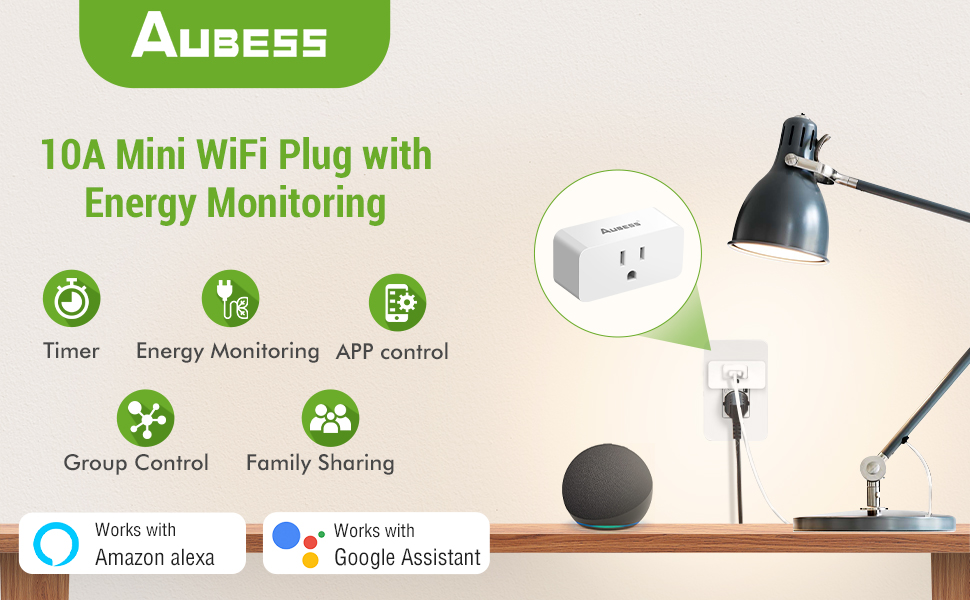
Image: A person using voice commands with an Amazon Echo Dot and Google Home speaker to control a lamp connected to a smart plug.
Device Sharing and Group Control
- Condivisione dispositivi: Share control of your smart plugs with family members through the VeSync app.
- Controllo di gruppo: Create groups of smart plugs in the app to control multiple devices simultaneously with a single command.

Image: An illustration of a house with various smart devices connected to the VeSync app, demonstrating the group control feature.
Manutenzione
- Pulizia: Disconnect the smart plug from the power outlet before cleaning. Wipe with a dry, soft cloth. Do not use liquid cleaners.
- Magazzinaggio: Quando non viene utilizzata, conservare la presa intelligente in un luogo fresco e asciutto.
Risoluzione dei problemi
Problemi comuni e soluzioni:
- Smart Plug not connecting to Wi-Fi:
- Assicurati che la tua rete Wi-Fi sia a 2.4 GHz.
- Verificare che il segnale Wi-Fi sia sufficientemente forte nel punto in cui si trova la presa.
- Riavvia il router Wi-Fi e prova nuovamente ad associarlo.
- Reset the smart plug by holding the power button for 5-10 seconds until the indicator light blinks rapidly.
- Il dispositivo non risponde ai comandi vocali/dell'app:
- Verify the smart plug is connected to Wi-Fi and the indicator light is solid.
- Controlla la tua connessione Internet.
- Assicurati che l'app VeSync sia aggiornata all'ultima versione.
- For voice control, confirm the VeSync skill/action is enabled and linked correctly in your Alexa/Google Home app.
- Smart Plug feels warm:
- It is normal for smart plugs to generate some heat during operation.
- If the plug feels excessively hot to the touch, unplug it immediately and discontinue use. Contact customer support.
- Assicurarsi che l'apparecchio collegato non superi la potenza massimatage (1200W) or current (10A).
- Energy monitoring data is inaccurate:
- Ensure the smart plug is properly connected and the appliance is drawing power.
- Se si verificano problemi persistenti, contattare l'assistenza clienti.
Specifiche
| Numero di modello | 10A Abuess Smart Plug |
| Valutazione attuale | 10 Amps |
| Volume di eserciziotage | 120 Volt |
| Cosatage | 1200 Watt massimo |
| Protocollo di connettività | Bluetooth, Wi-Fi (solo 2.4 GHz) |
| Metodo di controllo | App, telecomando, voce |
| Tipo di controllore | Amazon Alexa, Android, Assistente Google, iOS |
| Dimensioni (L x P x A) | 2.56 x 1.26 x 1.06 pollici |
| Peso dell'articolo | 7.9 once |
Garanzia e supporto
Aubess provides a 30-day worry-free return policy and a 12-month warranty for this product.
Assistenza clienti:
If you encounter any issues or have questions regarding your Aubess Smart Plug, please contact us through the following methods:
- Amazon Mail: Contact us directly via the Amazon messaging system.
- Domande e risposte dei clienti: Post your question on the product's customer Q&A section on Amazon.
- Aubess Official Websito: Visit the official Aubess websito per ulteriori opzioni di supporto.