
1. Introduzione
This manual provides essential information for the installation, operation, and maintenance of your Montech Titan Gold 850W ATX 3.0 Power Supply. This high-end power supply is designed for gaming systems, featuring 80 Plus Gold and Cybenetics Gold certifications, fully modular cabling, and readiness for PCIe 5.0 with a new 12VHPWR connector. Please read this manual thoroughly before installation and use to ensure proper functionality and safety.

Figure 1: Montech Titan Gold 850W Power Supply and its retail packaging.
2. Informazioni sulla sicurezza
Always observe the following safety precautions to prevent injury or damage to your power supply and system components:
- Prima dell'installazione o della manipolazione, assicurarsi che l'alimentazione sia scollegata dalla presa di corrente CA.
- Non aprire l'alimentatore casing. Alto volumetagall'interno sono presenti componenti e non ci sono parti riparabili dall'utente.
- Installare l'alimentatore in un'area ben ventilata, lontano da fonti di calore, luce solare diretta e umidità.
- Utilizzare solo i cavi modulari forniti con questo alimentatore. L'utilizzo di cavi incompatibili può causare danni.
- Ensure all connectors are securely seated before powering on the system.
3. Contenuto della confezione
Verificare che tutti gli articoli siano presenti nel pacco:
- Montech Titan Gold 850W Power Supply Unit
- Set di cavi modulari (incluso cavo 12VHPWR)
- Cavo di alimentazione CA
- Viti di montaggio
- Fascette fermacavi/cinghie in velcro
- Manuale dell'utente (questo documento)

Figure 2: Included modular cables and accessories for the power supply.
4. Configurazione e installazione
Per installare l'alimentatore, seguire questi passaggi:
- Prepara il case del tuo PC: Ensure your PC case is compatible with ATX power supplies.
- Montare l'alimentatore: Secure the power supply into the designated PSU bay in your PC case using the provided mounting screws. Ensure the fan is oriented correctly for optimal airflow (typically facing downwards if your case has a bottom vent).
- Collegare i cavi modulari: Identify the necessary cables for your motherboard, CPU, graphics card(s), and storage devices. Connect these cables to the corresponding ports on the power supply. The fully modular design allows you to connect only the cables you need, reducing clutter.
- Connetti ai componenti: Route the connected cables through your case's cable management channels and connect them to your motherboard (24-pin ATX, 8-pin EPS/CPU), graphics card(s) (PCIe, including the 12VHPWR for compatible GPUs), and storage drives (SATA, Molex).
- Connessioni sicure: Double-check all connections to ensure they are firm and properly seated.

Figura 3: Oltreview of the modular cable connection ports on the power supply.
5. Istruzioni per l'uso
After installation, follow these steps to operate your power supply:
- Collegare l'alimentazione CA: Plug the AC power cord into the power supply's AC inlet and then into a wall outlet or surge protector.
- Interruttore di alimentazione: Locate the main power switch on the rear of the power supply and flip it to the 'ON' (I) position.
- Accensione del sistema: Press the power button on your PC case to start your computer.
- Funzione Smart Zero Fan: This power supply includes a 'Smart Zero Fan' switch. When enabled (ON), the fan will remain off under low load conditions for silent operation. The fan will automatically activate when the load increases to maintain optimal temperatures. If disabled (OFF), the fan will operate continuously.

Figure 4: Rear panel with main power switch and Smart Zero Fan control.
6. Manutenzione
Per garantire la longevità e le prestazioni ottimali del vostro alimentatore, si consiglia una manutenzione periodica:
- Pulizia della polvere: Regularly clean dust from the power supply's fan intake and exhaust vents using compressed air. Ensure the power supply is turned off and unplugged before cleaning.
- Ispezione dei cavi: Periodically check all modular cable connections for looseness or damage. Re-seat any loose cables.
- Condizioni ambientali: Maintain a clean, dry, and cool environment for your PC to prevent excessive heat and dust buildup.

Figura 5: in alto view of the power supply, highlighting the fan grill for cleaning.
7. Risoluzione Dei Problemi
Se riscontri problemi con l'alimentatore, fai riferimento ai seguenti problemi comuni e alle relative soluzioni:
- Nessun potere:
- Assicurarsi che il cavo di alimentazione CA sia collegato saldamente sia all'alimentatore che alla presa a muro.
- Verify the main power switch on the PSU is in the 'ON' (I) position.
- Check all modular cable connections, especially the 24-pin ATX and 8-pin EPS/CPU cables, for secure seating.
- Prova la presa a muro con un altro dispositivo per verificare che sia alimentata.
- Il sistema si spegne inaspettatamente:
- This could indicate an overload or overheating. Ensure your system's power consumption does not exceed the PSU's 850W capacity.
- Check for proper ventilation around the PSU and inside the PC case. Clean any dust buildup.
- Ensure the 'Smart Zero Fan' is functioning correctly or try disabling it to force continuous fan operation.
- Fan Not Spinning (under low load):
- If the 'Smart Zero Fan' feature is enabled, the fan will not spin under low loads. This is normal operation. The fan will activate when the system load increases.
- If the fan never spins even under high load with 'Smart Zero Fan' disabled, contact customer support.
8. Specifiche
Detailed technical specifications for the Montech Titan Gold 850W Power Supply:
| Caratteristica | Specificazione |
|---|---|
| Marca | Montech |
| Nome del modello | Titan Gold 850W (TIS0124) |
| Cosatage | 850 Watt |
| Uscita Wattage | 750 Watts (Note: Product title states 850W, specifications list 750W. Please verify with manufacturer if discrepancy is critical.) |
| Certificazione di efficienza | 80 Plus Gold, Cybenetics Gold |
| Fattore di forma | ATX |
| Progettazione dell'alimentatore | Completamente modulare |
| Tipo di connettore | ATX, PCIe 5.0 (12VHPWR) |
| Metodo di raffreddamento | Aria (1 ventola) |
| Peso dell'articolo | 7.52 libbre |
| Data prima disponibilità | 13 dicembre 2022 |
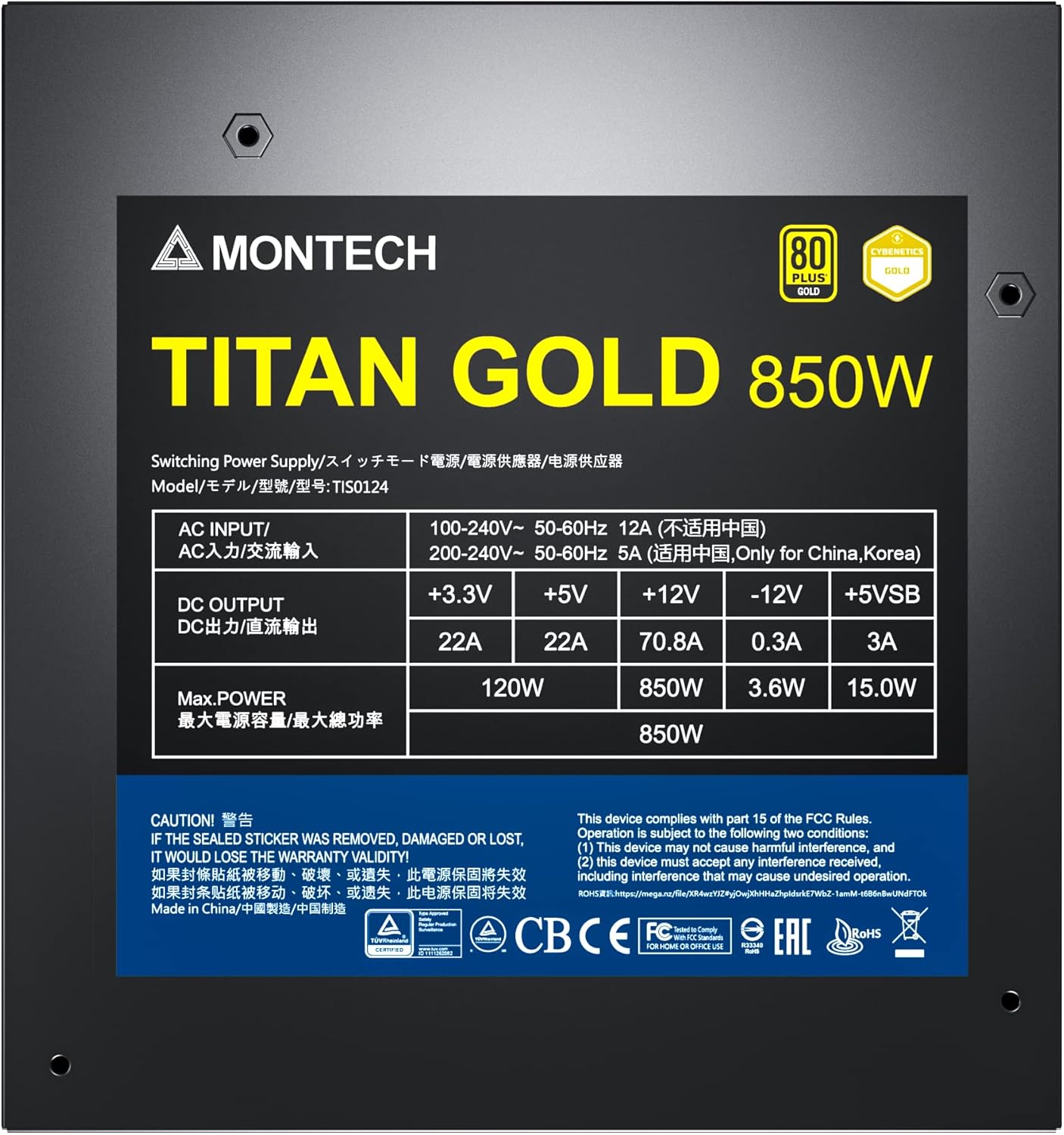
Figure 6: Product label displaying electrical specifications and certifications.
9. Garanzia e supporto
The Montech Titan Gold 850W Power Supply comes with a Garanzia di 10 anno, ensuring long-term reliability and peace of mind. For technical support, warranty claims, or further assistance, please visit the official Montech websito o contattare il loro servizio clienti.
Conservare la prova d'acquisto per la convalida della garanzia.