
Introduzione
This manual provides essential information for the installation, operation, and maintenance of your Seasonic VERTEX GX-1200 1200W 80+ Gold ATX 3.0 & PCIe 5.0 Power Supply. The Seasonic VERTEX GX-1200 is a high-performance, fully modular power supply designed to meet the demands of modern computing systems, offering high efficiency and robust power delivery.
Istruzioni di sicurezza
- Scollegare sempre il cavo di alimentazione CA dalla presa a muro prima di installare o rimuovere l'alimentatore.
- Garantire un'adeguata messa a terra per evitare scosse elettriche.
- Non aprire l'alimentatore. Alto volumetagall'interno sono presenti sostanze che possono causare lesioni gravi o la morte.
- Install the power supply in a well-ventilated area, away from heat sources or direct sunlight.
- Use only the modular cables provided with your Seasonic power supply. Using incompatible cables may damage your system.
- Keep the power supply away from moisture and extreme temperatures.
Contenuto della confezione
Verifica che tutti gli articoli siano presenti nel tuo pacco:
- Seasonic VERTEX GX-1200 Power Supply Unit
- Set di cavi modulari (incluso cavo 12VHPWR)
- Cavo di alimentazione CA
- Viti di montaggio
- Cable Ties (Velcro and plastic)
- Tester di alimentazione
- Manuale utente e guida all'installazione
- Borse per riporre alimentatori e cavi
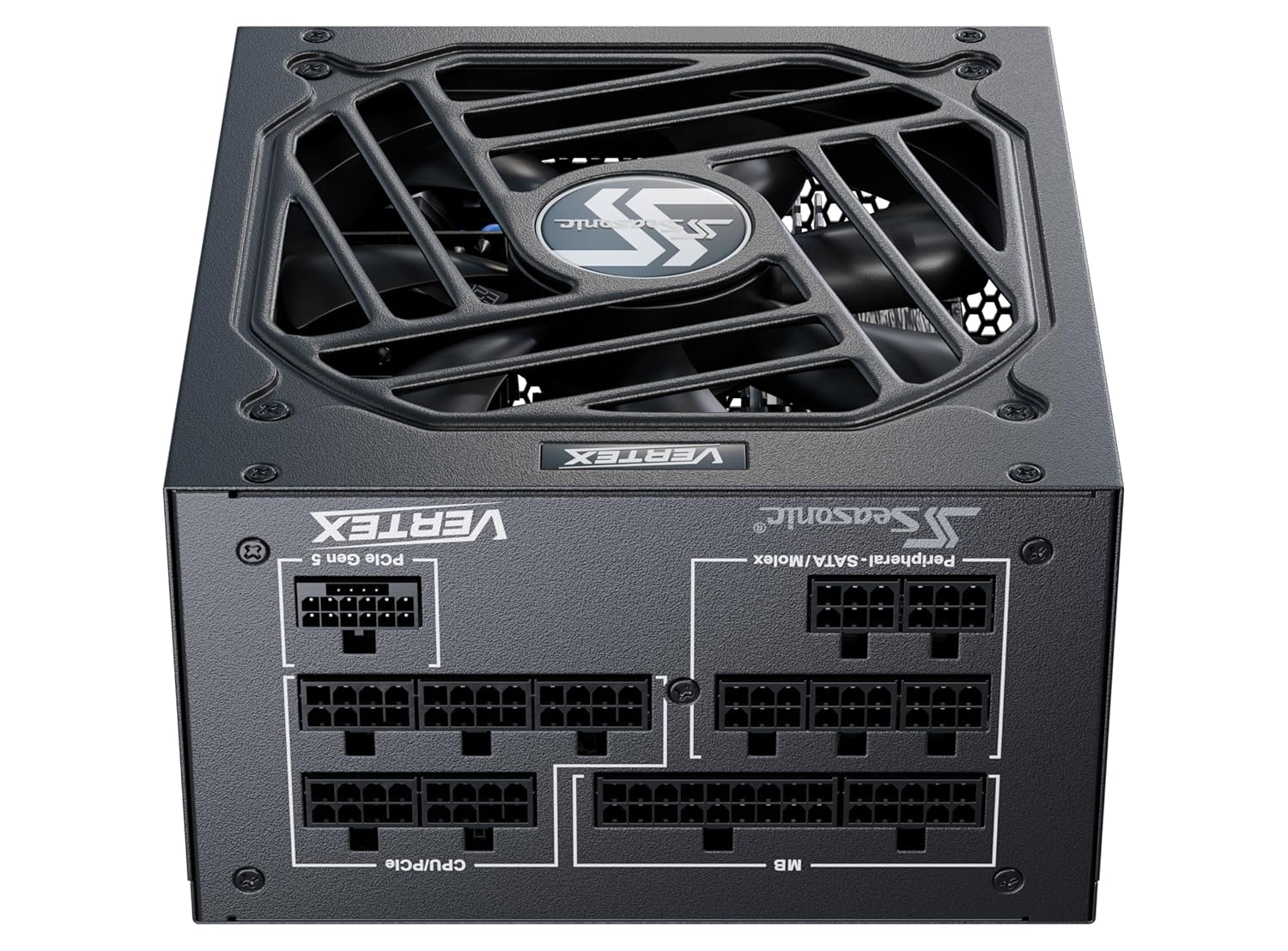
Image: Various modular cables included with the Seasonic VERTEX GX-1200 Power Supply, neatly bundled.
Impostare
1. Installazione fisica
- Ensure your computer case is powered off and disconnected from the wall outlet.
- Locate the power supply mounting area in your computer case.
- Carefully slide the Seasonic VERTEX GX-1200 into the designated slot.
- Fissare l'alimentatore al case utilizzando le viti di montaggio fornite.

Immagine: in alto view of the Seasonic VERTEX GX-1200 Power Supply, ready for installation.
2. Collegamento dei cavi modulari
The Seasonic VERTEX GX-1200 is a fully modular power supply, allowing you to connect only the cables your system requires. This reduces cable clutter and improves airflow.
- Potenza della scheda madre: Connect the 24-pin ATX cable to the corresponding port on the PSU and your motherboard.
- Potenza CPU: Connect the 4+4-pin or 8-pin EPS/CPU cables to the PSU and your motherboard's CPU power connectors.
- PCIe Power (Graphics Cards):
- For modern graphics cards, use the dedicated 12VHPWR (PCIe 5.0) cable. Ensure it is fully seated into both the PSU and the graphics card.
- For other graphics cards, use the 6+2-pin PCIe cables. Connect them to the PSU and your graphics card(s).
- Alimentazione SATA/Molex: Connect SATA cables for storage drives (HDDs, SSDs) and Molex cables for other peripherals as needed.

Image: Modular cable connection panel of the Seasonic VERTEX GX-1200 Power Supply, showing clearly labeled ports for various cables.
3. Collegamento elettrico
- Once all internal connections are secure, connect the AC power cord to the power supply unit.
- Collegare l'altra estremità del cavo di alimentazione CA a una presa a muro.
- Portare l'interruttore di alimentazione sul retro dell'alimentatore in posizione "ON".

Immagine: Frontale view of the Seasonic VERTEX GX-1200 Power Supply, highlighting the power input and ON/OFF switch.
Operativo
Hybrid Silent Fan Control (0 RPM Mode)
The Seasonic VERTEX GX-1200 features Hybrid Silent Fan Control, which allows for silent operation at low to moderate loads. In this mode, the 135mm Fluid Dynamic Bearing (FDB) fan will not spin until a certain load or temperature threshold is reached. This is normal operation and indicates the power supply is functioning correctly.
You can typically toggle between Hybrid Mode (0 RPM fan mode) and normal fan mode using a switch on the power supply unit, if available. Refer to the specific switch on your unit for its function.

Image: Close-up of the 135mm Fluid Dynamic Bearing fan on the Seasonic VERTEX GX-1200 Power Supply, designed for quiet operation.
Manutenzione
- Pulizia: Regularly clean the exterior of the power supply and the fan grille to prevent dust buildup, which can impede airflow and reduce cooling efficiency. Use a soft, dry cloth or compressed air. Ensure the power supply is turned off and unplugged before cleaning.
- Flusso d'aria: Ensure that there is adequate airflow around the power supply inside your computer case. Avoid blocking any vents.
- Gestione dei cavi: Proper cable management not only improves aesthetics but also enhances airflow, contributing to better cooling and longevity of components.
Risoluzione dei problemi
- Power Supply Not Turning On:
- Check that the AC power cord is securely plugged into both the wall outlet and the power supply.
- Assicurarsi che l'interruttore di alimentazione sul retro dell'alimentatore sia in posizione "ON".
- Verify all modular cables are correctly and firmly connected to the PSU and your components.
- Use the provided PSU tester to check if the power supply is functioning independently.
- La ventola non gira:
- If the power supply is operating under low load, the fan may not spin due to the Hybrid Silent Fan Control (0 RPM mode). This is normal. The fan will activate automatically when the load or temperature increases.
- If the fan never spins even under heavy load, ensure the Hybrid Mode switch (if present) is in the correct position or try toggling it.
- Instabilità/arresti anomali del sistema:
- Ensure all power connections are secure. Loose connections can cause instability.
- Verify that your system's power requirements do not exceed the PSU's capacity.
- Check for proper ventilation within your case to prevent overheating.
Specifiche
| Caratteristica | Descrizione |
|---|---|
| Nome del modello | VERTEX GX-1200 |
| Uscita Wattage | 1200 Watt |
| Certificazione di efficienza | Certificazione 80 PLUS® Gold |
| Standard ATX | Conforme ad ATX 3.0 |
| Standard PCIe | PCIe 5.0 Ready (with 12VHPWR cable) |
| Modularità | Fully Modular Cabling Design |
| Tipo di ventola | 135 mm Fluid Dynamic Bearing (FDB) Fan |
| Controllo della ventola | Seasonic Hybrid Silent Fan Control (0 RPM mode) |
| Condensatori | Premium Japanese 105 °C Aluminum Electrolytic Capacitors |
| Voltage Regolamento | Tight Voltage Regulation (± 3 % for 12 V, 5 V and 3.3 V) |
| Dimensioni (L x P x A) | 7.3 x 13.6 x 4.5 pollici |
| Peso dell'articolo | 3.3 chilogrammi |

Immagine: Interna view of the Seasonic VERTEX GX-1200 Power Supply, showcasing its high-quality components.
Prodotto finitoview Video
Video: Un prodotto dettagliato suview of the Seasonic VERTEX GX-1200 Power Supply, highlighting its features and design.
Garanzia e supporto
The Seasonic VERTEX GX-1200 Power Supply comes with an extensive Garanzia di 12 anno, reflecting the manufacturer's confidence in its quality and durability. For warranty claims, technical support, or additional product information, please visit the official Seasonic websito o contattare il loro servizio clienti.
Risorse online: For further assistance, FAQs, and driver downloads, please visit the Seasonic Support Page.