
Temtop M2000C
Manuale utente del misuratore di qualità dell'aria Temtop M2000C
Model: M2000C | Brand: Temtop
Introduzione
The Temtop M2000C Air Quality Meter is designed to provide essential insights into your indoor and outdoor air quality. This device accurately detects levels of CO2, PM2.5, and PM10, and also provides temperature and humidity readings. Equipped with an audio alarm, it notifies you when air quality levels exceed safe thresholds, helping you maintain a healthier living environment. Its user-friendly design and rechargeable battery make it a convenient tool for monitoring air quality in various settings.
Caratteristiche principali
- Affordable Quality Monitoring: Delivers essential air quality data for cost-conscious homes and offices.
- Streamlined Air Quality Insights: Features a professional-grade laser sensor for precise PM2.5 and PM10 detection and a sensitive NDIR sensor for CO2 levels.
- Intuitive Alerts and Clear Display: Audio alarm for threshold breaches and a vibrant TFT display for real-time air quality overview.
- User-centered Design: Ergonomic construction and rechargeable battery for simple operation and portability.
- Robust Support & Assurance: Backed by Temtop's 12-month warranty and round-the-clock customer support.
Prodotto finitoview
Familiarize yourself with the components and interface of your Temtop M2000C Air Quality Meter.

Immagine: Frontale view of the Temtop M2000C Air Quality Meter with labels indicating its various parts, including the USB port, display, and control buttons.
Componenti dell'interfaccia:
- Porta USB: Per caricare il dispositivo.
- Stato del cicalino: Indicates if the audio alarm is active.
- Measuring Status: Shows current measurement activity.
- Display: Vibrant TFT screen showing real-time readings and menu options.
- Pulsante Menu: Accede al menu principale.
- Increase/Up Button: Consente di spostarsi verso l'alto nei menu o di aumentare i valori.
- Pulsante Indietro: Ritorna alla schermata precedente.
- Pulsante di accensione/OK: Powers the device on/off or confirms selections.
- Decrease/Down/Switch (Start/Pause) Button: Navigates down in menus, decreases values, or starts/pauses measurements.
- Data e ora: Visualizza la data e l'ora correnti.
- Livello di potenza: Indicates battery charge.
Impostare
- Disimballaggio: Carefully remove the Temtop M2000C from its packaging. Ensure all components listed in the "What's in the Box" section are present.
- Carica iniziale: Before first use, fully charge the device using the provided USB charging cable. Connect the cable to the device's USB port and a compatible USB power adapter (not included) or computer USB port. The power level indicator on the display will show charging status.
- Accensione: Press and hold the Power/OK button to turn on the device.
- Initial Acclimation: For optimal accuracy, allow the device to acclimate to its environment for at least 8 hours before taking critical measurements. This allows the sensors to stabilize.
Istruzioni per l'uso
The Temtop M2000C offers straightforward operation for monitoring various air quality parameters.
Navigazione nel menù:
- Premere il tasto Menu pulsante per accedere al menu principale.
- Utilizzare il Aumenta/Su E Diminuisci/Giù buttons to scroll through options like PM2.5, CO2, HCHO, View all info, and Set.
- Premere il tasto Accensione/OK pulsante per selezionare un'opzione.
- Premere il tasto Indietro pulsante per tornare alla schermata precedente.
Prendere le misure:
- From the main menu, select the desired parameter (e.g., PM2.5, CO2) using the navigation buttons and press OK.
- The device will immediately begin displaying real-time readings for the selected parameter.
- The display will show the current concentration, along with a status indicator (e.g., "Good", "Moderate").
- For PM2.5 and CO2, a bar graph feature is available to show concentration trends over time. Use the navigation buttons to switch to the graph view se disponibile.
Allarme acustico:
- The device features an audio alarm that activates when air quality levels exceed preset thresholds.
- Refer to the "Air Quality Parameter for Reference" table in the "Understanding Readings" section to understand these thresholds.
- The buzzer status icon on the display indicates if the alarm is active.
Video: Un oltreview of the Temtop M2000C's functions, demonstrating how to navigate the menu, view particle counts, CO2 levels, and interpret the data using the on-screen charts and reference guide. It also highlights the device's portability and rechargeable battery.
Comprensione delle letture
The Temtop M2000C measures several key air quality parameters. Understanding these readings is crucial for assessing your environment.
PM2.5 e PM10:
PM2.5 refers to fine inhalable particles, with diameters that are generally 2.5 micrometers and smaller. PM10 refers to inhalable particles, with diameters that are generally 10 micrometers and smaller. These particles can come from various sources like combustion (vehicles, fires), industrial processes, and dust. High levels can impact respiratory and cardiovascular health.
CO2 (anidride carbonica):
CO2 is a gas naturally present in the atmosphere. In indoor environments, elevated CO2 levels often indicate inadequate ventilation. While not directly toxic at typical indoor concentrations, high CO2 can lead to drowsiness, headaches, and reduced cognitive function.
Air Quality Parameter for Reference:
The following table provides a general guide for interpreting the air quality readings from your device. These values are based on common air quality standards.
| Inquinanti | Stato | Bene | Moderare | Non salutare per i gruppi sensibili | Non sano | Molto malsano | Pericoloso |
|---|---|---|---|---|---|---|---|
| PM2.5 (µg/m³) | ≤12 | 12.1~35.4 | 35.5~55.4 | 55.5~150.4 | 150.5~250.4 | ≥250.5 | N / A |
| PM10 (µg/m³) | ≤54 | 55~154 | 155~254 | 255~354 | 355~424 | ≥425 | N / A |
| CO2 (ppm) | ≤700 | 701~1000 | 1001~1500 | 1501~2500 | 2501~5000 | ≥5001 | N / A |
| HCHO (mg/m³) | ≤0.1 | N / A | N / A | N / A | >0.1 | N / A | N / A |
Note: HCHO (Formaldehyde) detection is not available on the M2000C model. This table is for general reference across Temtop models.
For more detailed information on air quality and health impacts, please consult official environmental health resources.
Manutenzione
- Pulizia: Utilizzare un panno morbido e asciutto per pulire l'esterno del dispositivo. Non utilizzare detergenti abrasivi o solventi.
- Magazzinaggio: Quando non viene utilizzato per lunghi periodi, conservare il dispositivo in un luogo fresco e asciutto, lontano dalla luce solare diretta e da temperature estreme.
- Cura della batteria: Per prolungare la durata della batteria, evitare di scaricarla completamente frequentemente. Caricare regolarmente il dispositivo, anche se non lo si utilizza costantemente.
- Cura del sensore: Avoid exposing the sensor inlet to dust, water, or other contaminants. Do not attempt to clean the internal sensors.
- Calibrazione: The device features a calibration function for CO2 readings. Refer to the device's settings menu for instructions on how to perform calibration to ensure accurate measurements.
Risoluzione dei problemi
If you encounter issues with your Temtop M2000C, try the following steps:
- Dispositivo non si accende: Ensure the battery is charged. Connect the device to a power source using the USB cable and try turning it on again.
- Letture imprecise:
- Allow the device to acclimate to the environment for at least 8 hours.
- Perform a CO2 calibration if available in the settings menu.
- Ensure the sensor inlet is not obstructed.
- Audio Alarm Constantly On: Check the current air quality readings against the reference table. If levels are high, take appropriate action (e.g., improve ventilation). You can mute the buzzer through the device settings if needed.
- Problemi di visualizzazione: If the display is frozen or unresponsive, try restarting the device by holding the power button. If the issue persists, contact customer support.
Per ulteriore assistenza, consultare la sezione Garanzia e supporto.
Specifiche
| Attributo | Dettaglio |
|---|---|
| Dimensioni del prodotto | 1.4"P x 2.8"L x 8.8"A (1.4 x 2.8 x 8.8 pollici) |
| Numero modello articolo | M2000C |
| Batterie | 1 batteria agli ioni di litio richiesta (inclusa) |
| Data prima disponibilità | 2 luglio 2020 |
| Produttore | Tecnologia d'élite |
| Marca | Temptop |
| Stile | CO2, PM2.5/10, Particle, T&H |
| Fonte di alimentazione | Alimentato a batteria |
| Colore | M2000C |
| Peso dell'articolo | 14.4 once |
| Allarme | Udibile |
| Umidità di esercizio | 90 percento |
| Valutazione della temperatura superiore | 50 gradi Celsius |
| Tipo di sensore | NDIR (for CO2) |
| Paese di origine | Cina |
Cosa c'è nella scatola
- Temtop Air Quality Monitor (M2000C)
- Cavo di ricarica USB
- Manuale dell'utente (questo documento)
- Storage Box (for M2000 2nd, may vary for M2000C)

Image: The Temtop M2000C Air Quality Monitor, its USB charging cable, and the user manual, neatly packed within a protective storage box.
Garanzia e supporto
Each Temtop M2000C purchase is backed by a Garanzia di 12 mesi dalla data di acquisto. Questa garanzia copre i difetti di fabbricazione e assicura il funzionamento affidabile del dispositivo.
For any questions, technical assistance, or warranty claims, Temtop provides round-the-clock customer support. Please visit the official Temtop website or refer to the contact information provided in your physical user manual for support details.
Puoi anche visitare il Negozio Temptop su Amazon per maggiori informazioni sul prodotto e risorse di supporto.
Additional Information: Important Considerations
To help you better understand air quality monitoring and the readings from your Temtop device, here are some important points:
Cos'è il PM2.5?
PM2.5, which are tiny particles that we can breathe in. They come from things like cars, factories, fires, homes and buildings. PM2.5 can harm our health and cause problems like heart disease, lung cancer, asthma, stroke, diabetes and COPD.
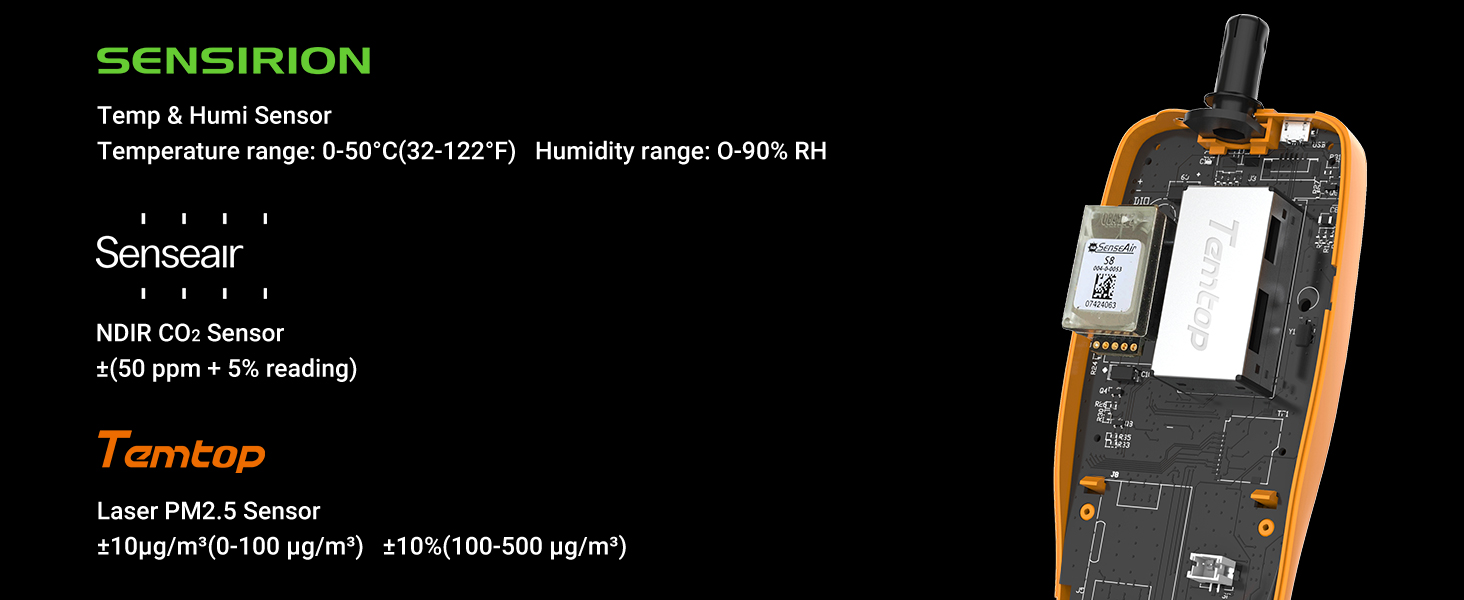
Image: An industrial scene with smoke stacks emitting plumes, illustrating common sources of PM2.5 particles in the air.
Why PM2.5 values vary in different locations of the same room?
PM2.5 in the air is not evenly distributed so the readings of PM2.5 monitors within the same room may also vary.

Image: A comfortable living room setting, demonstrating how PM2.5 levels can differ even within the same indoor space due to uneven distribution.
Why air quality monitor readings differ from official data?
Official data such as PurpleAir or Airnow reflect the average air quality of a region or city, while your air quality monitor reflects the specific air quality of your location, which may differ due to factors such as geography, weather, traffic, etc.

Image: An office environment, highlighting that personal air quality monitors provide localized readings, which can differ from broader official regional data due to various environmental factors.
How do I fix my PM2.5 problem?
To reduce the harmful effects of PM2.5, you can drive less or take public transport, use air purifiers or humidifiers at home, avoid outdoor activities or exercise when the air is polluted, wear masks or glasses to protect yourself, and eat more vitamin-rich foods to boost your immunity.

Image: A family relaxing at home, representing a healthy indoor environment and suggesting lifestyle adjustments to reduce PM2.5 exposure.
Tell me something about the history of air sensors.
In the 1900s, expensive air equipment was used in dangerous scenarios such as mining. In 2013-2016, the EPA first determined the accuracy of low-cost air sensors, and some sensors began popularizing in 2016. Now, Temtop has developed PM2.5 sensors since 2013 and is committed to providing professional-grade air testers at the best value.

Image: A laboratory setting featuring multiple air quality monitors, illustrating the historical development and increasing accessibility of air sensing technology.
Ask a question about this manual
Ask about setup, troubleshooting, compatibility, parts, safety, or missing instructions. Manuals+ will review the question and use this page’s manual context to help answer it.