
Introduzione
Thank you for choosing the NGS EVO RUST ICE Wireless Mouse. This manual provides essential information for setting up, operating, maintaining, and troubleshooting your device. Please read it carefully to ensure optimal performance and longevity of your mouse.

Davanti view of the NGS EVO RUST ICE wireless mouse in blue, showcasingrazie al suo design ergonomico e al ricevitore USB incluso.

The NGS EVO RUST ICE mouse is available in various colors, including blue, gold, and black.
Guida all'installazione
Follow these steps to set up your NGS EVO RUST ICE wireless mouse:
- Disimballare il mouse: Estrarre con cautela il mouse e il ricevitore USB dalla confezione.
- Individuare il ricevitore USB: The compact USB receiver is typically stored within the mouse itself, often in a compartment on the underside.
- Inserire il ricevitore USB: Plug the USB receiver into an available USB port on your computer (PC, Mac, MacBook, iPad, or Tablet). The mouse is designed for "Plug and Play" functionality, meaning it should be recognized automatically by your operating system.
- Accendere il mouse: Locate the On/Off switch on the underside of the mouse and slide it to the "On" position.
- Initial Charging (if needed): Although the mouse comes with some charge, it is recommended to fully charge it before first use. Connect the supplied micro USB cable to the mouse's charging port and the other end to a USB power source (e.g., computer USB port, USB wall adapter).

The NGS EVO RUST ICE mouse shown with its micro USB charging cable and the 2.4 GHz USB receiver, demonstrating its connectivity and charging method.
Istruzioni per l'uso
Your NGS EVO RUST ICE mouse is designed for intuitive use. Here's how to operate its key features:
- Movimento di base: Move the mouse across a flat surface. The optical sensor provides precise tracking.
- Pulsanti silenziosi: The left and right click buttons are designed to be silent, reducing click noise by over 90%.
- Rotella di scorrimento: Use the anti-sweat rubber scroll wheel for vertical scrolling through documents and web pagine. La rotellina di scorrimento funziona anche come pulsante centrale cliccabile.
- Regolazione DPI: The mouse features a dedicated DPI button, typically located behind the scroll wheel. Press this button to cycle through the available resolution settings: 800 DPI (for precise control), 1200 DPI (standard use), and 1600 DPI (for faster cursor movement). Choose the DPI setting that best suits your task and preference.
- Pulsanti laterali: The mouse includes additional buttons on the side, designed for right-handed users. These can often be configured for forward/back navigation in web browsers or other custom functions depending on your operating system and software.
- Risparmio energetico: Utilize the On/Off switch on the underside of the mouse to conserve battery life when not in use or when transporting the mouse.

The NGS EVO RUST ICE mouse in use with a laptop, demonstrating its ergonomic fit for right-handed users.
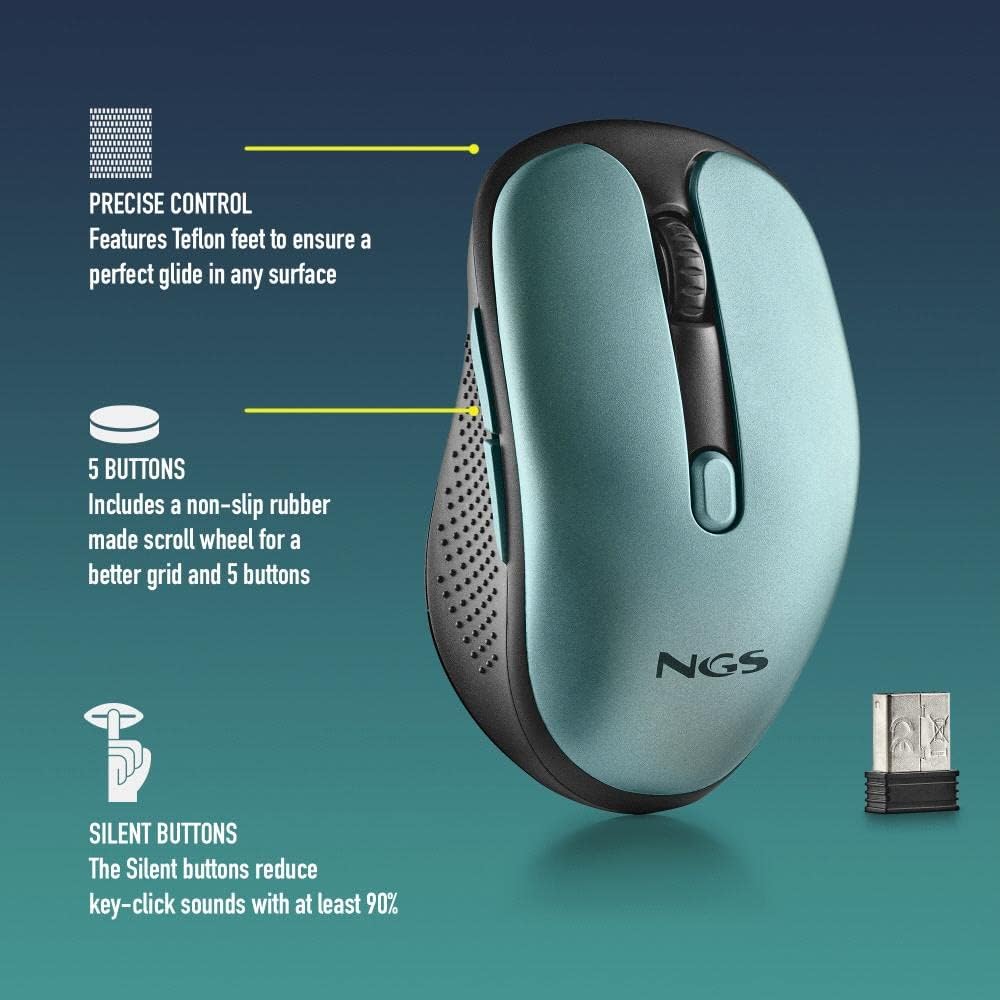
Un dettagliato view of the NGS EVO RUST ICE mouse highlighting its features: Teflon feet for smooth gliding, five responsive buttons, and silent click technology that reduces noise by over 90%.
Manutenzione
Una corretta manutenzione garantisce la longevità e le prestazioni ottimali del mouse:
- Pulizia: Utilizzare un panno morbido e asciutto per pulire la superficie del mouse. Per lo sporco ostinato, leggermente dampPulire il panno con acqua o con un detergente delicato e non abrasivo. Evitare l'uso di prodotti chimici aggressivi o materiali abrasivi.
- Sensore ottico: Mantenere il sensore ottico sul lato inferiore del mouse pulito e privo di polvere o detriti per garantire un tracciamento accurato. Utilizzare un cotton fioc o aria compressa se necessario.
- Ricarica: Recharge the mouse when the battery indicator (if present) shows low power, or when you notice a delay in response. Use the provided micro USB cable for charging. A full charge can provide up to 50 hours of use.
- Magazzinaggio: When not in use for extended periods, turn off the mouse using the On/Off switch to conserve battery life. Store it in a clean, dry place.

An illustrative image showing key features of the NGS EVO RUST ICE mouse, including its micro USB charging port and impressive battery life.
Risoluzione dei problemi
If you encounter issues with your NGS EVO RUST ICE mouse, try the following solutions:
| Problema | Possibile causa | Soluzione |
|---|---|---|
| Il mouse non risponde |
|
|
| Movimento irregolare del cursore |
|
|
| Durata breve della batteria |
|
|
Specifiche tecniche
- Nome modello: NGS EVO RUST ICE
- Connettività: Wireless a 2.4 GHz (ricevitore USB)
- Tecnologia dei sensori: Ottico
- Risoluzione DPI: 800 / 1200 / 1600 DPI (regolabile)
- Numero di pulsanti: 5 (Sinistra, Destra, Clic con rotellina di scorrimento, 2 pulsanti laterali)
- Caratteristiche speciali: Silent Buttons, Rechargeable Lithium Battery, Teflon Feet, On/Off Energy Saving Button, Plug & Play
- Tipo di batteria: Rechargeable Lithium Battery (600 mAh, based on image)
- Durata della batteria: Fino a 50 ore con una singola carica
- Porta di ricarica: Micro USB
- Distanza operativa: 8-10 metri
- Orientamento della mano: Design per destrimani
- Dimensioni (L x P x A): Circa 105 x 62 x 38 mm
- Peso: 66 grammi
- Compatibilità: PC, Mac, MacBook, iPad, Tablet (macOS, Windows compatible)

A graphic illustrating key features of the NGS EVO RUST ICE mouse: wireless operation, rechargeable battery, 800/1200/1600 DPI settings, silent buttons, and compatibility with PC and Mac systems.
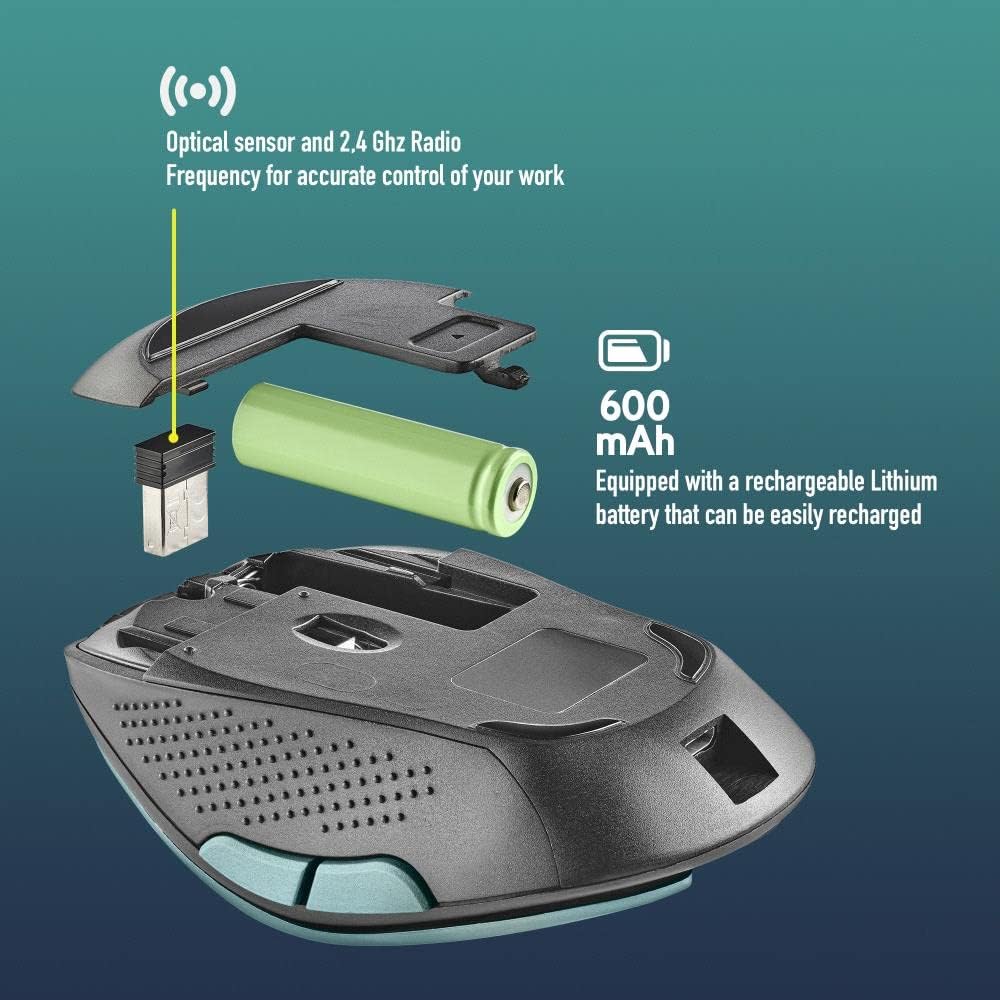
Un esploso view of the NGS EVO RUST ICE mouse, illustrating its internal components including the optical sensor, 2.4 GHz radio frequency module, and the 600 mAh rechargeable Lithium battery.
Garanzia e supporto
The NGS EVO RUST ICE mouse comes with a manufacturer's warranty. For specific details regarding warranty coverage, duration, and terms, please refer to the documentation included with your purchase or visit the official NGS websito.
For technical support, product registration, or further inquiries, please contact NGS customer service through their official channels. Contact information can typically be found on the product packaging or the manufacturer's websito.
Produttore: Lurbe Grup, S.A. (NGS)