
1. Introduzione
The Blaupunkt KRD 100 is a versatile kitchen radio designed to enhance your audio experience while cooking or baking. It features DAB+ and FM PLL tuners for clear radio reception, Bluetooth connectivity for wireless audio streaming, and a vibrant 2.4-inch color LED display. This radio also includes practical functions such as an integrated LED light for workspace illumination, a clock, two independent countdown timers, and an alarm function. The KRD 100 offers flexible installation options, allowing it to be mounted under cabinets or used freestanding with its integrated stand.
2. Istruzioni di sicurezza
Si prega di leggere attentamente le presenti istruzioni di sicurezza prima di utilizzare il dispositivo e di conservarle per riferimento futuro. Un uso improprio può causare scosse elettriche, incendi o altri pericoli.
- Fonte di energia: Only use the provided power cable and connect the device to a power outlet with the correct voltage as indicated on the device label.
- Acqua e umidità: Do not expose the device to dripping or splashing water. Do not place objects filled with liquids, such as vases, on the device. Avoid using the device in high humidity environments. While the product is rated as water-resistant, direct exposure to water should be avoided.
- Ventilazione: Ensure adequate ventilation around the device. Do not block any ventilation openings.
- Calore: Tenere il dispositivo lontano da fonti di calore quali termosifoni, bocchette di ventilazione, stufe o altri apparecchi che producono calore.
- Pulizia: Disconnect the device from the power supply before cleaning. Use a soft, dry cloth. Do not use liquid cleaners or aerosol cleaners.
- Manutenzione: Non tentare di riparare questo prodotto da soli. Affidare tutte le operazioni di manutenzione a personale di assistenza qualificato.
- Posizionamento: Ensure the device is placed on a stable surface or securely mounted to prevent it from falling.
3. Contenuto della confezione
Verificare che tutti gli articoli siano presenti nel pacco:
- Blaupunkt KRD 100 Radio Unit
- 75 Ω Launch Antenna
- Modello di foratura
- Mounting Hardware (4 spacers, 4 long screws, 4 short screws)
- Cavo di alimentazione
- Manuale dell'utente (questo documento)
- Scheda di garanzia
4. Prodotto finitoview
Familiarize yourself with the main components and controls of your Blaupunkt KRD 100 radio.

Figura 4.1: Davanti view of the Blaupunkt KRD 100 kitchen radio, displaying the screen and control buttons.
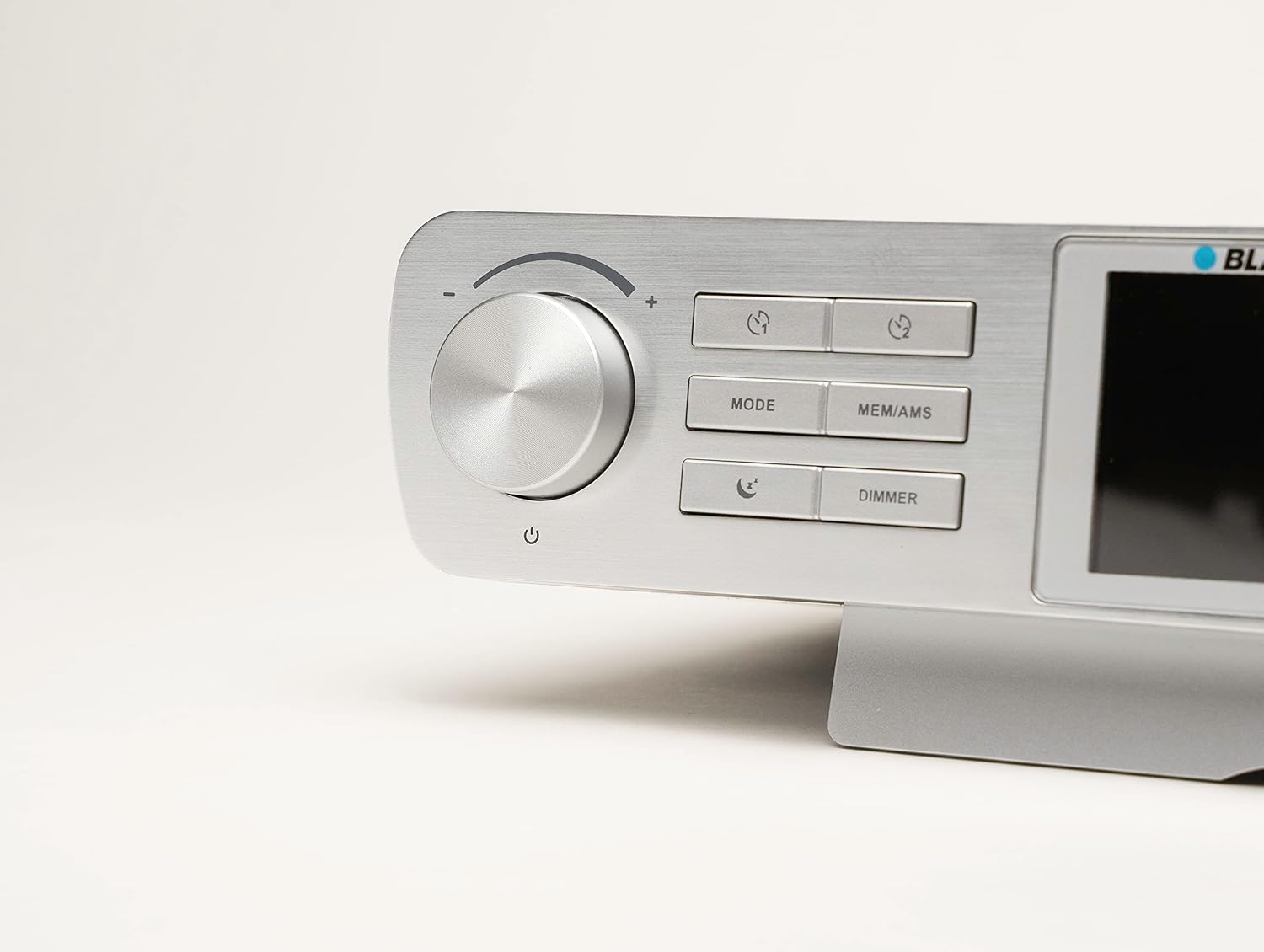
Figura 4.2: Dettagliato view of the control panel, including the volume/power knob, Mode, MEM/AMS, and Dimmer buttons.
Comandi e display:
- Volume Knob / Power Button: Ruotare per regolare il volume. Premere per accendere/spegnere.
- Pulsante MODE: Passa tra le modalità DAB+, FM e Bluetooth.
- Pulsante MEM/AMS: Accesses station memory and initiates Automatic Memory Scan.
- Pulsante DIMMER: Regola la luminosità del display.
- Pulsanti del timer: Dedicated buttons for setting and controlling the two countdown timers.
- 2.4-inch Color LED Display: Shows station information, time, settings, and other relevant data.
- Luce LED integrata: Located on the underside of the unit, provides illumination for the workspace.
5. Impostazione
5.1 Opzioni di montaggio
The Blaupunkt KRD 100 can be installed in two ways: under-cabinet mounting or freestanding on a flat surface.

Figura 5.1: The KRD 100 radio installed under a kitchen cabinet, demonstrating its space-saving design.

Figura 5.2: Dimensions of the KRD 100 radio, useful for planning installation space.
Montaggio sottopensile:
- Preparare la superficie: Choose a suitable location under a kitchen cabinet, ensuring enough space and clearance.
- Use Drilling Template: Place the provided drilling template against the underside of the cabinet and mark the drilling points.
- Fori di perforazione: Carefully drill holes at the marked positions.
- Attach Spacers: Insert the 4 spacers into the drilled holes.
- Proteggere la radio: Align the radio with the spacers and use the long screws to secure it firmly to the cabinet. Use the short screws if the cabinet material is thinner.
Uso indipendente:
Simply place the radio on a stable, flat surface. The integrated stand provides stability.
5.2 Collegamento di alimentazione
- Connect the provided power cable to the DC input port on the back of the radio.
- Collegare l'altra estremità del cavo di alimentazione a una presa a muro standard.
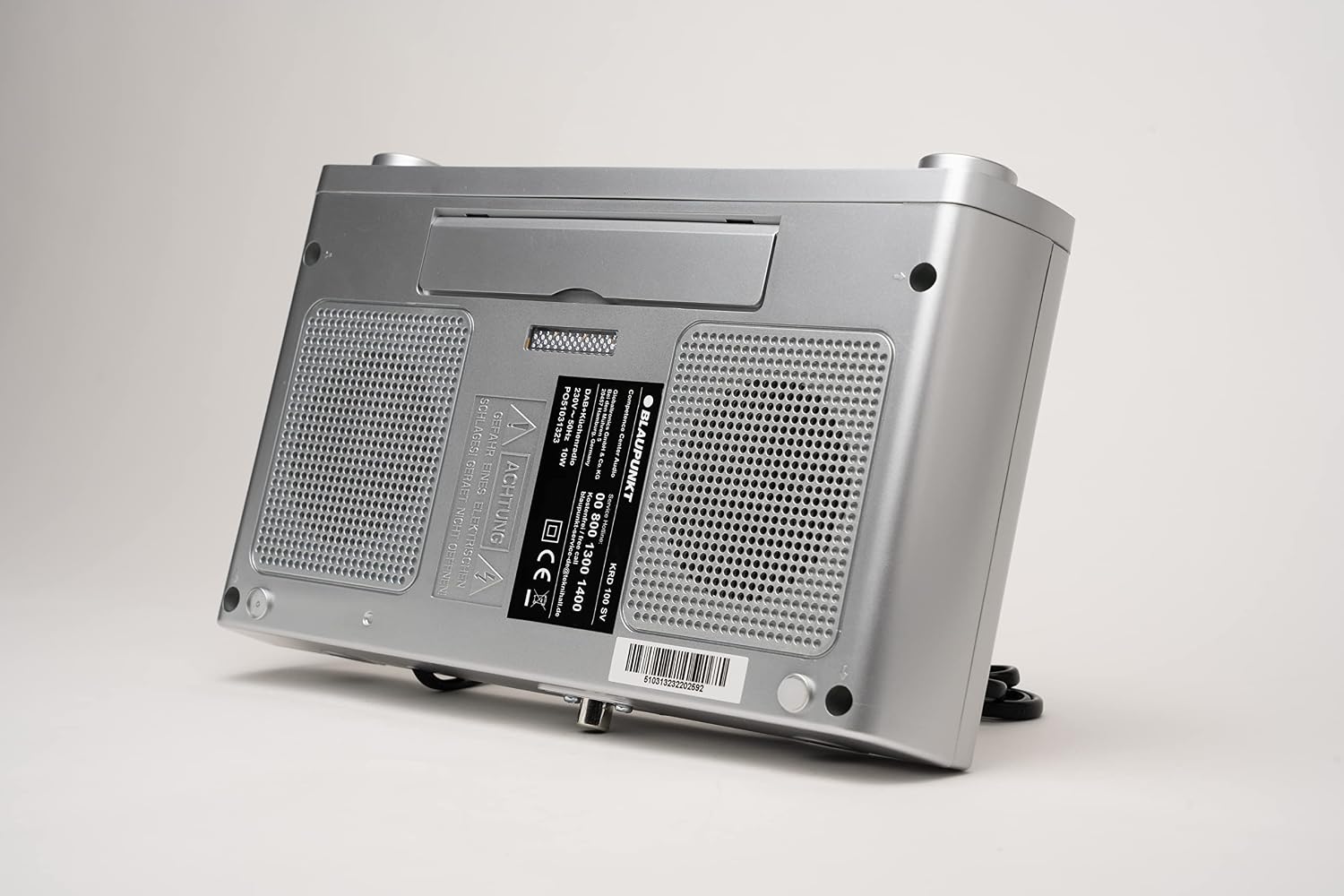
Figura 5.3: Posteriore view of the KRD 100, indicating connection points for power and antenna.
5.3 Collegamento dell'antenna
- Connect the 75 Ω launch antenna to the antenna input port on the back of the radio.
- Extend the antenna fully for optimal reception. Adjust its position if reception is poor.
6. Istruzioni per l'uso
6.1 Accensione/spegnimento e controllo del volume
- Accensione: Press the Volume knob. The display will light up.
- Spegni: Press and hold the Volume knob until the display turns off.
- Regolazione del volume: Rotate the Volume knob clockwise to increase volume and counter-clockwise to decrease volume.
6.2 Selezione della modalità
Premere il tasto MODALITÀ ripetutamente il pulsante per scorrere le modalità disponibili:
- Radio DAB+
- Radio FM
- Bluetooth
6.3 Funzionamento della radio DAB+
- Passare alla modalità DAB+ utilizzando il MODALITÀ pulsante.
- The radio will automatically perform an initial scan for available DAB+ stations. This may take a few moments.
- To manually initiate a scan, press and hold the MEM/AMS pulsante.
- Use the tuning/navigation buttons (usually integrated with the volume knob or separate buttons) to browse through the list of found stations.
- To save a favorite station (up to 30 presets for DAB+), tune to the desired station, then press and hold the MEM/AMS button. Follow the on-screen prompts to select a preset number.
6.4 Funzionamento della radio FM
- Passare alla modalità FM utilizzando il MODALITÀ pulsante.
- Per scansionare e salvare automaticamente le stazioni, tenere premuto il tasto MEM/AMS button. The radio will scan for strong signals and store them (up to 30 presets for FM).
- To manually tune, use the tuning/navigation buttons to adjust the frequency.
- To save a favorite station, tune to the desired frequency, then press and hold the MEM/AMS button. Follow the on-screen prompts to select a preset number.
6.5 Streaming Bluetooth
- Passare alla modalità Bluetooth utilizzando il MODALITÀ pulsante. Il display mostrerà "Bluetooth Pairing" o qualcosa di simile.
- Sul tuo smartphone o tablet, attiva il Bluetooth e cerca i dispositivi disponibili.
- Select "Blaupunkt KRD 100" from the list of devices.
- Once paired, you can stream audio from your device to the radio. Control playback and volume from your connected device or the radio's volume knob.
6.6 Clock and Time Setting
The radio typically sets the time automatically via DAB+ or FM RDS signals. If manual adjustment is needed:
- Access the system settings menu (refer to the specific button combination in your quick start guide if not obvious).
- Navigate to "Time/Date" settings.
- Adjust hours, minutes, and date using the navigation buttons.
- Conferma le tue impostazioni.
6.7 Countdown Timers
The KRD 100 features two independent countdown timers, ideal for cooking or baking.
- Press one of the dedicated Timer pulsanti.
- Use the navigation buttons to set the desired countdown duration.
- Premere nuovamente il pulsante Timer per avviare il conto alla rovescia.
- Quando il timer raggiunge lo zero, verrà emesso un avviso acustico.
6.8 Funzione di allarme
Set an alarm to wake up to an alarm sound or your favorite radio station.
- Accedi al menu delle impostazioni dell'allarme.
- Set the alarm time, alarm source (buzzer or radio station), and volume.
- Attiva l'allarme.
- Quando suona la sveglia, premere il tasto POSTICIPARE button (if available, often the volume knob press) for a temporary delay (5, 10, 15, or 30 minutes).
6.9 Luce LED integrata
The integrated LED light illuminates your workspace.
- Premere il tasto dedicato Leggero button (if available) or refer to the manual for specific activation instructions.
- Premere di nuovo per spegnere la luce.
6.10 Dimmer del display
Regola la luminosità del display in base alle tue preferenze.
- Premere il tasto DIMENSIONATORE button repeatedly to cycle through different brightness levels or to activate an energy-saving mode.
7. Manutenzione
7.1 Pulizia
- Always disconnect the radio from the power supply before cleaning.
- Utilizzare una pasta morbida e leggermenteamp panno per pulire le superfici esterne.
- Non utilizzare detergenti abrasivi, solventi o detergenti aggressivi, poiché potrebbero danneggiare la finitura.
- Assicurarsi che nessun liquido penetri nelle aperture del dispositivo.
7.2 Cura generale
- Avoid placing heavy objects on top of the radio.
- Proteggere il display dai graffi.
- If the radio will not be used for an extended period, unplug it from the power outlet.
8. Risoluzione Dei Problemi
If you encounter issues with your Blaupunkt KRD 100, refer to the following common problems and solutions:
| Problema | Possibile causa | Soluzione |
|---|---|---|
| Nessuna alimentazione / Il dispositivo non si accende | Power cable not connected properly; Power outlet not working. | Check if the power cable is securely plugged into both the radio and the wall outlet. Test the outlet with another device. |
| Scarsa ricezione DAB+ o FM | Antenna not extended or positioned correctly; Weak signal in your area; Interference from other electronic devices. | Fully extend and reposition the antenna. Try moving the radio to a different location. Keep the radio away from other electronic devices that may cause interference. |
| Il dispositivo Bluetooth non può accoppiarsi | Bluetooth not enabled on your device; Radio not in Bluetooth pairing mode; Device too far from the radio. | Ensure Bluetooth is enabled on your smartphone/tablet. Switch the radio to Bluetooth mode. Move your device closer to the radio (within 10 meters). |
| Nessun suono o volume basso | Volume set too low; Mute function activated; Incorrect audio source selected. | Increase the volume using the knob. Check if the radio is muted. Ensure the correct mode (DAB+, FM, Bluetooth) is selected. For Bluetooth, check volume on both the radio and the connected device. |
| Il display è vuoto o tremolante | Dimmer setting too low; Power issue; Device malfunction. | Press the DIMMER button to adjust brightness. Power cycle the device (unplug and plug back in). If the problem persists, contact support. |
9. Specifiche
| Marca | BLAUPUNKT |
| Numero di modello | KRD 100 |
| Colore | KRD 100 / Silver |
| Tecnologia di connettività | Bluetooth |
| Tecnologia sintonizzatore | DAB+, FM PLL |
| Bande radio supportate | DAB+, FM |
| Tipo di visualizzazione | LED a colori |
| Dimensioni dello schermo | 2.4 pollici (circa 6 cm) |
| Modalità di uscita audio | Stereo |
| Potenza massima in uscita | 4 Watt (2 x 2 W RMS) |
| Fonte di alimentazione | Mains powered (via included power cable) |
| Dimensioni del prodotto (L x P x A) | 25.9 x 16 x 5.9 cm |
| Peso dell'articolo | 745 grammi |
| Caratteristiche speciali | Integrated clock, 2 countdown timers, LED light, alarm function, snooze function |
| Dispositivi compatibili | Tablet (via Bluetooth) |
| Materiale interno | Metallo |
| Livello di resistenza all'acqua | Resistente all'acqua |
10. Garanzia e supporto
10.1 Garanzia del produttore
The Blaupunkt KRD 100 comes with a Garanzia del produttore di 2 anniPer i termini e le condizioni dettagliate, fare riferimento alla scheda di garanzia inclusa.
10.2 Assistenza clienti
For technical assistance, troubleshooting beyond this manual, or warranty claims, please contact Blaupunkt customer support. Contact information can typically be found on the warranty card or the official Blaupunkt websito.
Risorse online: You may find additional support and FAQs on the official Blaupunkt websito: www.blaupunkt.com