
1. Introduzione
The THINKWARE U3000 is an advanced 4K UHD dash camera designed to provide comprehensive vehicle surveillance and driving assistance. Equipped with cutting-edge technology, including a STARVIS 2 sensor for superior night vision, built-in GPS, 5GHz Wi-Fi, and radar for enhanced parking mode, the U3000 ensures high-quality video recording and intelligent alerts for a safer driving experience. This manual provides essential information for setup, operation, and maintenance of your dash cam.
2. Caratteristiche principali
- 4K UHD Front Recording: Cattura cibo cristallinotage with a 4K (3840x2160) resolution.
- STARVIS 2 Sensor & Super Night Vision 4.0: Delivers enhanced clarity and detail in low-light conditions.
- Built-in 5GHz Wi-Fi & Bluetooth: Abilita velocemente file transfers and seamless connection with the Thinkware Link App.
- GPS integrato: Tracks speed and time data, providing alerts for red light and speed cameras.
- Radar Parking Mode: Offers prolonged parking surveillance with buffered recording when motion or impact is detected.
- Modalità di parcheggio intelligente: Prevents heat-related damage by switching to a low-power mode when internal temperature is high.
- Thinkware Connected App: Provides remote live view, instant impact notifications, vehicle status, and driving history (requires internet connection).
- Sistema avanzato di assistenza alla guida (ADAS): Includes Front Vehicle Departure Warning (FVDW), Forward Collision Warning System (FCWS), and Lane Departure Warning System (LDWS) for increased road safety.
3. Cosa c'è nella scatola
Your THINKWARE U3000 package includes the following components:

The complete set of items included with the THINKWARE U3000 Dash Cam, such as the main unit, mounting accessories, and cables.
- U3000 Dash Cam (Front Unit)
- Adhesive Windshield Mount
- Scheda MicroSD da 64 GB
- Adhesive Wire Clips
- Strumento di rifinitura
- Cavo di alimentazione 12V
- Nastro di montaggio di ricambio
- Warranty & QR Code Card
- Filtro CPL (lente polarizzante circolare)
4. Impostazione
4.1 Montaggio della Dash Cam
The U3000 dash cam is designed for easy installation on your vehicle's windshield. The included adhesive mount ensures a secure fit. The camera lens can be adjusted to capture the optimal viewangolo di ing.

The main dash cam unit is shown with its adhesive mount, ready for attachment to the windshield. The camera's angle can be adjusted to ensure proper road coverage.
4.2 Collegamento dell'alimentazione
Connect the provided 12V power cable to your vehicle's cigarette lighter socket and the dash cam. For advanced parking surveillance features, an optional OBD-II power adapter or hardwiring cable (sold separately) is recommended for continuous power supply.
4.3 Inserimento della scheda MicroSD
Insert the included 64GB MicroSD card into the designated slot on the side of the dash cam. Ensure it clicks into place. The dash cam will automatically format the card upon first use.
4.4 Installazione del filtro CPL
The Circular Polarizing Lens (CPL) filter helps reduce dashboard reflections and enhance color saturation. Carefully attach the CPL filter to the front camera lens, aligning it with the guide points for optimal performance. It can be removed if not desired.
5. Istruzioni per l'uso
5.1 Initial App Pairing (Thinkware Link App)
To access full features and settings, pair your dash cam with the Thinkware Link App via Bluetooth. Once paired, you can manage settings and view cibo vivotage.

A smartphone screen displaying the Thinkware Link App, showing the U3000 dash cam connected, enabling easy device pairing and management.
5.2 Funzionamento di base
The dash cam automatically begins continuous recording when powered on. Use the physical buttons on the unit to manually trigger event recordings or control Wi-Fi and microphone functions.
5.3 App Usage (Thinkware Link & Thinkware Connected)
The Thinkware Link App allows you to view cibo vivotage, adjust camera settings, and download recorded videos. The Thinkware Connected App provides remote access and notifications.

Multiple smartphone screens showcasing the Thinkware Connected App's interface, including live vehicle monitoring, impact notifications, and location tracking.
Vivere View
Accedi alla diretta view through the app to see what your dash cam is recording in real-time. You can switch between front and rear camera views (if a rear camera is connected) and monitor driving data like speed and voltage.
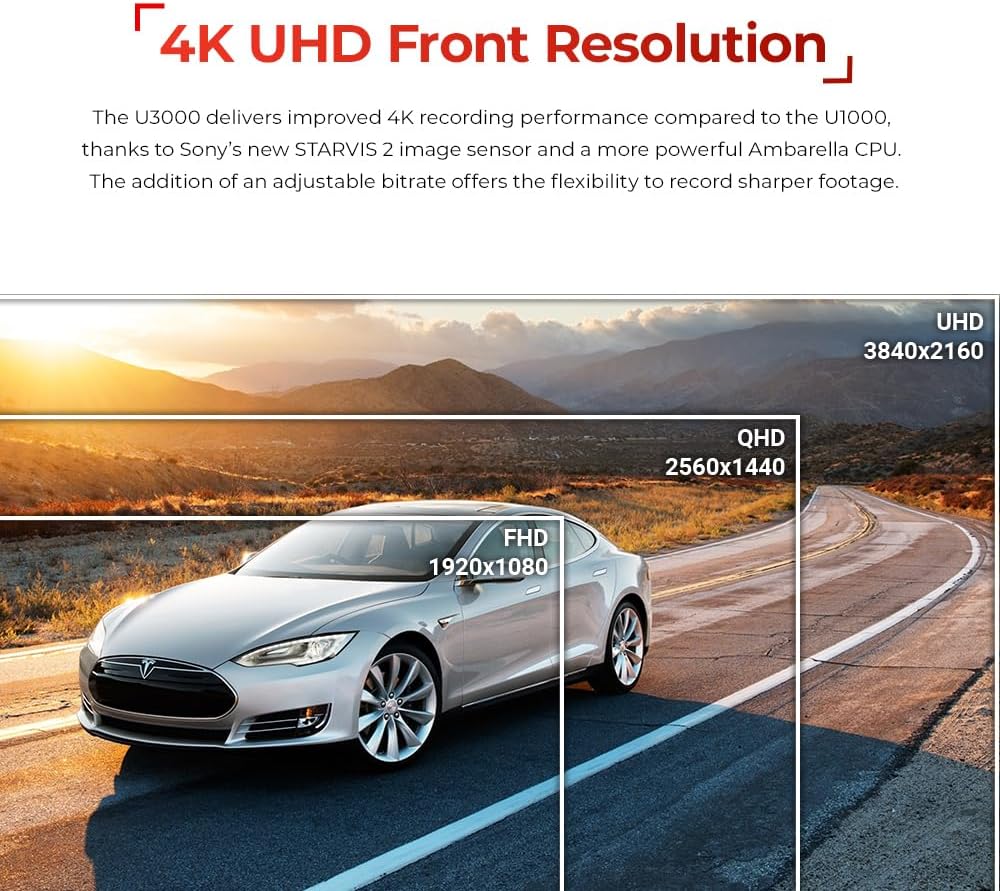
An image demonstrating the 4K UHD front recording capability of the U3000, showing a clear road view with resolution comparisons.
Impostazioni
Customize various settings including video resolution (4K 30fps, QHD 60fps), image quality, brightness, Super Night Vision 4.0 activation, G-sensor sensitivity for continuous and parking modes, motion detection sensitivity, and radar sensitivity for both front and rear. You can also configure external battery saving options and off-timer settings.
Accessing Recorded Videos
Browse recorded videos by file or by day. You can stream videos directly from the dash cam to your phone, download them for offline viewing, or delete unwanted files.
5.4 Modalità di sorveglianza del parcheggio
With hardwiring, the U3000 offers various parking surveillance modes:
- Radar Parking Mode: Utilizes radar to detect motion in a selected range, saving 20-second video clips (10s before and 10s after the event).
- Rilevamento del movimento: Records when motion is detected in front of the camera lens.
- Intervallo di tempo: Records at 2fps for extended periods of uninterrupted video.
- Risparmio energetico: Records only when impacts are detected, reducing power consumption.

A visual representation of the various parking surveillance modes available, including Radar Parking Mode, Smart Parking Mode, Energy Saving Mode, Time Lapse, and Motion & Impact Detection.
5.5 Sistema avanzato di assistenza alla guida (ADAS)
The ADAS features provide audible alerts to enhance driving safety:
- Avviso di allontanamento del veicolo anteriore (FVDW): Alerts when the vehicle in front starts to move.
- Sistema di avviso di collisione frontale (FCWS): Alerts when the distance to the vehicle ahead becomes too close.
- Sistema di avviso di deviazione dalla corsia (LDWS): Alerts when the vehicle drifts off its designated lane.
- Rear Collision Warning System (RCWS): Notifies if a vehicle is tailgating for more than 5 seconds within a certain distance.

An illustrative image showing a car on a road with digital overlays indicating ADAS warnings such as lane departure and forward collision alerts.
5.6 Speed and Red Light Camera Alerts
The built-in GPS antenna enables the dash cam to alert you of upcoming red light cameras and speed cameras, helping you stay informed and avoid violations.
6. Manutenzione
6.1 Gestione della scheda MicroSD
Regularly format your MicroSD card through the Thinkware Link App to ensure optimal recording performance and prevent data corruption. Use only genuine THINKWARE memory cards or Class 10 (or higher) cards from reputable brands for reliable operation.
6.2 Aggiornamenti firmware
Keep your dash cam's firmware updated to ensure the best performance and access to new features. Firmware updates can typically be downloaded from the official THINKWARE website or via the Thinkware Link App.
7. Risoluzione Dei Problemi
If you encounter any issues with your THINKWARE U3000, consider the following common troubleshooting steps:
- Problemi di connettività: Ensure Bluetooth and Wi-Fi are enabled on your smartphone and the dash cam. Try restarting both devices.
- Problemi di registrazione: Format the MicroSD card. If issues persist, try a different compatible MicroSD card.
- Parking Mode Notifications: Verify that the dash cam is properly hardwired or connected via an OBD-II cable for continuous power in parking mode. Check app settings for notification preferences.
- Qualità video: Ensure the lens is clean and free from smudges. Check resolution settings in the app.
8. Specifiche
| Dimensioni del prodotto | 5.5 x 7.48 x 3.86 pollici |
| Peso dell'articolo | 4.6 once |
| Nome del modello | PENSA U3000 |
| Numero modello articolo | TW-U3000MU64C |
| Risoluzione di acquisizione video | Risoluzione 4K UHD (3840 × 2160) |
| Tecnologia di connettività | Cablato, Wireless (Wi-Fi, Bluetooth) |
| Caratteristiche speciali | RADAR Parking Mode, Smart Parking Mode, Super Night Vision, GPS, Speed Camera Alerts |
| Tipo di montaggio | Supporto per parabrezza |
9. Video ufficiale del prodotto
Watch the official product video for a comprehensive overview of the THINKWARE U3000 Dash Cam's features and capabilities.
Mostra video ufficiale del prodottoasing the THINKWARE U3000 Dash Cam's features, including 4K recording, Super Night Vision, Radar Parking Mode, and app connectivity.
10. Garanzia e supporto
Your THINKWARE U3000 Dash Cam comes with a manufacturer's warranty. For detailed warranty information, product support, or to download the latest firmware and user manuals, please refer to the QR code included in your package or visit the official THINKWARE website. Ensure you register your product for warranty purposes.