
1. Introduzione
The ENDGAME GEAR XM2we is a high-performance wireless gaming mouse designed for competitive play. It features a lightweight, ergonomic design, precise optical sensor, and durable switches to enhance your gaming experience. This manual provides detailed instructions for setup, operation, and maintenance of your XM2we mouse.
2. Contenuto della confezione
Si prega di verificare che tutti gli articoli siano presenti nel pacco:
- Mouse da gioco wireless ENDGAME GEAR XM2we
- USB-C to USB-A Charging/Data Cable (180 cm) with Angled Connector
- Chiavetta USB wireless da 2.4 GHz

Image: The XM2we Wireless Gaming Mouse, showing its ergonomic shape and included USB-C cable.
3. Impostazione
3.1 Collegamento del mouse
- Insert the 2.4 GHz wireless USB dongle into an available USB-A port on your computer.
- Turn on the XM2we mouse using the power switch located on the bottom of the mouse.
- The mouse should automatically connect to the dongle. If not, ensure the dongle is properly inserted and the mouse is powered on.
3.2 Modalità cablata
The XM2we can also be used in wired mode. Connect the supplied USB-C cable to the front port of the mouse and the USB-A end to your computer. The mouse will function as a wired device and charge simultaneously.

Immagine: In basso view of the XM2we mouse, highlighting the USB-C port for charging and wired connection, and the PixArt PAW3370 optical sensor.
4. Istruzioni per l'uso
4.1 Funzioni dei pulsanti
The XM2we mouse features 5 programmable buttons:
- Pulsante sinistro del mouse: Azione primaria.
- Pulsante destro del mouse: Azione secondaria.
- Clic della rotellina di scorrimento: Middle button function.
- Side Button 1 (Forward): Navigazione in avanti predefinita.
- Side Button 2 (Back): Default back navigation.

Immagine: in alto view of the XM2we mouse, illustrating the main left and right click buttons and the scroll wheel.
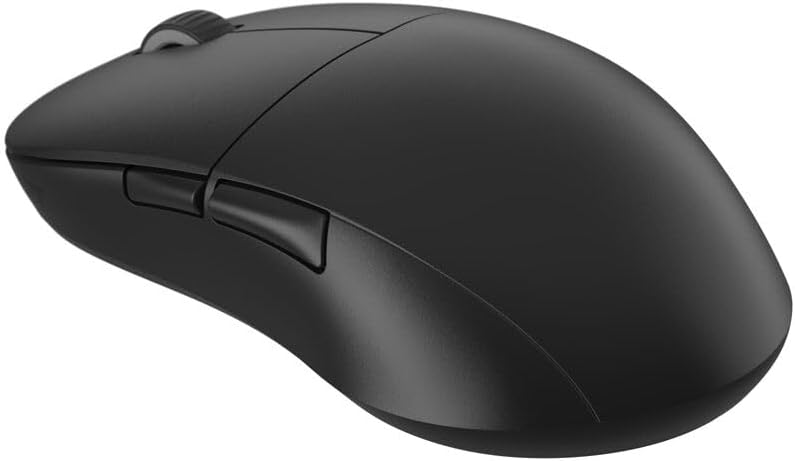
Immagine: Lato view of the XM2we mouse, highlighting the two thumb buttons.
4.2 Regolazione DPI e frequenza di polling
The XM2we features a PixArt PAW3370 optical sensor with up to 19,000 DPI. DPI and polling rate settings can be adjusted using the ENDGAME GEAR software. The mouse supports stable 1000 Hz polling rate for responsive performance.
5. Personalizzazione e software
To unlock the full potential of your XM2we mouse, download the official ENDGAME GEAR software from the manufacturer's websito. Il software consente di:
- Remap all 5 buttons to custom functions or macros.
- Regola i livelli DPI e crea più DPI profiles.
- Configure polling rate (125, 250, 500, 1000 Hz).
- Customize lift-off distance (LOD).
- Aggiorna il firmware del mouse.
6. Ricarica e batteria
The XM2we is equipped with a 410 mAh Lithium Polymer battery, providing up to a week of gameplay on a single charge. To charge the mouse:
- Connect the supplied USB-C cable to the front port of the mouse.
- Connect the USB-A end of the cable to your computer or a USB power adapter.
- The angled connector on the USB-C cable is designed to minimize cable drag if you choose to use the mouse while charging.

Image: The USB-C charging cable with its angled connector, designed for comfortable use during charging.
7. Manutenzione
To ensure the longevity and optimal performance of your XM2we mouse:
- Pulizia: Utilizzare un panno morbido e asciutto per pulire la superficie del mouse. Per lo sporco ostinato, un panno leggermenteamp È possibile utilizzare un panno, ma assicurarsi che non entri umidità nel mouse.
- Cura del sensore: Keep the optical sensor area on the bottom of the mouse clean and free from dust or debris.
- Teflon Feet: The large Teflon feet provide a smooth glide. Avoid scratching or damaging them. Replacement feet may be available from the manufacturer.
- Magazzinaggio: Conservare il mouse in un luogo fresco e asciutto, lontano dalla luce solare diretta e da temperature estreme.
8. Risoluzione Dei Problemi
- Il mouse non risponde:
- Assicurarsi che il mouse sia acceso.
- Verify the USB dongle is securely plugged into your computer.
- Prova a collegare il mouse in modalità cablata per verificare se funziona.
- Ricaricare il mouse se la batteria è scarica.
- Connessione intermittente:
- Move the USB dongle closer to the mouse, ideally to a front USB port or via a USB extension cable.
- Ensure there are no strong wireless interference sources (e.g., Wi-Fi routers, other wireless devices) nearby.
- Update mouse firmware using the ENDGAME GEAR software.
- Impostazioni DPI/pulsanti non applicabili:
- Ensure the ENDGAME GEAR software is installed and running.
- Apply changes within the software and save them to the mouse's onboard memory if available.
- Riavvia il computer.
9. Specifiche
| Caratteristica | Specificazione |
|---|---|
| Modello | XM2we |
| Connettività | 2.4 GHz Wireless, USB-C Wired |
| Sensore | Sensore ottico PixArt PAW3370 |
| DPI | Fino a 19,000 DPI |
| Tasso di sondaggio | 125, 250, 500, 1000 Hz |
| Interruttori | Kailh GO Optical Switches (Main Buttons) |
| Pulsanti | 5 pulsanti programmabili |
| Batteria | Polimeri di litio da 410 mAh |
| Peso | Under 64 g (2.22 oz) |
| Dimensioni (L x P x A) | 122 x 66 x 38 mm (4.80 x 2.59 x 1.50 pollici) |
| Lunghezza del cavo | 180 centimetri |

Image: Diagram illustrating the dimensions of the XM2we mouse: 122 mm length, 66 mm width, and 38 mm height, with a weight of 63g.
10. Garanzia e supporto
For warranty information, technical support, or further assistance, please refer to the official ENDGAME GEAR webo contattare direttamente il servizio clienti. Conservare la prova d'acquisto per eventuali reclami in garanzia.