
1. Introduzione
Grazie per l'acquistoasing the Roadstar IR-540D+BT Micro Hi-Fi System. This system offers a wide range of audio options including Internet Radio, DAB+/FM digital radio, CD-MP3 playback, Bluetooth connectivity, and USB media support. This manual provides essential information for safe operation, setup, and troubleshooting to ensure optimal performance of your device.
2. Informazioni sulla sicurezza
- Leggere attentamente tutte le istruzioni prima dell'uso.
- Conservare questo manuale per riferimento futuro.
- Non esporre l'unità alla pioggia o all'umidità per evitare incendi o scosse elettriche.
- Assicurare una ventilazione adeguata; non ostruire le aperture di ventilazione.
- Utilizzare solo gli accessori specificati dal produttore.
- Scollegare l'unità durante i temporali o quando non viene utilizzata per lunghi periodi.
- Affidare tutti gli interventi di assistenza a personale qualificato.
3. Contenuto della confezione
Si prega di verificare che tutti gli elementi siano presenti:
- Roadstar IR-540D+BT Micro Hi-Fi System
- Telecomando
- Adattatore di alimentazione
- Manuale dell'utente (questo documento)
4. Prodotto finitoview
Familiarize yourself with the main components and controls of your Hi-Fi system.
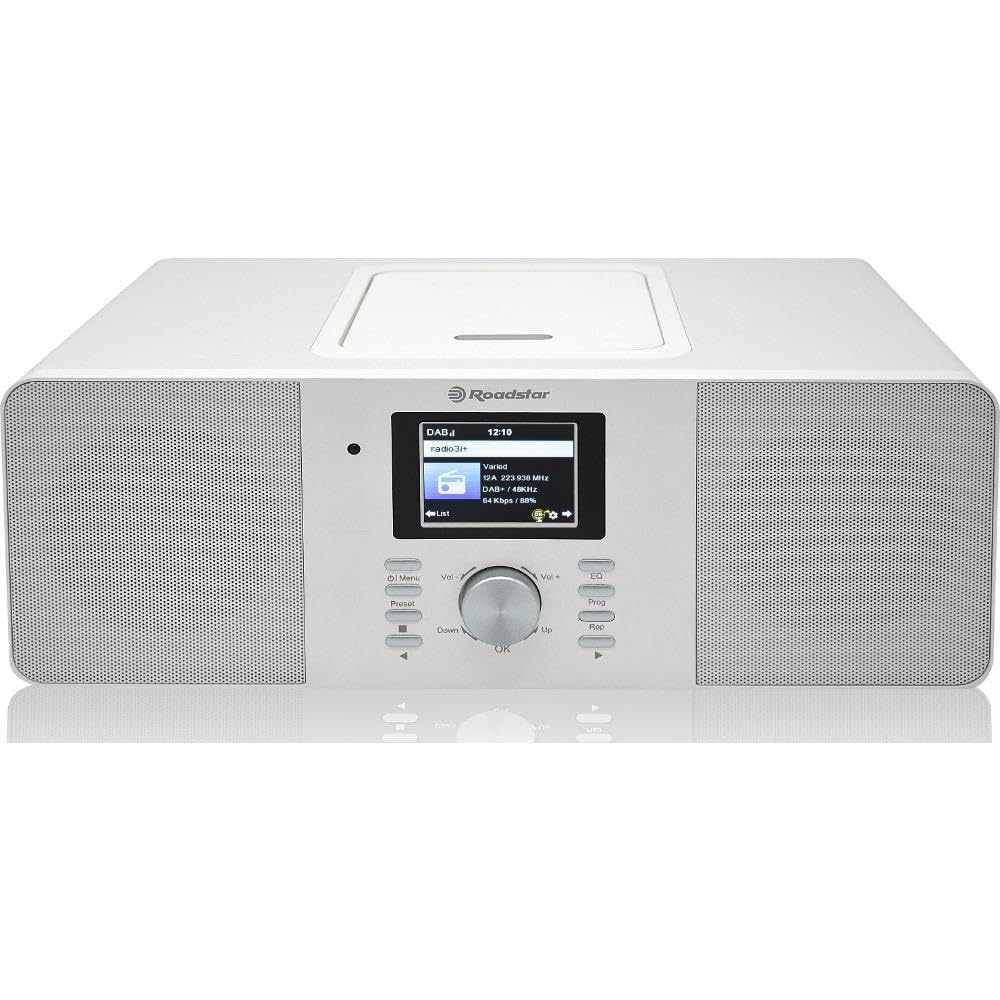
Figura 4.1: Fronte view of the Roadstar IR-540D+BT Micro Hi-Fi System.

Figure 4.2: Close-up of the LCD display and main control buttons/knobs.
Controlli del pannello frontale:
- Schermo LCD: Mostra la modalità corrente, le informazioni sulla traccia, la stazione radio, l'ora, ecc.
- Pulsante di accensione: Accende/spegne l'unità.
- Pulsante Modalità: Switches between CD, Internet Radio, DAB+, FM, Bluetooth, AUX, USB.
- Manopola del volume: Regola il livello di uscita audio.
- Pulsanti di navigazione (Su/Giù/Sinistra/Destra/OK): Per la navigazione e la selezione del menu.
- Pulsante Play/Pausa: Controlla la riproduzione per CD/USB/Bluetooth.
- Pulsanti Salta/Cerca: Skips tracks or searches radio stations.
- Porta USB: For USB media playback and fast charging.
- Jack per cuffie: Per l'ascolto privato.
Connessioni pannello posteriore:
- INGRESSO AUX: Jack da 3.5 mm per il collegamento di dispositivi audio esterni.
- Ingresso antenna FM/DAB: For connecting the included antenna.
- DC IN: Collegamento dell'adattatore di alimentazione.

Figure 4.3: The Roadstar IR-540D+BT system shown with its multi-function remote control.
Funzioni del telecomando:
- All basic functions (Power, Volume, Mode, Playback controls).
- Direct access buttons for different modes (e.g., CD, BT, Internet Radio).
- Numeric keypad for direct track/station entry.
- Alarm setting and sleep timer functions.
5. Impostazione
5.1 Collegamento di alimentazione
- Collegare l'adattatore di alimentazione alla presa DC IN sul retro dell'unità.
- Collegare l'alimentatore a una presa a muro standard.
5.2 Collegamento dell'antenna
For optimal DAB+ and FM radio reception, connect the supplied antenna to the FM/DAB Antenna Input on the rear panel. Extend the antenna fully and adjust its position for the best signal.
5.3 Initial Wi-Fi Setup (for Internet Radio)
Upon first power-on or when selecting Internet Radio mode, the system will prompt you to configure network settings.
- Use the navigation buttons to select 'Network Setup' or 'Wi-Fi Setup'.
- The system will scan for available Wi-Fi networks. Select your network from the list.
- Enter your Wi-Fi password using the navigation buttons and 'OK' to confirm each character.
- Once connected, the system will confirm the connection. You can now access Internet Radio stations.
6. Istruzioni per l'uso
6.1 Funzionamento generale
- Accensione/spegnimento: Premere il pulsante di accensione sull'unità o sul telecomando.
- Seleziona modalità: Press the 'Mode' button repeatedly to cycle through available sources (CD, Internet Radio, DAB+, FM, Bluetooth, AUX, USB).
- Regola volume: Rotate the Volume knob or use the VOL +/- buttons on the remote.
6.2 Riproduzione CD/MP3
- Aprire il coperchio del vano CD.
- Inserire un CD o un CD MP3 con l'etichetta rivolta verso l'alto.
- Close the CD compartment cover. The system will automatically switch to CD mode and begin playback.
- Use the Play/Pause, Skip, and Search buttons for control.
6.3 Funzionamento della radio
6.3.1 Radio Internet
- Selezionare la modalità 'Radio Internet'.
- Use the navigation buttons to browse stations by genre, location, or search.
- Premere 'OK' per selezionare una stazione.
Radio DAB+/FM 6.3.2
- Selezionare la modalità 'DAB+' o 'FM'.
- For DAB+, the system will perform an auto-scan for available stations. For FM, use the search buttons to find stations.
- To save a preset, press and hold the 'Preset' button, then select a preset number and press 'OK'.
6.4 Connettività Bluetooth
- Select 'Bluetooth' mode. The display will show 'Pairing' or 'Waiting for connection'.
- Sul tuo dispositivo mobile (smartphone, tablet), attiva il Bluetooth e cerca i dispositivi disponibili.
- Select 'IR-540D+BT' from the list.
- Once paired, you can play audio from your device through the Hi-Fi system.
6.5 Riproduzione e ricarica USB
- Inserire una chiavetta USB nella porta USB. Il sistema passerà automaticamente alla modalità USB e inizierà a riprodurre file audio compatibili. files (ad esempio, MP3).
- The USB port also supports fast charging for compatible devices.
6.6 Connessione AUX IN
Connect an external audio device (e.g., MP3 player, smartphone) to the AUX IN jack on the rear panel using a 3.5mm audio cable. Select 'AUX' mode to listen to audio from the connected device.
6.7 Funzione di allarme

Figure 6.1: The display showing alarm clock settings.
The system features a dual alarm function.
- Press the 'Alarm' button on the remote or navigate through the menu to 'Alarm Settings'.
- Selezionare Sveglia 1 o Sveglia 2.
- Set the desired alarm time, source (Buzzer, FM, DAB+, Internet Radio), and volume.
- Abilita l'allarme.
7. Manutenzione
- Pulizia: Per pulire l'unità, utilizzare un panno morbido e asciutto. Non utilizzare detergenti abrasivi o solventi.
- Cura del CD: Handle CDs by their edges. Clean with a soft, lint-free cloth, wiping from the center outwards.
- Ventilazione: Assicurarsi che le aperture di ventilazione non siano bloccate per evitare il surriscaldamento.
8. Risoluzione Dei Problemi
| Problema | Possibile causa | Soluzione |
|---|---|---|
| Nessun potere | Cavo di alimentazione non collegato; presa di corrente difettosa. | Controllare il collegamento del cavo di alimentazione; provare una presa diversa. |
| Nessun suono | Volume troppo basso; Modalità selezionata non corretta; Cuffie collegate. | Increase volume; Select correct source mode; Disconnect headphones. |
| Scarsa ricezione radio | Antenna non estesa/posizionata correttamente; segnale debole. | Extend and reposition the antenna; Try auto-tuning again. |
| Associazione Bluetooth non riuscita | Device not in pairing mode; Distance too far; Interference. | Ensure unit is in Bluetooth mode; Keep devices close; Restart both devices. |
| La radio Internet non si connette | Incorrect Wi-Fi password; Router issues; Weak Wi-Fi signal. | Re-enter Wi-Fi password; Restart router; Move unit closer to router. |
9. Specifiche
| Caratteristica | Specificazione |
|---|---|
| Marca | Stella della strada |
| Numero di modello | IR-540D+BT |
| Tecnologia di connettività | Auxiliary, USB, Bluetooth, Wi-Fi |
| Standard supportati | CD, CD-R, CD-RW, MP3, WAV, AAC, WMA |
| Tipo di altoparlante | Stereo |
| Potenza in uscita (RMS) | 2 x 10 W (Total 20W RMS) |
| Fonte di alimentazione | Elettrico con cavo |
| Dispositivi compatibili | Lettore MP3, Smartphone, Tablet |
| Sintonizzatore radio | Radio Internet, DAB+, FM |
| Porta USB | Playback and Fast Charging |
| Display | LCD digitale |
| Caratteristiche speciali | Dual Alarm, Equalizer Presets |
10. Garanzia e supporto
For warranty information and technical support, please refer to the warranty card included with your product or visit the official Roadstar websito. Conservare la prova d'acquisto per eventuali reclami in garanzia.