
NEEWER RGB-A111 II
NEEWER RGB-A111 II Smartphone Video Rig Instruction Manual
Model: RGB-A111 II
Introduzione
This manual provides instructions for the NEEWER RGB-A111 II Smartphone Video Rig. This device is designed to enhance smartphone videography and photography with integrated lighting, stabilization, and versatile mounting options.

Image: The NEEWER RGB-A111 II Smartphone Video Rig with a smartphone mounted, demonstrating its handheld use and integrated lighting.
Contenuto della confezione
Verifica che tutti gli articoli elencati di seguito siano inclusi nel tuo pacchetto:
- 1 x NEEWER RGB-A111 II RGB Lamp Corpo
- Supporto di ricarica 1 x
- 1 batterie NP-F550 (2600 mAh)
- 1 x supporto per smartphone
- 1 cavo USB
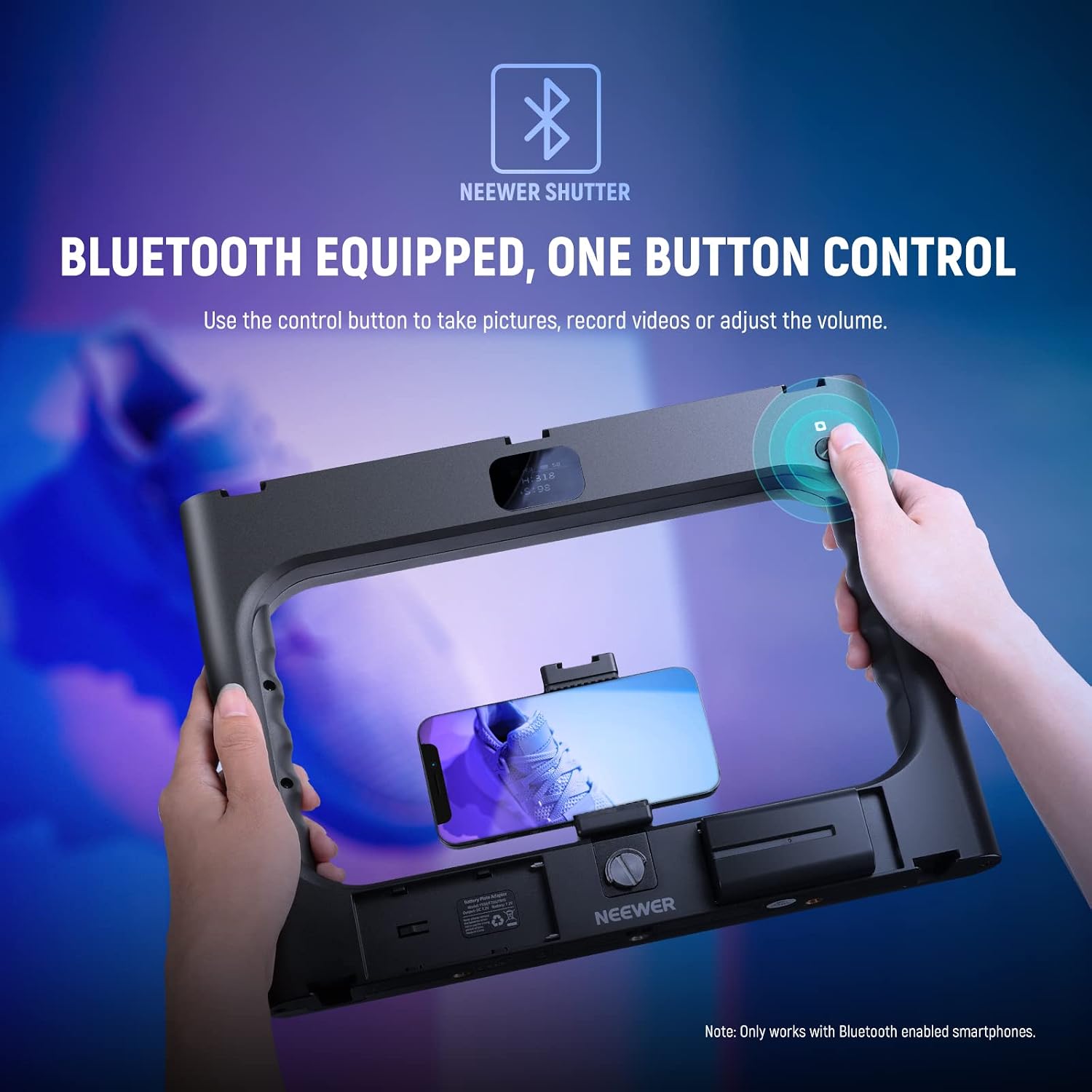
Immagine: dettagliata view of the NEEWER RGB-A111 II Video Rig components and the included accessories.
Caratteristiche del prodotto
- Illuminazione RGB integrata: 188 LEDs on two light panels provide 20W power and 2400lux/0.5m maximum illuminance.
- Molteplici modalità di illuminazione:
- Modalità HSI: 36,000 color options for precise color tone and saturation control.
- Modalità CCT: Adjustable color temperature from 2500K to 10000K with 0-100% dimming.
- Modalità FX: 17 special scene effects including Thunder & Lightning, Paparazzi, Defective Bulb, Explosion, Welding, CCT Flash, Color Flicker, CCT Pulse, Color Pulse, Police Car, Candle, HUE Color Cycle, CCT Cycle, Brightness Cycle, TV Screen, Fireworks, and Party.
- Elevata precisione del colore: CRI 97+ ensures realistic color reproduction.
- Vertical Shooting Support: Right handle includes a 1/4" screw hole for tripod mounting in vertical orientation.
- Supporti per accessori: 5 cold shoes and six 1/4" threads for attaching microphones, additional LED lights, monitors, or tripods.
- Design ergonomico: Dual side handles for comfortable and stable handheld shooting.
- Pannello LCD: Displays current settings for precise lighting adjustments.
- Bluetooth Wireless Shutter: Control smartphone camera functions (take pictures, record videos, adjust volume) wirelessly.
- Doppia fonte di alimentazione: Operates on one included 2600mAh NP-F550 battery or a 9-12V DC power adapter (sold separately). Compatible with NP-F750 & NP-F970 batteries.
Guida all'installazione
- Installa la batteria: Open the battery compartment and insert the provided NP-F550 battery. Ensure correct polarity.
- Mettere in carica la batteria: Use the included charging stand and USB cable to charge the NP-F550 battery before first use.
- Mount Smartphone/Camera:
- For smartphones: Attach the smartphone holder to the central 1/4" screw mount. Secure your smartphone in the holder.
- For cameras: Mount your camera directly onto the central 1/4" screw mount.
- Collegare gli accessori: Utilize the 5 cold shoe mounts or six 1/4" threads to attach external microphones, LED fill lights, or other compatible accessories as needed.
- Montaggio su treppiede (opzionale): Attach the rig to a tripod using any of the 1/4" screw threads. For vertical shooting, use the dedicated 1/4" screw hole on the right handle.

Image: The rig demonstrating accessory mounting points and compatibility with smartphones and DSLR cameras.
Istruzioni per l'uso
- Accensione/spegnimento: Locate the power switch on the rig and slide it to the "ON" position to power on the device. The LCD panel will illuminate.
- Regolazione delle modalità di illuminazione:
- Use the control buttons or dials to navigate through the available lighting modes: HSI, CCT, and FX.
- Modalità HSI: Adjust Hue (H), Saturation (S), and Intensity (I) to achieve desired colors.
- Modalità CCT: Adjust Color Temperature (CCT) from 2500K (warm) to 10000K (cool) and brightness (0-100%).
- Modalità FX: Select from 17 pre-programmed special scene effects.
- Regolazione luminosità e colore: Use the dedicated brightness adjustment dial and color temperature adjustment wheel (as indicated in the product details diagram) to fine-tune your lighting. The LCD panel will display current settings.
- Controllo otturatore Bluetooth:
- Abilita il Bluetooth sul tuo smartphone.
- Cercare and connect to "NEEWER Shutter" in your device list.
- Once connected, use the control button on the rig to remotely trigger your smartphone's camera for photos, start/stop video recording, or adjust phone volume.

Image: HSI Mode interface and color options.

Image: CCT Mode for adjustable color temperature and brightness.

Image: FX Mode with 17 special scene effects.

Image: Bluetooth wireless shutter control in action.
Manutenzione
- Mantenere pulito il dispositivo strofinandolo con un panno morbido e asciutto.
- Avoid exposing the rig to water or excessive moisture. The device is not water-resistant.
- Store the rig in a cool, dry place when not in use.
- Ensure battery contacts are clean for optimal performance.
Risoluzione dei problemi
| Problema | Possibile causa | Soluzione |
|---|---|---|
| Il dispositivo non si accende. | La batteria è scarica o non è installata correttamente. | Charge the NP-F550 battery or ensure it is correctly inserted. Check for proper DC adapter connection if using external power. |
| Le luci sono fioche o tremolanti. | Batteria scarica. | Recharge or replace the battery. Ensure the DC power adapter provides sufficient power. |
| Bluetooth shutter not connecting. | Bluetooth is off on smartphone or rig, or not paired. | Ensure Bluetooth is enabled on both devices. Go to your smartphone's Bluetooth settings, forget "NEEWER Shutter" if previously paired, and re-pair. |
| Rig feels wobbly with a heavy camera. | Exceeding recommended weight for smartphone holder/mount. | The rig is primarily designed for smartphones. While it can accommodate some cameras, very heavy setups may affect stability. Ensure all mounts are securely tightened. |
Specifiche
| Nome modello: | RGB-A111 II |
| Dimensioni del prodotto: | 13.2"L x 9.8"W x 1.4"H (336 x 248 x 35mm) |
| Peso dell'articolo: | 1.47 libbre (670 g) |
| Quantità LED: | 188 pezzi |
| Potenza massima: | 20W |
| Illuminamento massimo: | 2400 lux/0.5 m (a 10000 K) |
| Indice di resa cromatica (CRI): | 97+ |
| Intervallo di temperatura del colore: | 2500K-10000K |
| Regolazione della luminosità: | 0-100% |
| Modalità HSI: | 360° Hue, 0-100 Saturation |
| Modalità FX: | 17 Special Scene Effects |
| Connettività: | Bluetooth, USB |
| Fonte di energia: | NP-F550 Battery (included), 9-12V DC Power Adapter (sold separately) |
| Compatible Shoe Mount Type: | Scarpa fredda |
| Livello di resistenza all'acqua: | Non resistente all'acqua |
Garanzia e supporto
For warranty information or technical support, please contact NEEWER customer service. Refer to the product packaging or the official NEEWER websito per i dettagli di contatto e i termini di garanzia più aggiornati.
Negozio ufficiale NEEWER: Visita il negozio NEEWER su Amazon
Ask a question about this manual
Ask about setup, troubleshooting, compatibility, parts, safety, or missing instructions. Manuals+ will review the question and use this page’s manual context to help answer it.