
Introduzione
This manual provides detailed instructions for the proper use and maintenance of your Sunny CRS-300AT Android Smart LED TV Remote Control. This remote is designed for compatibility with AXEN LED TVs and features a dedicated Live TV button for convenient access to live broadcasts. Please read this manual carefully before using the remote control to ensure optimal performance and longevity.
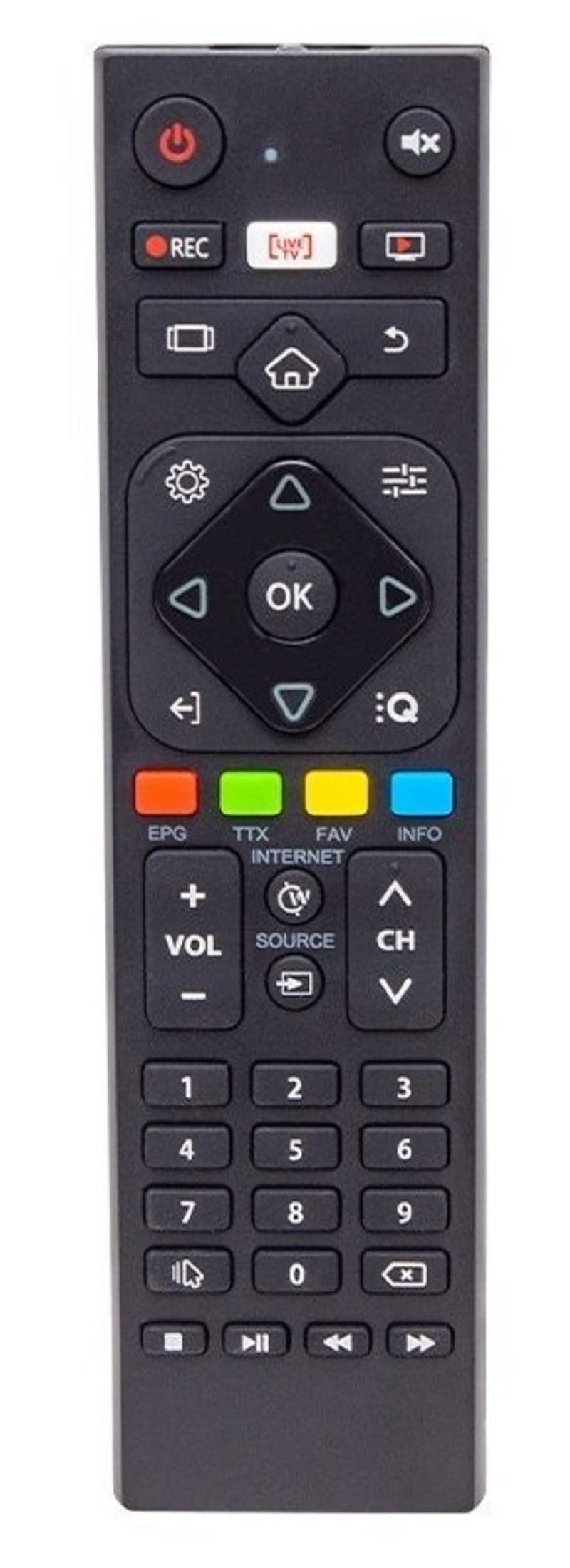
Image of the Sunny CRS-300AT remote control, showing its ergonomic design and button layout, including the dedicated Live TV button.
Impostare
Installazione della batteria
- Individuare il vano batterie sul retro del telecomando.
- Per aprire il coperchio del vano batteria, farlo scorrere verso il basso o nella direzione indicata dalla freccia.
- Insert two AAA batteries (not included), ensuring the positive (+) and negative (-) terminals align correctly with the markings inside the compartment. Incorrect battery orientation can prevent the remote from functioning.
- Richiudere il coperchio del vano batteria facendolo scorrere in posizione finché non scatta in posizione.
The remote control is an infrared (IR) device and does not require pairing. Once batteries are installed, it is ready for use with compatible AXEN LED TVs.
Istruzioni per l'uso
Point the remote control directly at your television's IR receiver. Ensure there are no obstructions between the remote and the TV.
Funzioni chiave
- Pulsante di accensione (⏻): Accende o spegne la TV.
- Volume su/giù (Vol+/-): Regola il volume del suono.
- Canale su/giù (Canale+/-): Cambia canale TV.
- Muto (🔇): Disattiva o riattiva l'audio della TV.
- Tasti numerici (0-9): Directly select TV channels or input numbers.
- Pulsanti di navigazione (▲ ▼ ◀ ▶): Navigare attraverso i menu e le opzioni.
- Pulsante OK/Invio: Conferma le selezioni nei menu.
- Pulsante Indietro/Indietro: Ritorna alla schermata o al menu precedente.
- Pulsante Home (🏠): Accede alla schermata iniziale o al menu principale della Smart TV.
- Pulsante TV in diretta: Directly switches to live television broadcasting.
- Pulsante Input/Sorgente: Changes the input source (e.g., HDMI 1, HDMI 2, AV).
- Pulsante Menu: Apre il menu delle impostazioni principali del televisore.
Specific button layouts and functions may vary slightly depending on your TV model, but the core functions remain consistent.
Manutenzione
Pulizia
- Pulire il telecomando con un panno morbido e asciutto.
- Per sporco ostinato, leggermente dampPulire il panno con acqua o con un detergente delicato e non abrasivo. Non spruzzare liquidi direttamente sul telecomando.
- Avoid using harsh chemicals, solvents, or abrasive cleaning materials, as these can damage the remote's surface or internal components.
Cura della batteria
- Sostituire le batterie quando la risposta del telecomando diventa lenta o smette di funzionare.
- Se il telecomando non verrà utilizzato per un periodo prolungato, rimuovere le batterie per evitare perdite e potenziali danni.
- Smaltire le batterie usate secondo le normative locali.
Magazzinaggio
Conservare il telecomando in un luogo fresco e asciutto, lontano dalla luce solare diretta, da temperature estreme e da elevata umidità.
Risoluzione dei problemi
| Problema | Possibile causa | Soluzione |
|---|---|---|
| Telecomando non funzionante. | Batterie scariche o installate in modo errato. | Sostituire le batterie con batterie nuove, assicurandosi della corretta polarità (+/-). |
| Telecomando non funzionante. | Ostruzione tra il telecomando e il ricevitore IR del televisore. | Ensure a clear line of sight between the remote and the TV. Remove any objects blocking the signal. |
| Telecomando non funzionante. | Il telecomando è troppo lontano dalla TV. | Move closer to the TV. The effective range for IR remotes is typically up to 7 meters (23 feet). |
| Alcuni pulsanti non rispondono. | Sporcizia o detriti sotto i pulsanti. | Pulire il telecomando come descritto nella sezione Manutenzione. |
| TV is not responding to any remote commands. | TV's IR receiver might be faulty or blocked. | Check your TV's user manual for troubleshooting its IR receiver. Try restarting the TV by unplugging it for a few minutes. |
Specifiche
- Modello: Sunny CRS-300AT
- Marca: Sunny (Compatible with AXEN)
- Dispositivi compatibili: Televisions (specifically AXEN LED TVs)
- Tecnologia di connettività: Infrarossi (IR)
- Fonte di energia: 2 x batterie AAA (non incluse)
- ASIN: B0BW4M6SRC
Informazioni sulla garanzia
This product is typically covered by a manufacturer's warranty. For specific details regarding warranty duration, coverage, and claims process, please refer to the documentation provided with your purchase or contact the retailer where the product was acquired. Keep your proof of purchase for warranty purposes.
Supporto
If you encounter issues that cannot be resolved using the troubleshooting guide, or if you require further assistance, please contact:
- Il rivenditore presso il quale hai acquistato il telecomando.
- The manufacturer's customer support (refer to product packaging or manufacturer's websito per i dettagli di contatto).
When contacting support, please have your product model (CRS-300AT) and proof of purchase readily available.