
1. Introduzione e oltreview
The LILYGO T5 4.7 Inch E-Paper V2.3 ESP32-S3 Development Board is a versatile module designed for projects requiring a low-power display and robust wireless connectivity. It integrates an ESP32-S3 microcontroller with a 4.7-inch e-paper display, offering Wi-Fi and Bluetooth V5.0 capabilities. This board is ideal for applications such as IoT devices, smart home systems, and custom display solutions where power efficiency and clear visual output are crucial.

Immagine: dall'alto verso il basso view of the LILYGO T5 4.7 Inch E-Paper V2.3 ESP32-S3 Development Board, showcasing i suoi componenti e la sua disposizione.
2. Cosa c'è nella scatola
Upon unboxing your LILYGO T5 4.7 Inch E-Paper V2.3 ESP32-S3 Development Board, please ensure all the following components are present:
- 1 x LILYGO T5 4.7 Inch E-Paper V2.3 ESP32-S3 Development Board
- 1 x 4.7-inch E-Paper Display
- 1 x scheda TF
- 1 x Manuale utente (questo documento)
- Additional cables or connectors as specified by the manufacturer.

Image: A visual representation of the main components included in the product package, such as the development board, e-paper display, and connecting cables.
3. Caratteristiche del prodotto
The LILYGO T5 4.7 Inch E-Paper V2.3 ESP32-S3 Development Board boasts a range of features designed for advanced embedded development:
- microcontrollori: ESP32-S3-WROOM-1-N1 6R8
- Display: 4.7-inch E-Paper, 540(H)x960(V) Resolution, 16 Gray levels, ultra-low power consumption, wide viewing angle. Note: The screen does not feature touch functionality.
- Memoria: Flash da 16 MB, RAM da 8 MB
- Connettività wireless: Wi-Fi, Bluetooth V5.0
- Magazzinaggio: Supports TF card for expanded storage.
- Orologio in tempo reale (RTC): Integrated PCF8563 RTC for accurate timekeeping.
- Gestione energetica: Features battery capacity detection.
- Ambiente di programmazione: Compatible with Arduino-IDE, VS Code.
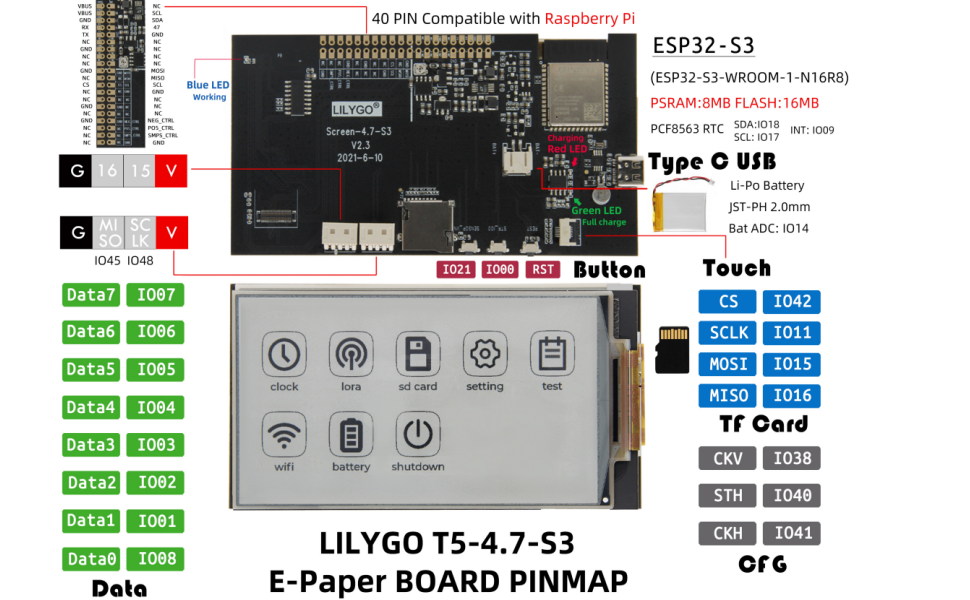
Image: A diagram highlighting key features and components of the LILYGO T5 4.7 Inch E-Paper V2.3 ESP32-S3 Development Board, including MCU, wireless connectivity, memory, and display specifications.
4. Istruzioni per l'installazione
Follow these steps to set up your LILYGO T5 4.7 Inch E-Paper V2.3 ESP32-S3 Development Board:
- Connect the E-Paper Display: Carefully connect the 4.7-inch e-paper display to the designated connector on the development board. Ensure proper alignment to avoid damage to the pins.
- Inserire la scheda TF (facoltativo): If your application requires external storage, insert a compatible TF card into the TF card slot on the board.
- Collegamento elettrico: Connect the board to a power source using a USB-C cable. The board can be powered via the USB-C port.
- Installazione del driver: Depending on your operating system and development environment, you may need to install specific USB-to-serial drivers for the ESP32-S3. Refer to the official ESP32-S3 documentation for detailed instructions.
- Configurazione dell'ambiente di sviluppo: Install your preferred Integrated Development Environment (IDE), such as Arduino IDE or VS Code with PlatformIO. Configure the IDE to support the ESP32-S3 board.
- Caricamento del firmware: Scarica esample code or your custom firmware from the LILYGO GitHub repository (github.com/Xinyuan-LilyGO/LilyGo-EPD47) and upload it to the board.
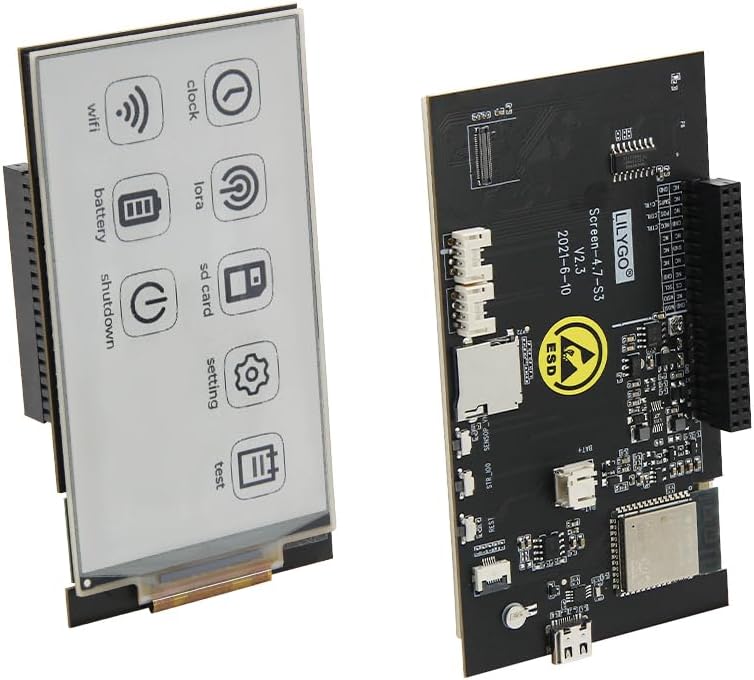
Image: The LILYGO T5 4.7 Inch E-Paper V2.3 ESP32-S3 Development Board with the e-paper display module connected, illustrating the assembled unit.
Product Application Instructions Video
Video: A short instructional video demonstrating the application and basic setup of the LILYGO T5 4.7 Inch E-Paper V2.3 ESP32-S3 Development Board.
5. Istruzioni per l'uso
Operating the LILYGO T5 4.7 Inch E-Paper V2.3 ESP32-S3 Development Board primarily involves running custom firmware and interacting with the e-paper display. Since it is a development board, specific operational steps will depend on the code loaded onto the ESP32-S3.
- Accensione: Once powered via USB-C, the board will execute the loaded firmware.
- Interazione di visualizzazione: The e-paper display will show information as programmed. E-paper displays are known for their low power consumption and high readability in ambient light.
- Comunicazione wireless: Utilize the integrated Wi-Fi and Bluetooth V5.0 for data transmission and reception as defined by your application.
- TF Card Access: If a TF card is inserted and supported by your firmware, it can be used for logging data, storing images, or other data-intensive tasks.

Image: The 4.7-inch e-paper display showing a graphical user interface with icons for functions like clock, Wi-Fi, battery, SD card, settings, and test modes.
6. Manutenzione
To ensure the longevity and optimal performance of your LILYGO T5 4.7 Inch E-Paper V2.3 ESP32-S3 Development Board, observe the following maintenance guidelines:
- Maneggiare con cura: Evitare di far cadere la scheda o di sottoporla a urti fisici.
- Protezione dalle scariche elettrostatiche (ESD): The board is sensitive to ESD. Always handle it in an ESD-safe environment or take appropriate precautions (e.g., using an anti-static wrist strap). The board features an ESD warning symbol.
- Mantenere asciutto: Proteggere la scheda dall'umidità e dai liquidi.
- Controllo della temperatura: Operate and store the board within recommended temperature ranges to prevent damage to electronic components.
- Pulizia: Mantenere la scheda pulita da polvere e detriti. Utilizzare una spazzola morbida e asciutta o aria compressa per la pulizia.
Image: Close-up of the LILYGO T5 4.7 Inch E-Paper V2.3 ESP32-S3 Development Board, clearly showing the ESD (Electrostatic Discharge) warning symbol, emphasizing the need for careful handling.
7. Risoluzione Dei Problemi
If you encounter issues with your LILYGO T5 4.7 Inch E-Paper V2.3 ESP32-S3 Development Board, consider the following troubleshooting steps:
- Nessun potere: Ensure the USB-C cable is securely connected to a functional power source. Check the power indicator LED on the board.
- Display non funzionante: Verify that the e-paper display is correctly and securely connected to the board. Re-upload your firmware to ensure it's not a software issue.
- Problemi di connettività (Wi-Fi/Bluetooth): Check your firmware for correct Wi-Fi/Bluetooth configuration. Ensure antennas are properly connected if external.
- Errore di caricamento del firmware: Confirm that the correct drivers are installed and your IDE is configured for the ESP32-S3. Try holding down the BOOT button (if available) while initiating the upload process.
- E-Paper Display Characteristics: Note that e-paper screens may exhibit certain characteristics:
- Small bubbles in the corners when fitting are currently unavoidable due to the soft screen material.
- This version of the ink screen may have a yellowish color.
- Partial refreshing for extended periods can cause residual images. This is a normal characteristic of e-paper technology.
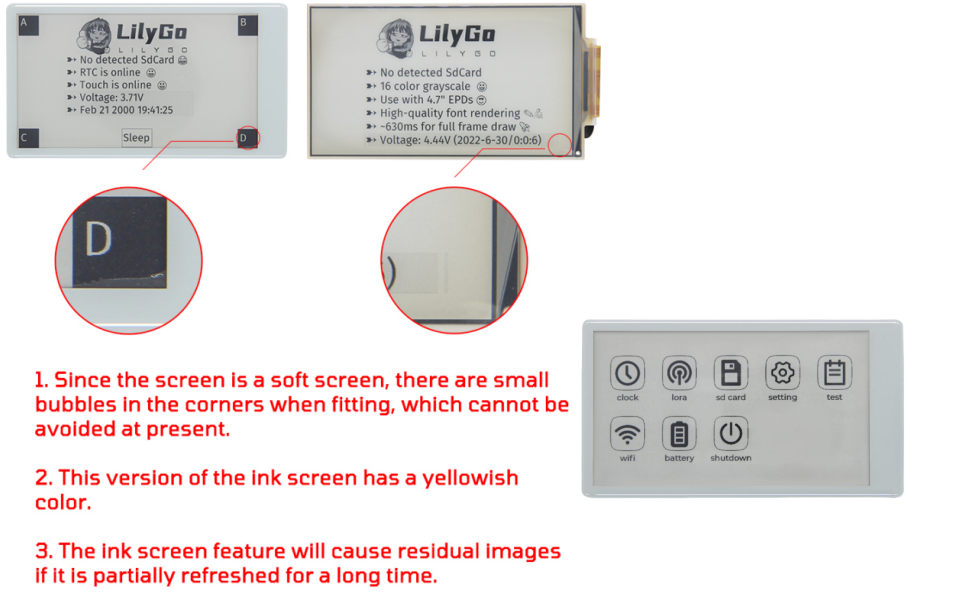
Image: An illustration detailing common characteristics and potential visual artifacts of e-paper displays, such as corner bubbles, yellowish tint, and residual images from partial refreshes.
For further assistance, refer to the LILYGO GitHub repository or contact LILYGO support.
8. Specifiche
Detailed technical specifications for the LILYGO T5 4.7 Inch E-Paper V2.3 ESP32-S3 Development Board:
| Attributo | Valore |
|---|---|
| Marca | LILYGO |
| Nome del modello | LILYGO T5 |
| MCU | ESP32-S3-WROOM-1-N1 6R8 |
| Dimensioni dello schermo | 4.7 Inch E-Paper |
| Risoluzione dello schermo | 540(H)x960(V) pixels |
| Livelli di grigio | 16 |
| Tocca Funzione | NO |
| Memoria Flash | 16 MB |
| PSRAM | 8 MB |
| Connettività wireless | Wi-Fi, Bluetooth V5.0 |
| Archiviazione esterna | Supporto per schede TF |
| RTC | Codice PCF8563 |
| Sistema operativo | FreeRTOS (or similar RTOS) |

Image: The LILYGO T5 4.7 Inch E-Paper V2.3 ESP32-S3 Development Board with its length, width, and height dimensions indicated in millimeters.
9. Garanzia e supporto
Per informazioni sulla garanzia e supporto tecnico, fare riferimento al sito ufficiale LILYGO website or contact the seller directly. The LILYGO GitHub repository (github.com/Xinyuan-LilyGO/LilyGo-EPD47) is an excellent resource for documentation, example code, and community support.