
1. Configurazione e installazione
1.1 Lista di controllo pre-installazione
- Compatibilità del sistema: Ensure your motherboard has an available PCI Express 4.0 x16 slot.
- Alimentazione elettrica: Verificare che l'unità di alimentazione (PSU) soddisfi i requisiti minimi di watttage requirements for the RTX 3060 Ti and has the necessary PCIe power connectors. Consult your PSU manual for details.
- Liquidazione: Confirm your PC case has adequate space for the graphics card dimensions.
- Autisti: Download the latest NVIDIA drivers from the official NVIDIA websito prima dell'installazione.
1.2 Installazione fisica
- Spegni: Spegnere completamente il computer e scollegare il cavo di alimentazione.
- Caso aperto: Aprire il case del computer per accedere alla scheda madre.
- Individuare lo slot PCIe: Identify an available PCI Express 4.0 x16 slot. Remove any expansion slot covers if necessary.
- Inserisci la scheda grafica: Allineare con cura la scheda grafica allo slot PCIe e premere con decisione fino a quando non è saldamente in posizione. Si dovrebbe sentire un clic dalla clip di fissaggio dello slot.
- Carta sicura: Fasten the graphics card to the case using the screw or latch mechanism.
- Connetti alimentazione: Connect the appropriate PCIe power cables from your PSU to the graphics card. The PNY GeForce RTX 3060 Ti typically requires one 8-pin PCIe power connector. Ensure all pins are fully seated.
- Chiudi caso: Chiudere il case del computer e ricollegare il cavo di alimentazione.
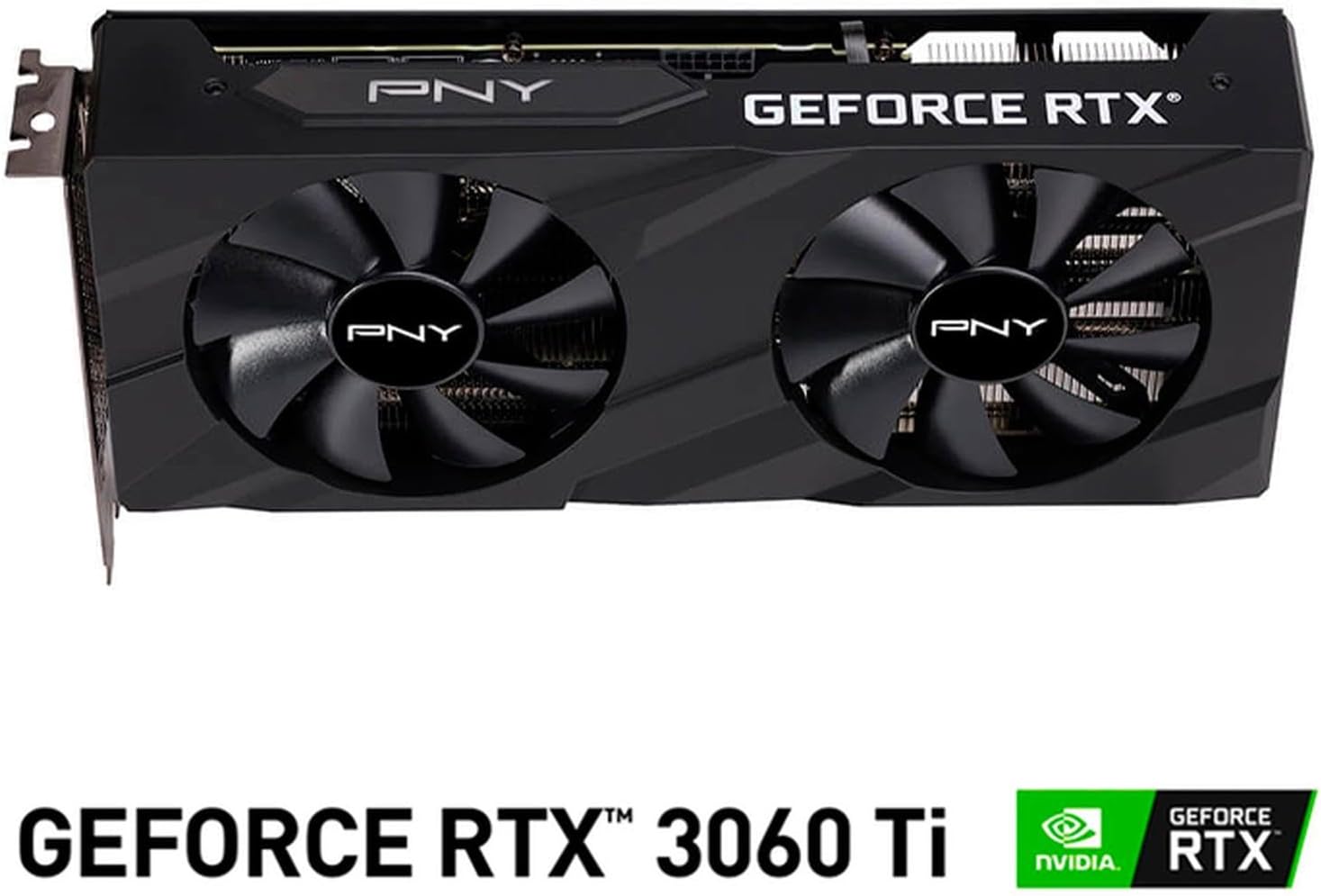
Immagine: Frontale view of the PNY GeForce RTX 3060 Ti Verto Dual Fan Graphics Card, showing the dual fans and PNY branding.
1.3 Installazione del driver
- Sistema di avvio: Power on your computer. It may boot into a lower resolution or use generic display drivers initially.
- Installa i driver: Run the NVIDIA driver installer downloaded earlier. Follow the on-screen prompts to complete the installation. A restart may be required.
- Verifica installazione: After restarting, open NVIDIA GeForce Experience or the NVIDIA Control Panel to confirm the graphics card is recognized and drivers are up to date.
2. Funzionamento
2.1 Collegamento dei display
The PNY GeForce RTX 3060 Ti features multiple video output interfaces for connecting displays:
- DisplayPort 1.4a: Per monitor ad alta risoluzione e alta frequenza di aggiornamento.
- HDMI 2.1: For connecting to TVs or monitors supporting 4K at higher refresh rates.
Connect your display cables to the appropriate ports on the graphics card. The card supports a maximum display resolution of 7680 x 4320 @60Hz.

Immagine: Angolata view of the PNY GeForce RTX 3060 Ti Verto Dual Fan Graphics Card, highlighting the cooling solution and overall design.
2.2 NVIDIA GeForce Experience
NVIDIA GeForce Experience is a companion application for your graphics card. It allows you to:
- Optimize Game Settings: Automatically configure game settings for the best experience.
- Keep Drivers Up to Date: Receive notifications and easily install the latest NVIDIA Game Ready Drivers.
- Cattura e condividi: Record gameplay, take screenshots, and livestream with friends using features like ShadowPlay.
2.3 Prestazioni superioriview
The GeForce RTX 3060 Ti is built on NVIDIA’s 2nd generation RTX architecture (Ampere), featuring enhanced Ray Tracing Cores and Tensor Cores for advanced graphics and AI acceleration. Key performance specifications include:
- Core Clock: 1410 MHz
- Boost Clock: 1665 MHz
- Memoria: 8GB GDDR6X (256-bit) with up to 608GB/sec bandwidth.
- Core CUDA: 4864
3. Manutenzione
3.1 Cleaning Your Graphics Card
Regular cleaning helps maintain optimal performance and extends the lifespan of your graphics card. Always power off your computer and disconnect the power cable before cleaning.
- Rimozione della polvere: Use compressed air to gently blow dust from the fans and heatsink fins. Hold the fans to prevent them from spinning rapidly during cleaning.
- Pulizia delle superfici: Wipe the exterior surfaces with a soft, dry, lint-free cloth. Avoid using liquid cleaners directly on the card.
3.2 Aggiornamenti dei driver
Keep your graphics drivers updated to ensure compatibility with the latest games and applications, and to benefit from performance improvements and bug fixes. Use NVIDIA GeForce Experience or visit the official NVIDIA websito per scaricare e installare i driver più recenti.
4. Risoluzione Dei Problemi
4.1 Problemi comuni e soluzioni
- Nessuna uscita di visualizzazione:
- Assicurarsi che i cavi del display siano collegati saldamente sia alla scheda grafica sia al monitor.
- Verificare che la scheda grafica sia completamente inserita nello slot PCIe e che tutti i connettori di alimentazione siano collegati.
- Se possibile, effettuare una prova con un cavo di visualizzazione o un monitor diverso.
- Instabilità o arresti anomali del sistema:
- Assicurati che l'alimentatore soddisfi i requisiti di potenza consigliatitage.
- Check for overheating. Monitor GPU temperatures using software like MSI Afterburner or HWMonitor.
- Perform a clean installation of the latest graphics drivers.
- Scarse prestazioni nei giochi:
- Assicurati di aver installato i driver grafici più recenti.
- Controlla le impostazioni di gioco; se necessario, riduci la risoluzione o la qualità grafica.
- Verify that your system is not bottlenecked by other components (CPU, RAM).

Immagine: Lato view of the PNY GeForce RTX 3060 Ti Verto Dual Fan Graphics Card, showing the heatsink fins and power connectors.
5. Specifiche
Below are the detailed technical specifications for the PNY GeForce RTX 3060 Ti 8GB GDDR6X Verto Dual Fan Graphics Card:
| Caratteristica | Specificazione |
|---|---|
| Coprocessore grafico | NVIDIA GeForce RTX 3060 Ti |
| Marca | PNY |
| Dimensione RAM grafica | 8 GB |
| Tipo di RAM grafica | Memoria GDDR6X |
| Velocità di clock della GPU | 1410 MHz |
| Velocità di clock della memoria | 1410 MHz (Effective 19000 MHz) |
| Interfaccia di uscita video | Porta Display, HDMI |
| Interfaccia della scheda grafica | PCI-Express x16 |
| Numero di fan | 2 |
| Risoluzione massima dello schermo | 7680 x 4320 a 60Hz |
| Dispositivi compatibili | Scrivania |
| Nome del modello | VERTO Dual Fan |
| Numero di modello | VCG3061T8LDFBPB1 |
| Codice UPC | 751492767314 |
| Peso dell'articolo | 1 chilogrammo |

Immagine: Indietro view of the PNY GeForce RTX 3060 Ti Verto Dual Fan Graphics Card, showing the backplate and PCB.
6. Garanzia e supporto
6.1 Garanzia del prodotto
This PNY GeForce RTX 3060 Ti Graphics Card comes with a Garanzia di 3 anno. For specific terms and conditions, please refer to the warranty documentation included with your product or visit the official PNY websito.
6.2 Supporto tecnico
If you encounter any issues not covered in this manual or require further assistance, please contact PNY Technical Support. You can typically find support contact information, FAQs, and driver downloads on the official PNY websito: