1. Introduzione
This user manual provides comprehensive instructions for the installation, operation, and maintenance of the Axis Communications AXIS Q6225-LE PTZ Camera. Please read this manual thoroughly before using the product to ensure proper functionality and safety. This camera is designed for robust outdoor surveillance in challenging conditions.
2. Informazioni sulla sicurezza
Osservare le seguenti precauzioni di sicurezza per evitare danni al prodotto o lesioni al personale:
- Installazione: Installation must be performed by qualified personnel in accordance with all local and national electrical and building codes.
- Alimentazione elettrica: Use only the specified power supply (60 watts) for this device. Ensure the power source is stable and meets the camera's requirements.
- Ambiente: The camera is designed for outdoor use. However, avoid exposing it to extreme conditions beyond its specified operating range.
- Pulizia: Scollegare l'alimentazione prima della pulizia. Utilizzare un panno morbido e asciutto. Non utilizzare detergenti liquidi o spray.
- Modifiche: Do not attempt to modify or disassemble the camera. This may void the warranty and pose safety risks.
3. Contenuto della confezione
Verificare che tutti gli articoli siano presenti nel pacco:
- Telecamera PTZ AXIS Q6225-LE
- Guida all'installazione
- Staffa di montaggio e hardware
- Network Cable Connector
- Documentation and Software CD (if applicable)
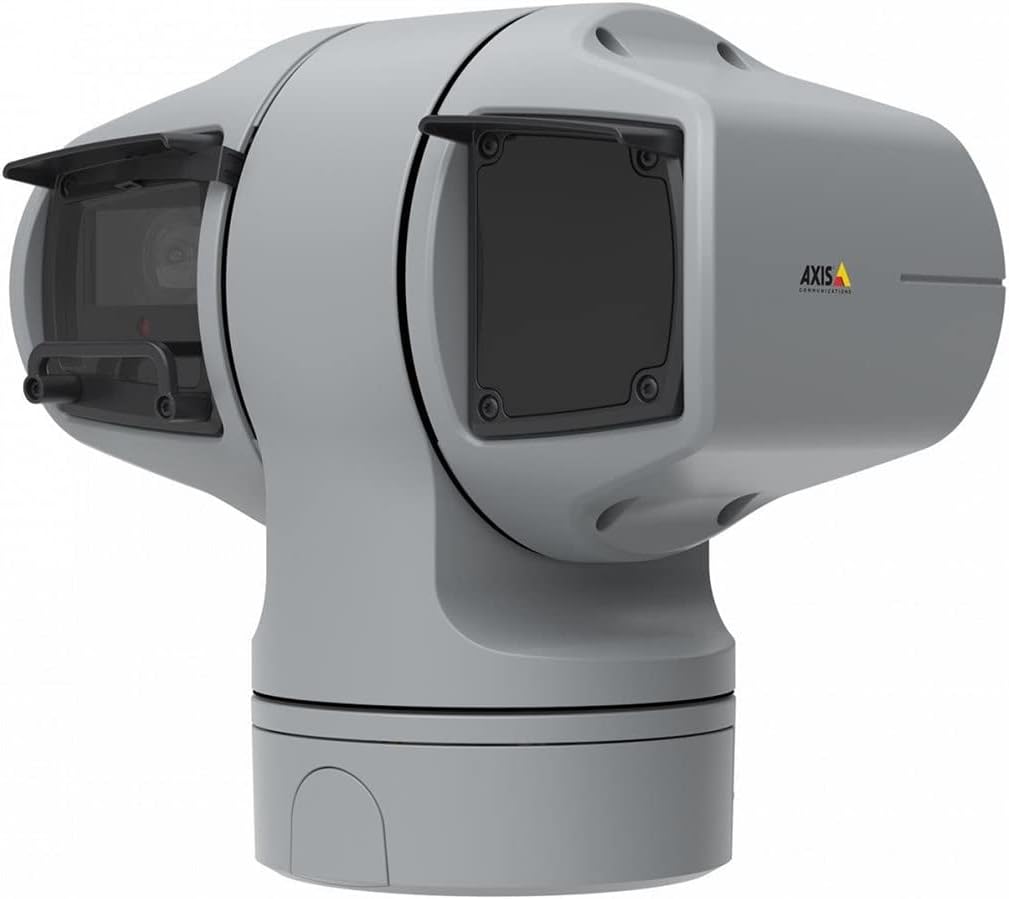
Figura 1: AXIS Q6225-LE PTZ Camera. This image displays the grey-colored PTZ camera unit, highlighting its robust housing and integrated lens system, designed for outdoor surveillance.
4. Configurazione e installazione
4.1 Montaggio della telecamera
The AXIS Q6225-LE is designed for wall mount installation. Ensure the mounting surface is strong enough to support the camera's weight and withstand environmental conditions.
- Selezionare una posizione di montaggio adatta che fornisca il campo di view ed è raggiungibile tramite collegamenti di alimentazione e di rete.
- Utilizzare la dima di montaggio fornita per contrassegnare i fori da praticare sulla parete.
- Drill pilot holes and secure the mounting bracket using appropriate screws and anchors.
- Attach the camera to the mounting bracket, ensuring it is firmly locked in place.
4.2 Alimentazione e connessione di rete
Connect the camera to power and network as follows:
- Energia: Connect the power cable to a 60-watt power source. Ensure the connection is secure and weatherproof.
- Rete: Connect an Ethernet cable from your network switch or router to the camera's network port. The camera supports Wi-Fi for wireless communication. Refer to the network configuration section for wireless setup.
4.3 Configurazione iniziale
Dopo l'installazione fisica e la connessione, accedere alla telecamera web interfaccia per la configurazione iniziale:
- Aprire un web browser on a computer connected to the same network as the camera.
- Enter the camera's IP address in the browser's address bar. If the IP address is unknown, use the AXIS IP Utility tool to discover it.
- Follow the on-screen prompts to set up a new password for the administrator account.
- Configure basic network settings, date/time, and video stream settings.
5. Utilizzo della fotocamera
5.1 Controllo Pan, Tilt e Zoom (PTZ)
The AXIS Q6225-LE camera features full PTZ capabilities, allowing remote adjustment of its viewing angle and zoom level. Control is typically performed via the camera's web interfaccia o software di gestione video (VMS) compatibile.
- Pan: Rotate the camera horizontally to cover a wider area.
- Inclinazione: Adjust the camera vertically to view objects at different heights.
- Zoom ottico: Use the optical zoom feature to magnify distant objects without loss of image quality.
5.2 Rilevamento del movimento e avvisi
The camera supports motion-only alerts. Configure motion detection zones and sensitivity settings in the web interface to trigger recordings or notifications when movement is detected.
5.3 Infrared (IR) Illumination
Equipped with infrared light sources, the camera provides clear video surveillance in low-light or complete darkness. IR illumination activates automatically or can be manually controlled.
6. Manutenzione
6.1 Pulizia
Regular cleaning of the camera lens and housing is recommended to ensure optimal performance, especially in dusty or harsh environments.
- Gently wipe the lens with a soft, lint-free cloth. For stubborn dirt, use a lens cleaning solution specifically designed for optical surfaces.
- Pulisci l'alloggiamento della fotocamera con un pannoamp panno. Evitare detergenti abrasivi o solventi.
6.2 Aggiornamenti firmware
Controllare periodicamente le comunicazioni Axis website for firmware updates. Keeping the camera's firmware up-to-date ensures access to the latest features, security enhancements, and bug fixes.
7. Risoluzione Dei Problemi
Questa sezione affronta i problemi più comuni che potresti riscontrare con la tua telecamera AXIS Q6225-LE.
| Problema | Possibile causa | Soluzione |
|---|---|---|
| Nessun feed video | Power disconnected, network issue, incorrect IP address. | Check power connection. Verify network cable or Wi-Fi connection. Confirm camera's IP address. |
| Scarsa qualità dell'immagine | Dirty lens, improper focus, low light conditions. | Clean the lens. Adjust focus via web interface. Ensure adequate lighting or verify IR functionality. |
| I controlli PTZ non rispondono | Network latency, software glitch, motor issue. | Check network connection. Restart the camera. If problem persists, contact support. |
8. Specifiche
| Caratteristica | Dettaglio |
|---|---|
| Numero di modello | 02316-002 |
| Marca | Comunicazioni dell'asse |
| Tipo di montaggio | Montaggio a parete |
| Colore | Bianco |
| Materiale | Metallo |
| Cosatage | 60 watt |
| Tecnologia di connettività | Senza fili, Wi-Fi |
| Uso interno/esterno | All'aperto |
| Metodo di controllo | Remoto |
| Tecnologia del sensore fotografico | CMOS |
| Formato di acquisizione video | Formato MPEG-4 |
| Tipo di sorgente luminosa | Infrarossi |
| Tipo di avviso | Solo movimento |
| Tipo di zoom | Zoom ottico |
| Peso dell'articolo | 0.01 chilogrammi (0.352 once) |
| Componenti inclusi | Fotocamera/Accessori |
9. Garanzia e supporto
For warranty information and technical support, please refer to the official Axis Communications webo contattare il rivenditore autorizzato. Conservare la ricevuta d'acquisto come prova d'acquisto.
Risorse online: www.axis.com