
Introduzione
This manual provides essential information for the safe and efficient use of your ONN 42-Inch Full HD LED Smart TV, Model 100018254. Please read these instructions thoroughly before operating your television and retain them for future reference.
Cosa c'è nella scatola
Verificare che tutti i componenti siano presenti prima di procedere con la configurazione.
- ONN 42-Inch Full HD LED Smart TV
- Telecomando
- Supporto TV (2 pezzi)
- Viti per supporto TV
- Cavo di alimentazione
- Guida rapida (non inclusa in questo manuale)

Immagine: Frontale view of the ONN 42-inch Smart TV displaying the Roku TV home screen with various streaming app icons like Netflix, Disney+, Apple TV, Hulu, Peacock, and Roku Channel. The TV is black with slim bezels and two stand feet.
Impostare
1. Fissaggio del supporto TV
- Posizionare con cautela lo schermo del televisore su una superficie morbida e pulita per evitare danni.
- Allineare ciascun pezzo del supporto con i fori delle viti corrispondenti nella parte inferiore del televisore.
- Fissare ciascun elemento del supporto con le viti fornite. Assicurarsi che siano ben serrate.

Image: A diagram illustrating the dimensions of the ONN 42-inch TV, showing its width as 43 inches and height as 37 inches when placed on its stand.
2. Montaggio a parete (opzionale)
This TV is compatible with VESA standard wall mounts. Refer to your wall mount's instructions for proper installation. Ensure the wall mount can support the weight of the television.

Immagine: Posteriore view of the ONN 42-inch TV, highlighting the VESA mounting screw holes in a square pattern and various input ports on the side and bottom right.
3. Collegamento dei dispositivi
Collega i tuoi dispositivi esterni, come decoder, console di gioco o lettori Blu-ray, alle porte di ingresso del televisore.
- HDMI: For high-definition audio and video. Use an HDMI cable to connect devices like set-top boxes, game consoles, or streaming sticks.
- USB: Per collegare dispositivi di archiviazione USB per riprodurre contenuti multimediali files.
- Wifi: For internet connectivity to access smart TV features and streaming services.
4. Accensione iniziale e procedura guidata di configurazione
- Collegare il cavo di alimentazione al televisore e poi a una presa a muro.
- Premere il pulsante di accensione sul telecomando o sul televisore stesso.
- Follow the on-screen instructions to complete the initial setup, including language selection, network connection (Wi-Fi), channel scanning, and linking to your Roku account (if applicable).
Funzionamento del televisore
1. Controllo remoto finitoview
Il telecomando consente di navigare nell'interfaccia del televisore e di controllarne varie funzioni.
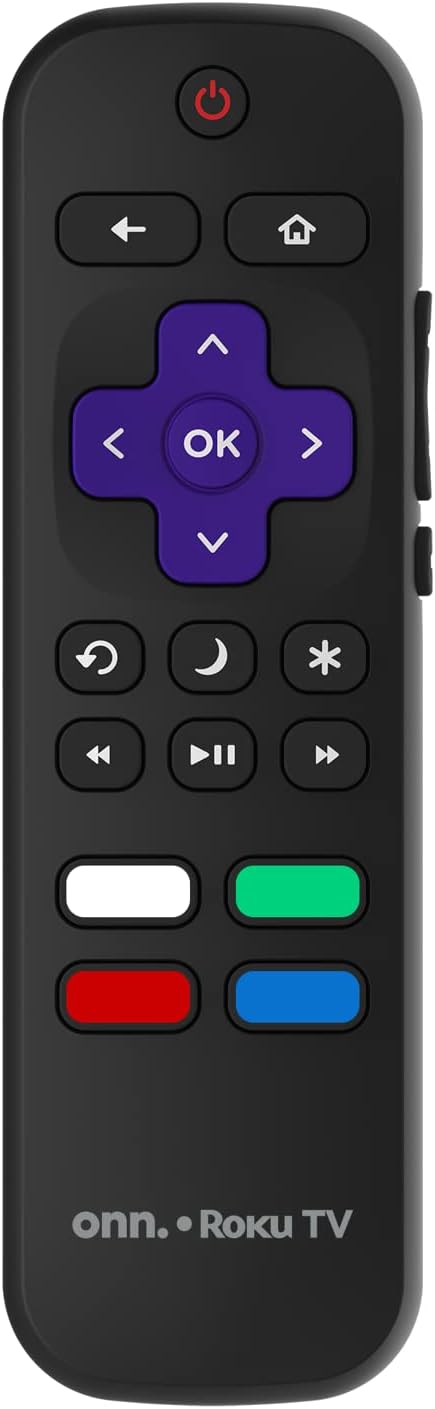
Image: The ONN Roku TV remote control, featuring a power button, directional pad, OK button, home button, back button, volume controls, and dedicated buttons for popular streaming services.
- Pulsante di accensione: Accende o spegne la TV.
- Directional Pad (D-Pad) & OK: Consente di navigare nei menu e di confermare le selezioni.
- Pulsante Home: Ritorna alla schermata iniziale di Roku TV.
- Pulsante Indietro: Ritorna alla schermata o al menu precedente.
- Volume su/giù: Regola il volume dell'audio.
- Tasto muto: Disattiva o riattiva l'audio.
- Canale su/giù: Changes channels (for antenna/cable inputs).
- Pulsanti app dedicati: Quick access to popular streaming services like Netflix, Hulu, etc.
2. Funzionalità della Smart TV
Your ONN Smart TV provides access to a wide range of streaming content and smart functionalities.
- Servizi di streaming: Access pre-installed apps like Netflix, YouTube, and many more through the Roku Channel Store.
- Controllo vocale: Compatible with Alexa and Google Assistant for hands-free control (requires a separate compatible voice assistant device).
- Aggiornamenti software automatici: The TV will automatically update its software when connected to the internet, ensuring you have the latest features and security.
3. Selezione ingresso
To switch between connected devices (e.g., cable box, game console), use the Ingresso button on your remote or select the desired input from the Roku TV home screen.
4. Impostazioni immagine e audio
Access the TV's settings menu to customize picture and sound preferences. Navigate to Impostazioni > Impostazioni immagine TV or Impostazioni > Audio to adjust options like brightness, contrast, color, sound mode, and equalizer settings.
Manutenzione
1. Pulizia dello schermo
- Always turn off the TV and unplug it before cleaning.
- Utilizzare un panno morbido e privo di lanugine, leggermente dampcon acqua o con un detergente specifico per schermi.
- Non spruzzare il detergente direttamente sullo schermo. Applicalo prima sul panno.
- Evitare l'uso di detergenti abrasivi, alcol, benzene o diluenti, poiché potrebbero danneggiare lo schermo.
2. Aggiornamenti software
Ensure your TV is connected to the internet to receive automatic software updates. These updates improve performance, add features, and enhance security. You can manually check for updates in the Impostazioni > Sistema > Aggiornamento di sistema menu.
Risoluzione dei problemi
Se riscontri problemi con la tua TV, fai riferimento alle seguenti soluzioni comuni:
Nessun potere
- Controllare che il cavo di alimentazione sia collegato saldamente sia al televisore sia alla presa a muro.
- Verificare che la presa a muro funzioni collegandovi un altro dispositivo.
- Prova a premere il pulsante di accensione sul televisore stesso, non solo sul telecomando.
Nessuna immagine / Immagine distorta
- Assicurarsi che sia selezionata la sorgente di input corretta (ad esempio, HDMI 1, HDMI 2).
- Controllare tutti i collegamenti dei cavi tra la TV e i dispositivi esterni.
- Try a different HDMI cable if possible.
- Adjust picture settings (brightness, contrast) in the TV menu.
Nessun suono / Suono basso
- Check if the TV is muted or if the volume is turned down.
- Ensure external audio devices (soundbars, receivers) are properly connected and powered on.
- Controllare le impostazioni audio nel menu TV.
Problemi di connessione di rete
- Verify your Wi-Fi router is powered on and functioning.
- Riavvia il router e il modem.
- Vai a Impostazioni > Rete > Verifica connessione sul televisore per diagnosticare il problema.
- Assicurati di inserire la password Wi-Fi corretta.
Specifiche
| Caratteristica | Dettaglio |
|---|---|
| Numero di modello | 100018254 |
| Dimensioni dello schermo | 42 pollici |
| Tecnologia di visualizzazione | GUIDATO |
| Risoluzione | 1080p (Full HD) |
| Frequenza di aggiornamento | Frequenza 60 Hz |
| Connettività | USB, Wi-Fi |
| Servizi Internet supportati | Netflix, YouTube (and others via Roku platform) |
| Metodo di controllo | Voice (via Alexa & Google Assistant compatible devices), Remote Control |
| Tipo di montaggio | Supporto a parete (compatibile VESA) |
| Colore | Nero |
| Codice UPC | 671227025567 |

Image: Energy Guide label for Television Model 100018254, indicating an estimated yearly energy cost of $11 based on 12 cents per kWh and 5 hours use per day.
Garanzia e supporto
For warranty information and technical support, please refer to the documentation included with your purchase or visit the official ONN support webluogo. Conserva la ricevuta di acquisto per eventuali richieste di garanzia.