
1. Prodotto finitoview
The imuto X-30 PRO is a high-capacity 27000mAh portable power bank designed to provide reliable power for a wide range of electronic devices, including laptops, tablets, and smartphones. Featuring 65W USB-C Power Delivery (PD) and multiple output ports, it ensures fast and efficient charging on the go. The integrated LCD display provides real-time battery status and charging information.

The imuto X-30 PRO portable power bank, featuring a sleek black design with gold accents and a digital LCD screen showing 100% battery.
2. Contenuto della confezione
- imuto X-30 PRO 27000mAh Power Bank
- Cavo di ricarica da USB-C a USB-C
- Manuale d'uso
3. Configurazione e utilizzo iniziale
3.1 Ricarica iniziale del Power Bank
Before first use, fully charge your imuto X-30 PRO power bank. For optimal charging speed, use a 65W (or higher) USB-C PD wall charger (not included) with the provided USB-C to USB-C cable. A full charge typically takes approximately 3.5 hours with a 65W charger.

Illustration demonstrating the fast recharge capability of the imuto X-30 PRO, showing it can be fully recharged in 3.5 hours using a 65W wall charger.
3.2 Comprensione del display LCD
The intelligent LCD display shows the remaining battery percentage. It also indicates charging speed and battery health status. The display activates when the power bank is in use or when a button is pressed.

Un dettagliato view of the imuto X-30 PRO's intelligent LCD screen, which clearly shows the remaining battery percentage altri indicatori di stato.
4. Istruzioni per l'uso
4.1 Ricarica dei dispositivi
The imuto X-30 PRO features three output ports:
- USB-C Port (65W PD Input/Output): Use this port for fast charging compatible laptops (e.g., MacBook Pro), tablets (e.g., iPad Pro), and smartphones. This port also serves as the input for recharging the power bank itself.
- Two USB-A Ports (18W Output each): These ports are suitable for charging a variety of devices that require up to 18W, such as smartphones, smartwatches, and other USB-powered accessories.
To charge a device, connect it to the appropriate port on the power bank using a compatible charging cable. The power bank will automatically begin charging.

A close-up of the imuto X-30 PRO's multiple charging ports, including two USB-A ports and one USB-C port, highlighting their respective power outputs and compatibility with various devices.
4.2 Ricarica simultanea
The power bank supports charging up to three devices simultaneously. When charging multiple devices, the total maximum output is 65W. The USB-C port can deliver up to 45W, and each USB-A port can deliver up to 18W.

The imuto X-30 PRO power bank connected to and charging three different devices concurrently: a laptop, a smartphone, and a tablet, showcasing its multi-device charging feature.
4.3 Capacity and Usage Examples
With its 27000mAh capacity, the imuto X-30 PRO can provide multiple charges for various devices, making it ideal for travel and outdoor activities. For example, it can charge an iPhone 14 approximately 6 times, a MacBook Pro 14" about 1.5 times, an iPad Pro 2 times, or a Samsung Galaxy S20 4 times.
An image depicting the imuto X-30 PRO power bank being used during travel, emphasizing its large 27000mAh capacity and ability to provide multiple charges for various devices.
5. Manutenzione
To ensure the longevity and optimal performance of your imuto X-30 PRO power bank, follow these maintenance guidelines:
- Magazzinaggio: Conservare il power bank in un luogo fresco e asciutto, lontano dalla luce solare diretta e da temperature estreme.
- Pulizia: Utilizzare un panno morbido e asciutto per pulire l'esterno del power bank. Evitare l'uso di prodotti chimici aggressivi o materiali abrasivi.
- Cicli di ricarica: Per una migliore durata della batteria, evitare di scaricare completamente il power bank frequentemente. Ricaricarlo quando il livello della batteria è basso.
- Evitare gocce: Proteggere il dispositivo da cadute e urti che potrebbero danneggiare i componenti interni.
6. Risoluzione Dei Problemi
If you encounter issues with your imuto X-30 PRO power bank, refer to the following common solutions:
- Power Bank non in carica: Ensure the charging cable is securely connected to both the power bank and the wall charger. Verify that the wall charger is functioning correctly and meets the recommended power output (65W PD for fastest charging).
- Dispositivo non in carica tramite power bank: Check if the power bank has sufficient charge. Ensure the charging cable connecting your device to the power bank is functional and correctly inserted. Try a different port or cable.
- Ricarica lenta: Confirm that your device supports fast charging protocols (e.g., USB-C PD) and that you are using a compatible cable. Ensure the power bank itself is adequately charged.
- Display LCD non funzionante: Press the power button to activate the display. If it remains unresponsive, try recharging the power bank.
Se i problemi persistono, contattare l'assistenza clienti per ulteriore assistenza.
7. Specifiche
| Caratteristica | Specificazione |
|---|---|
| Nome del modello | X-30 PRO |
| Marca | imuto |
| Capacità della batteria | 27000 mAh |
| Composizione della batteria | Litio-polimero |
| Tipo di connettore | USB tipo A, USB tipo C |
| Voltage | 20 Volt |
| Fonte di alimentazione | Cavo elettrico |
| Caratteristiche speciali | Digital Display, Fast Charging, Short-Circuit Protection, Discharge Protection |
| Usi consigliati | Camera, Laptop, Tablet, Phone |
8. Informazioni sulla sicurezza
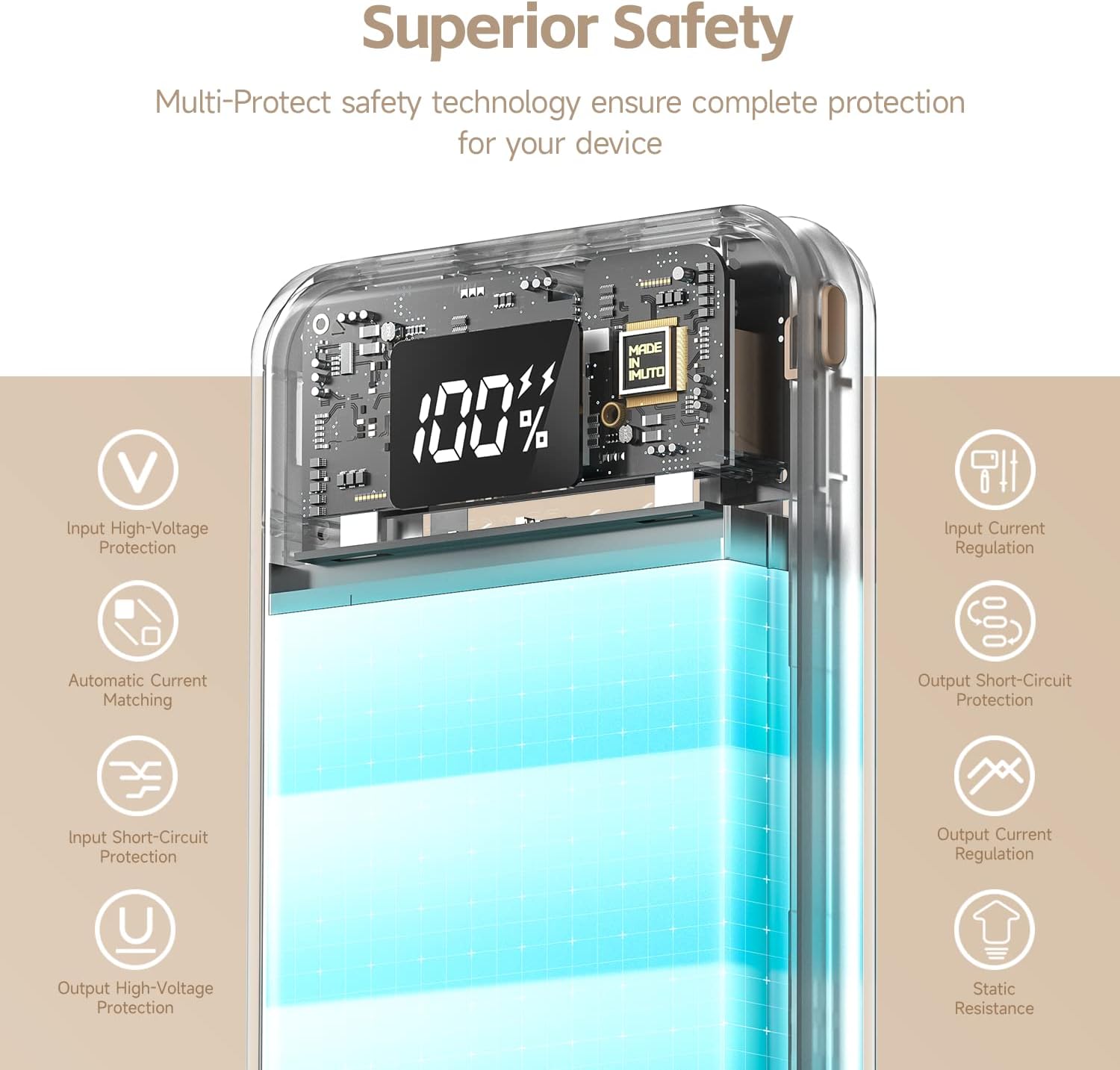
The imuto X-30 PRO is equipped with multi-protect safety technology to ensure complete protection for your devices and the power bank itself. These features include:
- Input High-Voltage Protezione
- Input Current Regulation
- Automatic Current Matching
- Protezione da cortocircuito in uscita
- Input Short-Circuit Protection
- Regolazione della corrente di uscita
- Uscita ad alto volumetage Protezione
- Static Resistance
Always use the power bank according to the instructions and avoid exposing it to extreme conditions, moisture, or physical damage.

An illustration highlighting the comprehensive safety mechanisms built into the imuto X-30 PRO, including protections against over-voltage, short-circuits, and current regulation.
9. Garanzia e supporto
Your imuto X-30 PRO power bank comes with a standard manufacturer's warranty. For detailed warranty information, please refer to the warranty card included in your product packaging or visit the official imuto websito.
For technical support, troubleshooting assistance, or any inquiries regarding your product, please contact imuto customer service through their official websito o le informazioni di contatto fornite nella documentazione del prodotto.