
Introduzione
Thank you for choosing the UXD Bluetooth Wireless Earphones. This manual provides essential information for setting up, operating, maintaining, and troubleshooting your new earphones. Please read it carefully to ensure optimal performance and longevity of your device. These earphones feature Bluetooth 5.0 connectivity, IPX7 waterproofing, CVC 8.0 noise cancellation for clear calls, and up to 20 hours of playtime.

Image: UXD Bluetooth Wireless Earphones, a general view del prodotto.
Contenuto della confezione
Prima di iniziare, controlla il contenuto della confezione per assicurarti che siano presenti tutti gli elementi:
- UXD Bluetooth Wireless Earphones
- Cavo di ricarica micro-USB
- Three (3) Pairs of Eartips (Small, Medium, Large)
- Three (3) Pairs of Cable Management Clips
- Manuale d'uso

Image: All items included in the UXD Bluetooth Wireless Earphones package, including the earphones, charging cable, various eartips, and clips.
Impostare
1. Ricarica degli auricolari
Before first use, fully charge the earphones. A full charge takes approximately 2 hours and provides up to 20 hours of playtime.
- Connect the micro-USB charging cable to the charging port on the earphone's control unit.
- Collegare l'altra estremità del cavo a un adattatore di alimentazione USB (non incluso) o alla porta USB di un computer.
- The LED indicator on the control unit will show the charging status (e.g., red for charging, blue for fully charged).

Image: A man exercising while wearing the UXD Bluetooth Wireless Earphones, highlighting the 20-hour playtime feature.
2. Accoppiamento Bluetooth
Pair your earphones with your Bluetooth-enabled device to begin listening.
- Assicurarsi che gli auricolari siano completamente carichi e spenti.
- Press and hold the Multi-function button (usually the center button on the control unit) for approximately 5-7 seconds until the LED indicator flashes red and blue alternately, indicating pairing mode.
- Sul tuo dispositivo (smartphone, tablet, ecc.), attiva il Bluetooth e cerca i dispositivi disponibili.
- Select "UXD Earphones" (or similar name) from the list of found devices.
- Once connected, the LED indicator on the earphones will flash blue slowly or turn solid blue. You will also hear an audible confirmation.
- The earphones support Bluetooth 5.0 for a stable connection up to 10 meters (30 feet).

Immagine: Un dettaglio view of the earphone's control unit, emphasizing the stable Bluetooth 5.0 technology.
Istruzioni per l'uso
1. Accensione/spegnimento
- Accensione: Press and hold the Multi-function button for 3 seconds until the LED flashes blue and you hear a power-on prompt.
- Spegni: Press and hold the Multi-function button for 3 seconds until the LED flashes red and you hear a power-off prompt.
2. Riproduzione di musica
- Riproduci/Pausa: Premi una volta il pulsante Multifunzione.
- Traccia successiva: Tieni premuto il pulsante Volume su (+).
- Traccia precedente: Premere e tenere premuto il pulsante Volume giù (-).
3. Gestione delle chiamate
The earphones feature CVC 8.0 noise cancellation for clear voice calls.
- Rispondi/Termina chiamata: Premi una volta il pulsante Multifunzione.
- Rifiuta chiamata: Tenere premuto il pulsante multifunzione per 2 secondi.
- Ricomponi l'ultimo numero: Premi due volte il pulsante Multifunzione.
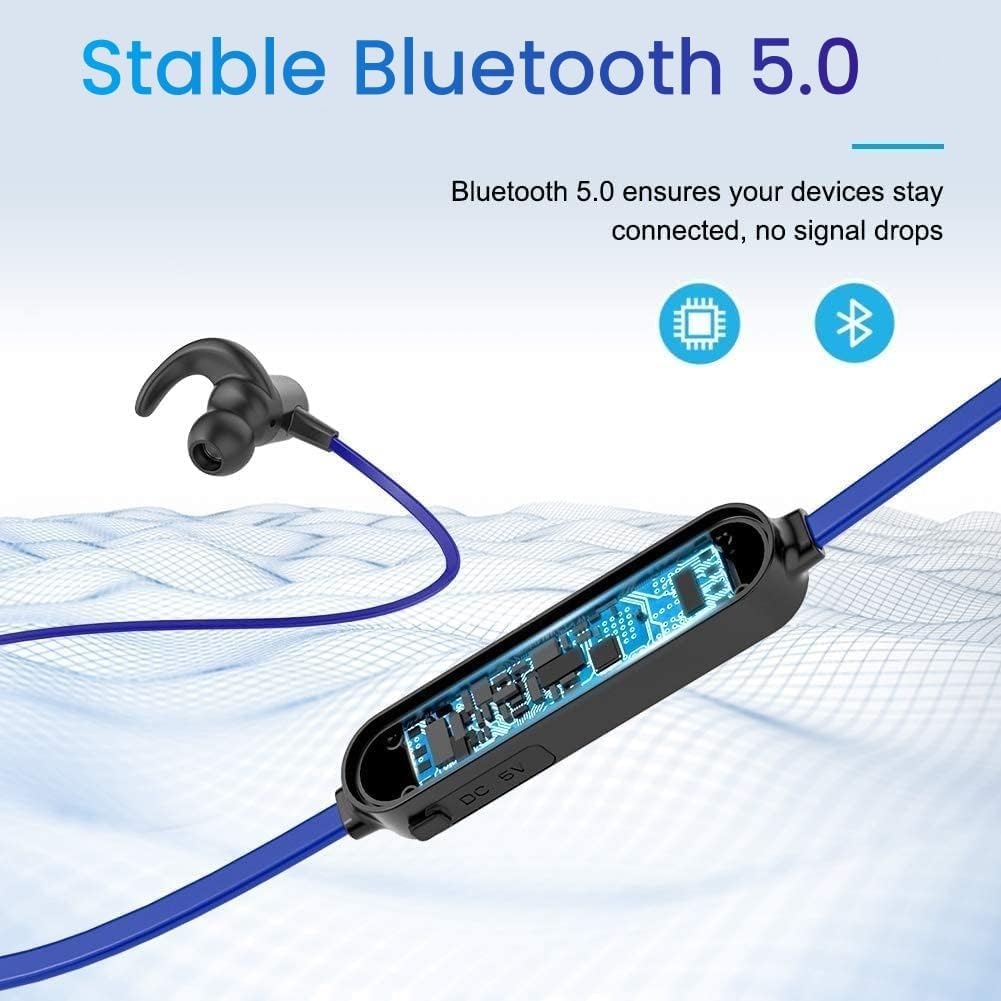
Image: A woman using the UXD Bluetooth Wireless Earphones, demonstrating the clear voice call feature powered by CVC 8.0 technology.
4. Controllo del volume
- Aumenta volume: Premere il pulsante Volume su (+).
- Diminuisci volume: Premere il pulsante Volume giù (-).
Manutenzione
Una corretta manutenzione garantisce la longevità e le prestazioni degli auricolari.
- Pulizia: Per pulire gli auricolari, utilizzare un panno morbido e asciutto. Non utilizzare prodotti chimici aggressivi o materiali abrasivi.
- Auricolari: Regularly remove and clean the eartips with mild soap and water. Ensure they are completely dry before reattaching.
- Magazzinaggio: Quando non vengono utilizzati, conservare gli auricolari in un luogo fresco e asciutto, lontano dalla luce solare diretta e da temperature estreme.
- Resistenza all'acqua: The earphones are IPX7 waterproof, meaning they can withstand submersion in up to 1 meter of water for 30 minutes. However, they are not designed for swimming or prolonged underwater use. Always ensure the charging port cover is securely closed to maintain water resistance.

Image: The UXD Bluetooth Wireless Earphones shown with water droplets, emphasizing their IPX7 waterproof capability.
Risoluzione dei problemi
Se riscontri problemi con gli auricolari, fai riferimento alle seguenti soluzioni comuni:
- Earphones will not turn on: Assicurarsi che gli auricolari siano completamente carichi.
- Impossibile associare il dispositivo:
- Assicurarsi che gli auricolari siano in modalità di associazione (LED lampeggiante in rosso e blu).
- Assicurati che il Bluetooth sia abilitato sul tuo dispositivo.
- Avvicinare gli auricolari al dispositivo (entro 10 metri).
- Turn off and on both the earphones and your device, then try pairing again.
- Cancella le precedenti connessioni Bluetooth sul tuo dispositivo.
- Nessun suono o volume basso:
- Controlla il livello del volume sia sugli auricolari che sul dispositivo collegato.
- Assicurati che gli auricolari siano collegati correttamente al dispositivo.
- Prova a riprodurre diverse sorgenti audio.
- Connessione intermittente:
- Assicurati che non ci siano ostacoli tra gli auricolari e il dispositivo.
- Allontanarsi da altri dispositivi wireless che potrebbero causare interferenze.
- Keep the earphones within the 10-meter Bluetooth range.
Specifiche
| Caratteristica | Dettaglio |
|---|---|
| Numero di modello | erfver |
| Marca | UXD |
| Connettività | Senza fili Bluetooth 5.0 |
| Tipo di batteria | Litio-polimero |
| Tempo di gioco | Fino a 20 ore |
| Tempo di ricarica | Circa 2 ore |
| Resistenza all'acqua | Grado di protezione IPX7 |
| Microfono | Integrated with CVC 8.0 |
| Fattore di forma | In-ear (auricolare) |
| Impedance (Sensitivity) | 15 ohm |
| Materiale | Silicone |
| Metodo di controllo | Telecomando |
Garanzia e supporto
Your UXD Bluetooth Wireless Earphones come with the following:
- Garanzia soddisfatti o rimborsati entro 30 giorni.
- 3-month product replacement warranty.
For any product inquiries, technical support, or warranty claims, please contact UXD customer service through the platform where you purchased the product. Please have your model number (erfver) and purchase details ready.