
ANRAN G01
ANRAN 3/4G LTE Cellular Security Camera G01
Manuale di istruzioni
Model: G01 (US-4G-黑)
Introduzione
The ANRAN 3/4G LTE Cellular Security Camera G01 is a wireless outdoor surveillance solution designed for locations without Wi-Fi or electrical power access. It operates on 4G LTE cellular networks and is powered by a high-capacity rechargeable battery and a solar panel, ensuring continuous operation. This camera features 2K HD resolution, 360° pan-tilt-zoom (PTZ) capabilities, advanced PIR human detection, two-way audio, and versatile night vision modes.
This manual provides detailed instructions for setting up, operating, and maintaining your ANRAN G01 camera to ensure optimal performance and longevity.
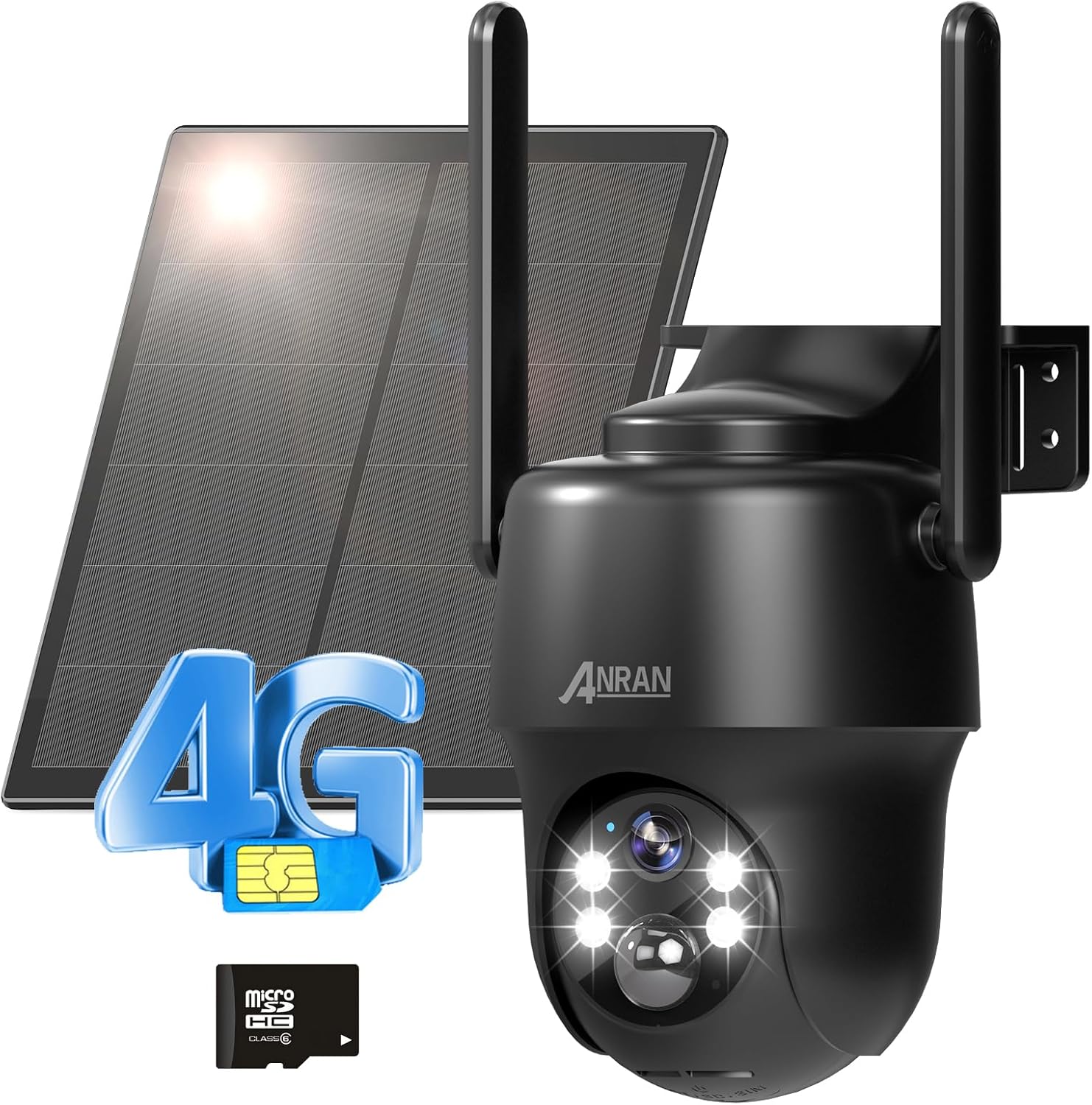
Figure 1: ANRAN 3/4G LTE Cellular Security Camera G01 with included accessories.
Cosa c'è nella scatola
Please check the package contents carefully upon unpacking:
- 1X ANRAN G1 PTZ Camera
- 1X Solar Panel
- 1X 100MB SIM Card (Pre-installed)
- 1X 32GB SD Card (Pre-installed)
- 1 cavo di ricarica di tipo C
Impostare
1. Ricarica iniziale
Before first use, ensure the camera's internal battery is fully charged. Connect the camera to the solar panel and place the solar panel in direct sunlight for several hours, or use the provided Type-C charging cable to charge via a standard USB power adapter (not included).

Figure 2: The camera is designed for 365 days of non-stop power with its solar panel and 9600mAh battery.
2. Installazione della scheda SIM e della scheda SD
The camera comes with a pre-installed 100MB SIM card and a 32GB SD card. If you need to replace them or verify installation:
- Locate the card slot on the camera body.
- Aprire delicatamente il coperchio protettivo.
- Insert the 4G LTE SIM card (if not already installed) into the SIM slot with the gold contacts facing down and the notched corner aligned correctly.
- Insert the Micro SD card (if not already installed) into the SD card slot until it clicks into place.
- Close the protective cover firmly to ensure weather resistance.

Figure 3: Location of the SIM and SD card slots. Both are pre-installed.
3. Download dell'app e creazione dell'account
Download the official ANRAN app from the App Store (for iOS) or Google Play Store (for Android). Follow the in-app instructions to create a new account and log in.

Figure 4: Download the ANRAN App for remote access and local storage management.
4. Camera Pairing/Activation
Once logged into the app, follow the on-screen prompts to add your new device. Power on the camera. The app will guide you through the pairing process, which typically involves scanning a QR code on the camera or entering its device ID.
5. Montaggio della fotocamera
The ANRAN G01 camera offers flexible installation options:
- Wall Mount: Use the provided screws and anchors to securely attach the camera bracket to a wall.
- Installazione della cinghia: Utilize mounting straps (not included) to attach the camera to poles or trees.
- Montaggio a soffitto: The camera can also be mounted upside down on a ceiling or overhang.
Ensure the solar panel is positioned to receive maximum direct sunlight throughout the day for optimal charging. The camera has an IP65 weather-resistant rating, suitable for outdoor use.

Figure 5: Various installation methods for the ANRAN G01 camera.
Operativo
1. Vivere View e controllo PTZ
Apri l'app ANRAN e seleziona la tua telecamera per accedere alla diretta view. Use the on-screen controls to pan (355° horizontally) and tilt (90° vertically) the camera, providing a 360° field of view. The camera also supports 4X digital zoom.

Figure 6: Control the camera's 360° field of view direttamente dal tuo smartphone.
2. Audio bidirezionale
La telecamera è dotata di microfono e altoparlante integrati. In diretta view, tap the microphone icon to speak through the camera, and listen to audio from the camera's surroundings.

Figure 7: Engage in two-way communication using the ANRAN app.
3 Rilevamento del movimento e avvisi
The ANRAN G01 uses a smart PIR (Passive Infrared) motion detection sensor to accurately identify human and animal movement, minimizing false alarms. When motion is detected, the camera can:
- Send real-time alerts and notifications to your phone.
- Trigger a siren warning.
- Activate spotlights for visual deterrence.
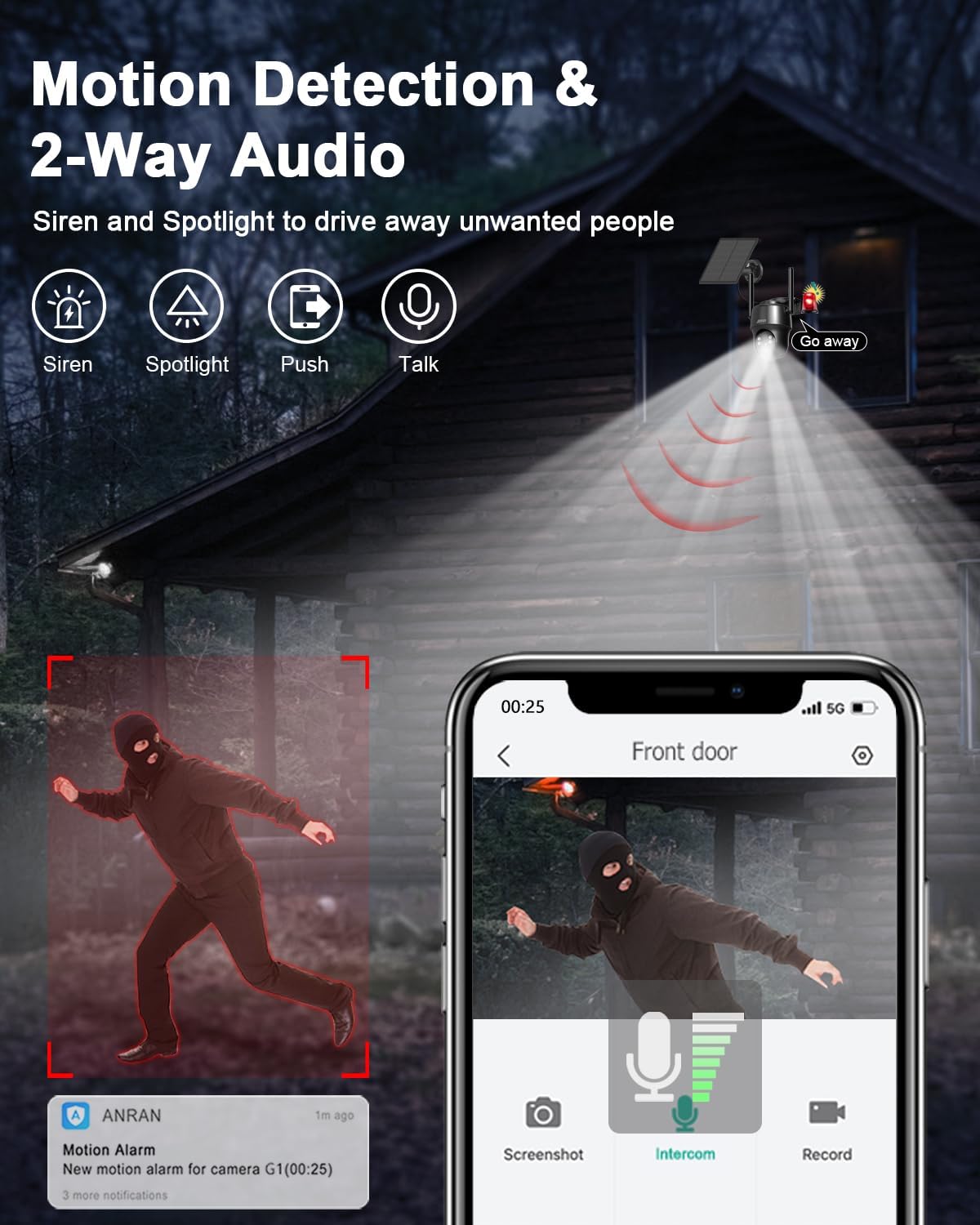
Figure 8: Motion detection features including siren and spotlight warnings.
Customizing Motion Detection:
- Regolazione della sensibilità: Adjust the detection sensitivity (levels 1-10) in the app settings to suit your environment and reduce frequent interference.
- Area di allarme personalizzata: Define specific detection zones to focus on critical areas and avoid unnecessary alerts.
- Pianificazione avvisi personalizzata: Set specific time periods for alerts to be active, improving battery life and reducing interruptions.

Figure 9: Adjust motion detection sensitivity to your needs.
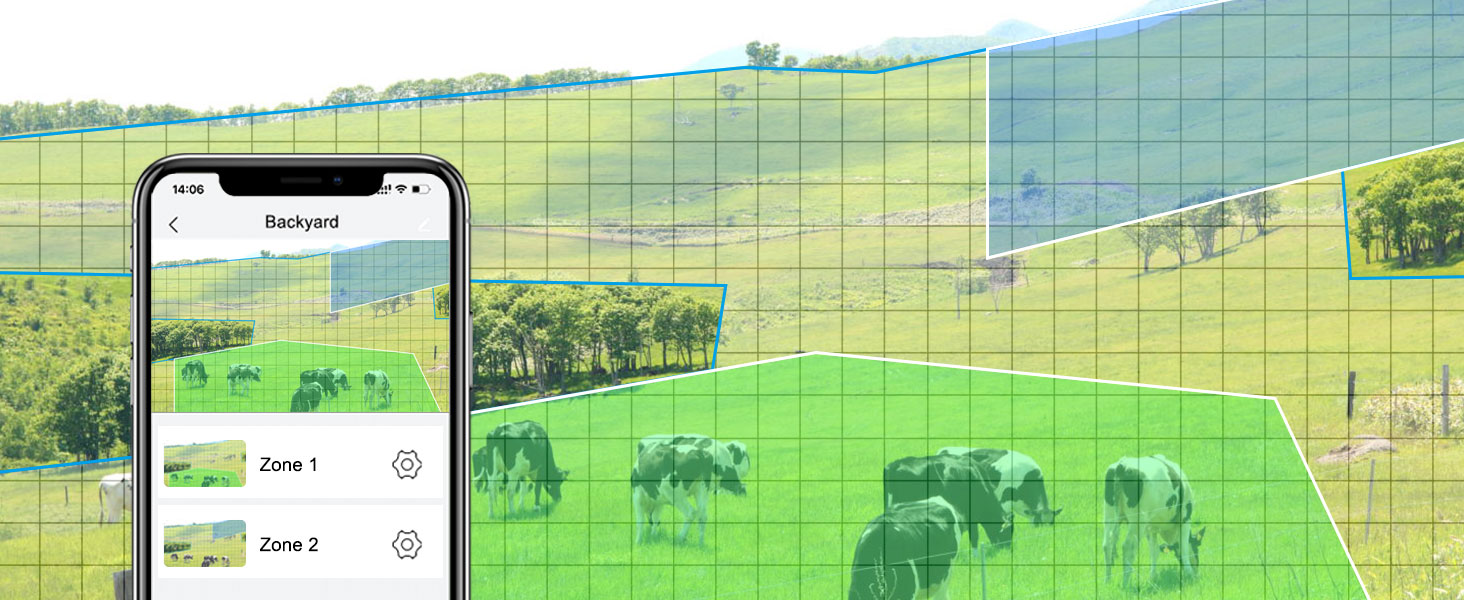
Figure 10: Set custom alert schedules to optimize battery life and reduce unwanted notifications.
4. Modalità di visione notturna
La telecamera offre tre modalità di visione notturna per una visibilità nitida in condizioni di scarsa illuminazione:
- Modalità a infrarossi: Fornisce immagini nitide in bianco e nero anche in completa oscurità utilizzando LED a infrarossi.
- Modalità colore: Utilizes built-in spotlights to provide full-color night vision, capturing more details.
- Modalità sveglia: Automatically switches to color night vision and activates spotlights upon motion detection.

Figure 11: Compare Color Night Vision and Infrared Night Vision capabilities.

Figure 12: Choose from three distinct night vision modes based on your surveillance needs.
5. Registrazione e riproduzione
La telecamera registra footage to the pre-installed 32GB SD card. You can access recorded videos and playback directly through the ANRAN app. Cloud storage options may also be available through the app (subscription may be required).
6. Multiutente View and Device Sharing
You can share access to your camera's live feed and recordings with multiple users through the ANRAN app. This allows family members or trusted individuals to monitor the property simultaneously.

Figura 13: Condivisione dell'accesso alla telecamera con più utenti per il monitoraggio collaborativo.
7. Data Plan Information
The camera includes a prepaid 4G LTE SIM card with 100MB of free trial data. After the trial data is consumed, you can renew your data plan through ANRAN. Various data plans are available, starting from $15.99 per month for unlimited data. If you wish to use your own SIM card, please contact ANRAN support to verify compatibility and for potential firmware updates.
Manutenzione
1. Battery Care and Solar Charging
The camera's 9600mAh battery is designed for long-term operation with the solar panel. To ensure continuous power:
- Periodically check the solar panel for dirt, dust, or obstructions that might reduce charging efficiency.
- Ensure the solar panel is positioned to receive maximum direct sunlight, especially during winter months or in areas with less sunlight.
- If the camera's battery level drops significantly, you can temporarily charge it using the Type-C cable.

Figure 14: The camera's battery and solar power system provide extended operation.
2. Cleaning the Camera and Solar Panel
To maintain clear image quality and efficient solar charging:
- Wipe the camera lens and solar panel surface with a soft, damp panno. Evitare detergenti abrasivi o prodotti chimici aggressivi.
- Regularly check for spiderwebs or insect nests around the camera, as these can obstruct the view or trigger false alarms.
3. Aggiornamenti del firmware
ANRAN may release firmware updates to improve camera performance, add new features, or fix bugs. Check the ANRAN app periodically for available updates and follow the in-app instructions to install them. Ensure the camera has sufficient battery power before starting a firmware update.
Risoluzione dei problemi
| Problema | Possibile causa | Soluzione |
|---|---|---|
| Camera not connecting to network / Activation issues | No 4G LTE signal; SIM card not properly inserted or activated; Incorrect APN settings; Firmware outdated. | Check 4G LTE signal strength at installation location. Ensure SIM card is correctly inserted and activated with a valid data plan. Contact ANRAN support if using your own SIM card for APN settings and compatibility check. Try restarting the camera. |
| Poor image quality / Distorted zoom | Dirty lens; Low light conditions; Digital zoom limitations. | Clean the camera lens. Ensure adequate lighting for optimal image quality. Digital zoom can cause pixelation; use optical zoom (if available) or physical repositioning for clearer close-ups. |
| Frequenti falsi allarmi | High motion detection sensitivity; Unwanted detection zones; Environmental factors (e.g., swaying branches, passing vehicles). | Adjust PIR motion detection sensitivity in the app. Define custom alarm areas to exclude irrelevant zones. Ensure camera is not pointed at areas with constant, non-threatening movement. |
| Battery not charging / Draining quickly | Insufficient sunlight on solar panel; Solar panel obstructed or dirty; Excessive camera activity; Extreme temperatures. | Relocate solar panel to receive more direct sunlight. Clean the solar panel. Reduce unnecessary live view access or excessive motion recordings. Ensure operating within specified temperature range (-10°C to 50°C). |
| No audio / Poor two-way audio | Microphone/speaker obstructed; App volume settings; Network latency. | Ensure microphone and speaker are clear of obstructions. Check volume settings on your phone and in the app. A stable 4G LTE connection is crucial for clear audio. |
Se riscontri problemi non elencati qui o necessiti di ulteriore assistenza, contatta l'assistenza clienti ANRAN.
Specifiche
| Caratteristica | Specificazione |
|---|---|
| Numero di modello | G01 (US-4G-黑) |
| Connettività | 4G LTE Cellular (T-Mobile, AT&T compatible) |
| Fonte di alimentazione | Batteria ricaricabile da 9600 mAh, alimentata a energia solare |
| Risoluzione video | 2K (3MP CMOS Sensor) |
| Campo di View | 360 gradi (panoramica 355°, inclinazione 90°) |
| Ingrandire | Zoom digitale 4X |
| Visione notturna | Visione notturna IR, visione notturna a colori 2K (con faretti) |
| Rilevamento del movimento | PIR Human Detection, Customizable Sensitivity & Areas |
| Audio | Comunicazione bidirezionale (microfono e altoparlante integrati) |
| Magazzinaggio | 32GB Micro SD Card (Pre-installed), Cloud Storage (Optional) |
| Resistenza alle intemperie | Grado di protezione IP65 |
| Temperatura di esercizio | Typically -10°C to 50°C (14°F to 122°F) |
| Dimensioni (L x P x A) | 7.48 x 7.87 x 2.76 pollici |
| Peso | 2.61 libbre |
Garanzia e supporto
ANRAN products typically come with a limited warranty. For specific warranty terms and conditions, please refer to the warranty card included with your product or visit the official ANRAN websito. Conserva la ricevuta d'acquisto come prova d'acquisto.
Assistenza clienti:
For technical assistance, troubleshooting, or any product-related inquiries, please contact ANRAN customer support through the following channels:
- Ufficiale Websito: Visit the ANRAN official websito per FAQ, risorse di supporto e informazioni di contatto.
- Supporto in-app: The ANRAN app may offer a direct support or feedback option.
- Supporto via e-mail: Fare riferimento alla confezione del prodotto o all'ANRAN websito per l'indirizzo email dell'assistenza clienti.
When contacting support, please have your product model number (G01 or US-4G-黑) and purchase details ready.
Ask a question about this manual
Ask about setup, troubleshooting, compatibility, parts, safety, or missing instructions. Manuals+ will review the question and use this page’s manual context to help answer it.